TOOLNAVIA / BUYING GUIDE
Movavi on Mac Has No System Audio: Check Permissions Before Paying
The short answer
Movavi Screen Recorder can suit a personal Mac user who wants application sound, optional narration and visual explanations in one recording. Paying will not repair a denied macOS permission or a silent playback route. First locate where the sound disappears. This guide analyzes official documentation; no Mac recording was performed.
At a glance
- Best for
- Personal Mac users who need repeatable screen recordings combining app sound, optional narration and visual explanation. Users whose intended app/build/OS pass the relevant permission and exported-file checks, and who value Movavi's integrated controls.
- Price model
- Dated localized reference: AUD 43.95/year, auto-renewal at then-current terms. Optional Video Editor: seven days free, then AUD 27.95/month. Verify the final Mac order; no verified USD checkout quote.
- Check first
- Payment cannot repair denied permissions or enable protected-stream capture. Other business/client work needs appropriate Business rights; the conditional YouTube-style monetization exception requires a made-with-Movavi statement and website link. An adequate existing tool may avoid another subscription.
Locate the first silent stage
**Quick choice:** evaluate the Personal one-year recorder only after its capture and exported audio work on your Mac. It combines system sound, microphone, webcam and drawing controls. Pricing localizes; the current dated reference and separate editor add-on are explained below.
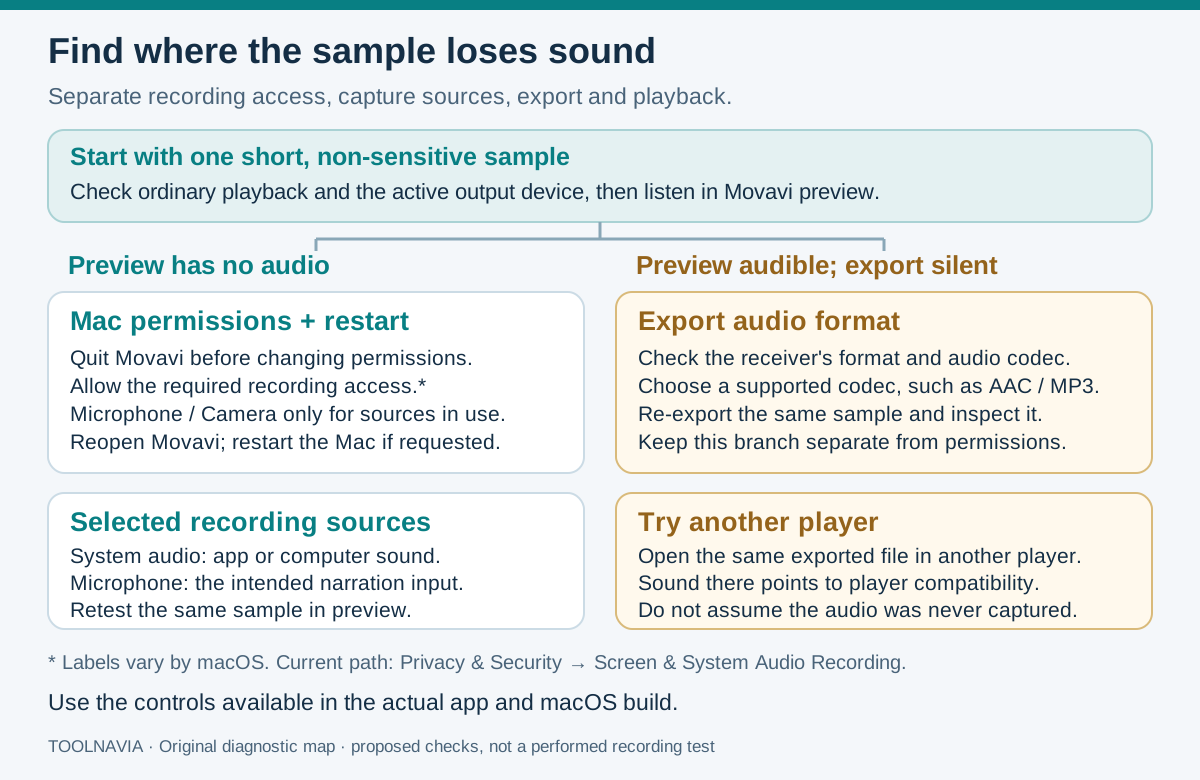
Use one short, unprotected sample from the application you intend to record. Keep the same output device while diagnosing it.
| Symptom | Check next | | --- | --- | | Ordinary Mac playback is silent | Selected Sound → Output device and audible source playback. | | Playback works, recording preview is silent | Required permissions, recorder switches and selected sources. | | Preview works, exported file is silent | Export audio codec and destination compatibility. | | Export works in another player | The original player’s playback compatibility. |
This separates a capture problem from an export or player problem; the symptoms do not prove a particular cause by themselves.
Grant the needed access, then reopen Movavi
Quit Movavi before changing privacy settings. Apple’s current path is **System Settings → Privacy & Security → Screen & System Audio Recording**; it can allow screen and audio, or audio alone. Older macOS versions and Movavi instructions may use different category names.
Check Microphone for narration and Camera when using the webcam. Movavi also lists Input Monitoring and Accessibility; match access to the features and prompts in your installed build. Reopen Movavi after changes, and restart the Mac if required. A denied permission may produce no in-app error.
An official documentation error remains unresolved: Movavi’s help page titled “Cannot record system audio on macOS” contains Windows microphone instructions. Those steps are excluded here; this workflow uses its separate Mac permissions article and Apple’s guidance.
Do not apply a generic legacy ACE-driver or reduced-security recipe. Movavi’s EULA mentions ACE or ARK-SDK; use instructions specific to your installed build and macOS.
Select the source before changing export settings
System Audio captures application/system sound; Microphone adds the selected input. Enable the sources you need in Movavi’s recording panel. A working microphone or webcam does not establish that system audio is being captured. Check the Mac’s actual output route and the chosen microphone, especially after switching headphones or devices.
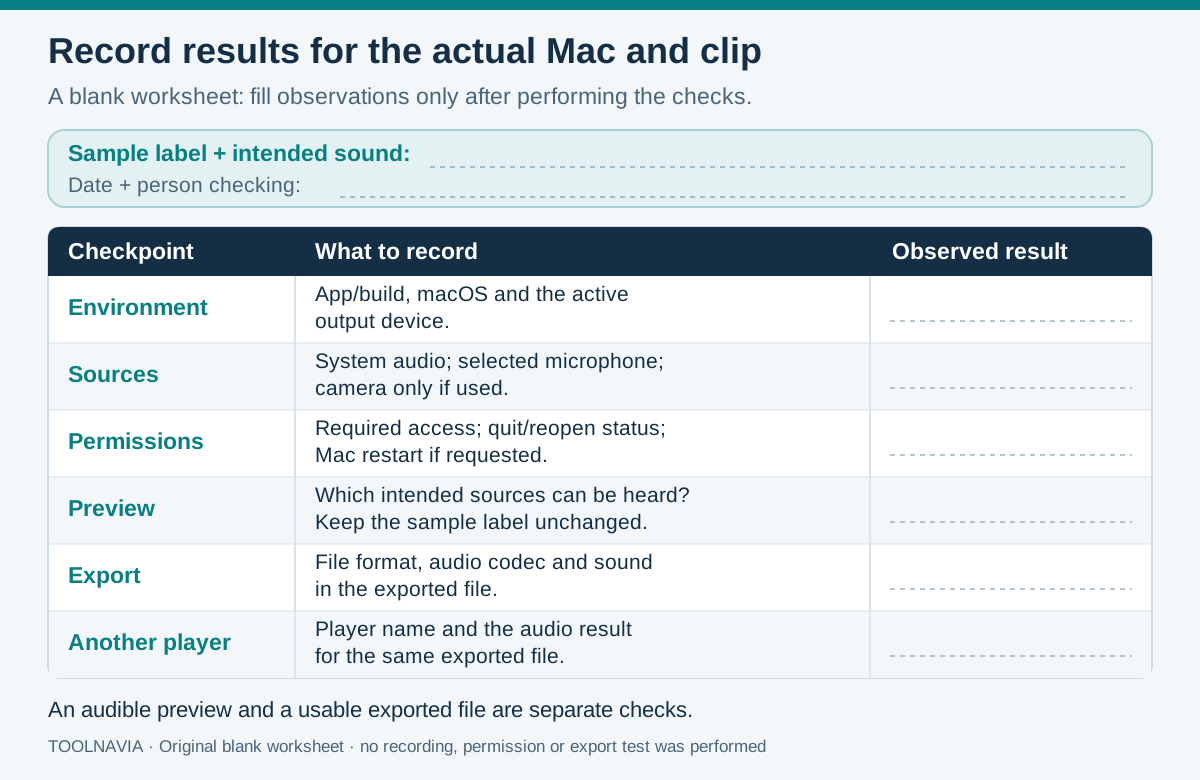
Record the sample, stop and listen in preview. If preview has sound but export does not, use a supported audio codec such as AAC where available, then reopen the resulting file in another player. Record the codec and both outcomes; repeated permission changes will not isolate a player-only problem.
Evaluate four useful recording conveniences
- **Screen activity with direct application sound:** preserve the audible part of a personal demonstration without re-recording speakers through a room microphone. Access, source selection and unprotected content remain prerequisites.
- **Optional spoken explanation:** combine narration with the application’s sound through separate controls. Confirm microphone permission, the selected input and the balance in the file.
- **Webcam context:** add your face when it helps a personal explanation. Camera access is independent; add it after the audio route is understood.
- **Drawing and cursor cues:** point to the relevant control while recording, reducing later annotation work for a short explanation. These tools cannot restore absent audio or replace a full editor.
Price the actual Mac order
On October 28, 2026, the official page localized to **AUD 43.95/year**, beside AUD 63.95, with a promotion ending November 1 and an “including VAT” label. Prices localize by region; this is a dated Australian-dollar reference, not a verified US-dollar checkout quote. The final Mac checkout was unavailable for verification.
The selectable Video Editor trial is separate: seven days free, then **AUD 27.95/month** in that same view. It is not required to fix recording permissions. Annual subscriptions renew at the then-current rate plus applicable taxes, with notice of changes. Confirm Mac platform, currency, tax, term and selected extras before paying.
Personal normally covers one computer. The EULA permits monetized YouTube or similar-service videos if the description states they were made with Movavi and links to its website. Other commercial work requires appropriate Business rights.
Decide from the resulting file
The requirements page lists Screen Recorder 2026 for Mac, version 24.8.2, macOS 12+, Intel 64-bit or Apple M1+, and 4 GB RAM. These minimums do not prove your recording works.
OBS documents a version-bounded alternative: OBS 30+ on macOS 13+ can capture desktop or selected-application audio. Snagit also requires Mac permissions and reopening; switching paid tools does not remove that OS boundary.
Buy when the intended file works and Movavi’s controls justify recurring cost. If it remains silent, send support the build, macOS version, permission state, preview/export distinction, codec and sample. See the [trial guide](/en/software/movavi-screen-recorder-seven-day-trial-watermark) for output restrictions; payment does not enable copy-protected capture.
Toolnavia may earn a commission from purchases through its links.