TOOLNAVIA / BUYING GUIDE
Sync.com Personal 1TB Cloud Storage: Files, Vault and Annual Billing
The short answer
Sync.com Personal 1TB suits one person who needs more cloud space and expiring sharing links, not unlimited devices or a second backup allowance. Decide which files should stay synchronized and which belong in a cloud-only archive before choosing an annual subscription.
This is an official-document buying analysis, not a Toolnavia application or security test.
At a glance
- Best for
- One person with a tested need for more capacity or expiring links, within the shared1TB and device limits.
- Price model
- Displayed $72 first annual term; currency and tax require checkout
- Check first
- Unlimited devices, a second Vault quota, permanent version retention or an assumed automatic return to Free.
Check Free before paying for familiar features
Free provides 5GB, including both Files and Vault, plus basic password-protected links. Its limits include three active links and 20 downloads per link daily. Paid plans add capacity and advanced sharing controls, but the five-active-device limit applies across plans. More storage does not buy unlimited connected computers and phones.
Four capabilities, four different boundaries
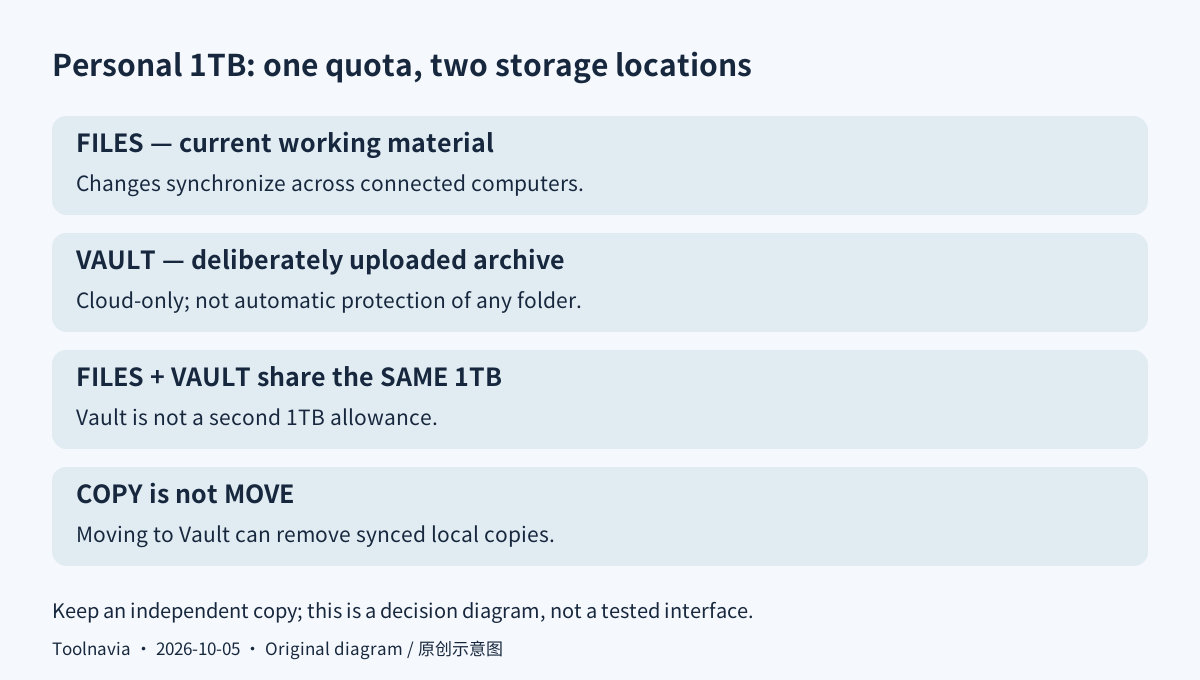
**Keep working files aligned.** Files and the desktop Sync folder make current documents available across connected computers. That helps when continuing work on another machine. Changes propagate, however, so this is not an independent untouched copy. Keep a separate recovery copy for material you cannot replace.
**Archive without synchronizing every file.** Vault holds cloud-only material outside that automatic workflow, useful for finished projects that need not occupy each computer. Uploading or copying into Vault is deliberate, not continuous protection of an arbitrary folder. Vault consumes the same account allowance. Moving files there can remove their synced local copies; verify a copy before using a move operation.
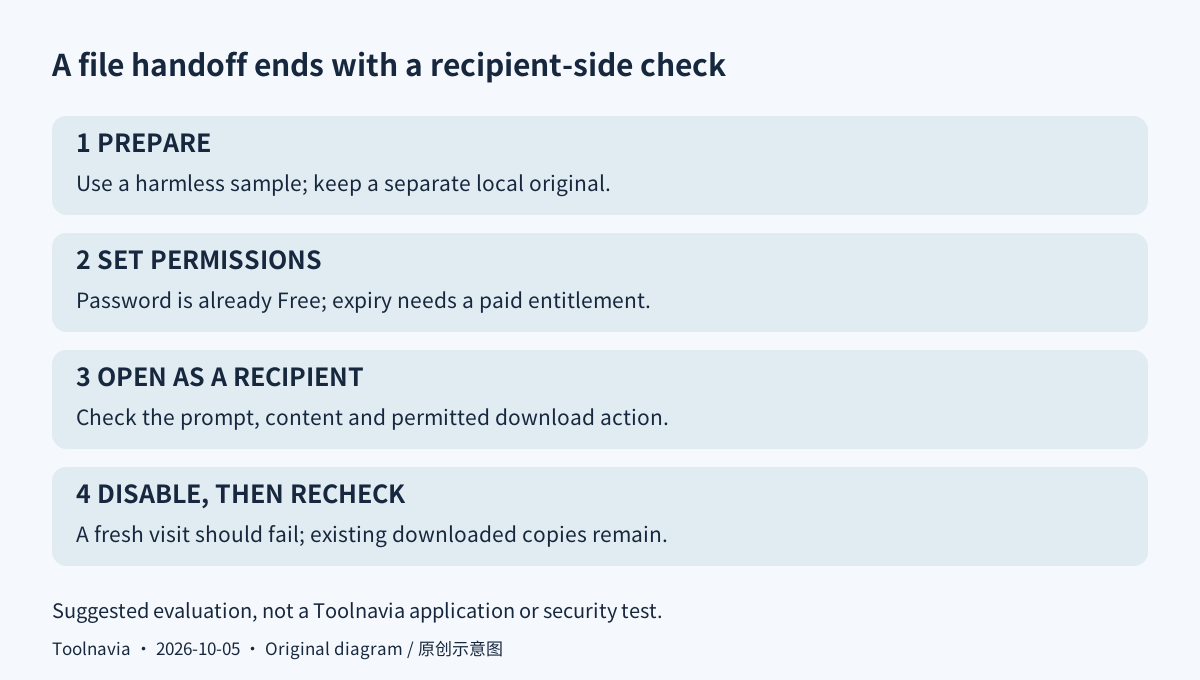
**Give a recipient time-limited access.** Personal adds link expiry and download controls; recipients can open a link without a Sync account. Password protection alone is already Free. Use the paid controls for an actual handoff deadline, then verify access from the recipient's side. Disabling a link stops future access, not copies already downloaded.
**Retrieve an earlier edit.** The current Personal table lists 90-day history, rather than the longer windows of higher tiers. It can help undo an unwanted revision, but is not permanent archiving or post-cancellation access. Check a representative file's available versions before relying on the window.
Separate the first bill, renewal and trial
The English price page displays $72 upfront for the first annual term: $6 is a monthly equivalent, not a monthly payment. Its regular $12 equivalent implies $144 annually. First year plus one renewal would therefore be $216 only if that regular price remains unchanged. A separate monthly offer displays $8 initially and $16 regularly.
The dollar symbol's ISO currency was not readable in this view, and the linked US-country checkout did not expose a final order. Treat these as display amounts, not confirmed USD or CAD. Verify currency, taxes, billing period and the next charge before payment; the terms allow renewal-price changes.
A trial automatically converts to the same plan at its regular price, not necessarily the promotional offer. The pricing page's broad money-back statement also needs qualification: the help policy limits the 30-day guarantee to new-plan purchases and excludes trials, renewals, reactivations and upgrades. Canceling does not request a refund.
Suggested rehearsal: share a disposable document
Keep an independent local sample with no personal information. Upload it through the web panel and confirm it opens. From the file's menu, choose Share as link, copy the link, and inspect Link settings. With the relevant paid entitlement active, set an expiry and the intended download permission; choose a password as appropriate.
Open the link in a signed-out browser. Check the password prompt, content and allowed actions. Disable the link, then verify a fresh visit fails. These are proposed acceptance checks, not measured results. Do not infer that earlier downloads were erased.
Before enabling previews or account recovery, inspect Privacy Center. The pricing page describes exclusive end-to-end protection, but the current terms disclose server-side processing for certain features and recovery-key escrow when email reset is enabled. Those settings change the boundary; this guide does not promise unconditional zero-knowledge operation.
Export before canceling; do not expect Free afterward
The current help page says paid accounts cannot downgrade to Free. Cancellation retains access through the paid term and then closes the account. Check the renewal date in Account & billing and act before its UTC processing date.
For departure, include Vault in the export, explicitly download cloud-only files, wait for completion and copy the files outside the Sync folder. Open representative copies independently before cancellation takes effect. A filename or placeholder alone is not a recovered file.
Keep Free or existing storage when it meets the job. Choose Personal for a verified capacity or sharing-control gap. Sync's cash affiliate application is open, but Toolnavia approval is unverified and tracking remains disabled; trial-origin sales are excluded from commission.