TOOLNAVIA / BUYING GUIDE
Stellar Data Recovery Professional: $79.99 vs Standard and Premium
The short answer
Stellar Data Recovery Professional is the paid Windows tier to compare when a recovery job needs lost-partition support, access from a non-booting PC, a disk image before deeper scanning, or SMART monitoring.
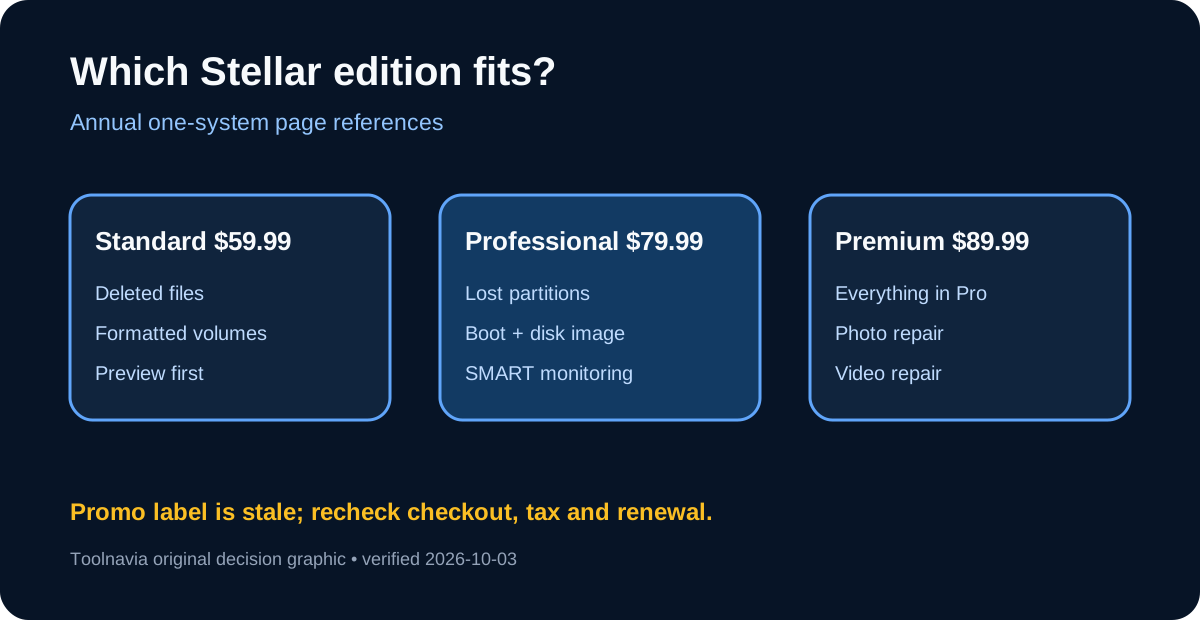
Stellar’s buy page currently shows Standard at $59.99 per year, Professional at $79.99, and Premium at $89.99 for one system. Use the trial to scan and preview representative files before paying, and never install the software or save recovered files onto the affected drive.
At a glance
- Best for
- Windows recovery jobs needing lost partitions, non-booting-PC recovery, disk imaging or SMART.
- Price model
- Standard $59.99/year; Professional $79.99/year; Premium $89.99/year
- Check first
- DIY software cannot repair physical damage; stale promotion, auto-renewal, tax and checkout can change.
Four Professional capabilities tied to real recovery jobs
Lost-partition recovery matters when a volume has disappeared or become inaccessible rather than when a few files were simply deleted. Professional also adds recovery from a crashed or non-booting Windows PC, disk imaging for a drive that is still readable, and SMART monitoring. Those are purchase gates: Standard may be enough for ordinary deleted-file or formatted-volume recovery, while Professional becomes relevant when the storage structure or boot path is damaged.
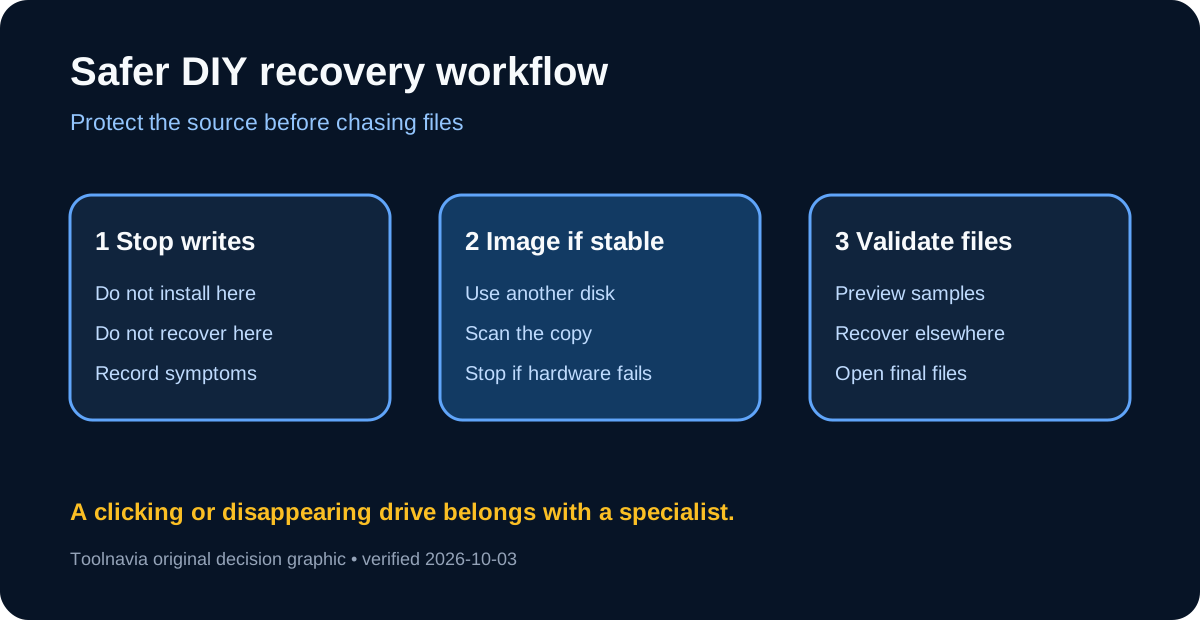
Disk imaging is the strongest reason to step up. Repeatedly reading a failing drive can make a marginal device worse; creating an image first lets later scans work from a copy. This remains a do-it-yourself workflow, not a substitute for a clean-room lab. If a drive clicks, disappears intermittently, has been dropped, or contains irreplaceable data, stop powering it and seek a specialist.
The non-booting-PC feature helps when Windows will not start but the storage device is still readable. Prepare bootable recovery media on another working computer, identify source and destination by model and capacity, and save results to a separate healthy disk. Writing back to the source can overwrite data that has not yet been found.
$59.99 Standard, $79.99 Professional, or $89.99 Premium
The official Windows buy page currently shows annual prices of $59.99 for Standard, $79.99 for Professional, and $89.99 for Premium, each for one system. Professional therefore costs $20 more than Standard; Premium is another $10 and adds corrupt photo and video repair. The page still displays “Special Offer Valid Till 16th September 2026,” although this check was made on October 3. Treat the displayed amounts as page references, not a promised promotion, and verify the live checkout, tax, renewal amount, and edition before purchase.
Stellar’s licensing page says subscription products use auto-renewal, while its support page says buyers receive notice at least seven days before the next charge and can cancel renewal through account management. The refund policy gives annual first purchases a 30-day request window but excludes later renewals. G2 separately lists Professional from $89.99, so this guide uses Stellar’s own live page for the $79.99 reference and discloses the conflict rather than promising a universal price.
When Standard or Premium is the better fit
Choose Standard if the job is ordinary deleted-file or formatted-drive recovery and the preview confirms the needed files. Choose Professional when the missing capability is a lost partition, a non-booting system, disk imaging, or SMART monitoring. Choose Premium only when repairing corrupt photos or videos is part of the task; it does not make physically damaged storage safe to scan.
Independent reviews praise the clean interface, broad media support, customizable searches, and disk imaging, while also recording slower scans, inconsistent results, or a NAS recovery problem. Those are reviewer-specific observations, not guarantees. Success depends on what happened after deletion, the storage medium, and whether new data overwrote the old blocks.
Test before committing money or the source drive
Stop using the affected drive, connect a separate destination with enough free space, and run the least invasive scan that can answer whether the target files are present. Preview several representative documents, photos, and videos. If the drive is stable enough, image it before deeper recovery; if it is physically unstable, stop DIY work.
The purchase decision
Pay for Professional only when one of its four documented gates solves the actual incident. Keep Standard for ordinary logical recovery, and move to Premium only for corrupt-media repair. Stellar publicly accepts cash affiliates, but Toolnavia has no approval, so tracking remains disabled. Next, record the device, symptoms, and must-recover file types, then decide whether scanning is safe at all.