TOOLNAVIA / BUYING GUIDE
Snagit Individual Screen Capture: Is $39 a Year Worth Paying?
The short answer
Snagit Individual is worth considering at the displayed US$39 annual price when you repeatedly turn screenshots into instructions, not when you only need an occasional screen grab. Check existing Camtasia entitlements first: Snagit may already be included. This is an official-document analysis, not a Toolnavia hands-on test.
At a glance
- Best for
- A named individual who repeatedly turns captures into reviewed instructions and needs scrolling, annotation or Step Capture.
- Price model
- US$39 per user billed yearly; tax and renewal require confirmation
- Check first
- Occasional screenshots, transferable staff seats, permanently offline workstations or full video production.
Four jobs that can justify a dedicated capture tool
Scrolling Capture joins a long webpage, document or spreadsheet into one image. That helps explain a process whose important context falls below the visible screen. Inspect the finished capture for omitted rows, repeated sections and unreadable text; a longer image is useful only when the recipient can read it.
Arrows, callouts and text annotations put the explanation beside the control the reader must use. Themes can keep colors and fonts consistent across a guide. Use one clear action per caption rather than covering the interface in arrows; styling cannot fix an ambiguous instruction.
Step Capture records clicks, takes screenshots and generates a sequential guide. It is useful for documenting a repeatable application task without separately collecting every image. Treat its output as a first draft: add prerequisites, remove detours and verify that another person can complete the task.
Smart Redact scans an image in the editor and lets you choose information categories to obscure with blur, pixelation or black bars. This can help prepare support screenshots without exposing customer details. Detection is not a guarantee: review missed identifiers and inspect the final exported copy before sharing it.
Individual is for your own named-user workflow
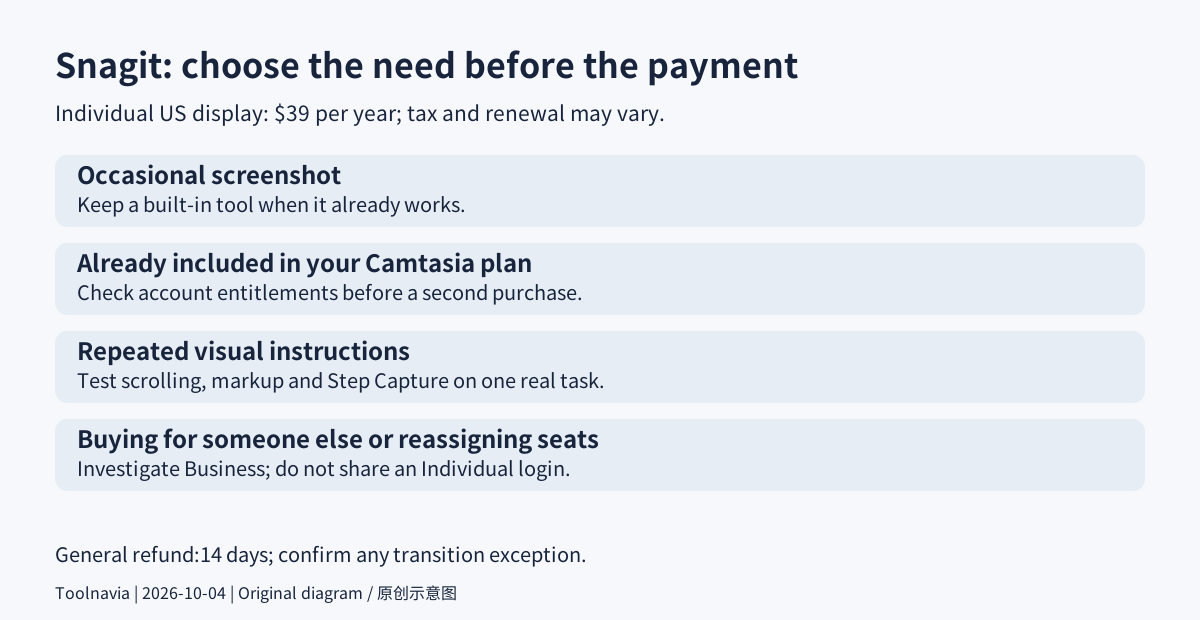
The Individual subscription is non-transferable and uses a TechSmith account rather than a software key. It supports one signed-in or activated device at a time, even though installation on multiple machines is allowed. A team buying for employees, reassigning seats or requiring offline activation should investigate the Business license instead of sharing one Individual login.
Snagit remains a desktop application for Windows and macOS. Periodic internet validation is required, so it is not a permanently disconnected workstation solution. Verify the current operating-system requirements and your organization's capture permissions before committing.
US$39 a year, with renewal and refund checks
The current US store displays $39 per user, billed yearly. This is an annual payment, not a monthly installment or a perpetual purchase. At an unchanged price, two annual payments total $78 before any applicable tax; that arithmetic does not establish the next renewal quote. Record the checkout currency, tax, renewal setting, next charge and cancellation route.
The store also presents Camtasia bundles that include Snagit. Before adding a standalone subscription, inspect your own account's exact entitlements. Key-based legacy subscriptions and separate premium assets are not automatically the same as a current Individual bundle. Do not assume that a low-priced bundle includes every Camtasia editing feature.
The store and general return policy say 14 days for a direct purchase, with the software uninstalled for a refund. A separate Camtasia-transition page describes a one-time 30-day extension for certain direct Snagit purchases. Its applicability to every new buyer is not clear enough to promise: plan around 14 days unless TechSmith confirms the extension for your order. Reseller returns follow the seller's process.
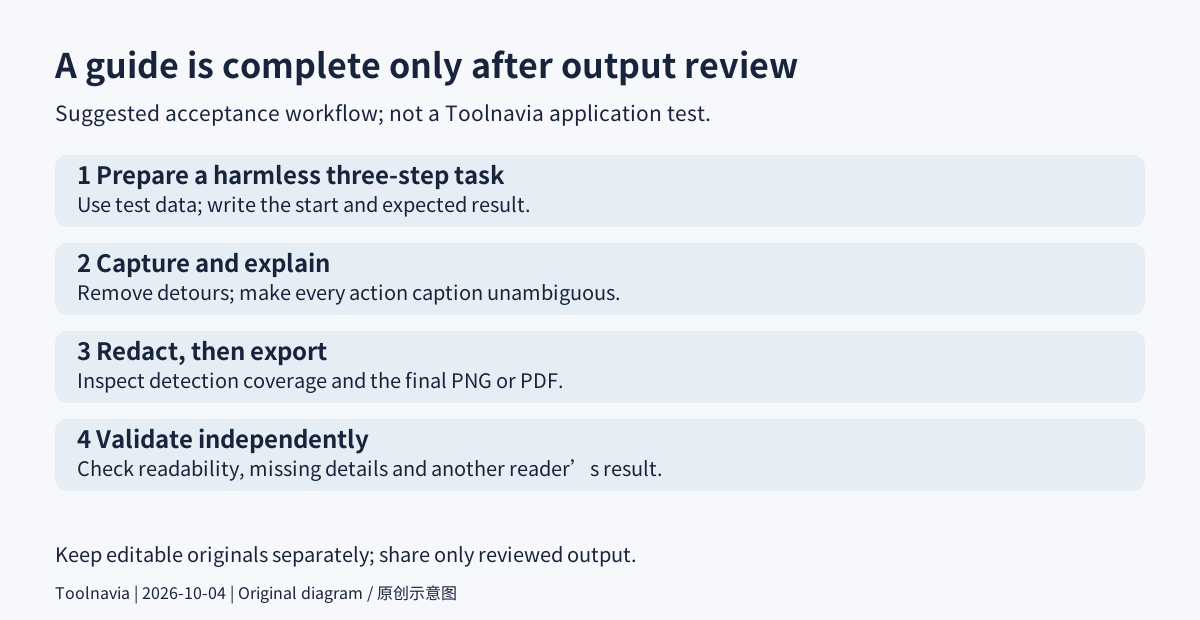
Suggested test: make a guide someone else can follow
Choose one harmless three-step task in a test account, such as locating a setting and producing a sample result. Remove real customer information and notifications before capture. Write the starting conditions and expected result first; this avoids turning accidental clicks into instructions.
Capture the process, trim irrelevant material, then add brief action captions. Open each image in the editor, choose the Blur tool's Smart Redact control, select the relevant information categories, and check the coverage manually. Export a PNG or PDF copy for review. These are suggested acceptance steps, not a task Toolnavia has performed on your machine.
Open that exported copy independently. Confirm that all steps are present, text is readable at the recipient's viewing size, sensitive details are absent, and a second reader reaches the stated result without extra explanation. Keep the editable original separately; share only the reviewed output.
Buy for repeated documentation, not a single screenshot
Keep built-in capture tools when they already do the job. Pay for Snagit when scrolling captures, reusable annotations or click-by-click guides remove a recurring obstacle. It is not a substitute for a full video-production workflow.
Canceling leaves subscription access until the paid term ends. Existing captures are not automatically deleted, but the editor's post-expiry export period is limited; export important material before cancellation takes effect rather than relying on an unspecified grace period. TechSmith's cash affiliate program is open, but Toolnavia approval has not been verified, so affiliate tracking stays disabled.