TOOLNAVIA / BUYING GUIDE
PDFelement Bates Numbering: Keep IDs Continuous Across PDFs
The short answer
When a delivery contains several PDFs, “page 1” is an ambiguous reference. PDFelement's Windows batch tools can assign a shared Bates sequence, but one setting decides whether numbers continue or restart. Evaluate that control and the saved output before buying for repeated document handoffs.
*Official-documentation analysis, October 28, 2026; examples are illustrative.*
At a glance
- Best for
- A Windows user who repeatedly hands over separate PDFs with a shared reference-ID scheme, can maintain issued ranges and validates the saved layout and sequence on representative files.
- Price model
- Observed USD auto-renewing annual card: $79.99 upfront/year. Other cards differ; confirm tax, eligibility and renewal. Trial saves carry watermarks.
- Check first
- A one-off small set already handled by an existing editor, a buyer expecting templates to guarantee global uniqueness, or anyone who cannot verify watermarked trial limits and clean activated output before production use.
Decide which pages share an ID series
**PDFelement 13 for Windows** includes batch Bates numbering, prefix/start controls, templates and placement settings. A Bates number is a page-reference ID such as `PKT-000101`; a collection-wide sequence can distinguish pages across separate files. Ordinary page counts can still belong to each PDF.
Choose the delivery's contents and order first. If pages still need assembling, start with our [PDF packet guide](/en/software/pdfelement-client-packet-updates).
Use Sort Documents for continuity across files
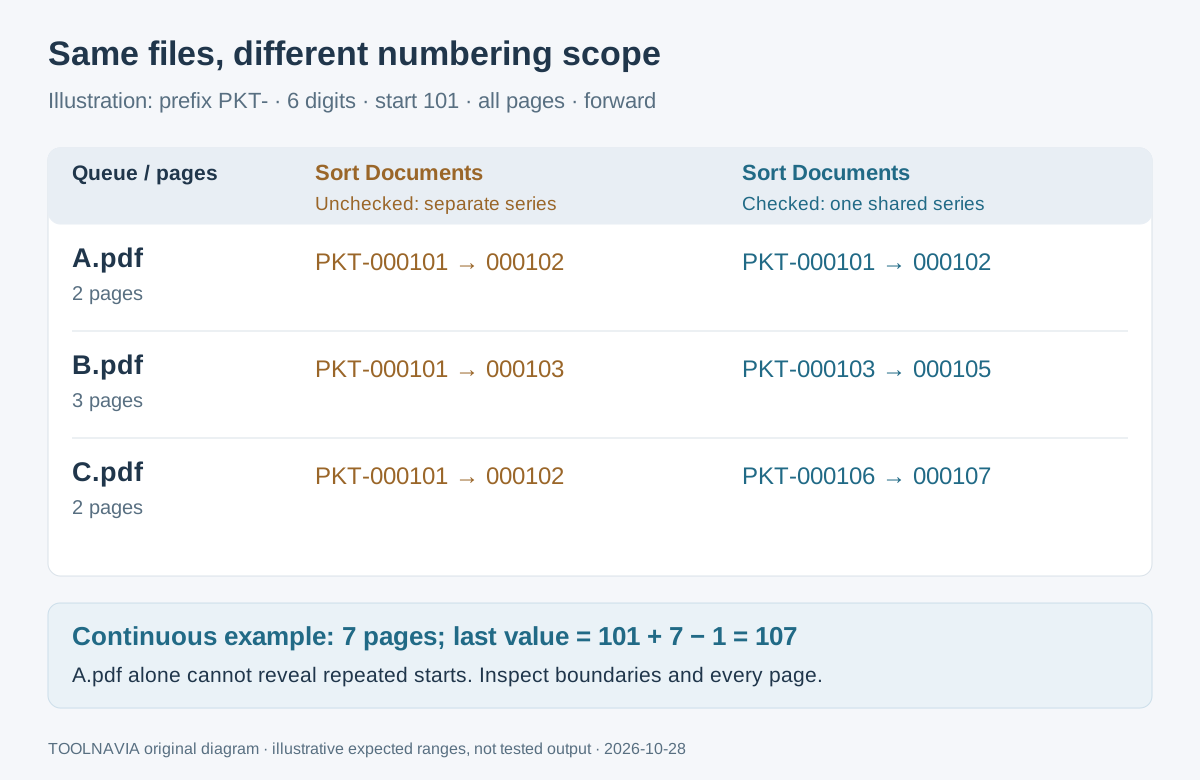
The online Windows guide uses **Tool → Batch Process → Bates Number**. Load the files, arrange their order, and select or create a template. Before applying it, set **Sort Documents**: unchecked gives each PDF its own series; checked gives the listed files one shared series. It does not decide the correct business order for you.
Illustration: all pages, forward numbering, six digits, start 101, prefix `PKT-`, no suffix:
| File order | Pages | First ID | Last ID | | --- | --- | --- | --- | | A.pdf | 2 | PKT-000101 | PKT-000102 | | B.pdf | 3 | PKT-000103 | PKT-000105 | | C.pdf | 2 | PKT-000106 | PKT-000107 |
These are expected ranges, not generated results. With separate series using the same start, all three files begin at `PKT-000101`. Checking only A.pdf would miss that duplication.
Four controls that support repeat deliveries
- **Number a set without merging it.** Batch Bates processing lets separate reports share a reference sequence. You still control the queue and continuity setting.
- **Give each delivery a recognizable range.** Prefix, suffix, digit count and starting value support a project-specific ID scheme. Uniqueness across jobs requires your own record of issued ranges.
- **Fit marks around the content.** Appearance, position and page-range settings help place identifiers where readers can see them. Inspect mixed page sizes, rotations and crowded footers for collisions or omissions.
- **Reuse the layout.** Saved templates reduce repeated formatting setup for similar deliveries. Recheck the starting value: the documentation does not establish an automatic counter continuing between separate jobs.
Inspect every output before handing it over
Use this suggested acceptance procedure on copies:
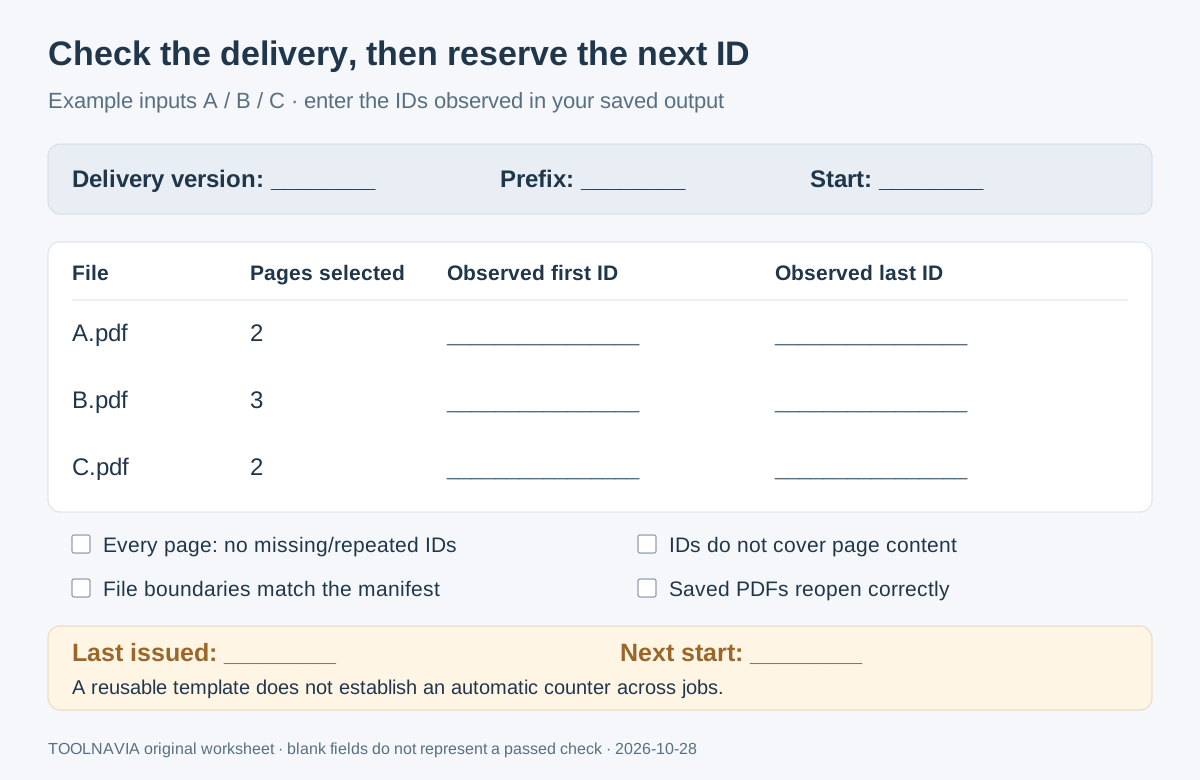
1. Preserve originals. Record the delivery version, ordered filenames, selected page counts, prefix and start in a manifest—a simple file-and-ID checklist.
2. Apply the chosen template and sequence scope to a small representative batch. Save the outputs separately, following the documented batch workflow.
3. Reopen every saved PDF. Compare first and last IDs with the manifest and check every numbered page for repeats, gaps or omissions. For a continuous series, each file must begin one number after the preceding file ends.
4. Inspect landscape, cropped and dense-footer pages at a readable zoom. Confirm the ID is visible and does not cover existing text.
5. Retain the checked files with the manifest. If page selection or order changes, check the revised delivery again and record its version.
Check the trial boundary and the purchase price
The current store lists a 14-day Bates trial and a generic batch cap of three files within 20MB. The registration guide instead says Bates processing handles all loaded files with trial watermarks. The scope difference remains unresolved: use a small sample and confirm the installed limit, rather than assuming unlimited trial batches.
Trial saves are watermarked. After purchasing, activate the license with the correct Wondershare ID; payment alone leaves an unactivated app in trial mode. Produce the delivery again from clean originals and inspect it.
On October 28, 2026, the official USD Windows **automatic-renewal annual card showed $79.99, billed upfront yearly**. Other campaign/manual-renewal cards coexist. Confirm the selected plan, tax, regional eligibility and renewal amount at checkout; renewal can change. Perpetual access covers PDFelement 13, with major upgrades potentially extra.
*Toolnavia may earn a commission through the approved Windows desktop purchase buttons.*
Reserve the next range, then choose your tool
For a continuation after the illustrated seven-page set, the next unused start is **108**, once the issued range ending at 107 is verified. A saved template is not proof that this value carries forward. Keep previous delivery references intact and record any replacement version.
Acrobat Pro, Nitro PDF Pro and Power PDF also document Bates workflows. If you already own a suitable edition, evaluate that entitlement before adding another editor.
Buy PDFelement when repeated Windows deliveries benefit from these controls and your representative output passes inspection. For one small set, an existing tool may be enough; a successful first-page preview is insufficient evidence for either choice.