TOOLNAVIA / BUYING GUIDE
PDFelement 13 PDF Editor Pricing: Annual vs Perpetual, Promo Caveats
The short answer
PDFelement 13 is worth considering when you need more than a PDF reader: editing text and images, OCR, conversion, forms, batch work, redaction, comparison and signing are all part of the current product toolset. The buying decision is less simple than the feature list because Wondershare currently publishes both normal reference rows and lower promotional rows on different official storefront views.
At a glance
- Best for
- People who regularly edit, convert, OCR, sign, compare or batch-process PDFs and want annual or perpetual purchase paths.
- Price model
- Windows reference: $79.99/year · $109.99/2 years · $129.99 perpetual; promos may be lower
- Check first
- Current official storefronts can expose lower campaign rows alongside stable references; perpetual keeps the purchased major version but does not guarantee every future major upgrade.
What you actually get
The current feature catalog covers PDF editing, conversion, OCR, forms, batch processing, compression, password protection, comparison, redaction and signing. That makes PDFelement most relevant to people who repeatedly modify or convert documents rather than only open and annotate them.
The free trial is useful for checking your real files before paying, but it is not a full free plan. Official trial documentation says edited or commented files can receive a watermark, conversion is page-limited, OCR is limited, and some advanced workflows are restricted. Test the exact documents you care about—especially scanned files and formatting-heavy PDFs—before choosing a license.
How current pricing really splits
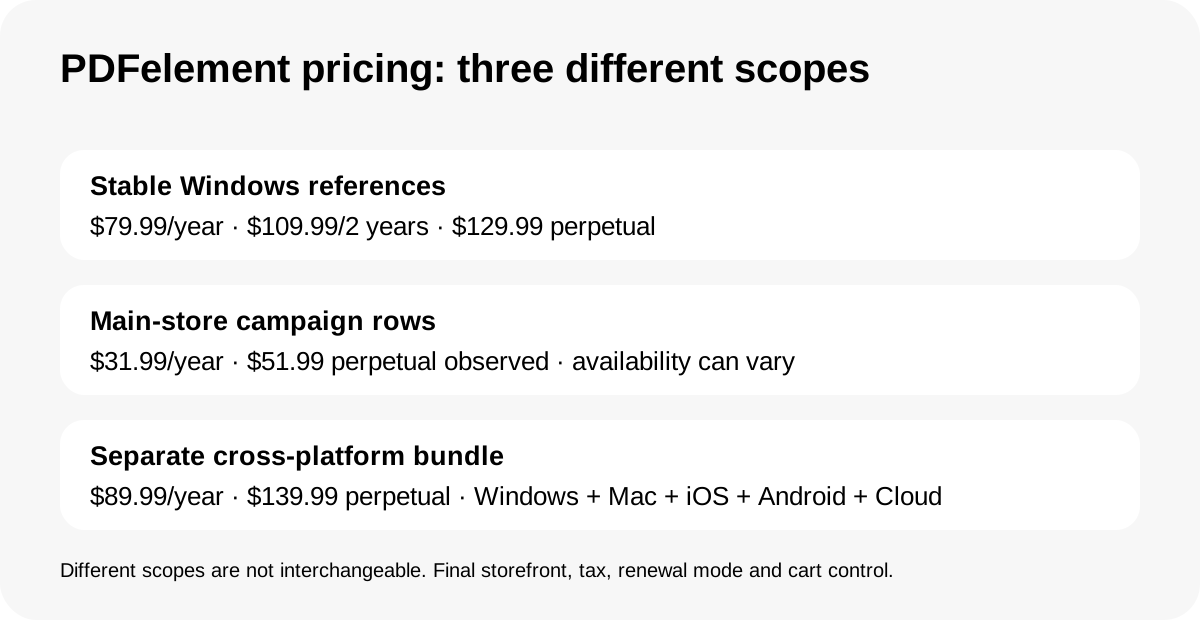
For the Windows individual store, one current official view lists $79.99 for a yearly plan, $109.99 for a two-year plan and $129.99 for a perpetual license. The main Windows store simultaneously exposes campaign rows such as $31.99 yearly and $51.99 perpetual alongside those higher reference rows, plus a quarterly offer. Those lower figures should be treated as campaign-dependent, not as universal prices.
The product scope also matters. Wondershare's cross-platform bundle is currently listed at $89.99 yearly or $139.99 perpetual and covers Windows, Mac, iOS, Android and Cloud. Do not compare that bundle directly with a single-platform reference as if they were the same entitlement. The checkout page and selected platform should control the final decision.
Annual or perpetual: the real trade-off
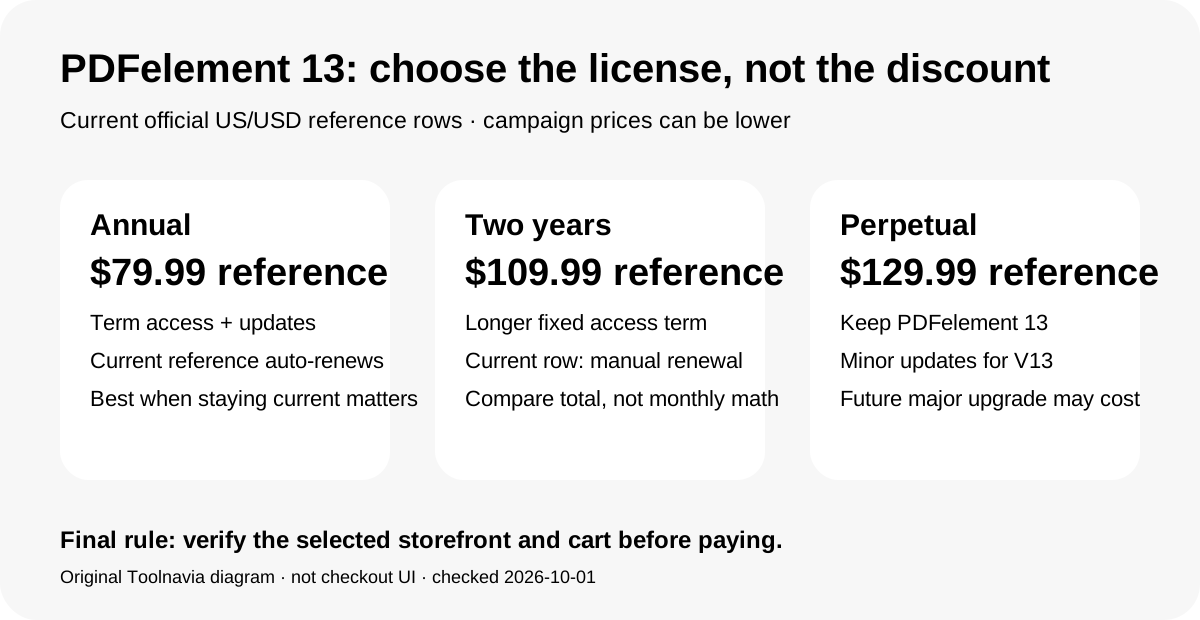
The yearly plan buys access for the subscription term and includes updates during that period. The current $79.99 row auto-renews; some lower promotional rows on the same store are marked for manual renewal instead. Wondershare's subscription terms say recurring plans charge the then-current rate until canceled and that rates can change with notice.
The perpetual license is different: the current store says it authorizes indefinite use of PDFelement 13, including minor updates for that major version, while a future major upgrade may require another purchase. That makes perpetual attractive when the current version already does what you need and you value avoiding recurring access fees. Annual makes more sense when you want major-version changes during an active subscription or prefer a lower initial commitment.
If you work across operating systems, compare the cross-platform bundle rather than buying the Windows plan and assuming Mac/mobile rights are identical.
Trial, AI, refund and renewal boundaries
AI tools need a separate budget check. Wondershare says trial and paid versions include limited AI usage and that additional AI usage or an AI add-on can cost extra after the included quota is exhausted. Do not assume a PDF license means unlimited AI work.
The refund language is also narrower than a simple “30-day no-questions-asked” promise. Wondershare's current policy says most direct purchases generally have up to a 30-day request window, but eligibility depends on product, use, reason and local law; renewal orders are generally not refundable just because the buyer forgot to cancel. The subscription terms say auto-renewing plans can be canceled before the next charge and that renewal charges are outside the standard initial-purchase 30-day policy.
That makes the safest workflow simple: use the trial first, record the exact checkout price and renewal method, and cancel in the account center before the next billing event if you no longer want the subscription.
Which plan makes sense next
Choose the annual plan when you expect to keep receiving major-version access and the current renewal model is acceptable. Choose the two-year option when its total is favorable and you are comfortable with a longer fixed access period. Choose perpetual when PDFelement 13 already solves your PDF work and permanent access to that major version matters more than automatic future major upgrades.
Before paying, compare the final cart against the reference rows in this guide. A lower campaign price can be real, but it may be manual-renew, time-limited or tied to a particular storefront. If you need Windows plus Mac/mobile/web, compare the cross-platform bundle separately. If your work only involves occasional viewing, annotation or simple conversions, the paid editor may be unnecessary.