TOOLNAVIA / BUYING GUIDE
PDFelement Accessibility: When Auto-Tags and Reading Order Are Worth Paying For
The short answer
# PDFelement Accessibility: When Auto-Tags and Reading Order Are Worth Paying For
PDFelement is worth considering when accessibility work is a repeatable editing job rather than a one-click certificate. Its value is the ability to bring OCR, automatic tagging, tag-tree repair, reading-order editing, alternative text, form-field work, and navigation fixes into one PDF editor. That can shorten remediation on documents that already exist only as PDFs. It does not remove the need for a dedicated checker or a human review.
The safest buying rule is simple: pay for PDFelement when the cost of manually rebuilding or repeatedly correcting PDFs is higher than the editor license. Do not buy it because an “accessibility check” sounds like a guarantee. A passing automated report cannot establish that every heading, figure, table, link, form control, and reading sequence makes sense to a screen-reader user.
At a glance
- Best for
- Recurring PDF accessibility remediation with separate validation and human review.
- Price model
- Official page rechecked 2026-11-05: quarterly US$11.99; yearly US$67.99 / promo US$31.99; 2-year US$109.99; perpetual US$51.99 / US$110.99. Live cart controls.
- Check first
- Auto-tagging and automated checks cannot certify PDF/UA, WCAG or Section 508 conformance; price rows overlap and live checkout controls.
What the accessibility workflow actually covers
PDFelement’s official support material describes an accessibility report that checks structural items such as tagged content, logical reading order, tab order, text encoding, alternative text, form fields, multimedia, scripts, and navigation. The Pro workflow can add tags automatically and provides both a Reading Order command and a Tags panel for manual correction.
That combination matters because accessibility defects rarely arrive one at a time. A scanned handout may first need OCR. A converted slide deck may need headings, figure tags, and alternative text. A form may need labels, tab order, and keyboard navigation. A complex annual report may need tables and artifacts reviewed separately. An editor that keeps these operations in one workspace can reduce handoffs and rework.
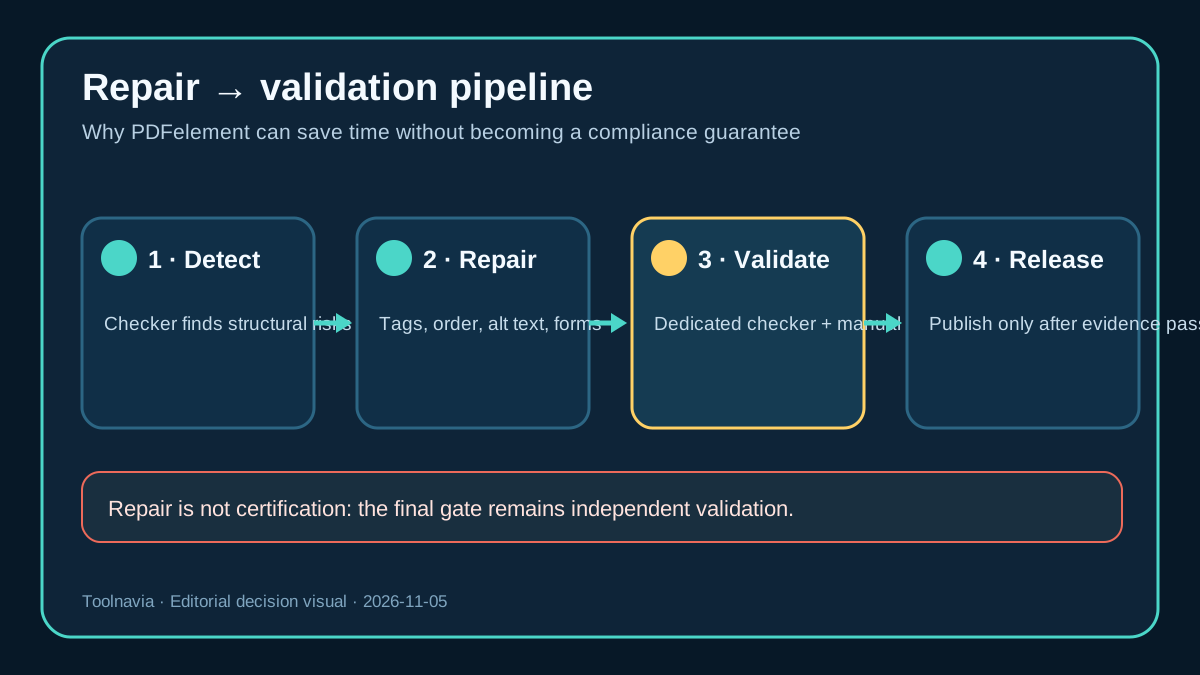
The feature list should still be read as a repair toolkit, not as proof of conformance. Official guidance says some checks require manual verification, and PDFelement’s own accessibility-checker article recommends using a dedicated checker such as Acrobat or PAC for formal validation before and after remediation.
Why automatic tags are only a starting point
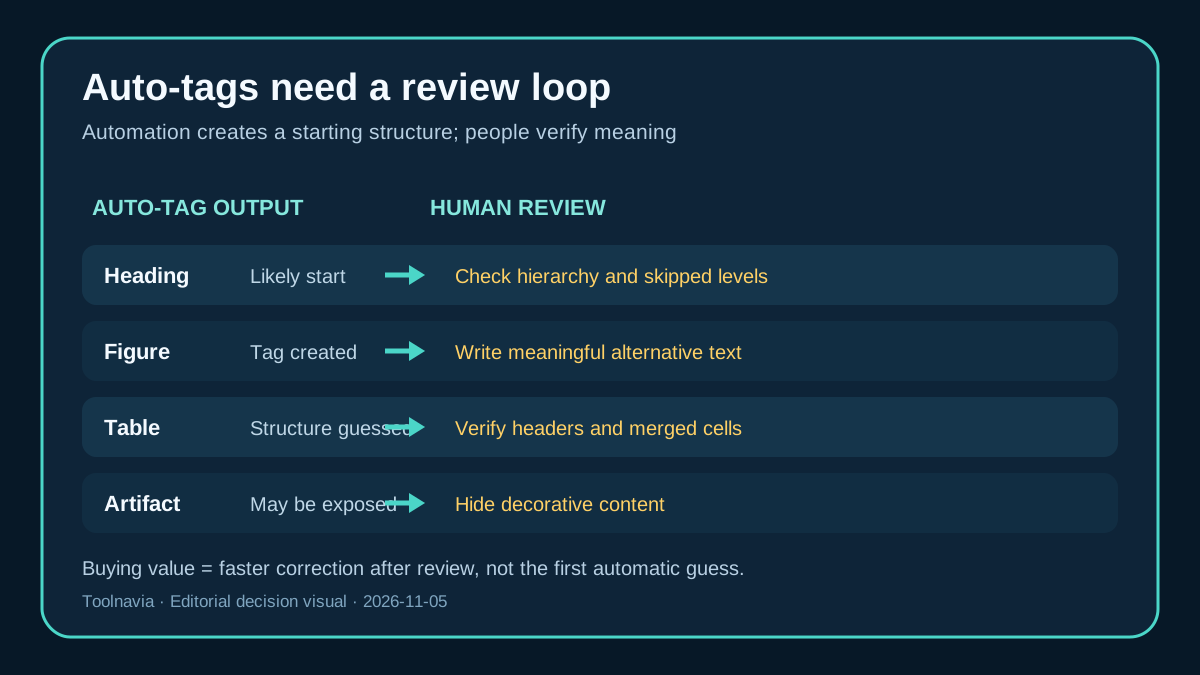
Automatic tagging can save time on a clean, conventionally structured document. It can also make plausible-looking mistakes. A large bold sentence can be tagged as a paragraph instead of a heading. A decorative rule may be exposed to assistive technology. A chart can receive a figure tag without useful alternative text. A visually simple table can contain merged cells that need header relationships a tagging engine cannot infer reliably.
This is why the purchase decision should focus on review speed, not automation alone. A useful workflow is: generate or repair tags, inspect the tag tree, verify headings and lists, mark decorative content as artifacts, add meaningful alternative text, check table headers, and then test the logical reading sequence. The time saved comes from having editing tools available when the checker finds a problem.
If the source Word, PowerPoint, InDesign, or web document still exists, correcting the source and exporting again is often safer than repairing every defect in the PDF. PDFelement’s own Reading Order guidance recommends returning to the source application when possible and presents the command as a way to fix basic tagging problems. That limitation is a reason to buy selectively, not a reason to ignore the tool.
Reading order is a human decision
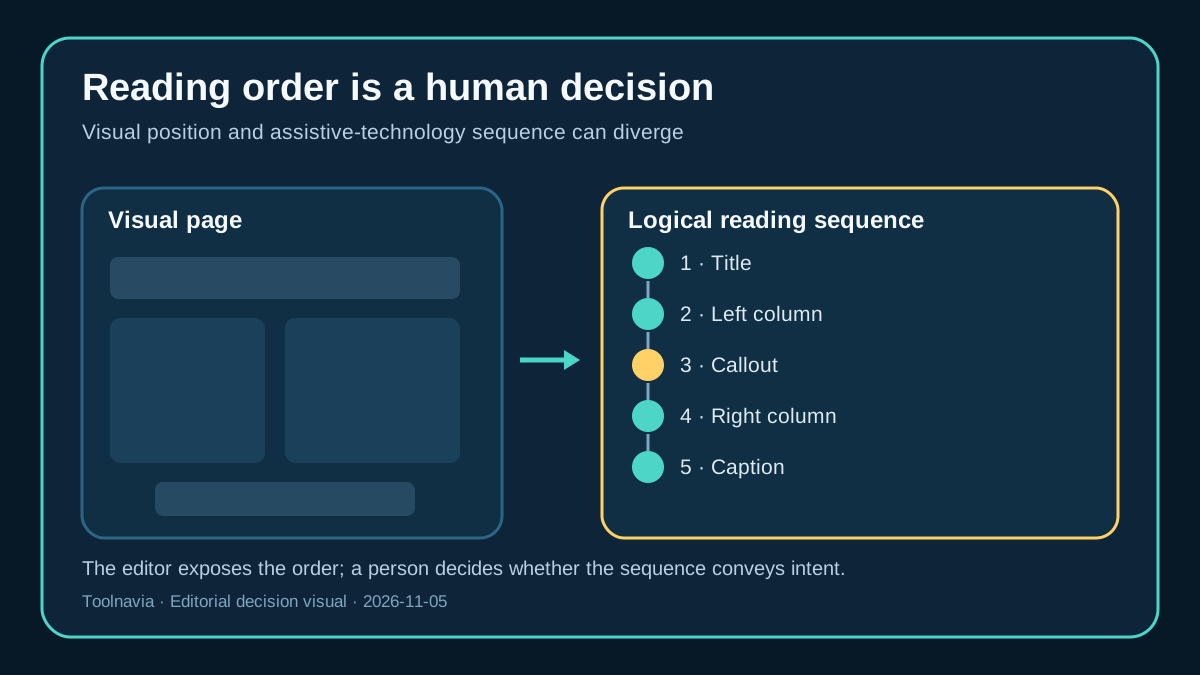
Reading order is not the same as visual order. A two-column page may look obvious to a sighted reader while a screen reader jumps from the left column to an unrelated callout and then into the right column. Captions, footnotes, sidebars, and repeated headers can make the sequence harder to infer automatically.
PDFelement lets an editor identify regions and assign structural roles such as headings, text, figures, tables, and artifacts. The editor still has to decide the intended sequence and whether the labels communicate meaning. For a short brochure, that review may take only minutes. For a long report with floating objects and complex tables, it can become the dominant cost.
This is the strongest reason to avoid compliance promises in a buying guide. The software can expose and edit the structure; it cannot know the author’s intent in every page. Buyers who must meet procurement, education, government, or legal accessibility requirements should budget for manual testing and, where appropriate, review by an accessibility specialist.
How the alternatives change the decision
Adobe Acrobat Pro, Foxit PDF Editor Pro, and Nitro PDF Pro all document comparable accessibility or tagging workflows. Acrobat combines automatic tagging, an accessibility report, reading-order tools, and manual structure repair. Foxit documents an accessibility checker, auto-tagging, reading-order work, and a Tags panel. Nitro offers automatic and manual document-structure tagging.
That means PDFelement should not be chosen merely because it has tags. Compare the parts of the workflow that affect your team: how quickly the editor reaches the tag tree, how it handles tables and form fields, whether reviewers can repeat checks after revisions, the learning curve, platform requirements, and the current license and renewal terms.
PAC represents a different category. It is a dedicated validation layer rather than a general PDF editor. A sensible process can use PDFelement for remediation and PAC or another accepted checker for validation. These tools are complements when a formal result matters. The cheapest editor is not economical if it leaves staff unable to diagnose or fix the issues the checker reports.
When paying for PDFelement makes sense
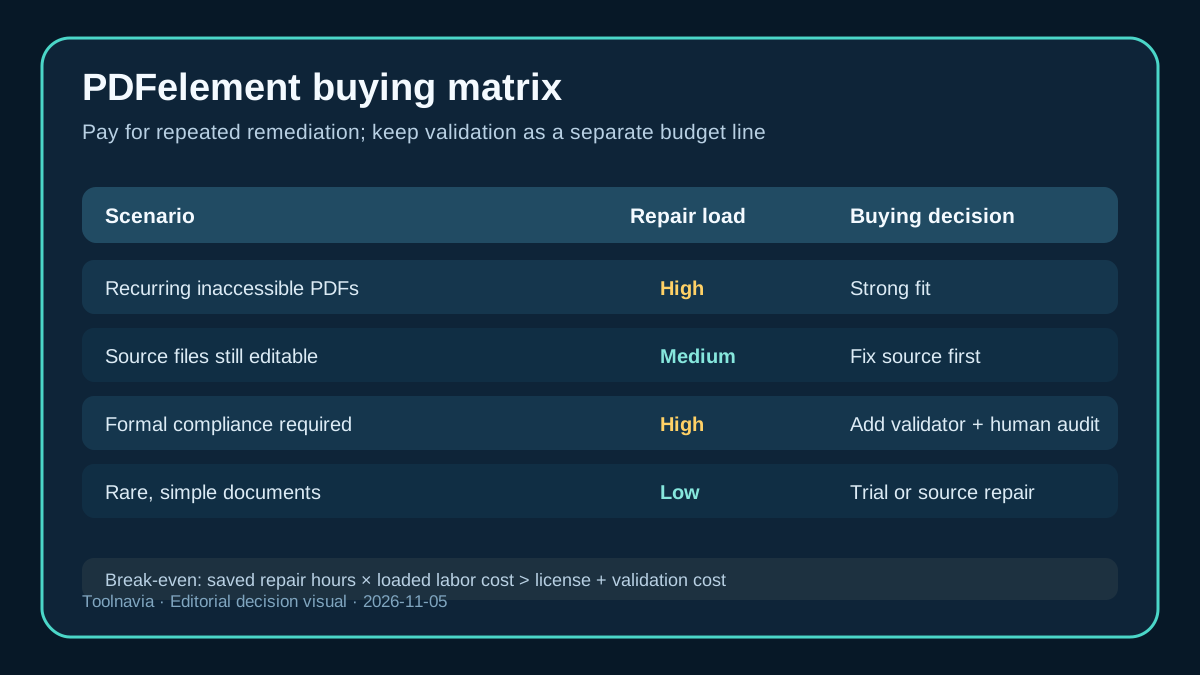
The purchase is easier to justify for a team that receives inaccessible PDFs from many sources, owns documents that cannot be recreated easily, or publishes updated PDFs every month. Repeated OCR, tag repair, reading-order correction, alternative-text work, and form remediation can create enough labor savings to justify a paid editor.
It can also fit an individual consultant or small organization that needs one broad PDF editor rather than separate tools for OCR, forms, redaction, conversion, and accessibility repair. The exact Windows Individual offer must be checked on the official store on the day of purchase because price, promotions, and renewal terms can change. The approved Toolnavia affiliate link points to the same product family; using it may generate a commission without changing the editorial conclusion.
A practical break-even test is to estimate the hours spent repairing PDFs each month. Multiply those hours by the real loaded cost of the person doing the work. Compare that amount with the current license and the cost of any separate validator or specialist review. If the editor saves even one or two difficult rebuilds, the economics may be favorable. If accessibility work is rare, a trial plus source-document correction may be enough.
The official Windows Individual store was rechecked on November 5, 2026. It currently displays several overlapping plan rows, including a quarterly price of US$11.99, yearly prices of US$67.99 and a promotional US$31.99, a two-year price of US$109.99, and perpetual prices of US$51.99 and US$110.99. Because the page itself presents multiple campaign rows, the live cart—not a copied headline—controls the actual plan, tax, currency and total. The yearly plan renews automatically until cancelled; the store says renewal rates can change with notice. The perpetual license covers PDFelement 13 and its minor updates, while major upgrades may require another purchase.
Affiliate disclosure: Toolnavia may earn a commission if you buy through the approved PDFelement link. That does not change the price shown by the merchant or the repair-versus-validation conclusion in this guide.
Decision advantages, stated with their evidence boundaries: **Integrated remediation workflow** — Keeps OCR, tags, reading order, alternative text, forms and navigation repair in one editor. **Automatic tagging** — Can create a faster structural starting point, but every semantic role still needs review. **Reading Order and Tags panels** — Lets an editor expose and repair logical sequence and semantic roles, while author intent still requires a human decision. **Source-file fallback** — Avoids expensive end-stage PDF surgery when the authoring file still exists.
When not to buy
Do not buy PDFelement solely to obtain a compliance badge. No editor can guarantee that content is understandable, that alternative text is useful, or that a table’s relationships are correctly conveyed. Official PDFelement material itself separates remediation from formal checking and warns that results vary.
Do not buy it as a substitute for accessible authoring practices. Documents created correctly in Word, InDesign, or HTML usually produce cleaner results than PDFs repaired at the end. Do not assume the product’s own accessibility statement proves that every exported document conforms; interface accessibility and document conformance are different scopes.
Finally, do not publish immediately after auto-tagging. Run a dedicated check, review every flagged item, inspect reading order, test keyboard navigation, and sample the document with assistive technology. A rushed automated pass can create false confidence, which is more dangerous than an obvious failure.
Buyer checklist and final recommendation
Before paying, test one representative document during the available trial or evaluation period. Include the hardest page you expect to handle: a table, multi-column layout, form, chart, or scanned page. Confirm that you can add and edit tags, correct the reading sequence, mark artifacts, add alternative text, and repeat the check after saving.
Then answer four questions. First, do you still have the source file, and would correcting it be faster? Second, does your organization require a specific checker or human audit? Third, does the current Windows Individual license fit the devices and users involved? Fourth, does the time saved across the year exceed the current purchase and renewal cost?
PDFelement is a reasonable remediation purchase when the editor will be used repeatedly and validation remains a separate gate. It is a poor purchase when the buyer expects automation to replace accessible design, human judgement, or independent verification. The right promise is not “make any PDF compliant.” It is “make many repair tasks faster, while keeping evidence and manual review in the workflow.”