TOOLNAVIA / BUYING GUIDE
Parallels Standard for Docker on Mac: Is WSL2 a Deal Breaker?
The short answer
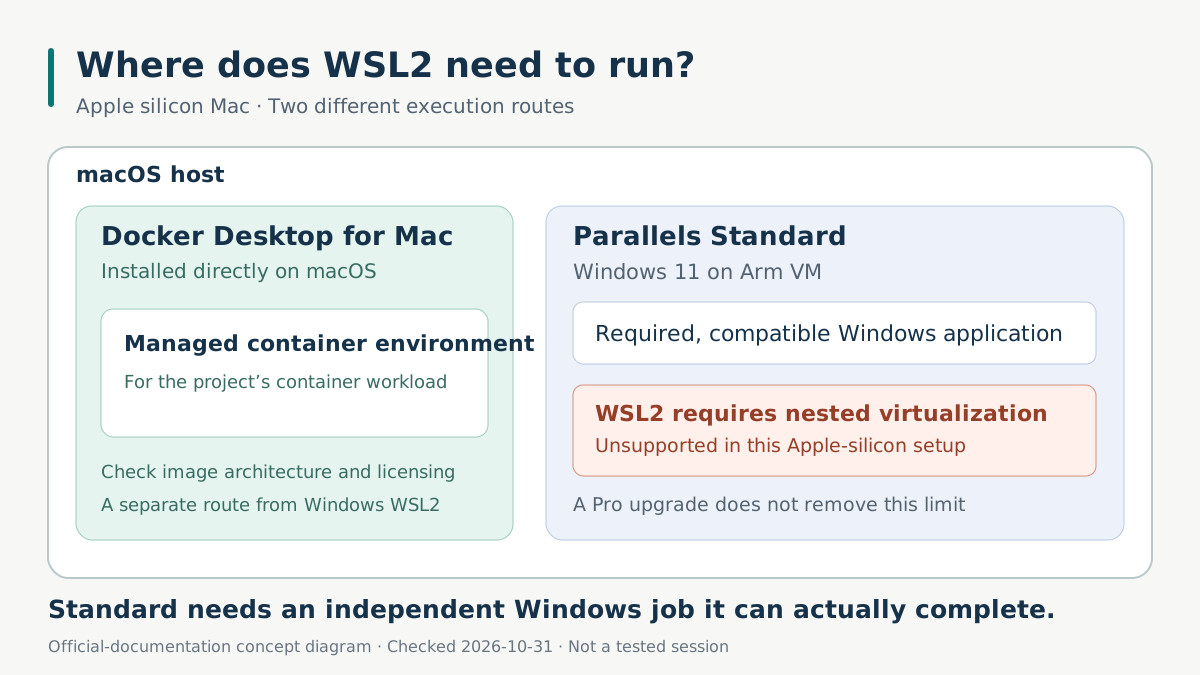
Parallels Desktop Standard cannot supply WSL2 inside a Windows virtual machine on an Apple silicon Mac. Upgrading to Pro does not remove that restriction. Consider Standard when you also need a compatible Windows application; evaluate a macOS container environment separately.
*Official-documentation analysis checked October 31, 2026. Toolnavia did not install software or benchmark a project.*
At a glance
- Best for
- A compatible, independently necessary Windows application alongside a Mac container workflow that fits Standard.
- Price model
- Standard subscription or one-time purchased-version license; check current cart. Windows activation and any paid container license are separate.
- Check first
- WSL2 inside Apple-silicon Windows VMs is unsupported; Pro cannot remove the limit. Standard is capped at 8GB and four vCPUs per VM.
Identify where the required Linux environment must run
A project asking for “Docker” may need Linux containers, while another explicitly requires Docker Desktop's WSL2 backend inside Windows. Those requirements lead to different purchases.
WSL2 uses a Linux kernel in a managed virtual machine. Inside an existing Windows VM, that requires another virtualization layer. Parallels' Pro comparison lists nested virtualization, but its footnote excludes M-series Macs. The restriction concerns Parallels' supported Windows-guest stack.
WSL1 is documented on Apple silicon, but Microsoft distinguishes its translation-based architecture from WSL2's full kernel and systemd support. Docker's WSL2 backend specifically requires WSL2; changing a setting to WSL1 does not satisfy that dependency.
The Intel route is different: supported nested virtualization requires a qualifying higher edition and the Parallels hypervisor. Desktop 27 requires Apple silicon; Intel Macs use Desktop 26. An Intel tutorial cannot establish an M-series upgrade path.
Put containers on the Mac when Windows is optional
Docker publishes an Apple-silicon macOS installer. Its current requirements include a supported macOS release and at least 4GB RAM; support covers the current and two previous major macOS releases. That is a direct Mac installation with its own runtime, rather than Docker's Windows WSL2 backend inside Parallels.
For a web project, identify where the editor, source files, database and build tools will live. If they work on macOS, a Windows VM may add expense without completing another task. If a Windows-only client must communicate with the container service, the split environment needs a working connection and consistent file paths. Neither arrangement guarantees that every image architecture or dependency works unchanged.
Where Standard can earn its place
Standard offers four useful conveniences when a genuine Windows application remains in the project.
**Guided Windows setup** reduces installation work: the edition comparison includes one-click Windows 11 installation in Standard. It does not include a Windows activation license.
**Coherence** lets supported Windows applications appear beside Mac applications, reducing desktop switching while you consult a Mac editor or browser. Application compatibility still needs checking.
**Clipboard and file sharing**, with Parallels Tools installed and sharing enabled, reduce manual handoffs between systems. Shared access does not automatically repair incompatible paths or tools.
**A separate supported Arm Linux VM** can provide an independent workspace in Standard when the project permits it; it does not become WSL2 inside Windows. Standard's per-VM ceiling remains 8GB virtual RAM and four virtual CPUs.
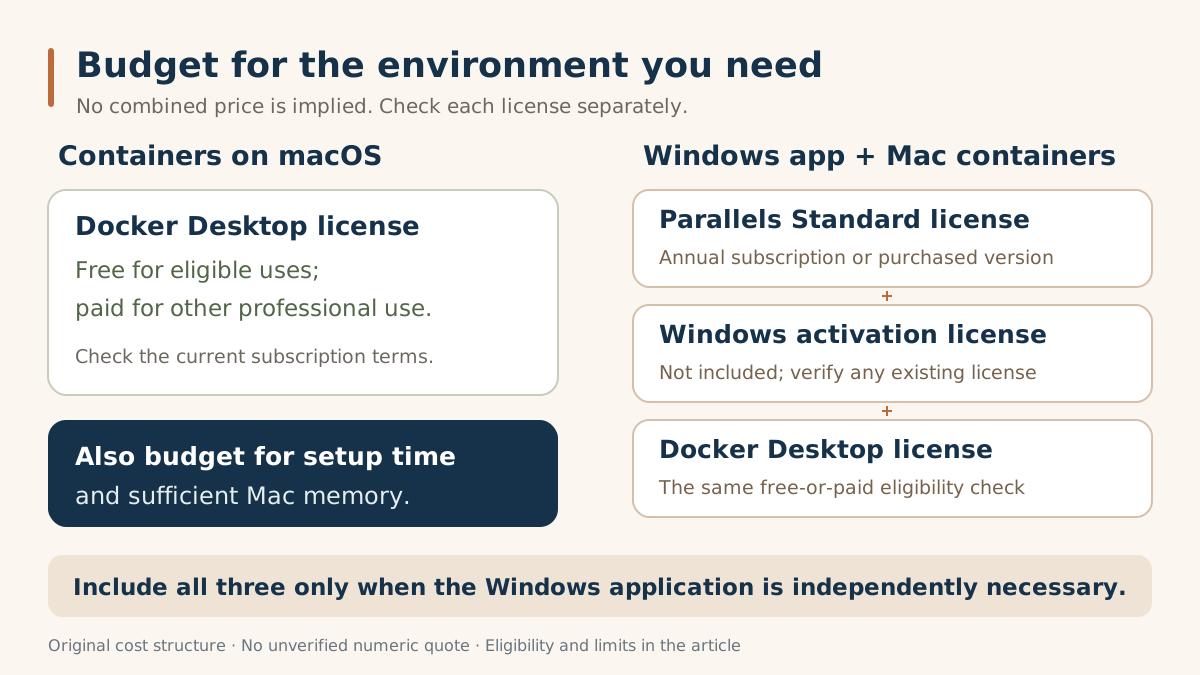
Budget for three separate licenses
Start with Parallels' billing choice. Standard offers an annual subscription or a one-time license for the purchased version. Subscription updates and future compatibility matter if you regularly upgrade macOS; a perpetual purchase does not guarantee support for later operating systems. The current store text did not expose a reliable numeric quote, so verify the selected total, tax and renewal terms in your cart.
Next, account for Windows. Parallels does not include its activation license. Check whether an existing license is valid for the VM before assuming another purchase is unnecessary.
Then check the container tool's commercial terms. Docker Desktop is free for personal use, education, non-commercial open source and qualifying small businesses with fewer than 250 employees **and** under $10 million annual revenue. Other professional use, including government, requires paid licensing.
A container-only route may therefore avoid both Parallels and Windows costs. A mixed Windows-and-Mac route may require all three licenses, plus setup time and enough memory for concurrent work. Paying for Pro solely to unlock unsupported WSL2 adds cost without solving this requirement.
Evaluate the whole split project during the trial
The current free trial lasts 14 days and provides Pro features. Evaluate the intended Standard workflow within its 8GB/four-vCPU limits, without depending on Pro-only controls.
Use one representative project: open the required Windows application, start the container service on macOS, make a normal change, rebuild and save the result. Reopen the environment and confirm that the application still reaches its service and files. These are proposed checks, not completed Toolnavia tests. If the team requires WSL2 specifically inside Windows, an incompatible runtime cannot be accepted merely because a different demo runs.
Buy for the Windows work you can actually complete
Choose Standard when the independent Windows requirement works and its integration justifies the combined cost. Keep containers on the Mac when that meets the project. A mandatory Windows WSL2 workflow needs another supported Windows environment, not an assumed Pro upgrade.
For connection choices, see the [Standard networking guide](/en/software/parallels-standard-shared-bridged-network-device-access).
*Affiliate disclosure: Toolnavia may earn a commission through its approved Standard link. Check the selected edition and billing terms on the merchant page; no discount is promised.*