TOOLNAVIA / BUYING GUIDE
Parallels Desktop Standard Networking: When Do You Need Pro?
The short answer
Parallels Desktop Standard already includes Shared, Bridged and Host-only networking. A Windows app needing a NAS or another LAN device does not automatically justify Pro. The buying question is who initiates the connection, and whether the working setup depends on Pro's built-in port forwarding.
*Official-documentation analysis, October 28, 2026; no LAN test performed.*
At a glance
- Best for
- A Mac owner whose ordinary Windows internet or permitted local-LAN task works using Standard's existing modes and fits its other limits.
- Price model
- July2026 official Standard reference: US$99.99/year or$219.99 once; current numeric quote unconfirmed. Windows, tax and renewal require separate checks.
- Check first
- A required Shared-network incoming connection that depends on built-in forwarding, a need for custom virtual networks, or an organization-controlled route that remains blocked regardless of edition.
Match the mode to the connection direction
The **guest** is your Windows virtual machine; the **host** is the Mac. A browser working inside Windows proves an outgoing path, not that another device can reach a service inside the guest. This direction distinction also appears in VMware and Oracle networking documentation.
| Mode or control | Typical task | Edition boundary | | --- | --- | --- | | Shared | Windows initiates network requests through the Mac | Included in Standard | | Bridged | Another LAN device reaches the VM's own LAN address | Included in Standard | | Host-only | Communication within the local virtual network | Included in Standard | | Shared port forwarding | A Mac port redirects incoming traffic to a VM port | Pro or Business |
Select the three modes through **Devices → Network**. Editing Shared/Host-only networks under application **Preferences → Network** is a separate higher-edition capability.
Four useful controls before an upgrade
- **Start ordinary internet work with Shared.** Its automatic private subnet routes Windows through the Mac, reducing initial network setup. Verify the actual app, NAS path or VPN requirement; a general internet connection proves less.
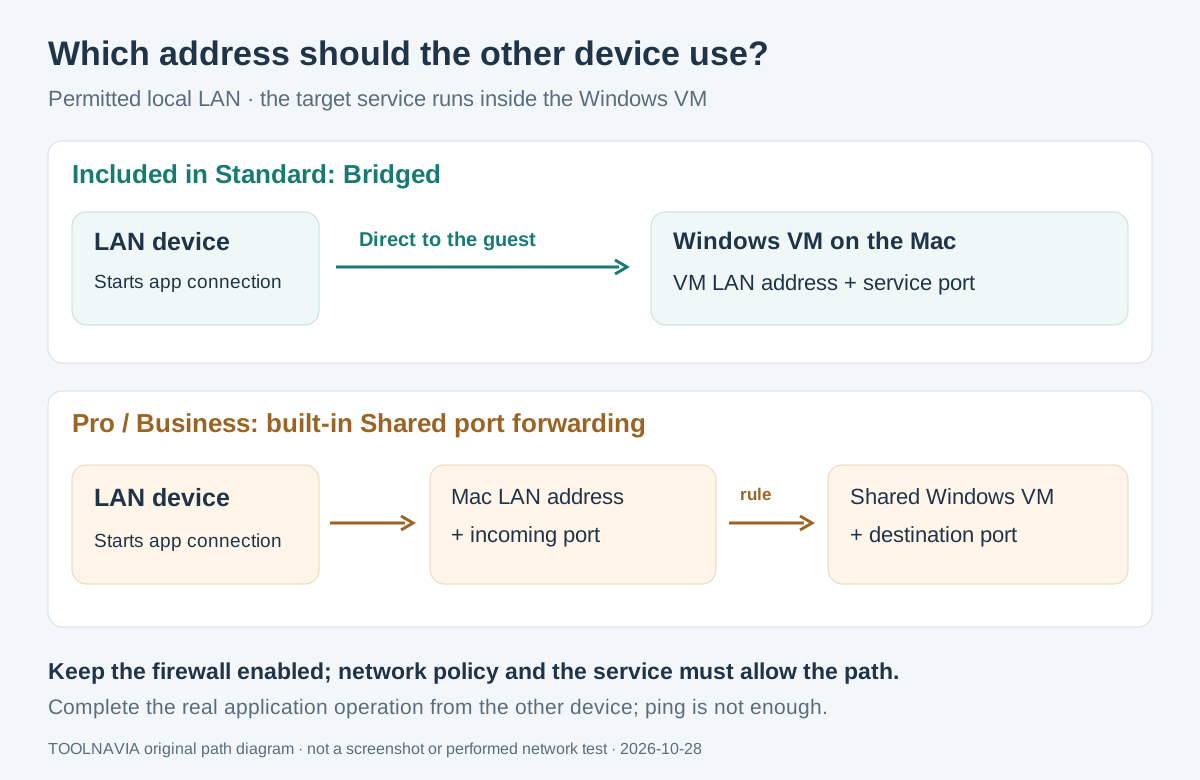
- **Give a guest service its own LAN address.** Bridged can let another permitted computer connect directly, without buying Pro solely for that topology. Router policies, the service and firewall must allow it.
- **Keep a local exercise on Host-only.** This mode supports local virtual-network communication without normal outside-network access. It is not a complete security sandbox: shared folders and clipboard settings remain separate.
- **Choose the Mac interface used for bridging.** Select Ethernet, Wi-Fi or the default adapter when a dock changes the intended network. Wi-Fi behavior depends on router settings; interface selection does not guarantee connectivity.
Audit the Pro trial before choosing Standard
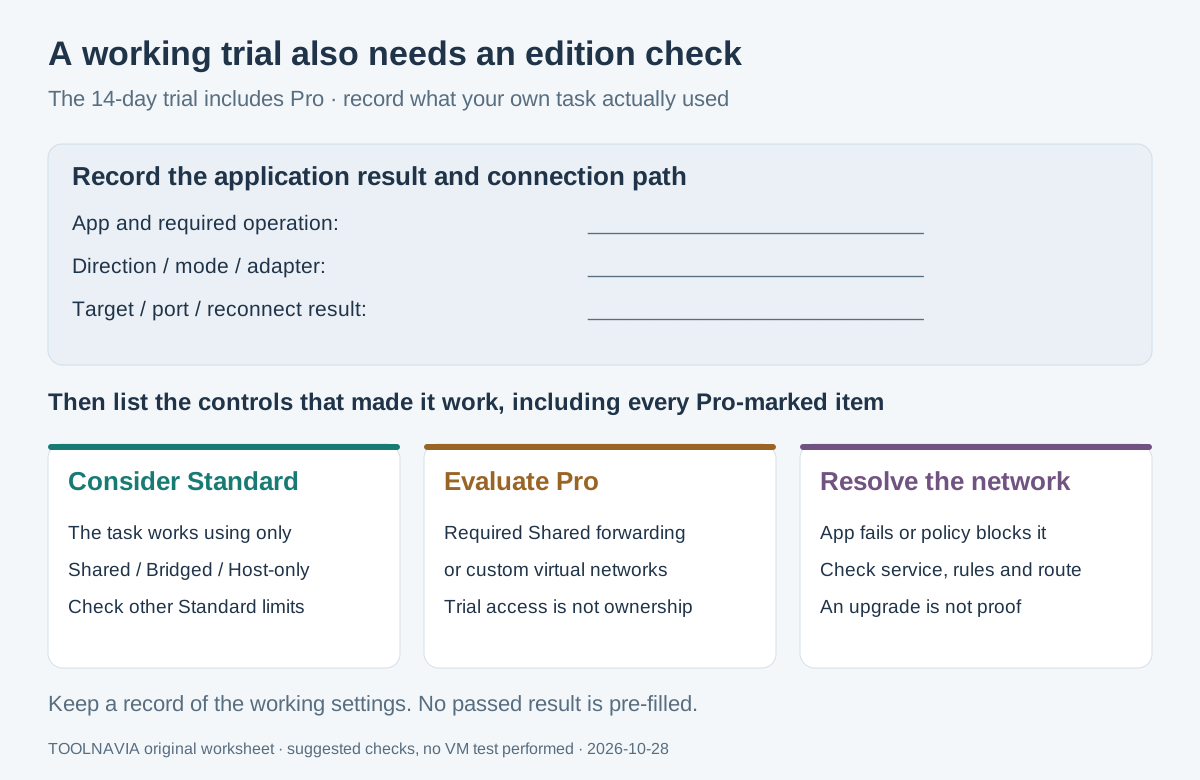
The 14-day trial provides Pro features. Parallels marks Pro-only controls with a Pro sign, so record which settings made your task work. A successful trial configuration using built-in Shared-network forwarding does not establish Standard entitlement.
With Bridged, the other device targets the **guest's LAN address**. With a Shared forwarding rule, it targets the **Mac's address and configured incoming port**, which forwards to the chosen VM port. Built-in forwarding is restricted to Pro and Business. These are different connection paths.
Budget from dated references, then verify the order
The current store's numeric quote did not render during this check. Parallels' **July 28, 2026 official reference** lists Standard at **US$99.99/year or $219.99 once**, and Pro at **$119.99/year**. These are planning references, not verified current checkout or renewal prices.
Each license covers one Mac. Add eligible Windows and application licensing separately; our [Windows license cost guide](/en/software/parallels-standard-windows-license-cost) covers that decision. Desktop 27 requires Apple silicon; Intel Macs use Desktop 26.
Subscriptions auto-renew by default. Check the actual term, total, tax, currency and renewal status; Pro is subscription-only. Perpetual Standard retains its purchased version, with future major upgrades extra.
Perpetual email support remains unclear: the store says 30 days, while the KB says two years from version release. Confirm that term before choosing one-time purchase.
*Toolnavia may earn commission through the Standard purchase buttons. The link does not establish a Pro entitlement.*
Verify the actual application path
Use this suggested check on the intended, permitted network:
1. Record Mac, Parallels and Windows versions, the required application, connection direction and expected operation. Preserve the working network settings.
2. For Windows-initiated work, start with Shared and complete the actual resource task, such as opening the intended NAS share.
3. For an incoming LAN task, select Bridged and the intended physical adapter. Record the guest's current LAN address and confirm the application accepts connections there.
4. Keep Windows Firewall enabled. Check the correct profile and a narrowly approved application rule; managed rules may require an administrator. From the intended second device, complete the application's operation. A ping alone is insufficient.
5. Repeat after reopening the VM or reconnecting the dock if that is part of daily use. Record the mode, addresses, relevant ports, result and any Pro-marked controls used.
Pay for a required capability
Choose Standard when the real task works with its included modes and fits its other limits, including 8GB virtual RAM and four virtual CPUs per VM.
Evaluate Pro when the required design must retain Shared networking with built-in incoming forwarding, or needs custom virtual networks. If the obstacle is router policy, application configuration or an unsupported VPN route, resolve that cause before upgrading; an edition change alone does not prove the task will work.