TOOLNAVIA / BUYING GUIDE
IDrive Personal 5TB Cloud Backup: $179.82 for Two Years, Overage Extra
The short answer
IDrive Personal 5TB fits one person backing up several computers under a shared capacity allowance. The displayed two-year price is $179.82, before applicable taxes; excess storage costs extra. Start with a small restore test rather than treating a completed upload as proof your files are protected.
This is an official-document analysis, not a Toolnavia recovery-speed or security test.
At a glance
- Best for
- One person with several computers, a measured backup set within5TB and a tested recovery/key plan.
- Price model
- Displayed $179.82 for2years; taxes and overage extra
- Check first
- A pooled10TB backup assumption, multiple independent team seats, guaranteed30-day history or an expired-account archive.
One user, several devices, two separate quotas
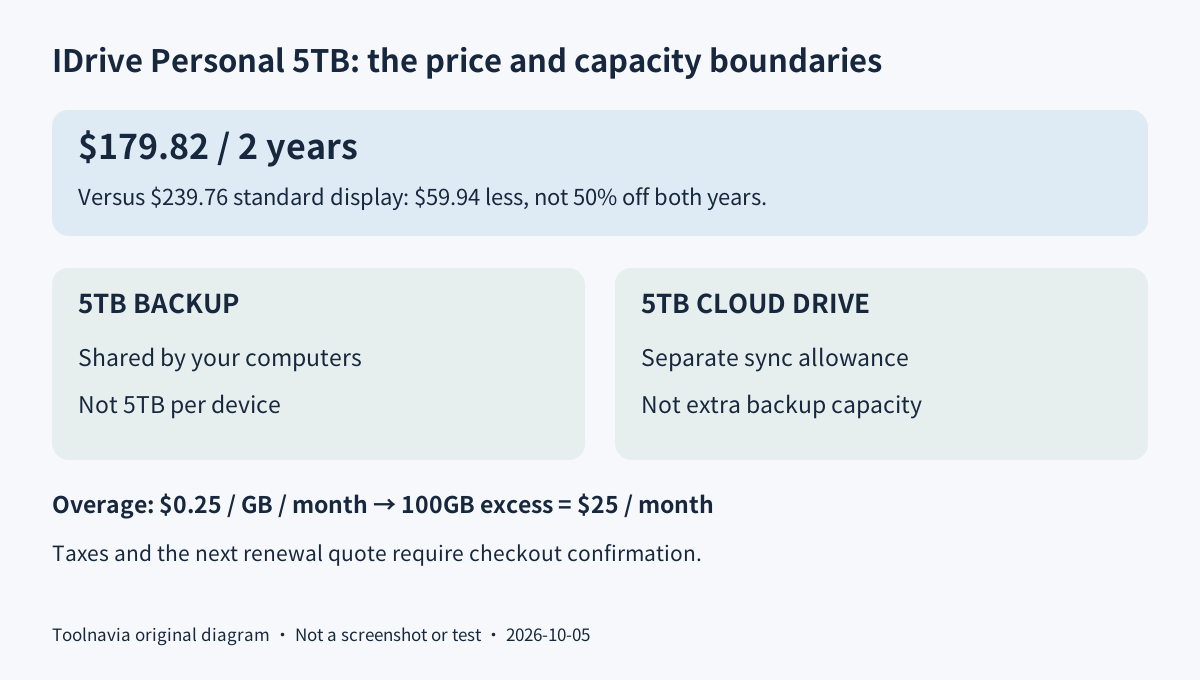
Personal covers one user with multiple computers, not independent seats for a team. The 5TB backup allowance belongs to the account, not to each computer. Add the selected folders across your devices before choosing capacity. The free 10GB Basic plan may be enough for a small evaluation or a modest backup set.
Cloud Drive adds a separate sync allowance matching the plan size. That does not create a pooled 10TB backup allowance: backup and Cloud Drive quotas are independent, and sync needs separate activation. Use the backup service for the recovery set being evaluated here; check synchronization as a different workflow.
Four capabilities worth testing before committing
**Consolidate an off-device recovery copy.** Multiple supported computers can use the same Personal account, helping one person protect files from more than one machine. That convenience still depends on selecting the right folders and staying within the shared capacity. Server and Cloud Applications options can carry separate charges; a broad feature list is not an entitlement to every add-on.
**Keep a backup after a local deletion.** True Archiving does not automatically erase a backed-up file just because it disappears from the source computer. That helps when a local cleanup was a mistake. However, manual cloud deletion and Archive Cleanup can remove stored files. The archiving page's broad availability language also does not override the billing policy for an expired account.
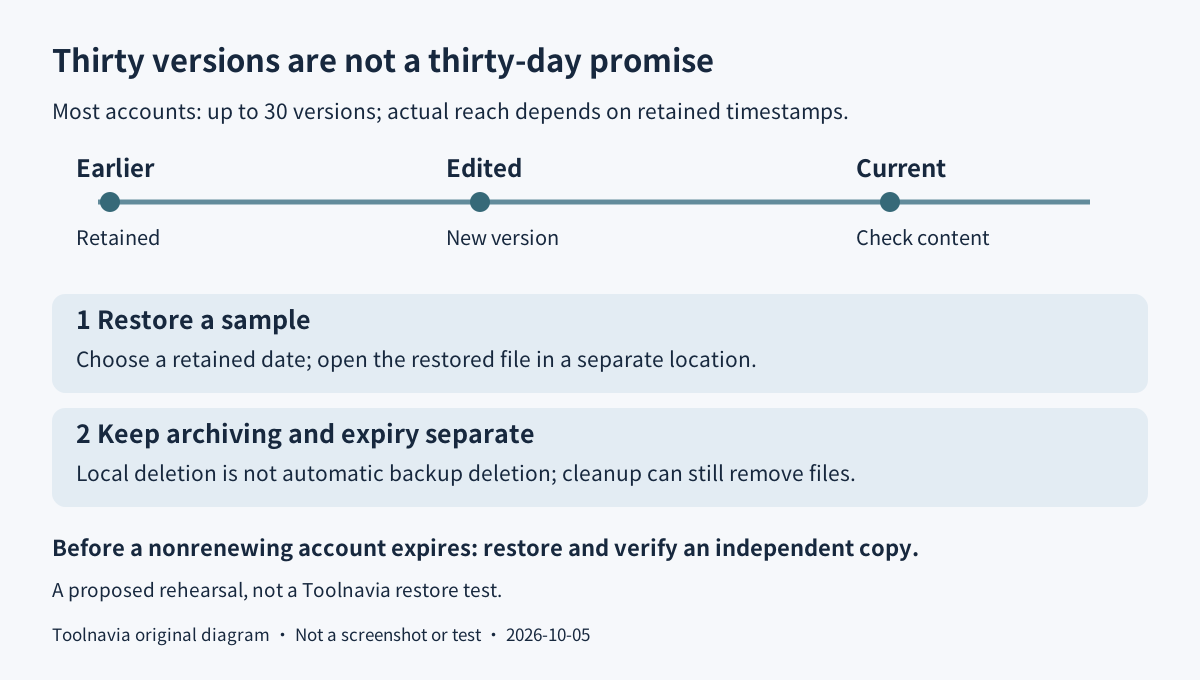
**Return to a previous version.** Snapshots use the retained versions of files to reconstruct an earlier state. Most accounts support up to 30 versions, not a guaranteed 30-day history; the available period depends on the oldest retained version, and some legacy accounts have fewer. Versions do not consume additional quota, but that does not make the timeline unlimited.
**Choose a private encryption key deliberately.** IDrive says the optional private key is not stored on its servers. Losing it can therefore prevent restoration. This is a documented control, not an independently tested security guarantee. Cloud Drive sharing requires default encryption, so decide whether the private-key or sharing workflow matters more before setup, and store recovery information safely.
$179.82 for two years is not 50% off both years
The official pricing and signup pages show Personal 5TB at $179.82 for two years against a $239.76 standard comparison. The $59.94 difference is 25% of that full two-year reference. The banner's 50% discount applies to the first year of the two-year plan, not every year. These are public display amounts, not a completed buyer-specific checkout.
The separate monthly option is $11.99. The annual tab's $6.99 monthly equivalent is billed annually, not a $6.99 monthly payment; its exact first-year total was not readable in the order summary. Subsequent renewal is at the applicable standard rate. Record the selected period, full charge, taxes and next renewal quote before authorizing payment.
Personal overage is $0.25 per GB per month. An illustrative 100GB excess would add $25 for a month, so capacity monitoring matters more than a small headline discount. Plan headroom rather than relying on the limit to stop uploads without charges. Cloud Drive's separate quota is not spare backup capacity.
Rehearse a restore without risking the originals
Begin with a disposable folder containing a few non-sensitive sample files, while retaining an independent copy. Confirm that the selected backup finishes, edit a sample, and back it up again. In Restore, choose Snapshots, select a date and time with a retained version, submit the selection and restore the sample. Use a separate destination where available so the rehearsal does not overwrite your working files.
Open the recovered file and check its actual contents. Then check a second device's selected folders and your total quota. These are suggested acceptance checks, not measured Toolnavia results. Before expanding to real data, verify your key, intended restore method and a realistic recovery window on your own connection.
Before leaving, recover the files elsewhere
The current billing FAQ specifically covers accounts created after September 25, 2026. It offers refunds for monthly or yearly accounts canceled within 15 days of creation, subject to its policy; a later technical-issue refund is exceptional, not automatic. Canceling renewal is not the same as requesting a refund.
The same FAQ says access ends and cloud files are permanently deleted when a nonrenewing subscription expires. Restore and verify an independent copy before that deadline; do not expect True Archiving to preserve an expired account.
Choose this plan for a tested multi-computer recovery need within 5TB, not for a supposedly unlimited archive. IDrive's cash referral program is open, but Toolnavia approval is unverified and tracking stays disabled. Promotion-code accounts are excluded from referral earnings, so no commission eligibility is promised for this offer.