TOOLNAVIA / BUYING GUIDE
Moving EverDoc to a New PC? Verify the Backup Before Reinstalling
The short answer
# Moving EverDoc to a New PC? Verify the Backup Before Reinstalling
**Meta description:** EverDoc lists a backup function, but public restore details are limited. Use this four-layer test before moving a searchable archive to a new Windows PC.
A backup is useful only after you have proved that it restores the records you care about. EverDoc’s current product page lists a backup function, OCR, cloud connectivity, scanner import and support for Windows 11 through Windows 7. At our October 31, 2026 observation, the page showed EverDoc 2027 v2027.12 at €29.95. A separate localized official Abelssoft route says the entire database can be backed up and restored, but the public pages do not publish a complete step-by-step contract for backup format, storage location, encryption, scheduling, cross-version behavior, license transfer or inclusion of cloud-linked originals.
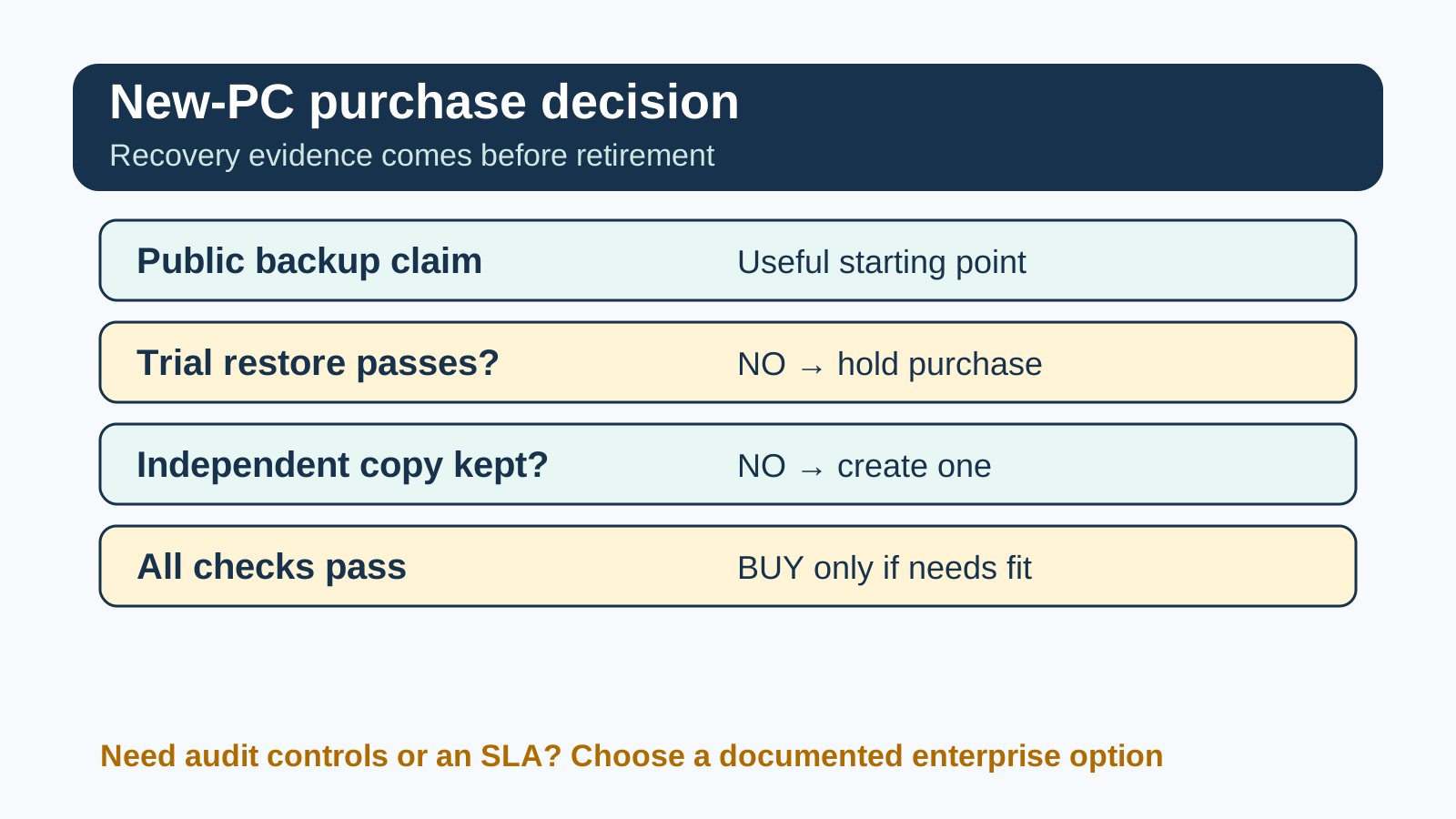
**Verdict:** EverDoc can remain on a shortlist for a local searchable document archive, but buyers with retention-critical records should make the purchase conditional on a trial backup-and-restore test. Keep a separate copy of the source documents, and do not erase the old PC until counts, searches and representative records have passed on the new machine.
> Affiliate disclosure: Toolnavia may earn a commission if you buy through the approved EverDoc link below. This does not change the price you pay or our requirement to disclose unverified restore behavior. We did not install EverDoc, complete checkout, move a license or restore a production archive for this article.

At a glance
- Best for
- Buyers who can validate a complete trial restore and keep an independent source-file copy.
- Price model
- English page €29.95; localized official route CHF55.50; verify locale and checkout
- Check first
- Organizations requiring documented encryption, scheduled backup controls, cross-version guarantees, audit trails or a recovery SLA.
Map the four things that must survive
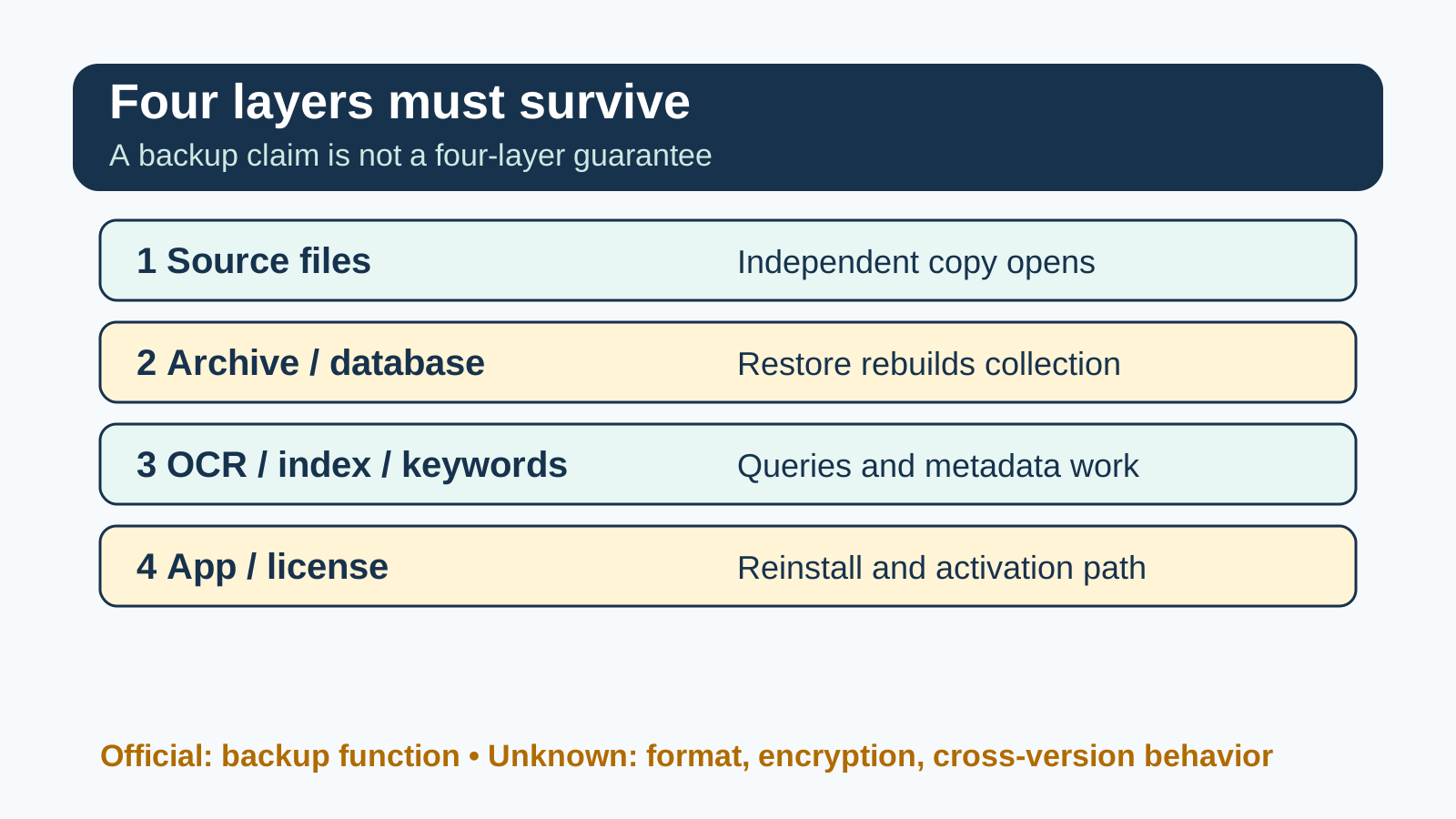
“Back up EverDoc” can mean four different things. Treating them as one bundle creates the biggest migration risk.
| Layer | What it contains | Evidence you need | |---|---|---| | Source files | PDFs, scans, images and cloud-linked originals | An independent copy that opens without EverDoc | | Archive/database | EverDoc’s document collection and relationships | A backup that can be selected and restored | | OCR/index/keywords | Search text, dates, tags and organization | Representative queries and metadata after restore | | App/license | Installer, current version and activation entitlement | A documented reinstall and activation path |
The official page confirms a backup function, but that wording alone does not prove that every layer above is included. FileCenter’s own support material separates program settings from cabinet contents and tells users to back up files separately. PaperPort similarly warns that folders on the system drive should be backed up before reinstalling. These competitor instructions do not prove how EverDoc behaves; they show why a buyer should demand layer-by-layer evidence.
Create evidence on the old PC
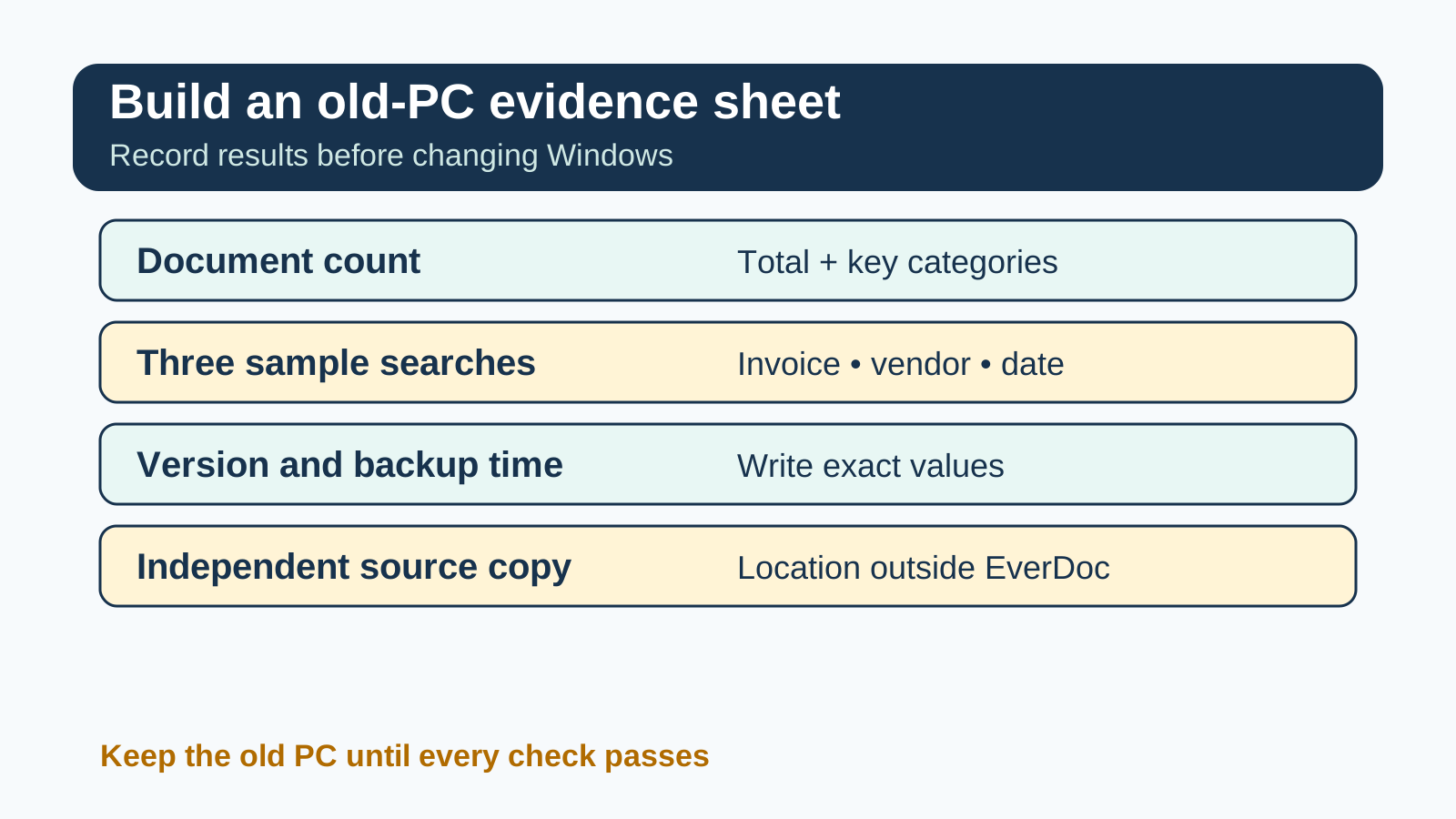
Before changing Windows, create a small audit sheet that can survive outside EverDoc. Record:
- the total document count and counts for two or three important categories; - three searches with memorable results, such as an invoice number, a vendor and a date range; - the keywords, dates and notes on three representative records; - which items are local files and which are connected to a cloud source; - the installed EverDoc version and backup timestamp; - the location of a separate source-file copy.
Do not invent a file location or copy a database folder just because it looks plausible. Use the backup control exposed by your installed version and preserve the original archive. EverDoc’s public page does not document the backup extension or default location, so the application’s UI and product support must be the authority.

This evidence converts “the program opened” into a meaningful recovery result. A restored window can still be incomplete if an OCR index, keyword set or linked original was not carried over.
Run a disposable restore test
Create the backup, then restore it into a disposable test location or separate Windows profile **only if the current EverDoc interface allows a safe destination**. Never point an untested restore at the only working archive. If the interface offers no isolated destination, ask Abelssoft support for the supported test procedure.
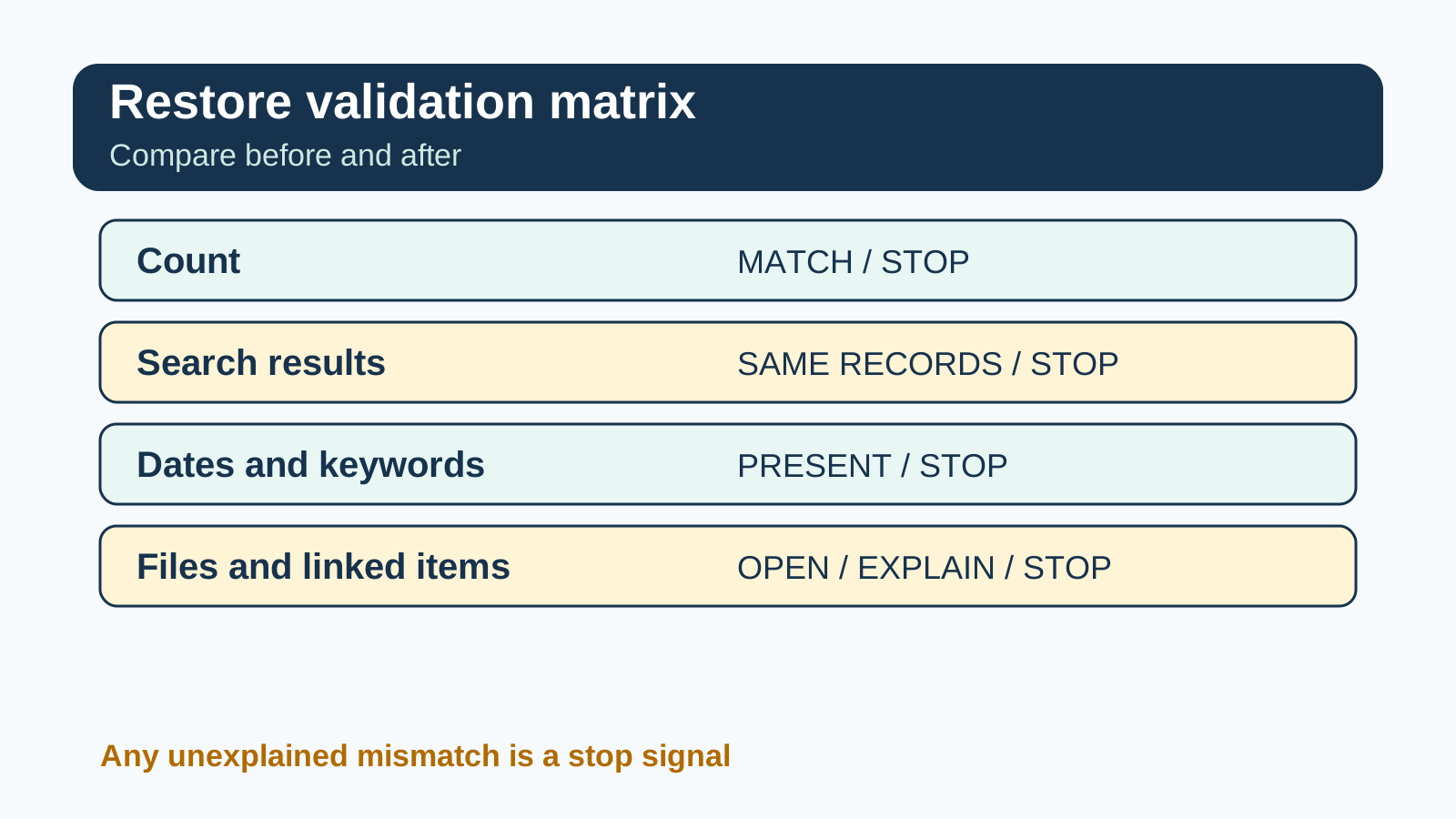
Compare the restored result with the old-PC audit:
1. Does the document count match? 2. Do the three sample searches return the same records? 3. Are dates, keywords and notes present? 4. Do representative PDFs, scans and images open? 5. Are cloud-linked items available because they were copied, reconnected or still depend on sign-in? 6. Can you repeat the restore without overwriting the sole original?

A mismatch is a stop signal. Keep the old installation intact, preserve both the source copy and backup, and obtain product-specific guidance. We found no current public evidence promising encrypted backups, automatic schedules or cross-version restore. Those remain unknown, not negative claims about the software.
Separate Windows transfer from EverDoc restore
Microsoft’s Windows transfer and Windows Backup can move selected files and settings, but Microsoft notes that installed applications and some credentials or system locations are not part of the transfer. OneDrive content may become available after sign-in rather than being copied as a self-contained archive.
Therefore, “Windows migration completed” is not proof that the EverDoc archive/database, OCR index or license survived. Plan two workstreams:
- use Windows or your normal backup method for general files and settings; - reinstall EverDoc through a legitimate installer and validate the EverDoc-specific backup separately.
Keep the old PC until the new installation passes the evidence sheet. Microsoft’s new-PC guidance makes the same conservative recommendation: verify files and applications before retiring the source machine.
Decide whether EverDoc is worth paying for
EverDoc is a reasonable fit when you want a Windows-based searchable archive, can preserve source documents independently and can demonstrate a full restore during the trial. OCR, scanner import and cloud connectivity may reduce filing work, but recovery determines whether the archive is dependable.
Pause the purchase if your organization requires any of the following and written confirmation is unavailable:
- documented backup encryption and key management; - scheduled or centrally monitored backups; - a supported cross-version or cross-device restore matrix; - an audit trail for restores and administrator actions; - a defined retention, legal-hold or disaster-recovery SLA.
Those needs usually point to an enterprise document-management system with a published recovery contract. The issue is whether documented evidence matches the consequence of losing your archive.

Price, purchase and evidence limits
On October 31, 2026, Abelssoft’s page displayed EverDoc 2027 v2027.12 at €29.95 and a 30-day trial. A localized official route simultaneously displayed CHF55.50, confirming that market and currency matter. Abelssoft’s terms distinguish Current Version, Saver Subscription and Lifetime Updates, so selected license and update rights also require confirmation. The Buy route reached a JavaScript checkout shell whose itemized final total was not readable in this review. Price, version and checkout terms can change by locale, tax and promotion, so verify them on purchase day.
[Check the current EverDoc offer](https://www.kqzyfj.com/click-101895278-15402688?url=https%3A%2F%2Fwww.abelssoft.de%2Fen%2Fwindows%2Fhelpers%2Feverdoc)
This is the exact approved, enabled and market-confirmed direct affiliate URL recorded in Toolnavia’s Native catalog and independently present in two completed EverDoc payloads. We do not claim a coupon is active, license transfer is included or checkout was completed.
Migration checklist
- [ ] Record old-PC counts, version, sample searches and representative metadata. - [ ] Keep an independent copy of every source document you cannot lose. - [ ] Create an EverDoc backup using the current application’s supported control. - [ ] Test a restore without overwriting the only working archive. - [ ] Compare counts, queries, dates, keywords and file opening. - [ ] Reinstall and activate through a supported path. - [ ] Keep the old PC until the new installation passes. - [ ] Recheck current price, version and terms at checkout.
Sources
- Abelssoft, EverDoc: https://abelssoft.de/en/windows/helpers/everdoc - FileCenter, new-PC move: https://www.filecenter.com/kb-move-filecenter-to-a-new-computer.html - FileCenter, backup/restore settings: https://www.filecenter.com/kb-back-up-and-restore-your-settings.html - Tungsten PaperPort folders: https://docshield.tungstenautomation.com/PaperPort/en_US/14.7.0-ng2rrq9m4g/help/Content/idh_about_paperport_folders.htm - Microsoft new-PC transfer: https://support.microsoft.com/en-us/windows/experience/backup-recovery/transfer-your-files-and-settings-to-a-new-windows-pc - Microsoft Windows Backup: https://support.microsoft.com/en-us/windows/experience/backup-recovery/back-up-and-restore-with-windows-backup - Microsoft transfer guide: https://www.microsoft.com/en-us/windows/learning-center/how-to-transfer-data-to-a-new-pc - Abelssoft localized EverDoc route (database backup/restore; locale price): https://www.abelssoft.de/everdoc - Abelssoft terms (license and update models): https://www.abelssoft.de/en/terms - Abelssoft official checkout route: https://www.abelssoft.de/en/checkout?addOnce=20