TOOLNAVIA / BUYING GUIDE
EdrawMax Gantt Charts: Check Imported Dates Before the Project Review
The short answer
EdrawMax is worth considering when you regularly turn a task spreadsheet into a timeline for project reviews. The buying test is whether imported dates, task relationships and later changes remain understandable in the revision your team will use.
*Official-documentation analysis, October 28, 2026. No software import or scheduling test was performed.*
At a glance
- Best for
- Individual authors who repeatedly turn an approved task table into an editable timeline and a readable project-review reference.
- Price model
- US$99 dated annual reference. Official subscription and perpetual displays conflict; verify the selected term, renewal, tax and optional assets.
- Check first
- Buyers who need proven live Excel synchronization, automatic critical-path scheduling or resource leveling before evaluation; those capabilities remain unestablished by the reviewed guides.
Import a small table before the whole plan
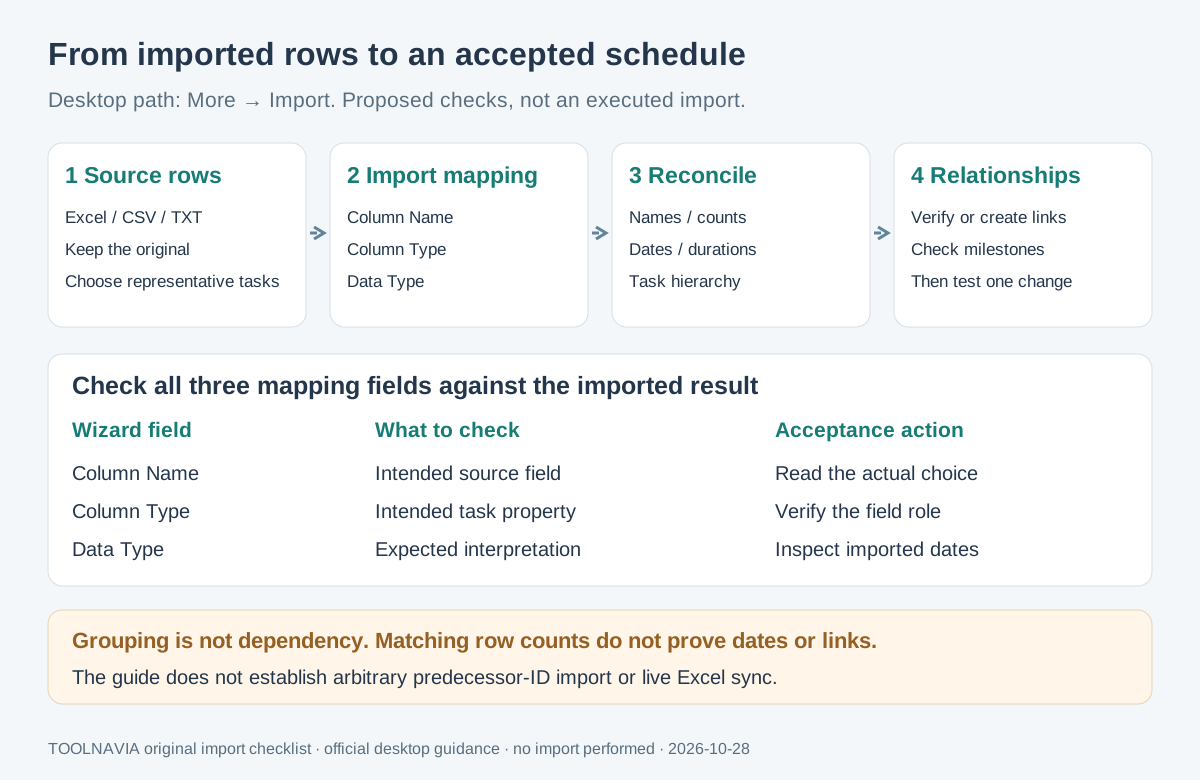
The current desktop guide accepts **Excel, CSV and TXT**. Start a Gantt chart, choose a library design, and use **More → Import** on its floating toolbar. Inspect the import wizard's **Column Name, Column Type and Data Type** mappings before proceeding.
Choose a sample containing a normal task, a subtask, a milestone and an independent activity. Keep the source unchanged. Reconcile task names and counts, then inspect start dates, finish dates and durations individually. A matching count cannot reveal a swapped date field or an ambiguous day/month interpretation.
The guide does not establish that arbitrary predecessor-ID columns import as working dependencies. Inspect the offered mapping, then verify or create the intended links after import. Live Excel synchronization is also unconfirmed by these instructions.
Four controls useful for project reviews
- **Import existing task rows.** Reusing the spreadsheet can reduce retyping. The benefit depends on correct field mapping and reconciliation; successful file selection alone proves little.
- **Organize tasks and subtasks.** Hierarchy and overview controls help readers distinguish work packages from their component activities. Indenting a task groups it; it does not by itself establish which activity must finish first.
- **Make sequence and review points explicit.** Dependency links and milestone controls help explain what a decision or delivery depends on. Their presence does not establish every automatic scheduling rule.
- **Maintain a readable review copy.** Editable dates, durations and task labels support revisions, while the paid comparison removes the default PDF and print watermark. Readability and scheduling accuracy still need separate checks.
Delay one predecessor and inspect the effect
Use a copy for this proposed acceptance exercise:
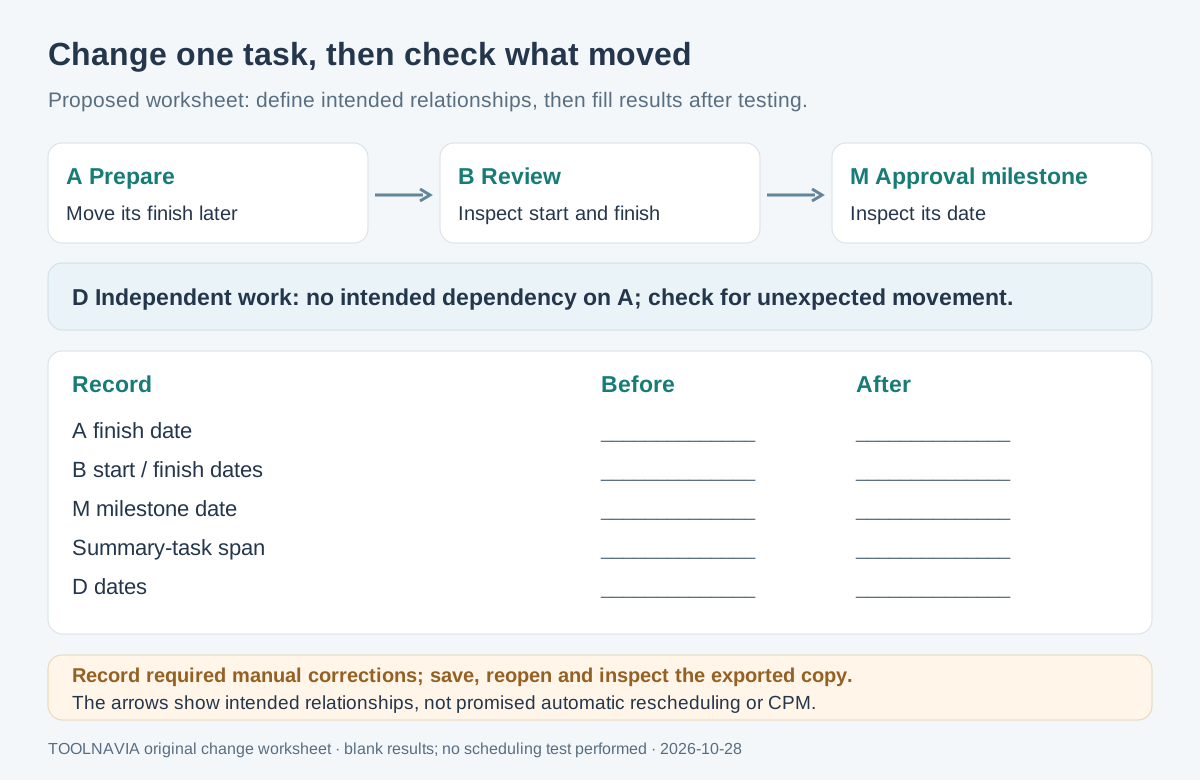
1. Define three connected items: **A — Prepare**, **B — Review**, and **M — Approval milestone**. Add **D — Independent work**, with no intended dependency on A. Record the required relationship and original dates before editing.
2. Verify A's link to B and B's link to M. EdrawMax documents link and unlink controls under Task Dependencies. Check relationships explicitly instead of inferring them from row order or indentation.
3. Move A's finish later across a relevant working-day boundary. Record B's start and finish, M's date, the summary span and D's dates before and after. If a duration or calendar setting matters, record it too.
4. Compare the result with the project owner's intended sequence. Investigate an unchanged successor or a moved independent task. Record any manual correction required; a plausible-looking bar is insufficient evidence.
5. Save and reopen the working file. Confirm the corrected dates and relationships, then inspect the exported review copy at its intended reading size.
This exercise produces evidence for your actual build and file. It is not a reported result or a guarantee of automatic rescheduling.
Decide how much scheduling you need
Microsoft Project distinguishes link types, manually scheduled tasks and constraints. Smartsheet documents predecessor, duration and working-calendar settings; TeamGantt documents preferences that change how dependent tasks move. Those are their respective implementations, not EdrawMax specifications.
Use these distinctions to write your requirements. If automatic replanning, critical-path analysis or resource leveling is essential, seek explicit current EdrawMax evidence and test the required behavior before purchasing. The reviewed desktop guides do not establish those capabilities. EdrawProj is a separately sold product; its scheduling claims cannot be assigned to EdrawMax.
Price the editor and optional assets separately
On October 28, 2026, the general store and annual comparison show **US$99**. The individual page also displays **$89** beside subscription-term choices without establishing the selected term. Its perpetual card says **$198**, while its comparison table says **$99**. These discrepancies remain unresolved; use $99 only as a dated annual reference.
Subscriptions auto-renew. Verify the exact annual entitlement, platform, initial total, tax and renewal in the order. The general store's optional **Creative Assets** trial becomes **$15.90/month after seven days**; the individual page's separate AI Assets amount is blank. Do not assume identical bundles or charges. Check every optional line.
The free comparison's PDF and print watermarks matter if meetings require clean output. A paid plan removes that stated limit; it does not validate the schedule.
Keep one accepted revision for the meeting
Retain the source table, editable chart and exported reference under one revision identifier. Note changed dates, unresolved relationships and who accepted the schedule. A later spreadsheet change needs a deliberate update and verification unless your actual workflow establishes synchronization.
Choose EdrawMax when recurring diagram preparation and the accepted change behavior fit your needs. Broader ownership and renewal questions belong in our [EdrawMax plan guide](/en/software/edrawmax).
*Toolnavia may earn commission through the EdrawMax Annual Individual purchase buttons. No tested scheduling performance or exclusive discount is promised.*