TOOLNAVIA / BUYING GUIDE
DemoCreator Mosaic: Is Your Screen Recording Actually Ready to Share?
The short answer
DemoCreator is worth considering for a repeatable recording-and-editing workflow, not because adding one mosaic makes a video safe to publish. A fixed cover can look correct in one frame and miss the same detail after a scroll. Decide whether the editor lets you produce and inspect a suitable final copy before paying.
This guide analyzes documentation. Toolnavia has not installed the current build, tested tracking accuracy or verified irreversible removal of sensitive information.
At a glance
- Best for
- Recurring personal screen recordings with an inspected masking and final-export workflow.
- Price model
- November2 annual display US$59.99; optional Assets7day trial thenUS$15.99/month; checkout applies.
- Check first
- No automatic tracking or irreversible-redaction guarantee; current build and output need review.
Avoid recording the secret when you can
For a personal software demonstration, start with sample names and dummy records rather than a live account full of private material. Close unrelated messages and notifications, and decide which parts of the screen the audience actually needs. This is a proposed preparation practice, not a promise that an app detects every secret.
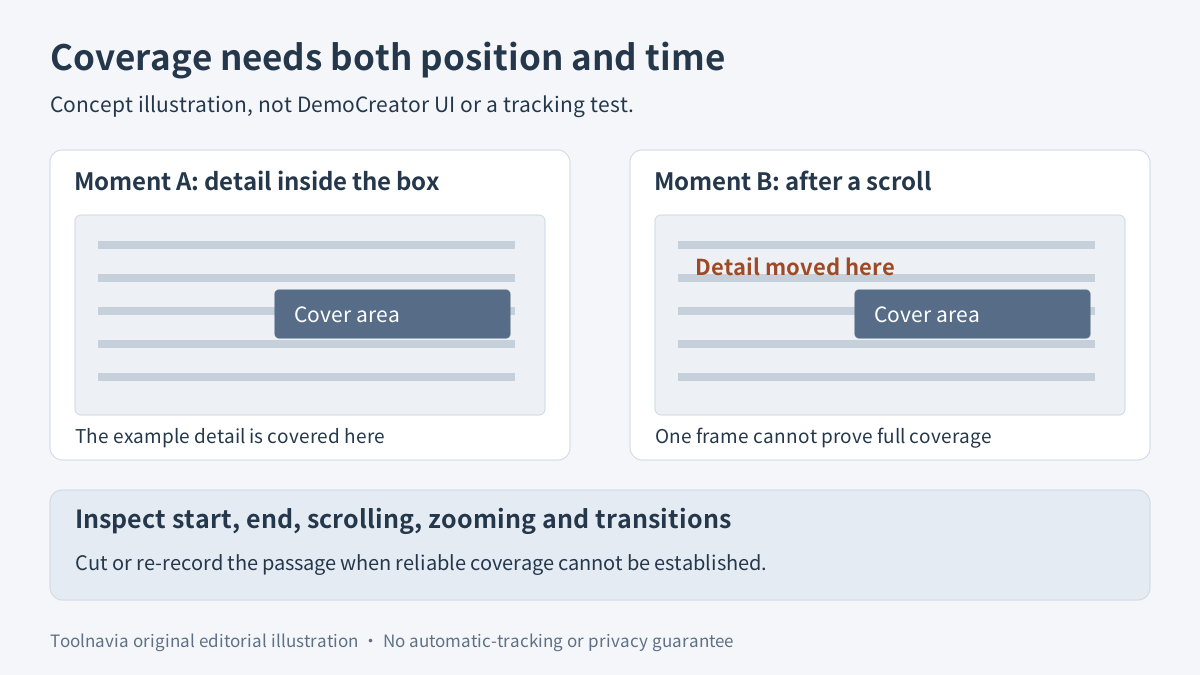
Imagine an account detail appears in a panel, then moves when the page scrolls. The editing task is not simply to put a rectangle over the panel's first location. It is to prevent that detail being exposed anywhere in the delivered passage. Cutting the affected section or recording it again with harmless data may be simpler than maintaining a moving cover.
What DemoCreator actually documents
The Windows guide places Mosaic under Effect > Advanced. Add it above the relevant clip, resize it in the preview, and adjust type, intensity and opacity. Those documented controls support regional visual treatment; the guide does not establish automatic sensitive-data detection, guaranteed motion tracking or an irreversible privacy-redaction process.
Four practical capabilities matter here: a separate mosaic overlay, adjustable covered area, adjustable visual treatment, and a named local export that can be reviewed before distribution. They help an editor manage a recording, but none removes the review work.
Check the controls in your installed trial and the exact licensed build. Do not assume that increasing an intensity slider proves the underlying information cannot be inferred, or that a feature described in help is a confirmed paid-only entitlement. When disclosure would cause serious harm, prefer removing the sensitive source content or rerecording instead of relying on an untested effect.
Coverage has a position and a time interval
Inspect the whole affected passage, including frames immediately before and after the intended cover. The detail may first appear in a notification, move during scrolling, enlarge with a zoom, or return in a transition. A preview paused on the best-looking frame says little about these boundaries.
Use a harmless sample to rehearse this problem. Put a distinctive dummy label in the same kind of panel, make the same movements, and inspect whether the available controls can keep it covered. Do not invent keyframe or tracking steps that your version does not expose. If maintaining coverage is unreliable, shorten, replace or rerecord the passage.
The question is also broader than legibility at normal playback speed. Pause and inspect the exported passage at its intended viewing size. The goal is to catch visible gaps; this does not constitute a security audit or prove resistance to every reconstruction technique.
A free tool may fit a simpler job
Microsoft Clipchamp documents a free blur workflow. Its cropped, duplicated-layer workaround for a localized area is explicitly suited to footage with little movement. That is a useful baseline for a static detail, not proof that it handles a scrolling account page automatically.
ScreenPal also documents an opacity-controlled blur overlay, while its editor guide distinguishes whole-video tools from timeline edits. Read the applicable plan before assuming a feature is free. We read these written pages; we did not watch the embedded tutorial or test the product.
For a video appropriately already hosted on YouTube, Studio offers a custom blur with adjustable timing and either object tracking or a fixed position. Those are YouTube controls, not evidence of DemoCreator's capabilities. Do not upload a confidential raw recording merely to reach an online blur tool. YouTube also warns that saved Studio edits can no longer be undone through Revert to original, so retain any necessary original securely.
Choose an existing tool when it completes the required edit reliably. Buying another editor is not automatically the better privacy decision.
Review the delivered file, not just the project
DemoCreator's export guide allows a local output name, destination and video settings. Export a clearly named review copy and open that actual file in a separate player before sharing. This recommendation uses the documented local-export route rather than requiring a direct upload.
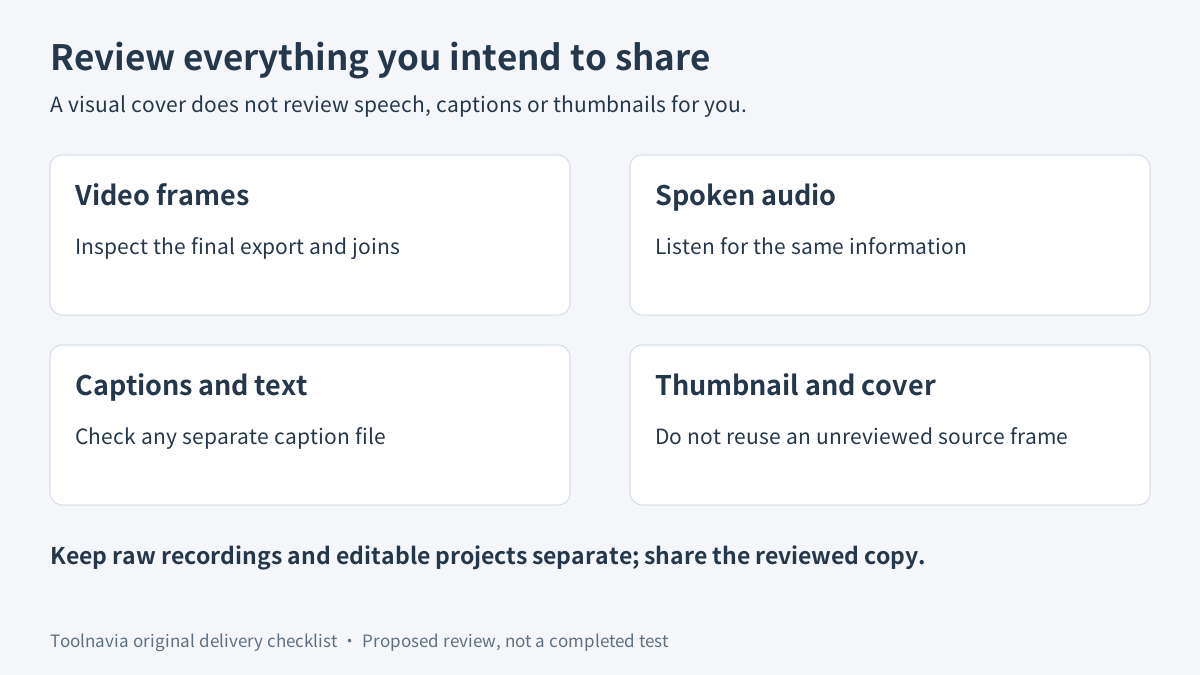
Watch the entire affected section and its joins, then listen to the audio. Covering an account label visually does not remove a spoken reading of it. Also inspect any accompanying captions, still images or thumbnail selected for the delivery; do not reuse an unreviewed frame from the raw recording. These are independent editorial checks, not an automatic all-channel inspection feature.
Keep the raw footage and editable project separate from the approved sharing copy. An exported video does not erase its source files. Give the final copy an unmistakable name so an older, unmasked export is not accidentally attached instead.
Record the reviewed filename, the affected intervals and any unresolved issue. Do not mark the file ready while a moving detail, audible disclosure or accompanying image still needs correction. This is a suggested acceptance process, not a report that a real sensitive recording passed.
Is the annual license worth buying?
On November 2, 2026, the official Windows destination displayed the Cross-Platform Yearly plan at **US$59.99/year**, with automatic renewal, future-version updates and watermark-free export. Verify the actual platform, license scope, local currency, tax and renewal terms in your selected order. A fixed future renewal amount was not independently established.
The page separately offers a Visual Assets seven-day trial that then renews at **US$15.99/month**. Check whether that optional item is selected. The reviewed Mosaic help does not establish that this additional asset subscription is required for the built-in effect; do not buy it on that assumption.
Consider the annual editor when repeated capture, editing and reviewed final export justify its cost, and the actual build supports the controls you need. Keep a free or existing tool for a small static edit. Defer purchase when the footage cannot be covered reliably or when you need a documented security or compliance guarantee that this research does not establish.
[Check the current DemoCreator yearly offer](https://www.anrdoezrs.net/click-101895278-15901180). Toolnavia may earn a commission through this link. No exclusive discount, automatic-tracking result or privacy guarantee is promised.