TOOLNAVIA / BUYING GUIDE
Close CRM SMS: Check US Approval and Usage Costs Before Buying Essentials
The short answer
Close Essentials can support a small team's manual sales texts, but buying seats does not approve US messaging. Before committing, establish the registration status, an SMS-capable sending number and a budget beyond the subscription.
*Official-documentation analysis checked October 31, 2026. Toolnavia did not register a business, rent a number or send messages.*
At a glance
- Best for
- Small teams needing consent-based manual texts, shared templates and CRM reply context.
- Price model
- USD49/user/month monthly, or USD35/user/month billed annually (USD420/seat/year); rentals, registration and usage are separate.
- Check first
- US delivery needs approved registration and a capable number; Essentials excludes text scheduling and SMS Workflows; official billing descriptions conflict.
Establish approval before promising a launch date
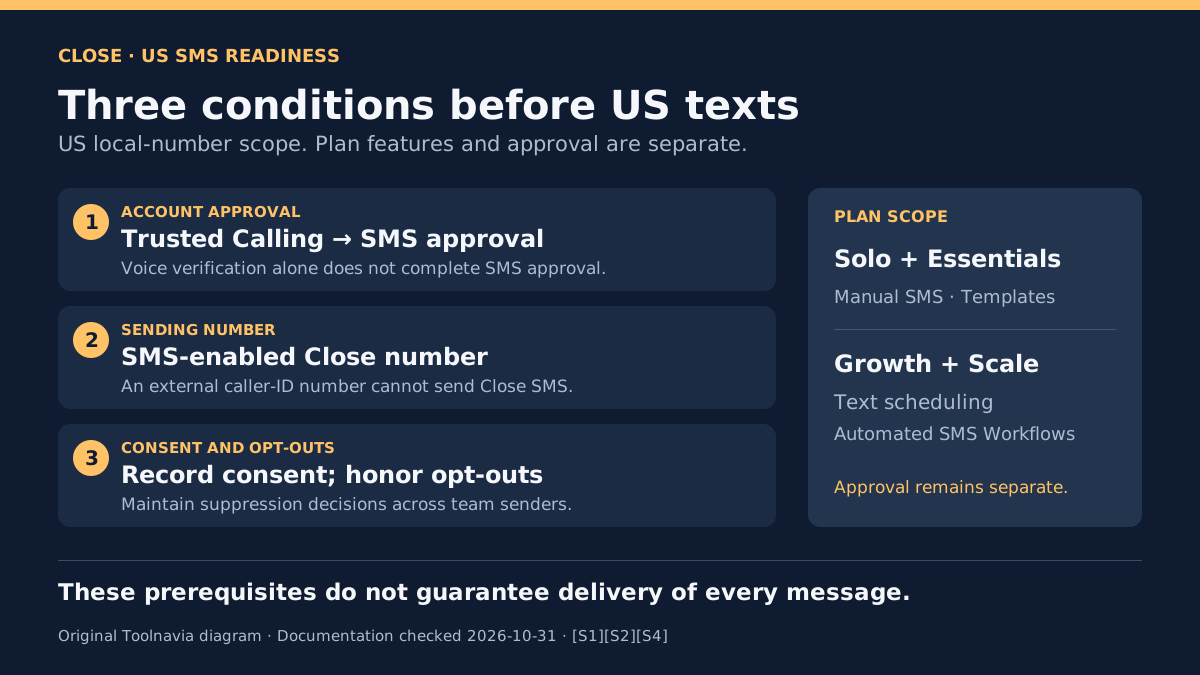
For US and US-territory messaging through ten-digit local numbers, Close treats even occasional business texts as application-to-person traffic. Its A2P 10DLC guide says US messages will not be delivered before registration is approved. A rep manually typing a meeting follow-up does not bypass that requirement.
Begin at **Settings → Phone & Voicemail → US Compliance**. Prepare the business identity, website, authorized representative, intended messages and evidence of how recipients agree to receive them. Trusted Calling verification is the initial stage; verify the subsequent SMS approval, rather than treating a voice-registration success as the finish. Approval remains an external dependency, so keep a launch date provisional.
A useful buying document is a short readiness record: who owns registration, which use case was submitted, where consent is recorded and what status the account actually shows. This is a proposed preparation step, not a completed Toolnavia registration.
Assign the right number and an opt-out owner
A number displayed as external caller ID cannot send Close SMS. Confirm that the actual Close sending number has SMS capability and supports the intended destination. This article concerns US local-number messaging; other country and number types need their own checks.
Close describes STOP blocking against the particular sending number. A team using several numbers must still honor the recipient's opt-out across its outreach; rotating numbers is not a recovery method. Assign someone to maintain that suppression decision before inviting more reps to text.
What the CRM contributes after approval
Close offers four practical conveniences for manual sales conversations:
- **Compose from a Lead or Contact** to keep outreach beside the sales record. - **Read replies in the Lead and Inbox** so the response stays attached to the conversation. - **Reuse personalized, organization-shared templates** to reduce repeated typing. - **Inspect failed-message labels and find Leads with SMS errors** when investigating delivery problems. Error visibility does not guarantee delivery or reveal every cause.
Compare the actual workflow: Pipedrive's documented mobile texting button hands the number to the phone's messaging app. HubSpot's marketing SMS route instead requires an eligible Marketing Hub tier and an SMS add-on. These are different purchases and operating arrangements, not interchangeable “SMS included” claims.
Build a bill with four separate lines
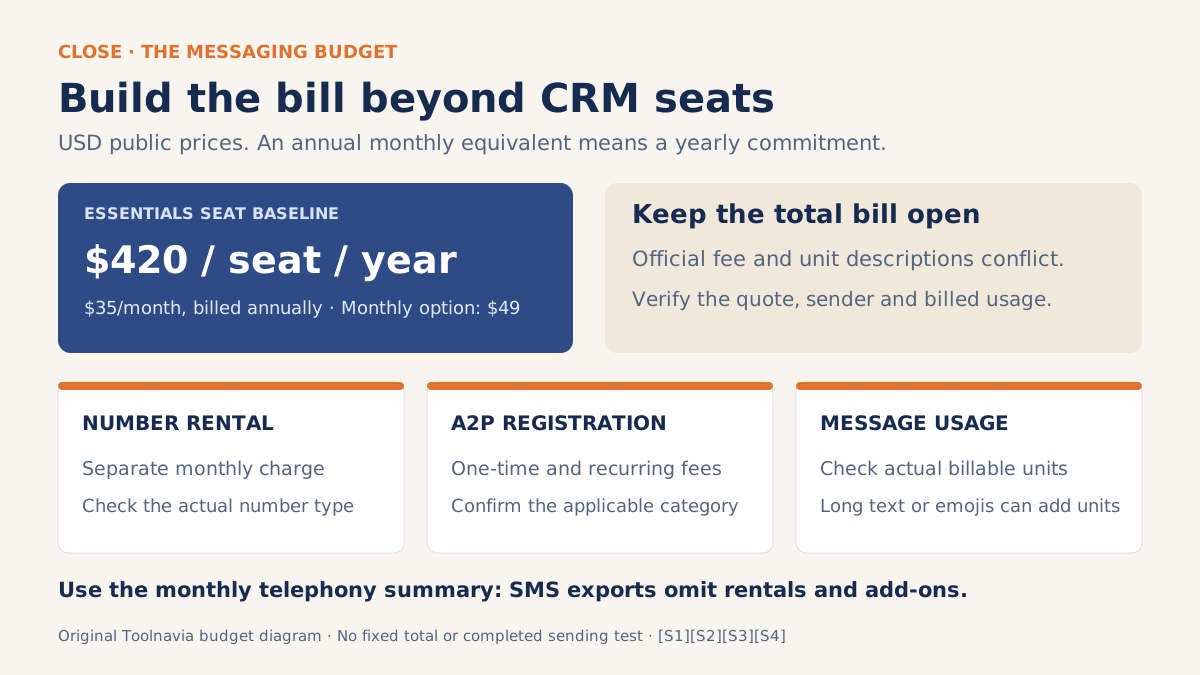
Essentials publicly costs **$49 per user per month on monthly billing**, or **$35 per user per month billed annually**. The latter means **$420 per seat for a year**, before other charges; it is an annual commitment, not a $35 monthly subscription.
Budget separately for CRM seats, number rental, one-time and recurring registration charges, and message usage. An SMS export alone is incomplete: Close says its usage export omits number rentals and add-ons, while the monthly telephony summary provides the broader breakdown.
Two official-documentation conflicts prevent a reliable fixed total. The registration guide lists $4.50/$46 low-volume/standard brand fees where the usage page lists $4/$44, and recurring descriptions also differ.
The SMS guide gives GSM-7/UCS-2 limits of 160/70 characters, falling to 153/67 for multipart messages. The usage page instead describes 140 English-alphabet characters or as few as 33 with other characters or emojis. Confirm the billed category, fee and actual units; long or emoji-containing templates can consume multiple units.
Twilio's brand-registration guidance helps identify upstream categories, but its prices cannot establish the complete Close invoice. Do not turn these conflicting pages into a guaranteed character-to-dollar calculator.
Match the plan to manual team texting
Essentials is the multiuser example here, not the lowest SMS tier. **Solo already includes SMS and templates**, with one user and 10,000 leads. A single operator should check whether that is enough.
The current plan matrix excludes **Text scheduling** and **SMS in automated workflows** from Solo and Essentials; Growth and Scale include them. The general SMS tutorial's Send Later instructions describe a product feature, not an Essentials entitlement. Shared templates therefore support manual sending, not unattended reminder sequences.
For the broader commitment decision, see the [Essentials annual-versus-monthly guide](/en/software/close-essentials).
Commit when readiness and costs are visible
Choose Essentials when several reps need manual conversations in one CRM and the approval, sender and cost conditions fit. If scheduled texts are essential, revisit the plan before buying. If approval is pending, a paid seat alone cannot make the launch ready.
After approval, use one consenting recipient and a representative template to observe the conversation and billed usage. Treat that as a limited account check, not evidence that every destination or message will deliver.
*Affiliate disclosure: Toolnavia may earn a commission through its approved Essentials annual link. Confirm the selected plan and billing cycle; no discount is promised.*