TOOLNAVIA / BUYING GUIDE
AOMEI Backupper Professional: $39.95 Annual or $69.95 Lifetime?
The short answer
AOMEI Backupper Professional suits a personal Windows PC needing paid system cloning, differential backups or automatic cleanup. One-PC licensing currently costs $39.95 yearly with automatic renewal or $69.95 Lifetime. Choose around a recovery task you can verify.
At a glance
- Best for
- One personal Windows PC needing differential backup management or paid system cloning.
- Price model
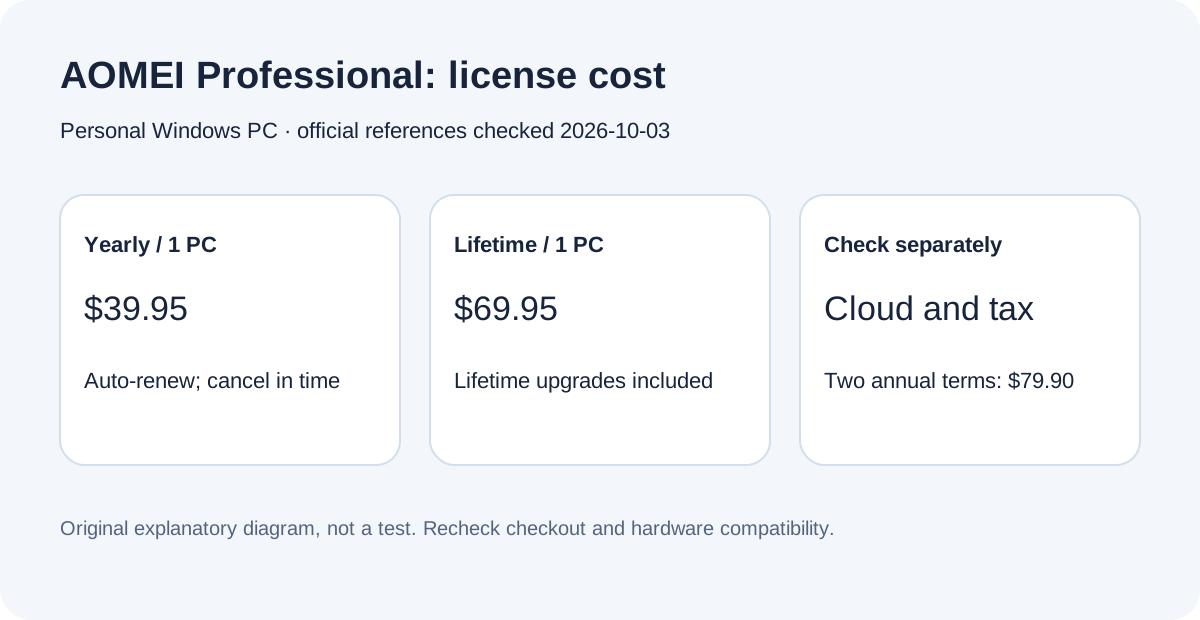
- Professional: $39.95 yearly or $69.95 Lifetime / 1 PC
- Check first
- Business/Windows Server licensing, buyers whose tasks are already covered by Standard, or assumed included cloud storage.
Four jobs Professional can help with
Keep several recovery points
Professional supports differential backups and automatic backup cleanup alongside full and incremental images. That can reduce the routine work of rotating copies. Decide how many recovery points you need before enabling deletion, and preserve a separate copy of irreplaceable files. A successful scheduled job is only one part of a usable recovery plan.
Move Windows to a replacement drive
Paid system cloning can help with an SSD upgrade; the free Standard edition's data-disk cloning is a different entitlement. Identify the source and destination by model and capacity before proceeding. Labeling two similar drives is a small preparation step with a much larger consequence than choosing the cheapest license.
Recover when Windows will not start
A WinPE rescue environment provides a route to restore an existing image when the installed system cannot boot. This capability is also available in Standard, so it alone does not justify Professional. Prepare the media while the PC works, then check that it starts and can see both the internal drive and the backup location.
Restore a file without rolling back everything
Backupper provides file-level recovery and image exploration. That matters when you need one accidentally changed document rather than yesterday's entire system. Keep the restored file in a separate folder first, inspect it, and only then replace the working copy. This suggested check avoids treating a full-system rollback as the answer to every mistake.
Annual and Lifetime buy different commitments
At today's public USD prices, two annual payments would total $79.90, compared with $69.95 once for the single-PC Lifetime option: a $9.95 difference before tax, assuming the annual price stays unchanged. That is an arithmetic comparison, not a promise about future prices or suitability. The official store includes lifetime upgrades with this Lifetime license.
Annual is a smaller initial payment for a limited period of need. Lifetime is more attractive if you expect to keep using the product beyond the first year and the current license fits. Record the selected plan, licensed computer count, tax and renewal setting before paying. Cancel automatic renewal before the next billing date if you do not want another annual term. Cloud-storage bundles are separately listed; the base license should not be described as including an ongoing 1TB cloud allocation.
Check the edition before checking out
Professional is a personal-use Windows PC product. The current edition comparison separates business use into Workstation and Windows Server use into Server editions. A home user migrating one supported PC and an administrator protecting business machines are therefore making different license decisions.
Stay with Standard when its documented backup and recovery functions cover the task. Compare Professional when you specifically need the paid cloning or backup-management functions. A plan called Lifetime does not by itself increase the number of licensed computers, supply replacement hardware or make a recovery operation compatible with every storage controller.
Treat cloning as a controlled replacement
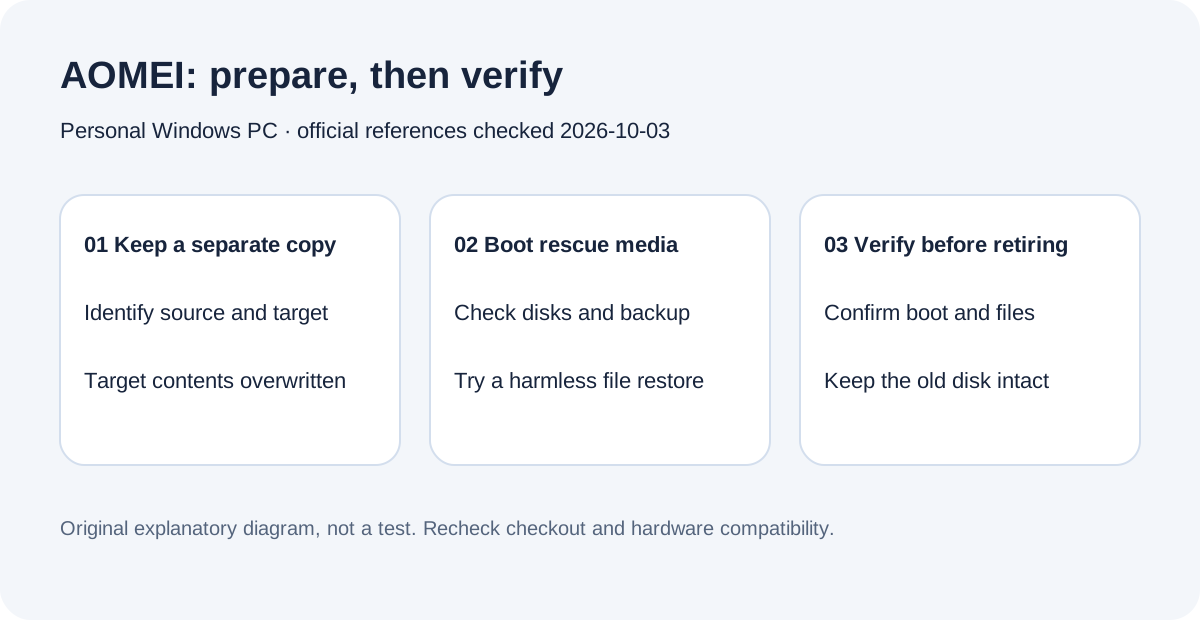
AOMEI's clone instructions warn that the destination is formatted and its contents overwritten. They also distinguish used-space requirements from sector-by-sector cloning, which needs a destination at least as large as the source. After cloning, the documented boot path calls for the destination drive internally installed and a suitable firmware boot configuration.
Before starting, independently back up anything on the destination that you still need. Check the exact disk layout and encryption state against the official instructions. Keep the old disk intact until the replacement starts and representative applications and files work. These are proposed acceptance checks, not a claim that Toolnavia has migrated your hardware.
Separate synchronization from recovery history
Backupper offers multiple synchronization modes, including mirror and two-way sync. Those modes address keeping locations aligned; they should not be your only answer to needing yesterday's file after a mistaken edit or deletion. Write down whether your goal is a current working copy, a dated image or a bootable replacement.
For image-based recovery, keep the backup location reachable from the rescue environment. AOMEI documents adding drivers when creating WinPE media and lists boot-mode and media limitations. A practical rehearsal should confirm media boot, disk visibility and access to a harmless sample file before you rely on the arrangement during an outage.
The purchase decision
Choose Professional when a paid feature removes a concrete obstacle for one personal Windows PC, and you are prepared to verify recovery or migration. Choose Standard when it already covers the job; compare the relevant business edition when the license scope changes.
AOMEI publicly offers affiliate applications, but its partner pages disagree on the maximum commission figure. Toolnavia makes no maximum-rate claim, has not been approved and keeps tracking disabled. This guide uses current official documentation and suggested checks, without a claimed hands-on speed or reliability benchmark.