TOOLNAVIA / BUYING GUIDE
EverDoc vs FileFusion: Searchable Documents or Duplicate Storage?
The short answer
EverDoc and FileFusion both address a folder that feels out of control, but they solve different failures. EverDoc is for retrieval: documents exist, yet you cannot reliably find the right one by date, keyword or text inside an image. FileFusion is for physical duplication: byte-identical files occupy storage in several paths, and those paths still matter. Diagnose the failure before paying; these products are complements in some archives, not direct substitutes.
At a glance
- Best for
- Buyers who can measure either repeated retrieval failures or meaningful byte-identical storage waste before choosing.
- Price model
- Both English product pages displayed €29.95 on 2026-10-26; confirm live cart, tax and license.
- Check first
- Teams needing unverified enterprise governance, users with mostly unique large files, or anyone without independent backups.
The short answer
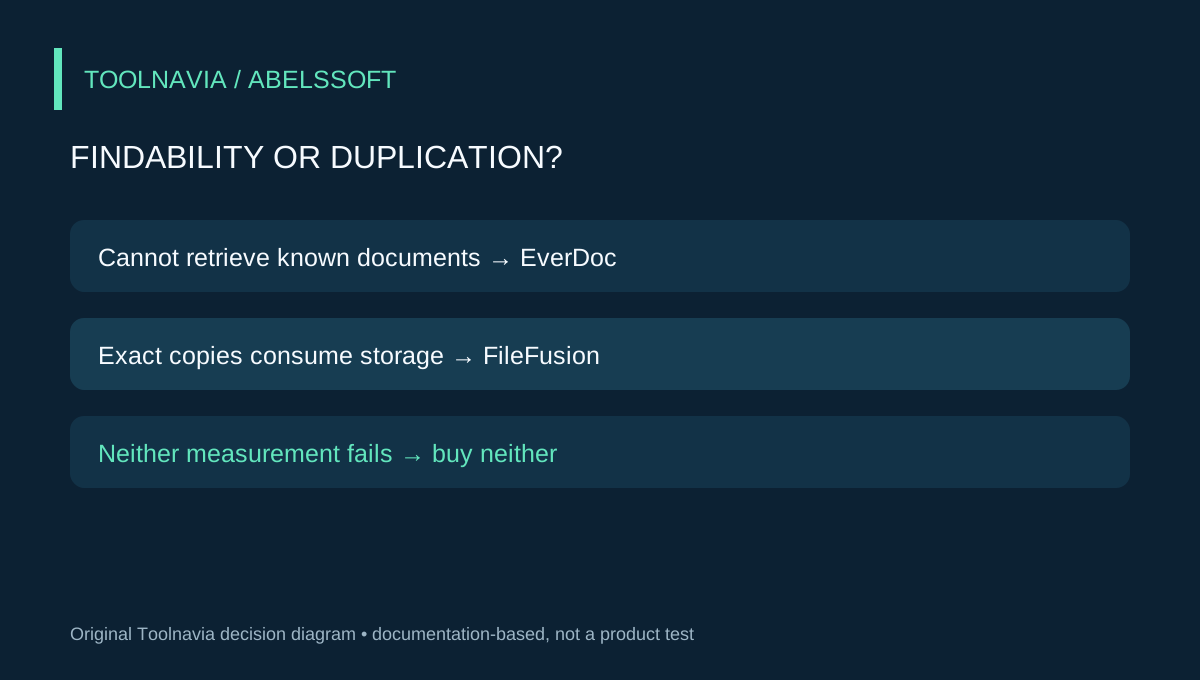
Choose EverDoc when the costly moment is “I know the document exists, but I cannot retrieve it.” Its current page documents OCR, full-text and keyword search, common document formats, WIA 2.0 scanning, phone capture and optional cloud discovery. Choose FileFusion when the evidence is “the same bytes exist at several locations and consume measurable space.” It fingerprints file contents and can replace redundant physical copies with NTFS hard links while keeping their paths.
Choose neither when ordinary Windows Search finds your sample quickly and an exact-duplicate report shows little reclaimable space. Windows already searches filenames and document keywords across the PC and OneDrive; it should be the free retrieval baseline.
Start with two measurements, not one product list
A messy folder can hide two different costs. Retrieval cost is the time spent naming, browsing, opening and checking files. Duplication cost is the storage occupied by confirmed identical data. Counting files does not distinguish them.
Create a representative, non-sensitive sample of 50–100 documents: scans, phone photos, PDFs and office files. Before changing anything, write five retrieval tasks—perhaps a supplier, invoice number, date, phrase and tag. Time the same tasks using your existing folders and Windows Search. Record wrong matches and misses, not just successes.
Separately, run a read-only exact-duplicate scan or inventory. Record only byte-identical groups and the reclaimable size after keeping one required physical copy. Do not count similar names, related revisions or photos that merely look alike. Checksum equality is strong evidence of identical bytes; resemblance is a review cue, not deletion proof.
What EverDoc changes
EverDoc puts mixed documents into a searchable archive. The current English page lists PDF, DOC/DOCX, XLS/XLSX, RTF, ODT and common image formats. OCR can make text in JPG, GIF and BMP images searchable; date, title, keywords and full text provide different routes back to a document. WIA 2.0 scanning, phone import and optional cloud discovery can feed the archive. The page currently displays €29.95 and version 2027 v2027.12.
That is valuable when filename discipline has failed but the contents remain meaningful. Folderit and Revver make the broader distinction: simple storage can hold files, whereas document management adds metadata, full-text retrieval and lifecycle structure. EverDoc is a personal Windows product, however, so do not project enterprise workflow, governance or compliance features from those broader DMS articles onto it.
The trial question is retrieval lift. Import copies of the representative sample, then repeat the five prewritten searches without relying on remembered filenames. Open the underlying document for each result. Test the languages, scan quality, phone route and scanner driver you actually use. Vendor wording does not establish OCR accuracy for your material, and this article contains no Toolnavia hands-on benchmark.
What FileFusion changes
FileFusion addresses exact physical duplication. It creates a digital fingerprint for each file, finds matching contents even when names differ, and uses hard links so several paths can refer to one physical file. The current page documents NTFS-based drives, Windows 7 through 11, a reviewable duplicate list, a storage report and a trial limited to 1GB processed. It currently displays €29.95 and version 2026 v2026.8.
This is useful when repeated assets must remain visible inside several project or archive folders. It is not a search index, OCR engine or version-control system. Microsoft’s hard-link documentation supports the underlying boundary: multiple names refer to the same file, so links are not independent backups.
There is another boundary for documents. A re-saved Word, Excel, PowerPoint or PDF file can contain changed metadata and therefore a different checksum even when a reader sees nearly the same content. Duplicate File Detective’s same-intent guide explains why exact matching may undercount such revisions and why property-based candidates still require human review. FileFusion should therefore be evaluated as exact-byte storage recovery, not as a promise to clean every confusing document revision.
Price and license economics
Both current English product pages display €29.95, but the same headline price does not create the same return. EverDoc earns its cost only if repeated retrieval becomes materially easier. FileFusion earns its cost only if confirmed eligible duplication is large enough and preserving paths matters.
Abelssoft’s terms distinguish a Current Version license—unlimited use of the purchased version with six months of updates—from a Saver Subscription that works only while the subscription remains active. The product page price alone does not reveal which option the live cart selects. Confirm license type, currency, tax, optional additions and update window before paying.
Use a simple break-even calculation. For EverDoc, multiply average minutes saved per successful retrieval by the number of important searches you perform, then subtract capture, tagging, correction, backup and exit effort. For FileFusion, compare measured reclaimable gigabytes and path-preservation value with the price, review time, backup cost and risk of application-specific save behavior. Do not monetize vendor percentages or assume a universal storage saving.
A reversible two-pass trial
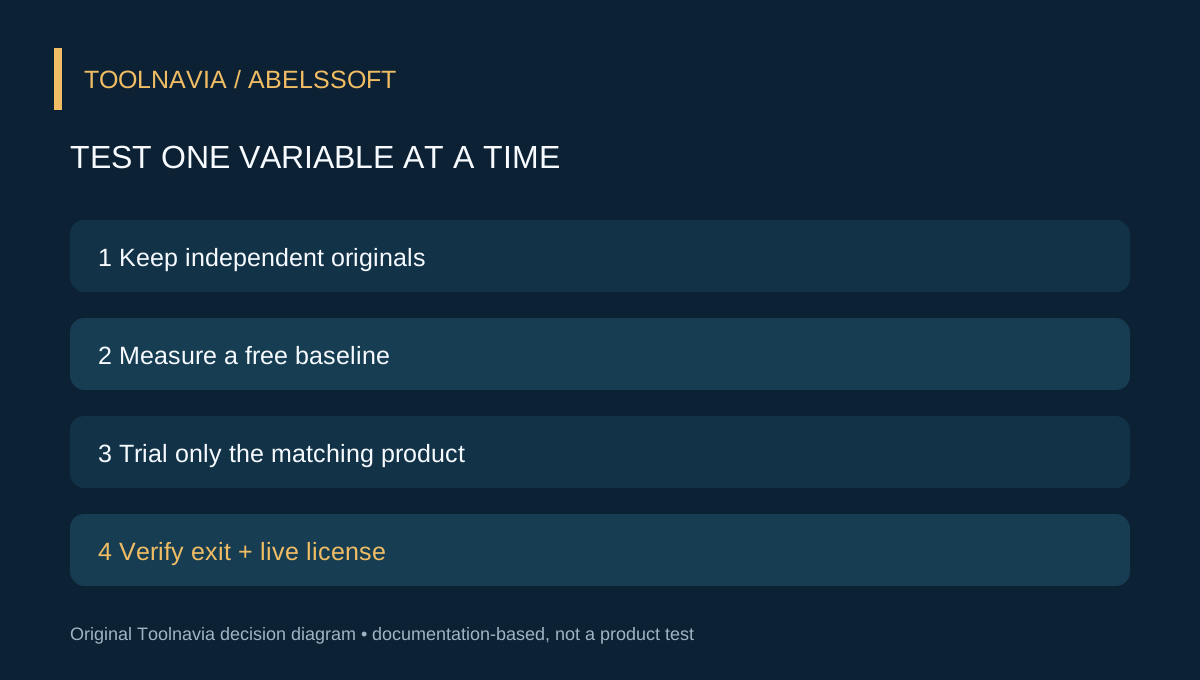
For EverDoc, keep originals outside the test archive. Import copies, run the predefined searches, add another batch without relying on filename memory, and test backup restoration plus ordinary-file retrieval before any large migration. If Windows Search is already fast and reliable, buying a separate archive may add work rather than remove it.
For FileFusion, use disposable copies on a representative NTFS volume and maintain an independent backup. Include identical files under different names, a deliberately edited version and a re-saved office document. Review the list, fuse only confirmed exact copies, verify every expected path, edit with your normal applications, then test deletion and restore. The 1GB trial can validate behavior, although it may not estimate whole-drive savings.
Do not run both trials on the same working set at once. EverDoc changes how you ingest and retrieve documents; FileFusion changes physical storage relationships. Testing one variable at a time makes failures attributable and rollback clearer.
Which should you buy?
Buy EverDoc if your measured problem is findability, its trial improves retrieval across the documents and languages you actually use, and backup and exit paths are acceptable. Buy FileFusion if exact duplicates consume meaningful space, required paths must remain, and a disposable trial proves your applications behave predictably. Buy neither when Windows Search and ordinary cleanup already solve the problem, or when the real issue is version governance, collaboration or unique large files.
The links in this article are the approved exact EverDoc and FileFusion destinations. Toolnavia may earn a commission from qualifying purchases. That does not change the price, the diagnostic boundaries or the recommendation, and it is not a guarantee of OCR accuracy, recovered space or application compatibility.