TOOLNAVIA / BUYING GUIDE
Namecheap Quasar VPS: Complete Management, No Root, 100GB Backups
The short answer
Namecheap Quasar with Complete management can suit a conventional cPanel website whose owner wants help running the server. It is not the advertised bare-VPS price, and it trades root access for provider management. This document-based guide examines the full monthly budget and the smaller backup allowance before you commit—not measured performance.
At a glance
- Best for
- A conventional cPanel workload whose owner values delegated core-server work, accepts reseller-only access and can fit or expand the backup quota.
- Price model
- $61.76/month component budget: Quasar + Complete + Solo; tax/extras separate, final cart unconfirmed
- Check first
- Custom root-controlled stacks, assumed all-inclusive headline pricing, unrestricted daily backup history or a guaranteed whole-bundle refund.
Budget the server, management and license separately
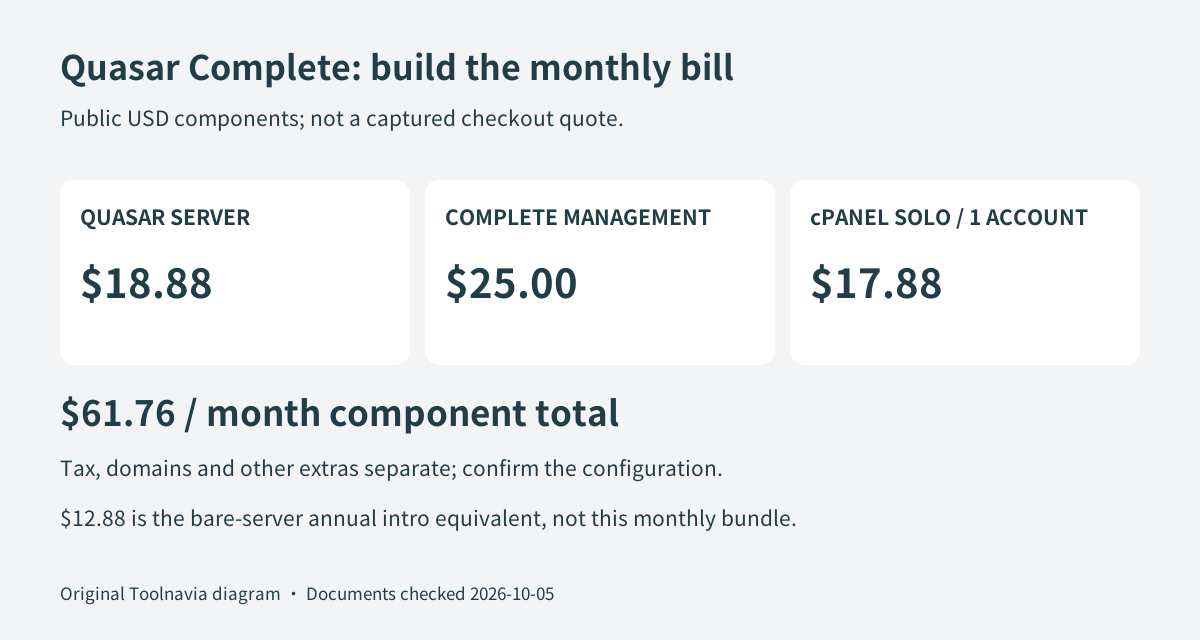
Quasar lists four CPU cores, 6GB RAM, 120GB SSD and 3,000GB monthly transfer. Its $12.88 headline is an annual introductory equivalent: $154.56 upfront, with $190.56 shown for annual renewal. The separate one-month price is $18.88. Do not substitute one billing period for another.
For a one-account cPanel Solo configuration, the published components give $18.88 server + $25 Complete + $17.88 license = $61.76 per month, before tax and extras. This is a component-based budget, not a captured checkout quote. Confirm the exact operating system, account count, add-on billing and next payment with the order.
Solo permits one cPanel account; the five-account license is $20.88 monthly. A portfolio that needs separate accounts should not use the Solo total. Domains, optional software, extra resources and independent backup storage can add costs. Current figures do not guarantee future renewal prices.
Four useful benefits for a standard hosting workload
The defined CPU, memory, disk and transfer allowances provide a concrete capacity checklist instead of a vague promise of unlimited hosting. Test the actual application and leave operating-system headroom; the specification is not a concurrency benchmark.
Complete management adds core-service monitoring and vendor updates, giving a site owner help maintaining the supported server stack. Incident root-cause work and server-failure restoration reduce the need to purchase those interventions separately. Included weekly off-site copies add a provider-operated recovery route. These are distinct practical benefits, but they do not promise custom application development, uninterrupted service or an unlimited backup archive.
Complete management removes root—it does not add it
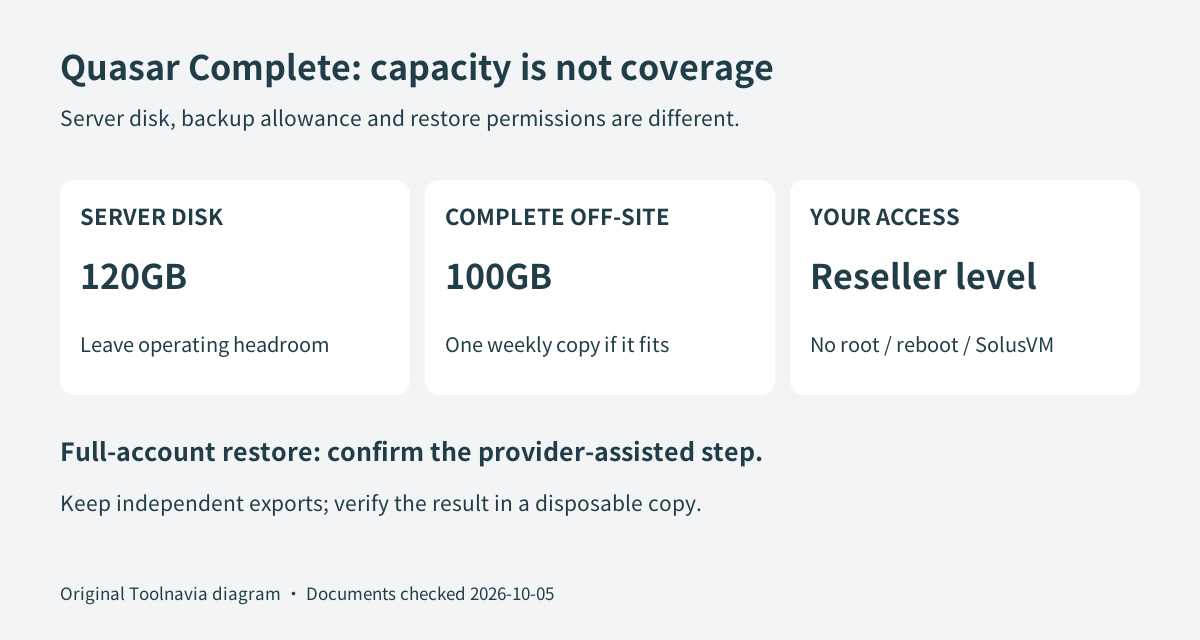
The management guide specifies AlmaLinux with cPanel. Complete users receive reseller-level WHM/cPanel access, not root, reboot or SolusVM access. A developer needing system-wide packages or direct restart control should settle that requirement before purchasing, not discover it after migration.
Basic management, at $10 monthly plus the relevant server and license charges, retains root but has a narrower service scope. It is not the Complete bundle with a cheaper name. Compare the duties you need delegated rather than assuming every paid management level handles the same failures.
A 120GB disk is not a 120GB backup guarantee
Quasar's Complete option includes 100GB of off-site backup storage. The management guide guarantees one weekly copy only when the accounts fit that allowance; insufficient capacity triggers an email asking you to reduce data or buy more storage. The separate 120GB server disk therefore cannot establish full backup coverage.
Ask how account size is measured, when the last successful copy was made and what happens after a failed job. Weekly copying can also leave changes since the last copy outside that recovery point. A busy store may need a separate, more frequent database export even when storage capacity is sufficient.
Verify a restore that your access level can actually perform
cPanel's documentation distinguishes partial restores from a full-account restore: a full backup cannot be automatically restored through cPanel itself, and the documentation directs users to their hosting provider for that operation. A downloadable archive is not proof that your reseller permissions can perform every recovery step.
Use this suggested acceptance sequence: keep the old host, copy a disposable site, check its accounts and resource use, and ask support to confirm the applicable backup quota. Obtain an independent export, arrange a test restore into a disposable destination, then compare files, database records, login and forms. Record who performs each action and how support is contacted. Move production only after the result is satisfactory. Toolnavia has not performed this test.
Cancel before renewal; do not assume every charge is refundable
The hosting terms require a Billing Issues ticket at least three working days before renewal. Export and verify your data first, complete cancellation and retain confirmation.
The refund policy conditionally covers eligible first-time Quasar package purchases canceled within 30 days, but excludes paid add-ons. For renewals it permits discretionary requests within 48 hours, whereas the hosting terms exclude renewal refunds. That official discrepancy is unresolved here. Do not budget on recovering a renewal or the entire managed bundle; obtain written clarification before paying.
Choose Complete when its supported stack, permissions and backup limits match your workload. Choose another arrangement when root control, custom software or a tighter recovery schedule is essential; keeping a satisfactory existing host is reasonable. The public cash affiliate program includes VPS, but hosting add-ons are not commissionable and this offer has no evidenced Toolnavia approval; tracking remains disabled.