TOOLNAVIA / BUYING GUIDE
Kamatera Basic Cloud Server: 1GB RAM, Hourly Billing and Exit Rules
The short answer
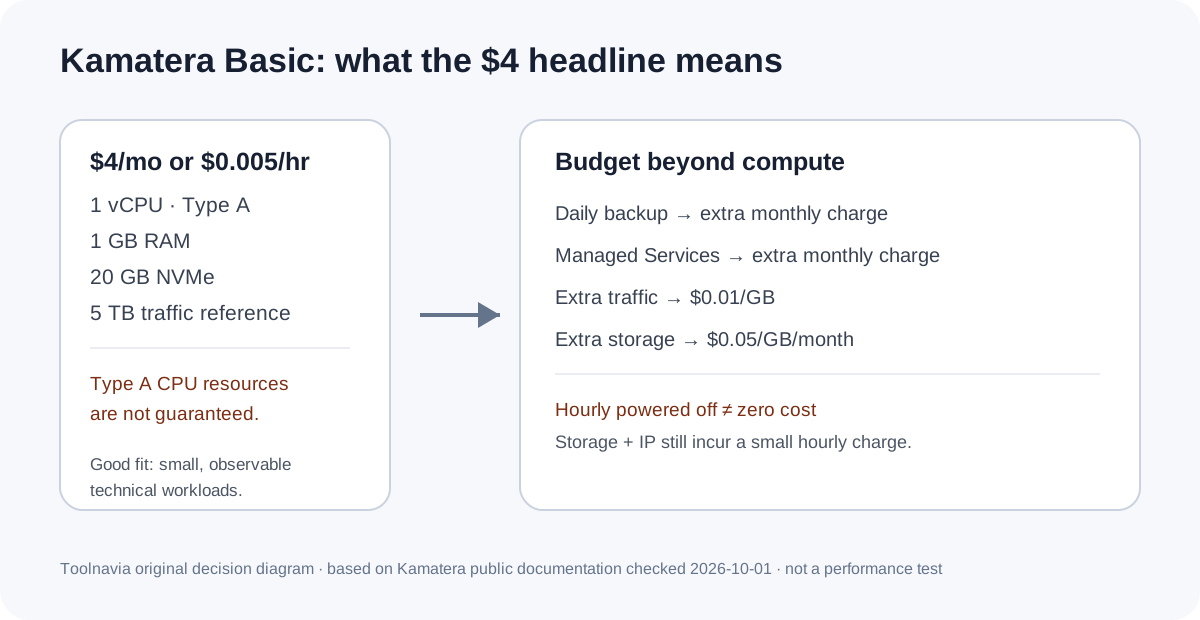
Kamatera Basic is a flexible low-cost cloud-server starting point, not a managed-hosting bundle. The current reference is $4/month or $0.005/hour for 1 vCPU Type A, 1GB RAM, 20GB NVMe and 5TB traffic. The main trade-off is that Type A CPU resources are not guaranteed, while backup and management are separate choices.
At a glance
- Best for
- Technical users who can manage Linux, want a low-cost 1GB starting point or short hourly deployments, and will monitor resources and configure backup separately.
- Price model
- Cloud server · $4/mo or $0.005/hr · 1 Type A vCPU / 1GB RAM / 20GB NVMe / 5TB traffic
- Check first
- Type A CPU is non-dedicated with no guaranteed resources; backup and management cost extra; powered-off hourly servers still incur storage/IP charges; monthly cancellation after the first still incurs the full month.
What the $4 Basic configuration actually buys
Kamatera's current Basic card lists 1 vCPU Type A – Availability, 1GB RAM, 20GB NVMe and 5TB traffic at $4/month. The same pricing page gives a $0.005/hour reference and says hourly servers are billed by the minute. Extra traffic is listed at $0.01/GB and extra storage at $0.05/GB/month.
The CPU label matters more than it first appears. Kamatera's CPU documentation says Type A uses a non-dedicated physical CPU thread with no guaranteed resources. It is positioned for development, microservices, smaller applications and workloads that do not require guaranteed CPU capacity. For a lightweight Linux service, test box, small API or low-demand site, that can be a rational way to start. For sustained production load, the $4 headline should not be treated as a guaranteed-performance tier.
Hourly billing is flexible, but powered off is not free
Hourly billing is useful when a server may exist for days rather than months: usage is post-billed and the pricing page says compute is billed by the minute. Once an hourly server is terminated, Kamatera says server-usage charges stop, although the final invoice can arrive the following month because hourly service is billed in arrears.
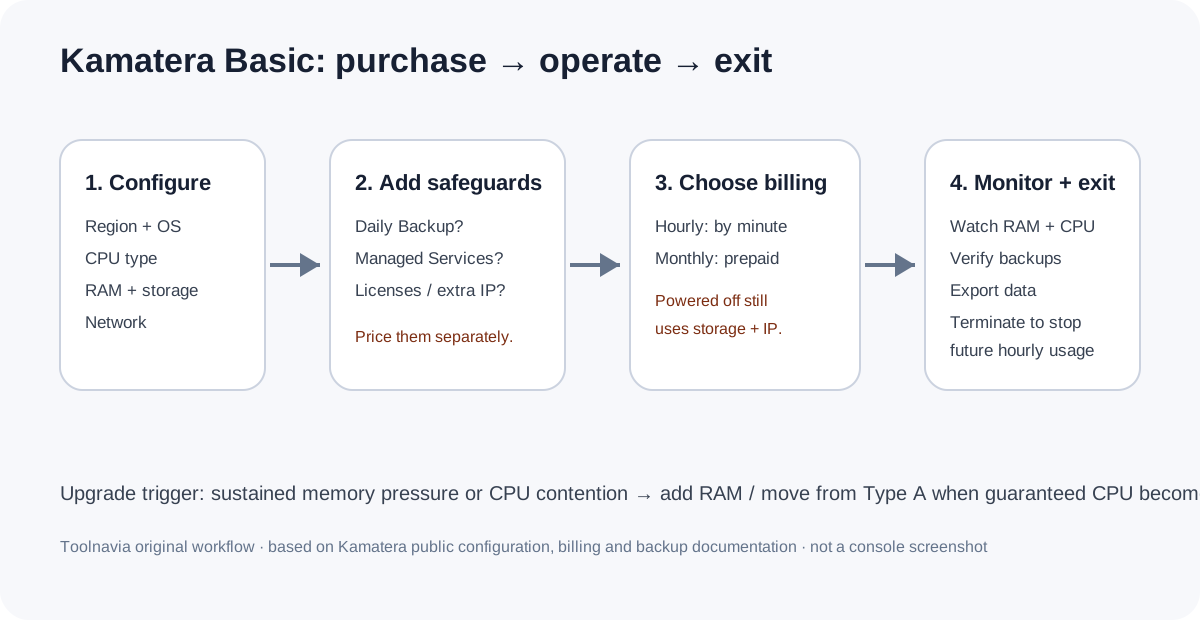
Turning a server off is different from terminating it. Kamatera says a powered-off hourly server still has a small charge for storage space and its IP address, with the amount changing by disk size. If the goal is to stop future usage charges rather than simply pause compute, terminate the server after exporting and verifying anything you need to keep.
Monthly billing is simpler, but the calendar boundary matters
Monthly servers are prepaid for the current month. Kamatera's billing FAQ says that if you create or upgrade after the first day of the month, additions are prorated and billed later; if you cancel after the first, you still owe the full month's service.
That makes monthly billing reasonable for a server expected to stay online continuously, but it is less forgiving for an early-month cancellation. Before choosing monthly over hourly, compare the expected uptime pattern and note the next billing boundary. “No long-term contract” does not mean every unused day in a prepaid month is refunded.
Backups and management must be budgeted separately
Daily backup is optional and costs extra. Kamatera says its cloud-server backup can run once per day and retain versions for up to 14 days; the monthly cost depends on the server specification. The server-creation guide also shows Daily Backup as a separate-charge choice and Managed Services as another separate monthly choice.
This separation is useful because a technical buyer can keep the base server lean, but it also means the $4 figure is not an all-in production budget. Add the real backup quote, management service if needed, paid licenses, extra storage, extra traffic, and any additional IPs before comparing Kamatera with a managed VPS or shared-hosting plan.
When 1GB Type A is enough — and when to upgrade
The low tier is most defensible when the workload is deliberately small and observable. One GB can suit development environments, a lightweight proxy, a small static or low-traffic dynamic service, or a narrow utility where you already understand memory use. Type A is also explicitly the non-guaranteed CPU option, so CPU-sensitive production workloads deserve extra caution.
Upgrade when memory pressure, swap use, CPU contention or application latency becomes persistent rather than occasional. If predictable CPU capacity matters, Kamatera's Type B uses a dedicated physical CPU thread with reserved resources. If the team does not want to manage an operating system at all, compare the price of Managed Services or a genuinely managed hosting product instead of trying to make the $4 server perform a different job.
A practical purchase and exit checklist
Before deploying, choose the data center, OS, CPU type, RAM and storage; then decide explicitly whether Daily Backup and Managed Services are required and whether hourly or monthly billing matches the workload. Kamatera's creation flow exposes these choices before the server is created.
After launch, record the actual configured price and monitor RAM, CPU, disk and traffic rather than relying on the preset card forever. For hourly experiments, remember that power-off still leaves storage/IP charges; for monthly use, plan cancellation around the first of the month. Keep an independent copy of critical data and verify it before termination.
For link transparency, Kamatera currently operates an affiliate program with custom tracking links, a 365-day referral cookie and monthly commission payments; Toolnavia keeps affiliate tracking disabled unless its own participation is separately approved.