TOOLNAVIA / BUYING GUIDE
UniConverter GPU Acceleration: Check the Codec Before Paying for Speed
The short answer
UniConverter is worth evaluating for repeated local conversions when your input, GPU and output profile support a useful accelerated path. Keep the required picture, audio and playback result fixed while checking whether that path saves time.
*Official-documentation analysis, October 28, 2026. No software benchmark or video conversion was performed.*
At a glance
- Best for
- Personal Windows users with recurring local transcodes, known source/output requirements and time to verify the current build on their actual GPU.
- Price model
- Windows yearly price varies: official pages display US$29.99, $49.99 and a dated $47.49 V18 campaign. Confirm the selected order, tax and renewal.
- Check first
- A buyer expecting 130X on every file, guaranteed identical quality after arbitrary re-encoding, AV1 hardware encoding merely because an older RTX is present, or an approved commercial/Mac license from this personal Windows offer.
Check four layers before expecting speed
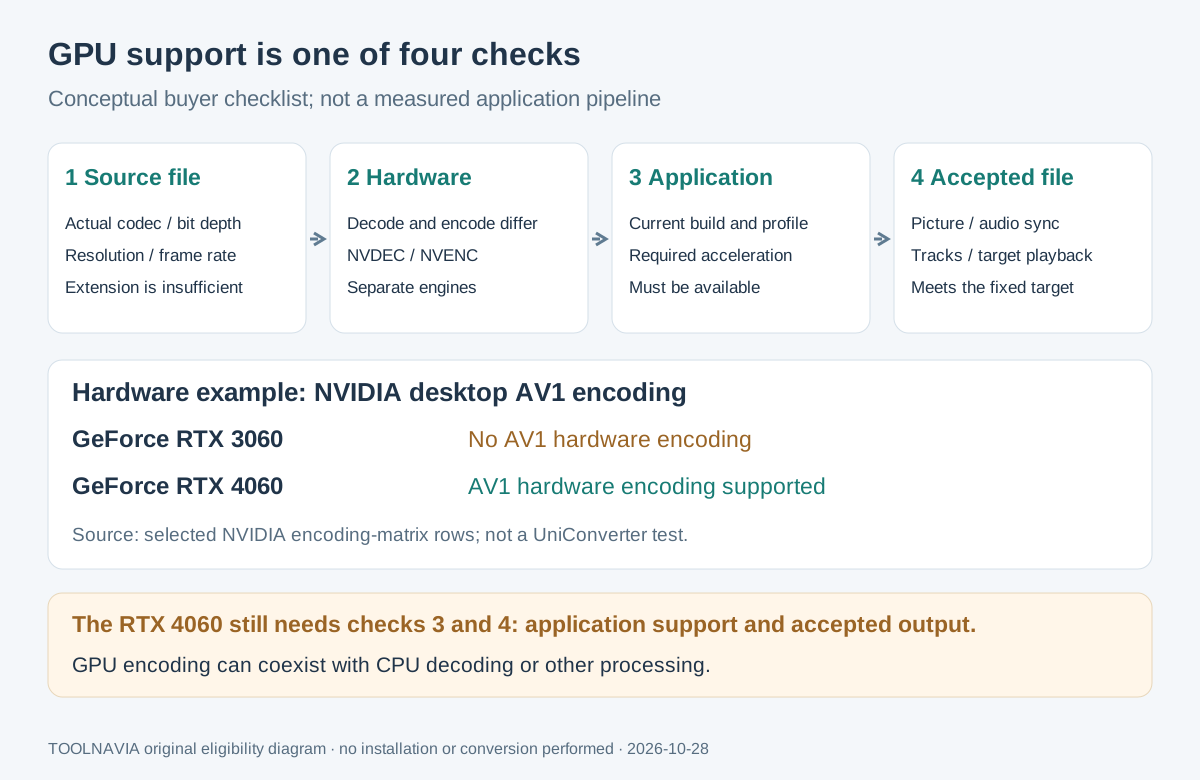
MP4 names a container; the video inside can use H.264, HEVC or AV1. Record the actual codec and bit depth. UniConverter's general format tables and GPU list do not establish every accelerated combination.
| Layer | What to establish | | --- | --- | | Source | Actual codec, bit depth, resolution and frame rate | | Hardware | Required decoding and encoding capabilities, checked separately | | Application | Current build exposes the intended accelerated output profile | | Deliverable | Export meets picture, audio, track and playback requirements |
Decoding reads compressed input; encoding creates the output. NVIDIA implements these through separate NVDEC and NVENC engines. GPU encoding does not imply that every input is also decoded on the GPU.
Four features that can make repeated work worthwhile
- **Accelerate a qualifying conversion.** Compatible NVIDIA, Intel or AMD hardware can reduce waiting on supported jobs. Verify the selected path; no universal speed multiplier follows from the graphics brand.
- **Set a deliberate output target.** Codec and resolution controls help preserve the delivery requirements while comparing time. Equal settings still require visual inspection; different encoders need not produce identical files.
- **Retain compatible media components.** V18 documents audio passthrough and supported track or metadata retention, potentially reducing reconstruction work. Container, codec and settings decide what survives; audio passthrough is not a blanket lossless-video promise.
- **Reuse an accepted setup.** Presets, batch processing and CPU controls can reduce repeated preparation while balancing foreground work. Retest when source properties or processing change; acceleration does not guarantee an idle CPU.
Interpret the hardware badge and the headline
NVIDIA's matrix lists **no AV1 hardware encoding for desktop RTX 3060**, and **AV1 encoding for desktop RTX 4060**. This is a hardware distinction, not proof that your UniConverter build and profile expose AV1 acceleration. Paying for software cannot add a missing hardware encoder.
Intel says Quick Sync requires enabled processor graphics. Check that configuration before concluding a discrete GPU is your only route. UniConverter's separate RTX 30-series requirement concerns selected AI models, not every ordinary conversion task.
The speed page's **130X headline** sits above published comparisons labeled **UniConverter 15**, including an RTX 4090/i9-10900X setup. Current product information describes V18. Those older conditions do not predict your current file's runtime, nor prove unchanged quality after arbitrary re-encoding.
Compare equivalent jobs, then inspect the files
Use this proposed acceptance procedure:
1. Record the application build, Windows version, GPU and driver. Preserve the original and document its codec, bit depth, duration, color information and required tracks.
2. Choose the intended output container, codec, resolution, frame rate and bitrate or quality target. Verify that the build actually offers the corresponding acceleration option.
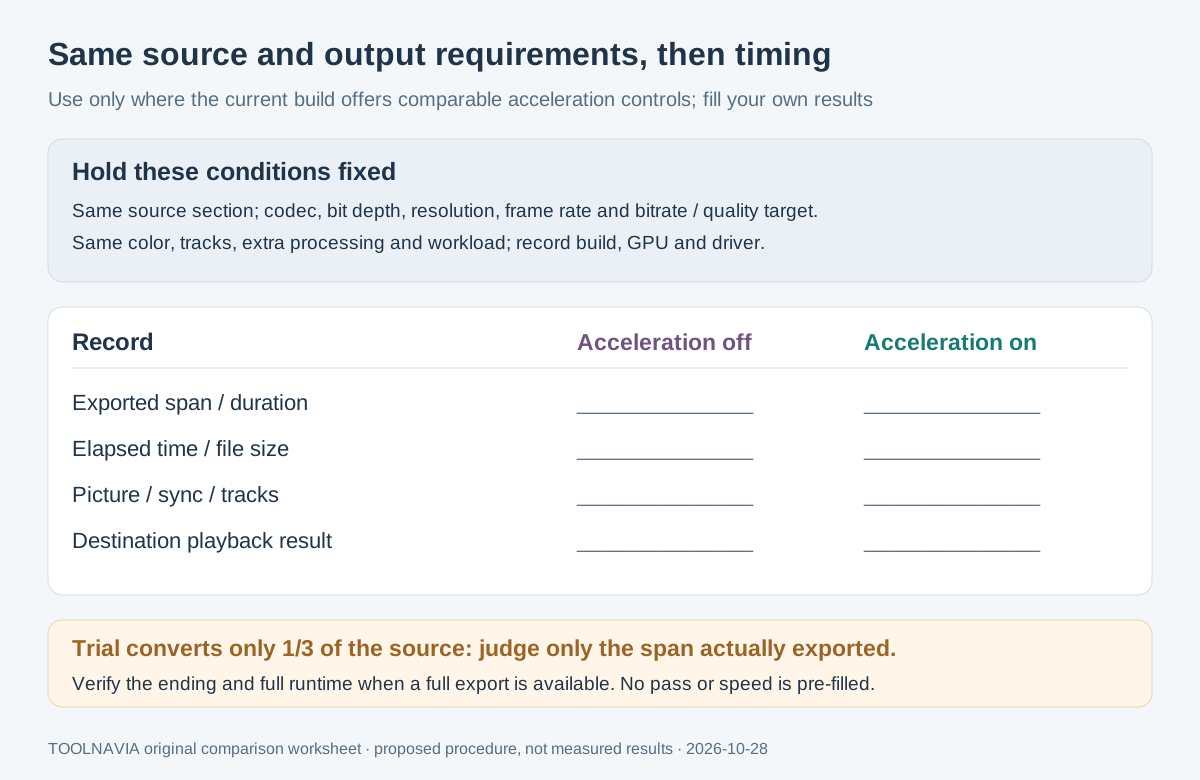
3. Where comparable controls exist, process the same source section with acceleration off and on. Keep other processing and background workload consistent. Record elapsed time, exported duration and file size; reject comparisons with different targets.
4. Open both exports outside the converter. Inspect fine text, movement, dark scenes, gradients and intended colors; check audio synchronization, seeking, tracks and destination playback. A faster rejected output has no useful speed advantage.
5. Repeat a sample after changing codecs or adding processing. Once a full export is legitimately available, inspect its ending and full runtime before relying on it for a deadline.
HandBrake's documentation illustrates why decoding, filters and audio work can still use the CPU during hardware encoding. Its exact fallback rules belong to HandBrake; they are not UniConverter specifications.
Keep trial evidence and purchase terms in scope
The seven-day trial limits conversion to **one-third of the source**; the store applies that limit to high-speed/GPU conversion. A successful partial export proves only the inspected span, not full-film completion or runtime.
Official yearly prices remain variant-dependent: the Windows store shows **US$29.99 and $49.99**, while the V18 campaign shows **$47.49/year for October 15–31, 2026**. Selected eligibility and renewal remain unconfirmed. Check version, Windows platform, personal-use entitlement, initial total, tax, renewal and extras in the order. Windows and Mac are separate purchases.
The yearly plan auto-renews. Perpetual keeps the purchased major version and its updates, with future major versions separate.
*Toolnavia may earn commission through the Windows personal-plan purchase buttons. No measured speed improvement or exclusive discount is promised.*
Pay for a useful, accepted conversion path
Choose the Windows plan when repeated compatible jobs justify the verified workflow and the live terms fit. Hold when the required encoder is absent, the application path remains unavailable, or the exported result fails acceptance.
For AI processing costs, use our separate [AI-credit budgeting guide](/en/software/uniconverter-ai-credits-bonus-vs-monthly-budget). This decision concerns local conversion eligibility and usable output, not the number of AI credits included.