TOOLNAVIA / BUYING GUIDE
UniConverter Video AI: How Long Will 600 Bonus Credits Last?
The short answer
The 600 AI credits bundled with a UniConverter subscription are issued once and last for the paid term. They do not replenish monthly. Budget repeated AI operations separately when evaluating Windows desktop access.
*Official-documentation analysis, October 28, 2026. The calculations below are hypothetical; no AI job or credit deduction was tested.*
At a glance
- Best for
- Windows users who need recurring traditional media conversion or compression and can forecast separate, model-specific AI work before credits expire.
- Price model
- Monthly AI packs: 200 credits for US$9.99, 500 for $19.99, or 1,000 for $29.99; 30-day reset. Confirm the desktop yearly price and renewal in the selected cart.
- Check first
- Buyers assuming 600 credits arrive every month, unlimited AI follows a desktop plan, or an AI-only credit pack automatically includes the desktop Converter and Compressor.
Separate desktop access from the credit balance
The paid Windows plan lists unlimited traditional conversion and compression alongside AI tools charged by credits. A desktop subscription therefore does not establish unlimited AI processing. Conversely, Wondershare permits standalone credit purchases but warns that they may not unlock advanced Converter or Compressor access.
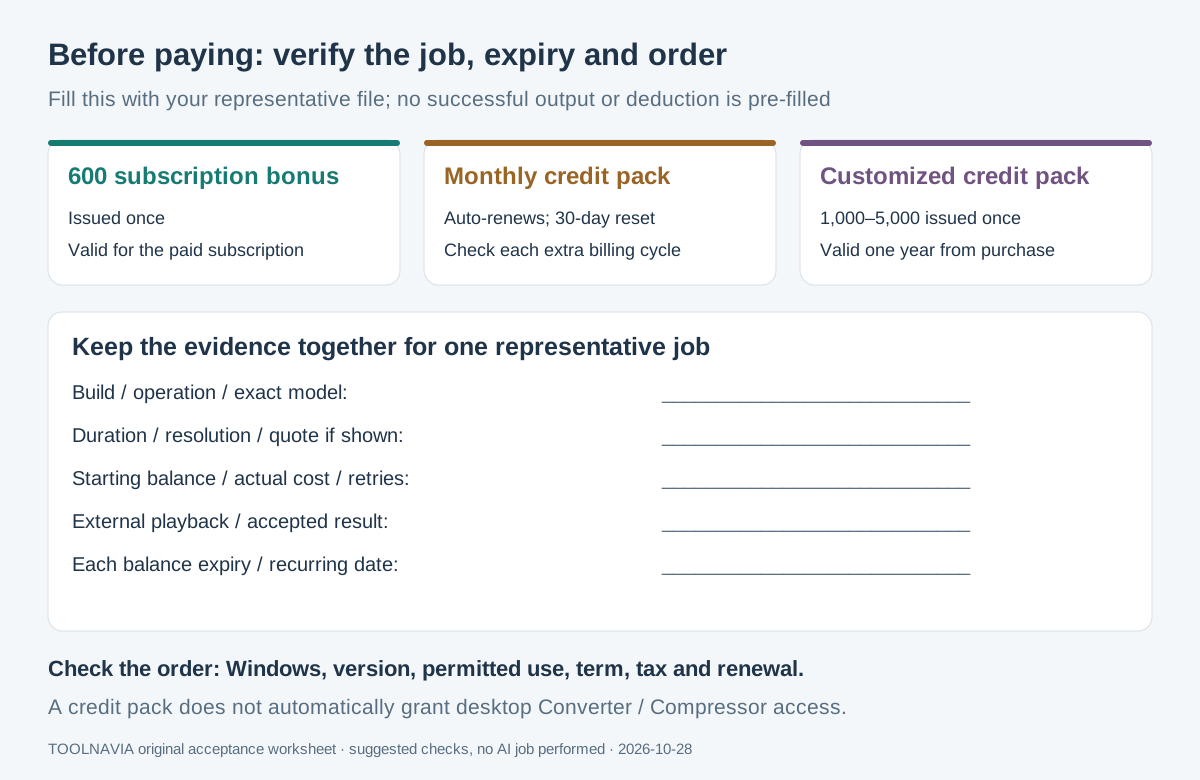
Credit expiry also depends on origin. The subscription's 600-credit bonus lasts for the paid term. A new perpetual plan's 1,000-credit bonus has permanent validity; customized purchased credits last one year. These are different balances, not interchangeable promises.
Four AI tasks worth pricing separately
- **Turn speech into a draft transcript.** Speech-to-Text can provide a starting point for subtitles, reducing blank-page work. Review names, numbers and timing before using the result.
- **Evaluate a specific enhancement model.** Video Enhancer's Quality Enhancement (Standard) provides a defined option for improving footage. Inspect a representative segment; its rate does not cover every enhancement model or guarantee recovered detail.
- **Clean up distracting audio.** Noise Remover gives a separate treatment to try before final delivery. Listen for damaged speech or unwanted changes as well as reduced noise.
- **Remove a video's background.** Video BG Remover can prepare a subject for another background. Check moving edges and difficult frames; the video operation has a different listed rate from image background removal.
Calculate one ten-minute job
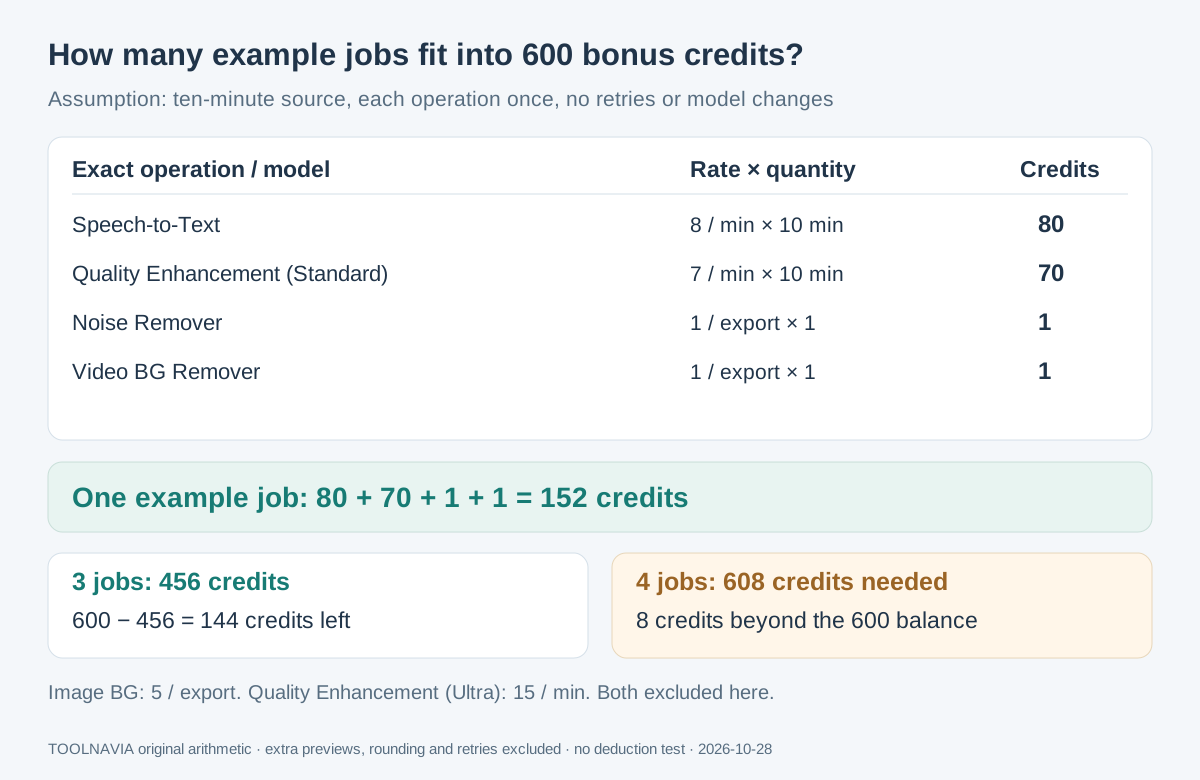
Assume one ten-minute source needs each operation below once, using these exact published rates:
| Operation | Published unit | Example credits | | --- | --- | --- | | Speech-to-Text | 8 per minute | 80 | | Quality Enhancement (Standard) | 7 per minute | 70 | | Noise Remover | 1 per export | 1 | | Video BG Remover | 1 per export | 1 |
That is **152 credits**. A 600-credit bonus covers three such calculations: **456 spent, 144 remaining**. A fourth needs 608 in total, leaving an eight-credit shortfall. This is arithmetic, not a measured output guarantee.
The example excludes retries, additional previews, rounding and changed models. Quality Enhancement (Ultra) is listed at 15 credits per minute; Image BG Remover costs five per export. Neither belongs in this 152-credit calculation. Verify the selected operation before processing.
Match the pack to the work you will finish
The credit page displays **200 for US$9.99/month, 500 for $19.99/month and 1,000 for $29.99/month**. These packs auto-renew and reset every 30 days. Buying another pack creates its own recurring billing cycle; do not treat an extra purchase as a single permanent top-up.
After the bonus is exhausted, 200 credits cover one example job per cycle at the listed rates. Twelve unchanged $9.99 charges total **$119.88 before tax**, in addition to any desktop license. This is a budget scenario, not a fixed renewal quote.
For intermittent work, the customized option issues 1,000–5,000 credits once, valid for one year. The displayed 2,500-credit example costs $62.25. Buy against work likely to finish before expiry, rather than the lowest nominal price per credit.
Adobe, Topaz and Descript use different allocation, model and expiry rules. Their credit counts are not a common currency for comparing finished jobs.
Verify a small job and the exact order
1. Record your build, operation, exact model, duration, resolution and starting balance. Use a representative file you may process.
2. Check the displayed usage terms and any job quote. Run the small sample, inspect the output outside the tool, and record the actual deduction, retries and accepted result. Investigate differences before scaling up.
3. Forecast the next cycle's workload, keeping bonus expiry and each paid pack's reset date separate. Record every recurring item; our [cancellation guide](/en/software/uniconverter-17-subscription-cancellation-refund) covers stopping future charges.
4. Verify Windows, version, permitted use, term, optional items, tax and renewal in the selected order. Windows and Mac purchases are separate.
Official desktop prices remain inconsistent across variants: the Windows store displays **$29.99 and $49.99 yearly**, while the V18 campaign shows **$47.49/year** for October 15–31, 2026. Eligibility and future renewal are not universally resolved; do not assume the lowest figure applies to your order.
Buy the combination your workload needs
Current product information describes **UniConverter 18**. Choose the Windows desktop plan when recurring conversion or compression justifies it, then budget metered AI separately. If AI is your only requirement, examine standalone credits before purchasing desktop access merely for its bonus.
*Toolnavia may earn commission through the Windows desktop purchase buttons. They do not represent a standalone credit-pack checkout. Confirm the current version and selected entitlement before paying.*