TOOLNAVIA / BUYING GUIDE
pCloud Docs: Can Premium Replace Your Office Editing Workflow?
The short answer
pCloud Docs can bring proposal writing and review into your storage account. Premium fits routine collaboration after you verify access and file behavior; macro-dependent or format-sensitive work may still need its existing editor.
*Official-documentation analysis checked October 31, 2026. Toolnavia did not edit files, join a collaboration session or complete checkout.*
At a glance
- Best for
- Buyers who need cloud storage and have verified everyday document collaboration in Docs.
- Price model
- Premium 500 GB Lifetime publicly displays $219 USD once; verify account entitlement and final order.
- Check first
- Legacy-plan access and conflicting collaboration help remain unresolved; macro and exact Office compatibility are not guaranteed.
What changes when the editor lives beside the file
pCloud Docs covers documents, spreadsheets, presentations, PDFs, Markdown and plain text. The help guide says changes return to the original stored file. That can remove the repeated download, local edit and replacement-upload cycle for supported work.
Its launch article also describes anchored comments and tracked document changes. A reviewer can discuss a disputed paragraph where it belongs, while the author considers the proposed revision. This is more useful than merely keeping another copy of a proposal online.
Treat that convenience as a workflow benefit, not a promise that every Office feature survives. A simple price list and a workbook running business logic can share an Excel-style extension while making very different demands.
Check the account and the editing route first
There are two unresolved documentation boundaries. The current pricing page includes Docs with every Premium plan, but the Docs help page says it is available with **new plans**. Neither statement establishes what every older subscription receives. Existing customers should check their account before buying an upgrade solely for editing.
The separate Business collaboration help page still says simultaneous document editing is unsupported and can create conflicted files. The guidance is not aligned across these scopes. Public documentation alone cannot settle the behavior of your plan and editing route.
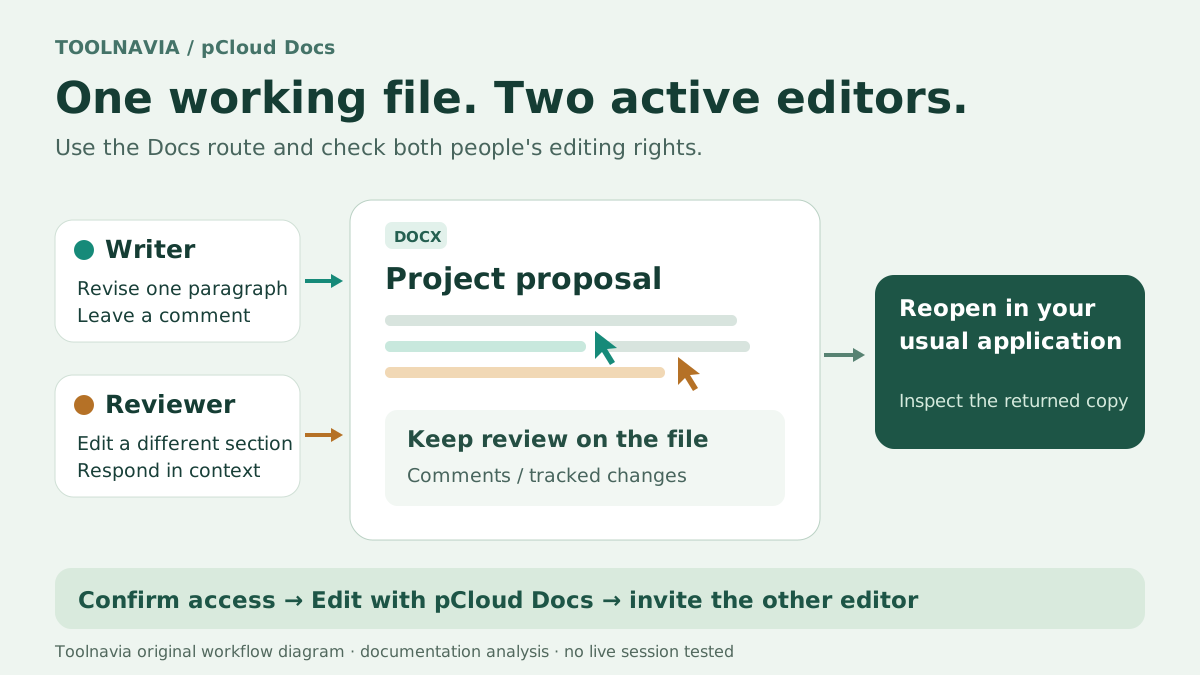
For the documented Docs route, select a file at my.pcloud.com and choose **Edit with pCloud Docs**; the guide also lists that command in pCloud Drive's context menu. Share through **Invite to folder** and verify editing rights. **Open with → Word/Excel** uses a separate installed-editor route; storage sync does not establish Docs co-editing.
Keep macro-dependent originals outside the experiment
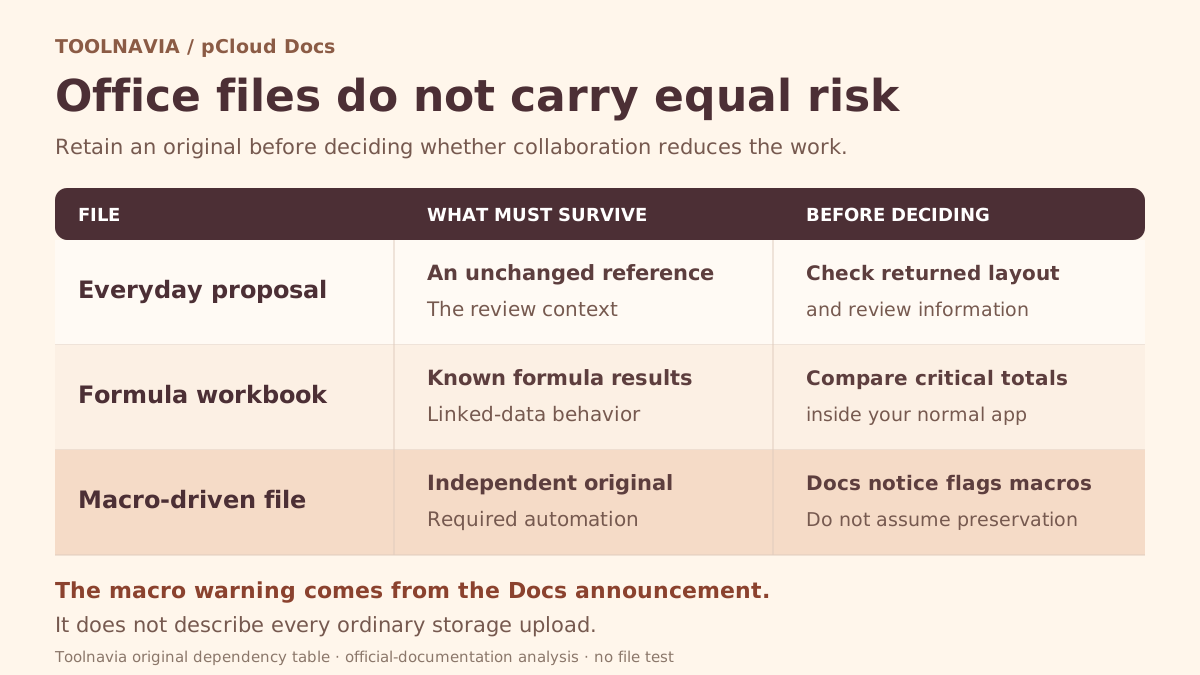
The Docs launch article says embedded Word and Excel macros are stripped on upload. This wording appears in the Docs announcement; it does **not** justify saying every ordinary pCloud storage upload removes macros. It does make a macro-preserving Docs replacement unsafe to assume.
Keep an independent, unchanged original before trying a copy. If a workbook's value comes from its automation, preserving visible cells is insufficient: the automation must remain usable in the application where the business runs it.
Apply the same purchasing discipline to linked data, unusual formulas and exact layouts. The sources reviewed do not provide a complete Office-compatibility matrix. An unverified dependency is a reason to retain the current editor until the actual file works, rather than interpreting silence as support.
Let a real project reveal the remaining work
Take a copy of a proposal that normally needs a colleague's review. Have the writer revise one paragraph while the reviewer edits another, then have each leave a comment. Confirm that each person sees the intended revision after reopening the file.
Next, return the edited copy to the application your client uses. Check the items that matter to that project: table layout, numbering, formulas, comments or presentation elements. For a spreadsheet, compare important totals against an unchanged reference.
Count the remaining work. If every collaborative edit creates a long desktop repair session, the apparent convenience may not reduce work. If the ordinary files survive and review stays attached, keeping storage and editing together has a credible practical benefit.
Judge the $219 storage purchase separately
The official USD page currently displays **Premium 500 GB Lifetime at $219, paid once**, with Docs listed among Premium features. This is a dated public price, not an executed order or a guarantee of unchanged future functionality. Confirm the selected plan, currency, tax, refund terms and account entitlement in the actual purchase flow.
Do not justify the whole payment by assuming it eliminates an existing office subscription. That saving exists only if you can stop that other payment. If you still need its macros, specialist features or client workflow, budget for both.
Keep the workflow that carries your dependencies
Microsoft documents co-authoring prerequisites involving compatible apps, storage, formats and permissions. Google distinguishes original Office-format editing from conversion to its native documents. Zoho Writer offers another DOCX editing and collaboration route. Each has its own capabilities to verify.
Choose Premium when you need the storage and its verified Docs workflow handles your everyday collaboration. Keep a dedicated editor for dependencies that remain unresolved. For desktop storage behavior, see the [pCloud Drive, Sync and Backup guide](/en/software/pcloud-drive-sync-backup-500gb).
*Affiliate disclosure: Toolnavia may earn a commission through its approved pCloud link. No exclusive discount is promised.*