TOOLNAVIA / BUYING GUIDE
OneStream Live Professional: Playlists, Loops and the 24/7 Add-on
The short answer
At a glance
- Best for
- Scheduled multi-video replays within eight hours
- Price model
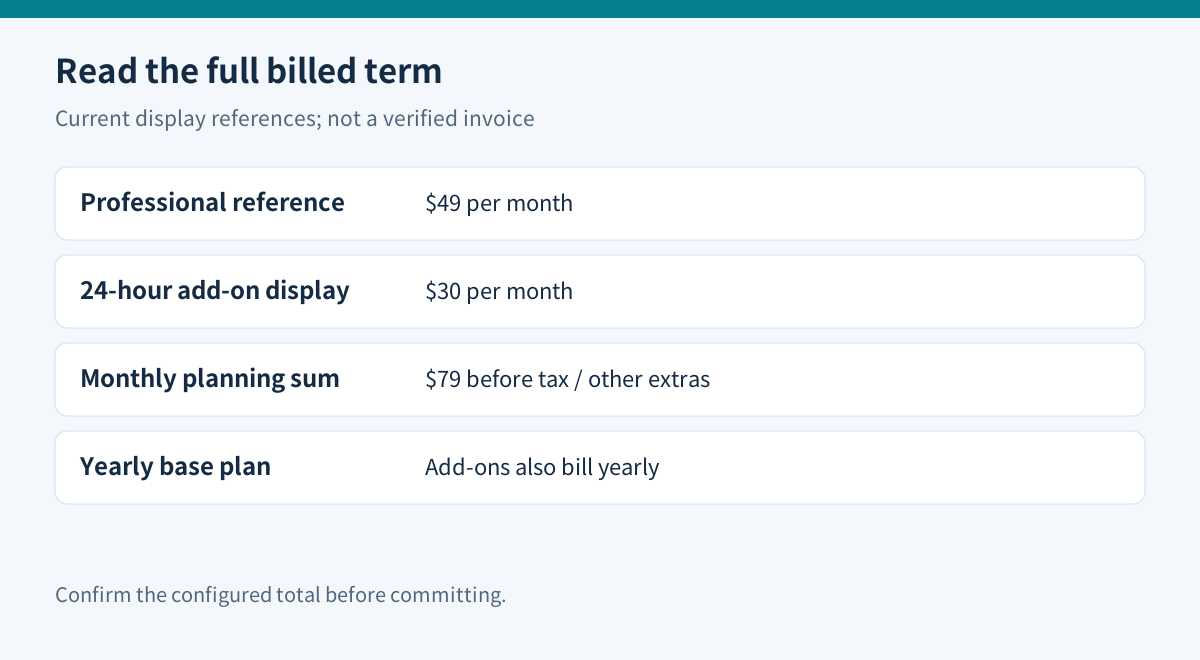
- Professional $49/mo reference; 24-hour YouTube add-on $30/mo display. Checkout may differ.
- Check first
- 24/7 needs separate entitlement; annual add-ons follow annual billing; generally no prorated refund.
Professional pays for a different replay workflow
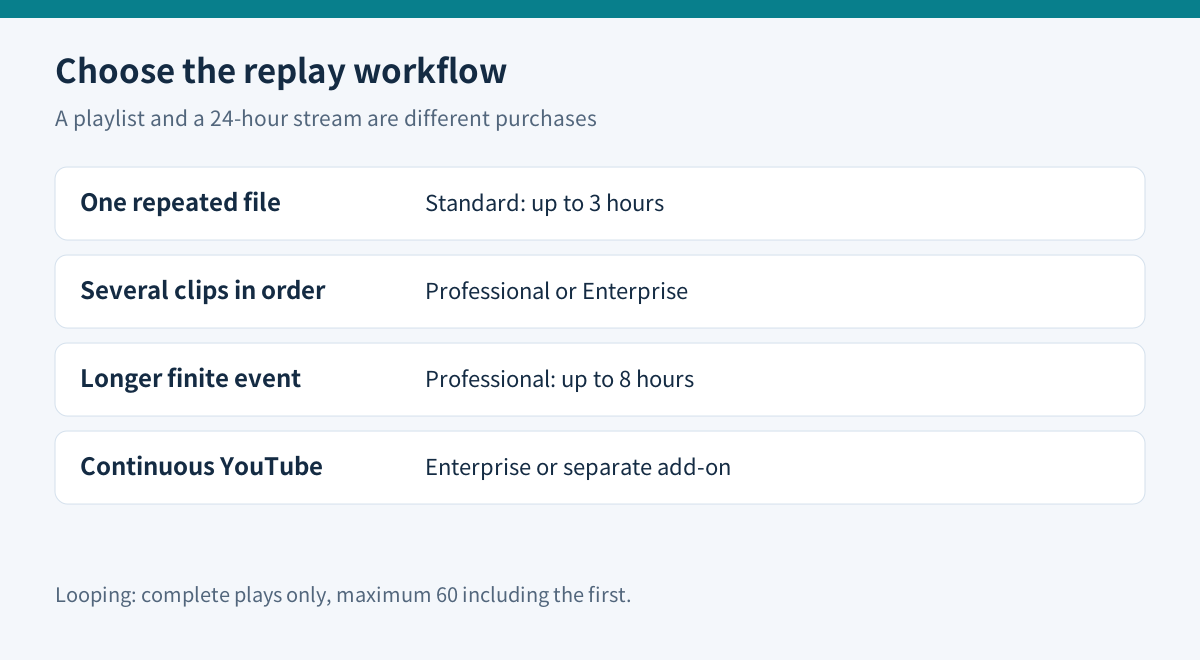
Choose OneStream Live Professional when you need several videos played in sequence or a prerecorded event longer than Standard's three-hour allowance. Do not choose it merely because you want an always-on channel. Ordinary looping, a playlist and the dedicated 24-hour streaming service have different limits and billing.
This is a review of official documentation, not a completed broadcast test. The useful question is what must happen after the first video ends: repeat that file, play another file, or continue for days.
One file, several files, or several days
The looping guide sets prerecorded duration at one hour for Basic, three for Standard, eight for Professional and twenty for Enterprise. It also caps a broadcast at sixty complete plays, including the first play. A fifty-minute video fits three times in Standard:150minutes. Professional fits nine complete plays:450minutes; a tenth would exceed480minutes. This is arithmetic from the documented limits, not measured service performance.
For several different videos, OneStream's playlist guide specifies Professional or Enterprise. Upload or select the clips, choose destinations and schedule the combined broadcast. A playlist is sequential content, not a promise of perpetual broadcasting.
The separate24-hour workflow is YouTube-only. Enterprise includes that entitlement; other plans need an add-on. Its scheduling guide limits an individual24/7 setup to thirty days. Do not assume the same service runs continuously on every supported social platform.
The $10 upgrade and the larger add-on bill
The current pricing comparison displays Standard at $39/month and Professional at $49/month. The $10 difference would total$120 across twelve unchanged monthly payments. Professional also lists thirty rather than ten destinations and six rather than four team seats, but unused capacity has no automatic value.
Price labels need care. The pricing page contains inconsistent savings text, while an official comparison article lists Professional at$49 in its table and$39 in a later paragraph. Use$49 as the current pricing-table reference and verify the configured invoice; this guide does not infer an annual total or a live Black Friday code from those fragments.
The24-hour YouTube add-on displays$30/month. Adding that to the$49 Professional reference gives a$79 monthly planning estimate before tax or other extras. Crucially, add-ons follow the base subscription's billing cycle: a yearly subscriber cannot buy the add-on with monthly billing. A monthly equivalent is not necessarily the amount charged today.
Duration, storage and bandwidth are different budgets
Professional lists50GB storage and2.5TB monthly bandwidth. Storage holds the uploaded library; duration controls the event; the bandwidth dashboard combines Stream Players and Custom Websites. Its help page says usage resets at the start of the calendar month. Do not turn that allowance into an unsupported estimate of social-platform viewers or assume it resets on the subscription anniversary.
Keep your source recordings independently. YouTube says it can archive streams shorter than twelve hours, but streams beyond twelve hours may not be captured at all. Paying for a continuous channel therefore does not establish a complete replay archive.
Try the delivery path before committing
Use the free plan for a small connection and playback check; it lists two destinations,720p,1GB storage and three scheduled events. Free cannot validate the paid looping entitlement. For a paid evaluation, prepare a short recording with visible timing cues, speech and a deliberate transition. Check the selected destination, start time, audio sync, order and ending from the viewer side. These are proposed checks, not Toolnavia test results.
If an export needs frame-rate normalization for a specific compatibility issue, HandBrake distinguishes constant, variable and peak-limited frame rates. Its draft documentation does not recommend converting everything to constant frame rate. Preserve the original and compare a short converted sample; this is optional preparation, not a OneStream requirement.
For a local alternative, OBS Media Source can loop a file and its VLC source can play a playlist, with VLC installed. That may suit a staffed workstation, but it leaves the local machine and upload connection in the delivery path. It is not a like-for-like cloud automation service.
Cancellation does not undo a poor fit
OneStream generally does not refund unused subscriptions or provide prorated refunds after cancellation. Access continues through the paid term, and service-failure cases are reviewed individually. Its terms also warn that changing or cancelling a subscription may remove promotional benefits. Mandatory rights are separate; do not treat the free plan as a money-back guarantee for a paid year.
Buy Professional for a real playlist or eight-hour replay requirement. Keep Standard when one repeated file fits its limit. Price the dedicated YouTube add-on separately when the requirement is continuous distribution, and check the full billed term before paying.
The public affiliate program offers cash commissions, but Toolnavia has not activated an account or tracking link. The availability of that program is not an endorsement or evidence that a stream was tested.