TOOLNAVIA / BUYING GUIDE
EverDoc Scanner & Mobile Import: Will Every Document Reach One Archive?
The short answer
# EverDoc Scanner & Mobile Import: Will Every Document Reach One Archive?
EverDoc is easy to understand as a promise: scan a paper, photograph a receipt, connect a cloud folder or print a digital document, and the result should become one searchable archive record. The buying question is harder. Your scanner driver, Windows account, phone-to-PC transfer and cloud setup sit between that promise and a dependable workflow.
Do not buy on an OCR checkbox alone. Run one 12-minute acceptance test with four documents. Buy only if every route you need produces a findable record, preserves the details you care about and survives a backup. Wait if one route is still uncertain. Choose another document-management system if the route is essential and repeatedly fails.
At a glance
- Best for
- Buyers who can test their actual scanner, phone, cloud service and backup path.
- Price model
- Verify live seller route and checkout
- Check first
- Organizations requiring capture queues, hot-folder automation, approval, compliance or enterprise validation.
The short verdict
EverDoc is a sensible candidate for a Windows user who wants a local document archive and whose main inputs are a WIA-compatible scanner, phone photos and ordinary digital files. Abelssoft’s current product page says EverDoc supports WIA 2.0 scanning, automatically adds scans to the archive, transfers photos from its mobile app to the home PC, connects cloud storage and includes OCR plus backup.
Those are product claims, not a guarantee that every scanner, phone configuration or cloud account will work. Microsoft’s WIA documentation makes the device boundary clear: Windows must first detect and operate the scanner. The safest purchase decision is therefore conditional.
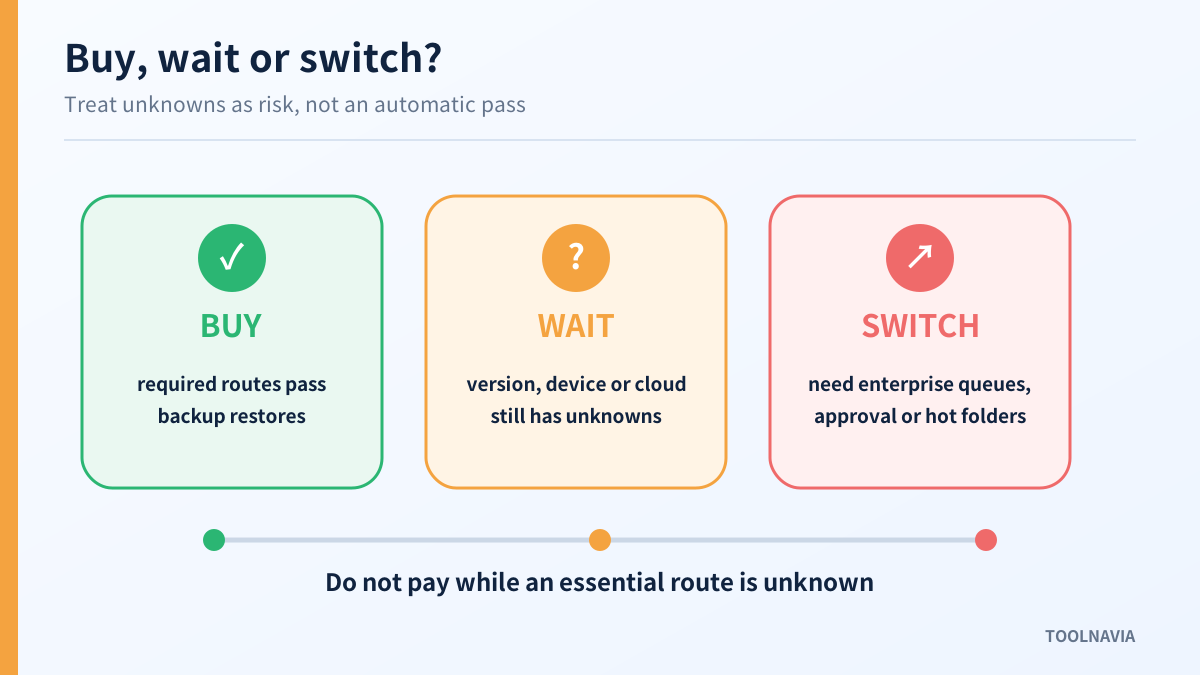
Buy when your current Windows PC detects the scanner, the EverDoc trial or current build receives the test pages, phone photos arrive in the intended archive, cloud-connected documents remain findable, and a backup can be restored.
Wait when the seller route, delivered version or device compatibility is unclear, or when you have not tested a representative batch.
Switch when you need enterprise controls such as monitored mailboxes, validated capture queues, classification rules, audit workflows or guaranteed PDF/A processing that are documented by larger DMS products but not clearly promised on EverDoc’s public product page.

Start with four documents, not a feature list
Prepare four files before installing or paying:
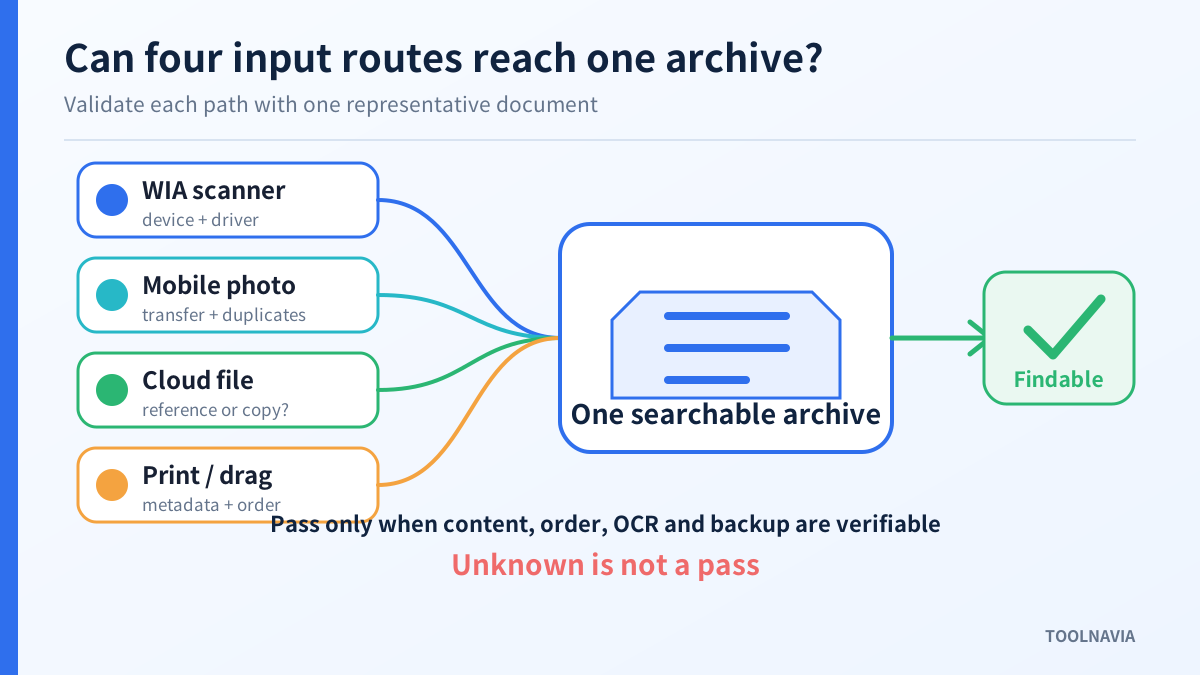
1. A two-page scanner document with one page rotated. 2. A phone photo of a receipt with a date, merchant name and total. 3. A PDF stored in the cloud service you expect to connect. 4. A digital document that you can print to a virtual printer or drag into the archive.
Give each item a unique phrase such as “EV-ROUTE-01.” That makes the search test objective. Record the source route, import time, page count, orientation, OCR result, duplicate behavior and final location. Do not use irreplaceable originals for the first test.
The goal is not to prove that EverDoc has the most features. It is to prove that the few routes you actually rely on reach one archive without silent loss.

Route 1: verify the WIA scanner gate
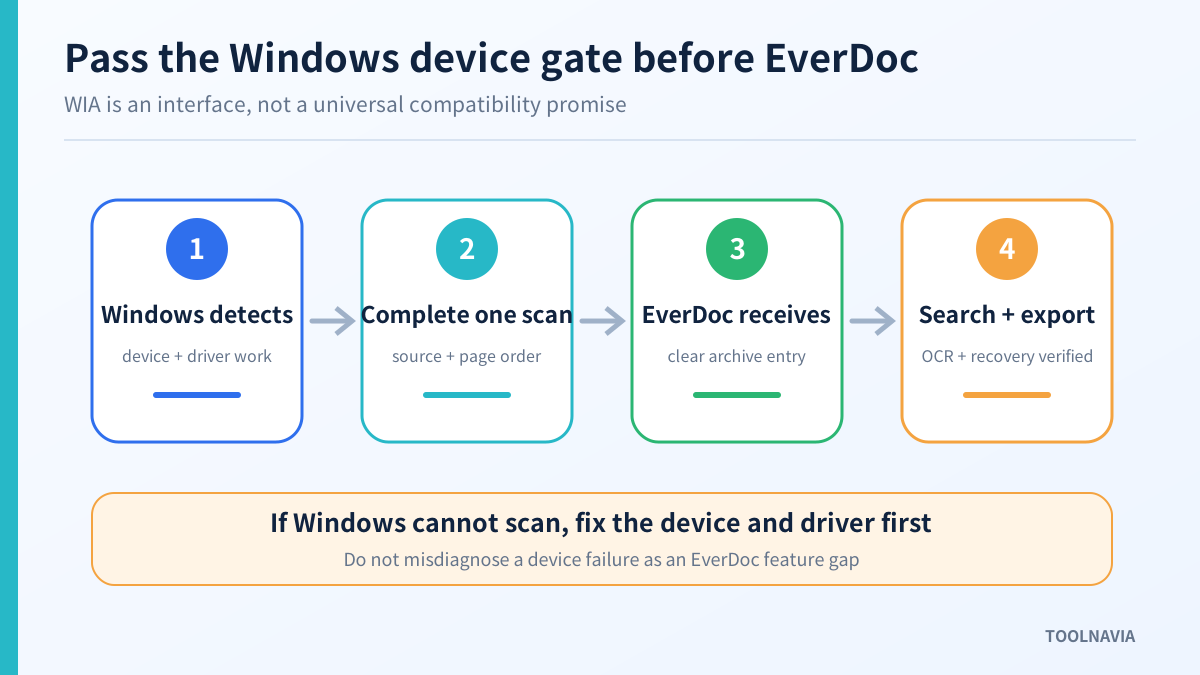
Abelssoft says WIA 2.0 scans can be added automatically. WIA is the Windows imaging interface between an application and compatible imaging hardware. It does not remove the need for a working scanner driver, correct Windows detection or a supported scan source.
Before opening EverDoc, confirm that Windows can see the device and complete a scan. If Windows itself cannot scan, EverDoc is not the first place to troubleshoot. For a network scanner, also verify that the correct device and source are selected.
Then scan the two-page sample through the route EverDoc exposes. Check:
- Did both pages enter the same document record? - Did the rotated page remain readable? - Is the unique phrase searchable after OCR? - Are the date and document type sensible? - Does rescanning create a duplicate or replace the intended record? - Can the document be exported in a usable format?
Pass this route only after a normal user can repeat it. A single lucky scan is not enough for a shared household or office workflow.
Route 2: test the mobile-photo handoff
The current Abelssoft page says photos taken with the EverDoc mobile app can be transferred automatically to the home PC. That can remove a manual cable or email step, but “automatic” still needs a destination and a repeatable path.
Photograph the receipt and wait for it to reach the PC. Verify orientation, cropping, legibility and whether the app sends the original image or a processed copy. Search for the unique phrase, date and merchant. Then send the same photo again and observe duplicate handling.
This route fails the buying test if photos land in an unexpected folder, require repeated manual recovery, lose enough detail to make the receipt unusable, or create duplicates that are difficult to identify. If the phone is used by several family members or employees, repeat the test with the actual accounts and permissions that will be used after purchase.
Do not infer a mobile scanning SLA, background-sync guarantee or universal iOS/Android behavior from the product page. Treat the current app, phone OS and PC pairing as one testable configuration.
Route 3: distinguish a cloud connection from a cloud copy
EverDoc’s public information describes cloud connectivity. Independent product profiles also describe connecting cloud folders or accounts for indexing. That wording does not by itself answer whether a file is copied into the EverDoc archive, referenced in place, cached for offline use or removed when the cloud connection changes.
Connect only a test folder. Import or index the sample PDF, then answer four questions:
- Is the file visible and searchable in EverDoc? - Does changing the cloud filename or folder break the record? - Is the content still available when the cloud client is paused? - Does EverDoc’s backup include the document content, metadata or only a reference?
If the current build or help text does not answer these questions, label the behavior unknown rather than assuming offline availability. Buyers who need an independently recoverable archive should insist on a backup-and-restore test before moving large folders.
Route 4: test printed and dragged digital files
Independent EverDoc profiles describe a virtual-printer path and drag-and-drop import. These routes are useful for invoices, statements and confirmations that already exist as digital files. Because they are corroborated outside the main current product page, verify that the delivered build still exposes them before treating them as a purchase reason.
Print or drag the fourth document into EverDoc. Check whether the original filename, date, page order and searchable text survive. Add a keyword, close the application and search again. Import the same file twice to see whether EverDoc warns about a duplicate.
If you need automated watched-folder ingestion, do not assume that drag-and-drop equals a monitored folder. Competitors such as Docuflair, NG DMS and Canon IRISPowerscan explicitly document hot folders, browser upload, MFP capture or validation workflows. Their capabilities are useful comparison points, but they do not prove feature parity in EverDoc.

Build a route matrix before you pay
Use a simple decision table:
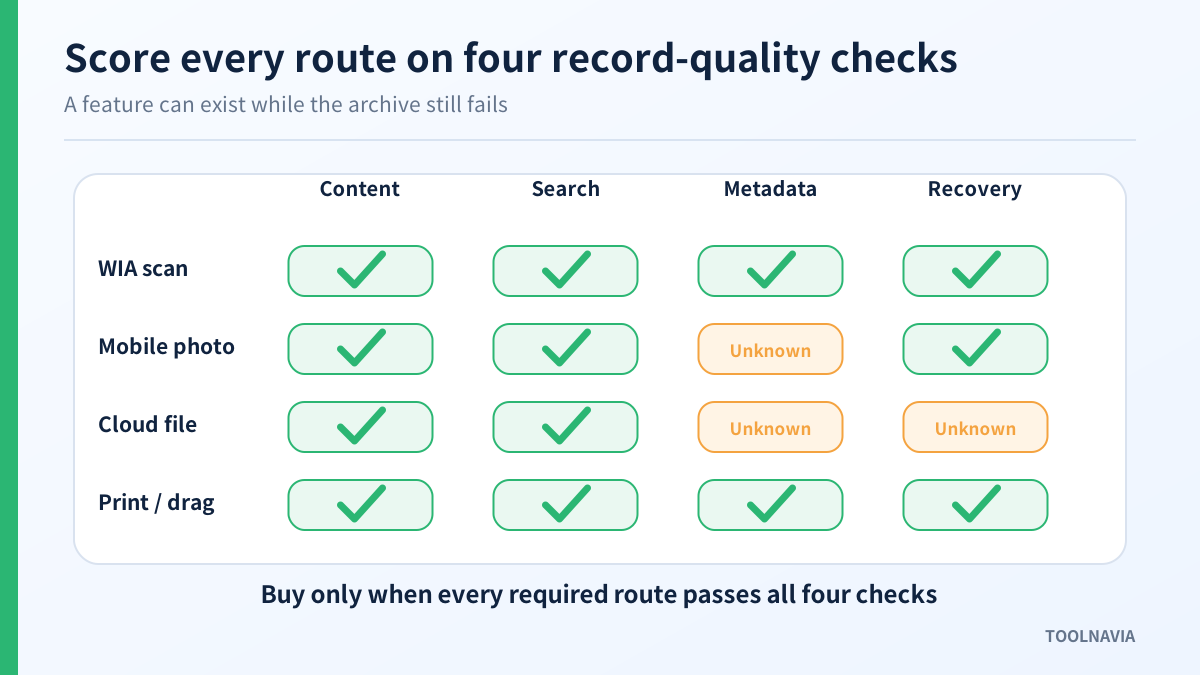
| Route | Must work? | Test result | Evidence to keep | |---|---:|---|---| | WIA scanner | Yes/No | Pass, fail or unknown | scanner model, driver, sample export | | Mobile photo | Yes/No | Pass, fail or unknown | phone OS, transfer time, duplicate result | | Cloud connection | Yes/No | Pass, fail or unknown | cloud service, offline behavior, backup result | | Print or drag | Yes/No | Pass, fail or unknown | delivered build, metadata, duplicate behavior |
A route marked “unknown” is not a pass. If an unknown route is optional, you may still buy and keep the limitation. If it is essential, wait until you can test it or choose a product that documents and demonstrates the workflow.
Price and version conflicts require a live check
The pages observed for this review did not present one universal price or version. Abelssoft’s English page showed EverDoc 2027 version 2027.12 and a euro price. A localized Abelssoft page showed the same generation with a different currency and amount. An Ashampoo reseller page presented EverDoc 2026 with its own US-dollar offer. Another software profile listed a different 2026 build label.
These are channel and market differences, not numbers that should be blended into a single “normal price.” Follow the exact seller route you intend to use. Before payment, record the seller, delivered version, licence scope, currency, tax, renewal or update rights, refund terms and whether the checkout matches the product you tested.
The affiliate link in this article points to the approved Abelssoft EverDoc product destination. It is not proof of the final local price, a guaranteed discount or a preselected licence.
Back up the archive before declaring success
Abelssoft lists backup and restore as EverDoc capabilities. Use them during the trial or refund window if possible. Add the four test records, create a backup, restore into a safe test location or fresh profile, and verify search, page order, tags and attached content.
A backup file that merely exists is not enough. The archive passes only when the restored records are readable and findable. Keep an independent copy of source documents until that restore has succeeded.

Who should buy, wait or switch?
Buy EverDoc if you use Windows, need a personal or small-office archive, and the four routes you require pass on your current hardware. The strongest case is a user who wants scanner and phone inputs to become searchable records without adopting a larger document-management platform.
Wait if the scanner is not detected reliably, the mobile transfer destination is unclear, the cloud behavior is unknown, or the delivered version differs from the build you evaluated.
Switch if you need formally documented capture queues, hot-folder automation, shared approval, compliance controls, enterprise validation or broad device guarantees. Those needs point toward a fuller DMS rather than a personal archive tool.
Final buying checklist
Before clicking Buy, confirm all of the following:
- Windows completes a scan with the exact scanner you will use. - EverDoc receives every page and OCR finds the unique phrase. - Mobile photos reach the correct PC and do not create uncontrolled duplicates. - Cloud-connected records behave as expected online, offline and after renaming. - Print or drag import exists in the delivered build if you need it. - A backup restores searchable content, not merely an empty database. - The live checkout identifies the seller, version, licence, currency, tax and renewal or update rights. - Optional routes are clearly marked; essential unknowns remain blockers.
EverDoc deserves a “buy” only after the route matrix passes. That is a stronger decision than trusting a long feature list, and it protects you from discovering the weakest link after hundreds of documents have already entered the workflow.
**Evidence map:** EverDoc’s current product and localized pages support the WIA 2.0, mobile-app, cloud, OCR and backup statements. Seller and independent profiles establish the channel/version conflict and corroborate digital-file routes. Microsoft defines the WIA and scanner-detection boundary. Docuflair, NG DMS and Canon provide same-intent capture-workflow comparisons without implying EverDoc parity.