TOOLNAVIA / BUYING GUIDE
Close Essentials CRM Permissions: Can Reps See Only Their Own Leads?
The short answer
Close Essentials CRM fits a sales team that shares customer records but needs limits on what individual reps can do. If each rep must see only their assigned leads, Essentials is the wrong tier. Restricted User and private Smart Views do not provide that boundary. This is documentation analysis, not an account-access test.
At a glance
- Best for
- Small sales teams that accept shared customer records and want the four preset roles to separate daily communication, lead maintenance, sales operations and account administration.
- Price model
- Essentials displays $35/user/month with annual billing ($420/user/year base), or $49 monthly. Scale annual reference is $139/user/month. Confirm final currency, tax, usage, selected extras and renewal; no upgrade invoice quoted.
- Check first
- Teams requiring each rep to see only their own customer records, customized roles or field-editing restrictions on Essentials. A private Smart View does not enforce record privacy. Even Scale evaluation must include Inbox tasks, Call Coaching exceptions and Predictive Dialer restrictions.
Separate action limits from record access
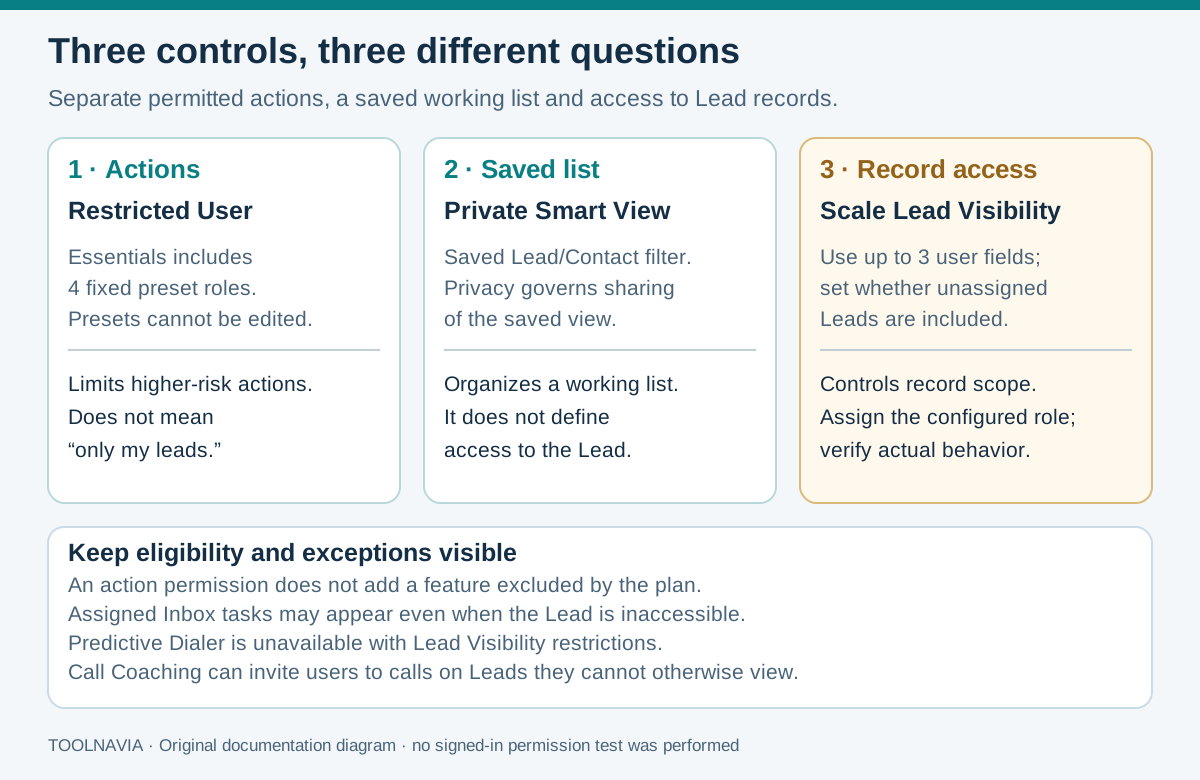
Essentials and Growth include four fixed roles: Restricted User, User, Super User and Admin. You can assign them, but cannot edit their permissions or create custom roles. Those options require Scale.
A role answers whether someone may export, delete or administer. Lead Visibility answers which records they can see. A Smart View saves a filtered working list; making it private hides that saved search from colleagues, not the underlying leads. A tidy “my leads” list is therefore insufficient evidence of access separation.
Quick fit: Essentials supplies preset action controls in a shared CRM. At the displayed annual rate, its base reference is $420 per user for a year. Owner-only record visibility requires a different plan evaluation.
Four useful jobs for the preset roles
- **Limit destructive work for ordinary reps.** Restricted User permits calls, SMS and management of their own opportunities, activities and tasks, including deleting those items. It blocks bulk imports, exports, merging and deleting leads; it is not a read-only role.
- **Delegate record maintenance.** User adds operations such as importing, merging and deleting leads without organization customization or role management. Assign it deliberately when those actions belong in someone's job.
- **Delegate sales operations without billing.** Super User can manage statuses, custom fields, team Smart Views and phone numbers, plus exports and bulk changes. That does not mean custom role design or Scale's field-editing restrictions.
- **Keep account control with administrators.** Admin covers billing and user/role management. Routine calling or lead maintenance does not require giving every rep that authority.
These are permissions within purchased features. Generic role pages mentioning a Dialer, bulk email or Workflows do not add Power Dialer, bulk email or automated Workflows to Essentials.
Evaluate Scale's visibility rules and exceptions
Close places Lead Visibility on Scale and legacy Enterprise. A Limited Visibility role can use up to three user fields and optionally allow unassigned leads. Its scope covers search, reports, opportunities and pipelines; opening an unauthorized lead directly produces a blocked-access page. Report totals consequently reflect the leads that user can see.
Do not promise absolute isolation. An assigned task on an inaccessible lead may still appear in the user's Inbox. Predictive Dialer is unavailable to users with Lead Visibility enabled. With Call Coaching enabled, a user can be invited to a call involving a lead they cannot otherwise see. Include these exceptions in the purchase decision.
Budget for the required access level
On 28 October 2026, Close displayed Essentials at $49 per user monthly or $35 per month equivalent with annual billing; Scale showed $149 or $139 respectively. Three users at unchanged annual rates calculate to $1,260 versus $5,004 for a full year—a $3,744 base difference. This preserves the website's dollar symbol; confirm the final billing currency.
That arithmetic is not an upgrade invoice, discount or renewal guarantee. Close documents immediate upgrades with a prorated charge; actual timing and subscription terms determine that amount. Add applicable tax, communication usage and selected extras, and verify renewal before paying.
Run a two-user, three-lead rehearsal
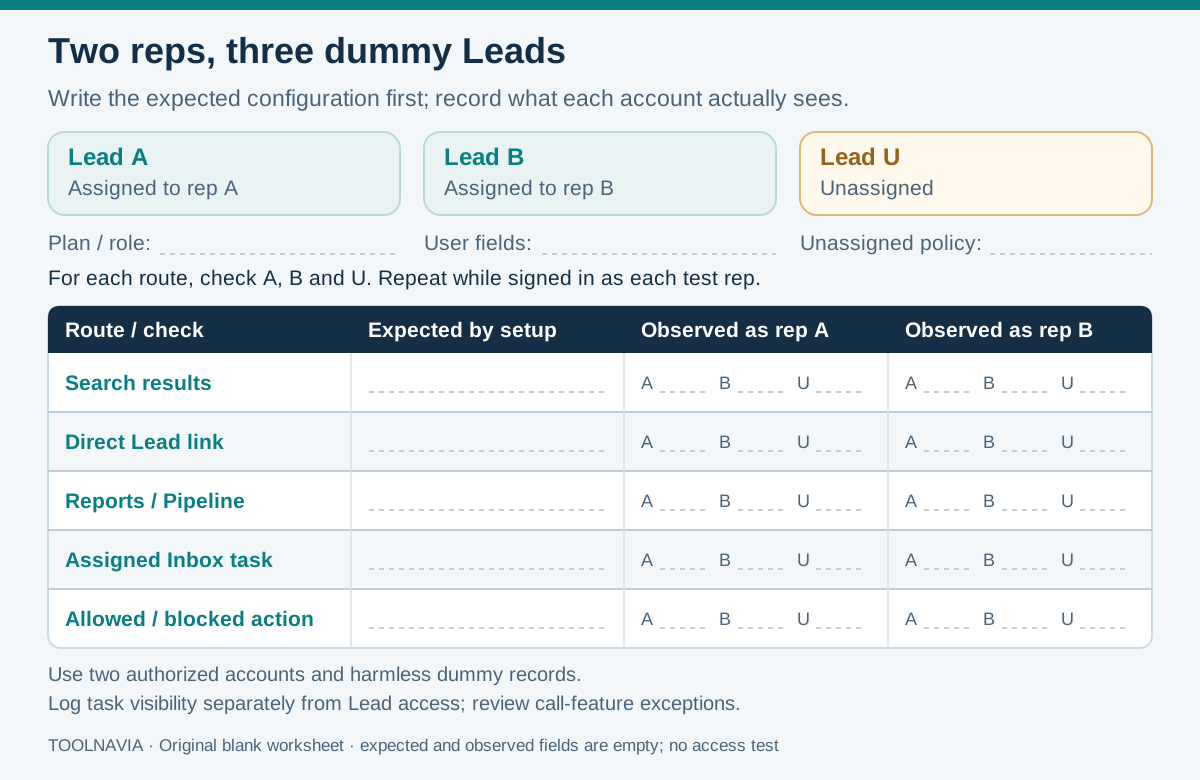
Use authorized test accounts and harmless dummy records. These steps are proposed; the worksheet's observed results are blank.
1. Write separate requirements for permitted actions and visible records. Create accounts A and B, one lead assigned to each, and one unassigned lead. Record the actual plan and role; a broadly enabled trial is not proof of Essentials entitlement.
2. As Admin, open **Settings → Organization → Team Management → Edit**, select the intended preset and save. Sign into each test account separately and attempt a routine allowed task plus relevant export, import or delete restrictions.
3. Check the colleague's dummy lead through search and its direct link, beyond the “my leads” Smart View. Record expected and observed access separately from action permissions.
4. If evaluating Scale, record the controlling user fields and unassigned policy. Repeat searches, reports, opportunities and pipelines, inspect assigned Inbox tasks, and review any Call Coaching invitations. Change a dummy assignment and verify the resulting access again.
Choose the plan that matches the boundary
Other CRMs also require precise questions: HubSpot separates record actions and ownership scope; Pipedrive distinguishes permissions from visibility; Salesforce layers record sharing over object permissions. Their administration exceptions and plan requirements differ, so these references do not establish feature parity.
Choose Essentials when shared records are acceptable and its preset roles fit the work. If hiding other reps' customer records is mandatory, evaluate Scale or another suitable CRM before committing. For ordinary list organization, use our [Smart Views guide](/en/software/close-sales-follow-up-smart-views).
The Essentials offer below is appropriate only for the first case. Toolnavia may earn a commission on qualifying subscriptions.