TOOLNAVIA / BUYING GUIDE
Close Call Recording Retention: Is 30 Days Enough on Essentials?
The short answer
Close Essentials keeps call recordings for 30 days. That can be enough for weekly coaching, but it is a short window for quarterly quality reviews, regulated evidence requests, or teams that postpone audits. Buy Essentials only if 30 days fits the operating policy or the team will export audio on a dependable schedule.
*Official-documentation analysis checked November 1, 2026. Toolnavia did not enable recording, process calls, download account data, or provide legal advice.*
At a glance
- Best for
- Small sales teams whose call-review cycle fits 30 days or that can run a verified recurring audio export.
- Price model
- Essentials $49/user/month monthly or $35 annual-equivalent; usage, Call Assistant and tax extra.
- Check first
- Essentials audio expires after 30 days; transcript/JSON do not replace audio; recording law and archive governance remain buyer responsibilities.
Start with the record you actually need
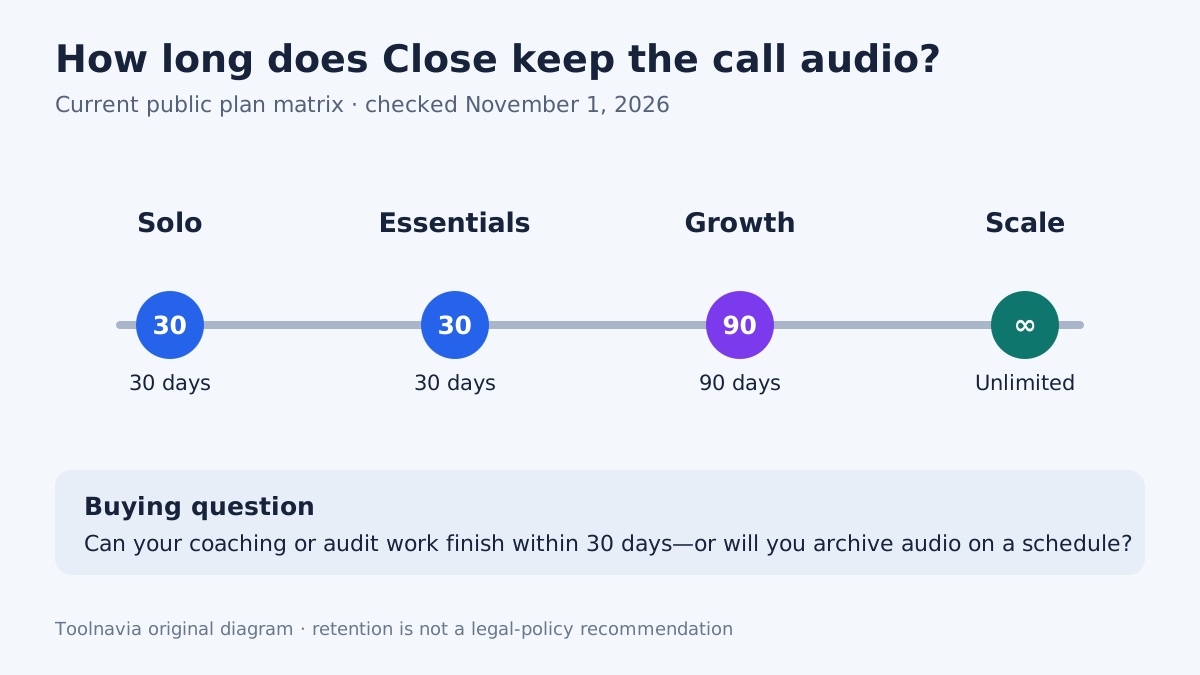
Close stores recorded call audio for 30 days on Solo and Essentials, 90 days on Growth, and indefinitely on Scale. The Calling guide also lets an authorized user download one recording or copy its direct link.
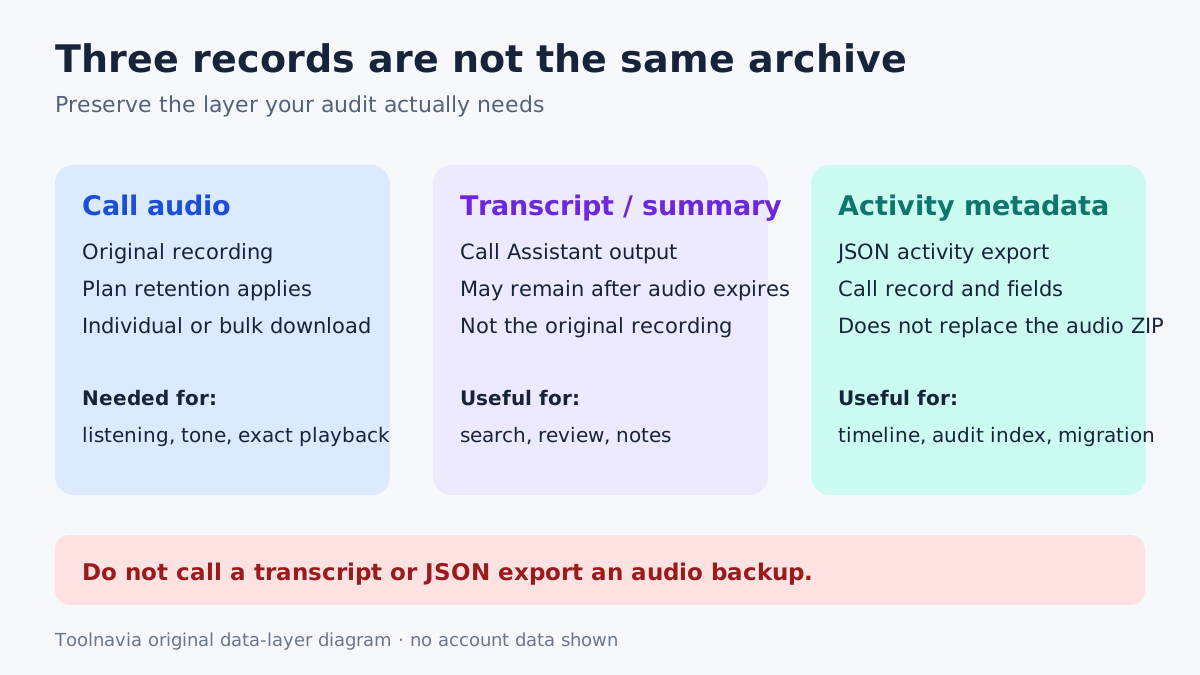
Those facts do not answer every archive question. A team may need one or more of three different records:
- **Audio** preserves the voices, timing and exact playback. The plan retention window applies to this layer. - **Transcript or summary** can help search and review. Where Call Assistant is enabled, Close says transcriptions remain after the recording expires or is deleted. That does not recreate the audio. - **Activity metadata** preserves the CRM record of a call. Close's JSON export is the format that includes all Activities, including Calls, but a JSON call activity is not the audio file.
Write the evidence requirement before choosing a plan. If a complaint needs exact playback, keeping only JSON or a transcript is not enough. If the team needs searchable coaching notes rather than voice evidence, the transcript may be useful—but Call Assistant has separate pricing and scope.
Build the export process before day 30
Close Support Tools can download call recordings and transcripts in bulk, filtered by date range and Smart View. Recordings arrive as a ZIP. The same page warns that Copy Calls does not copy associated recordings, transcripts, or summaries.
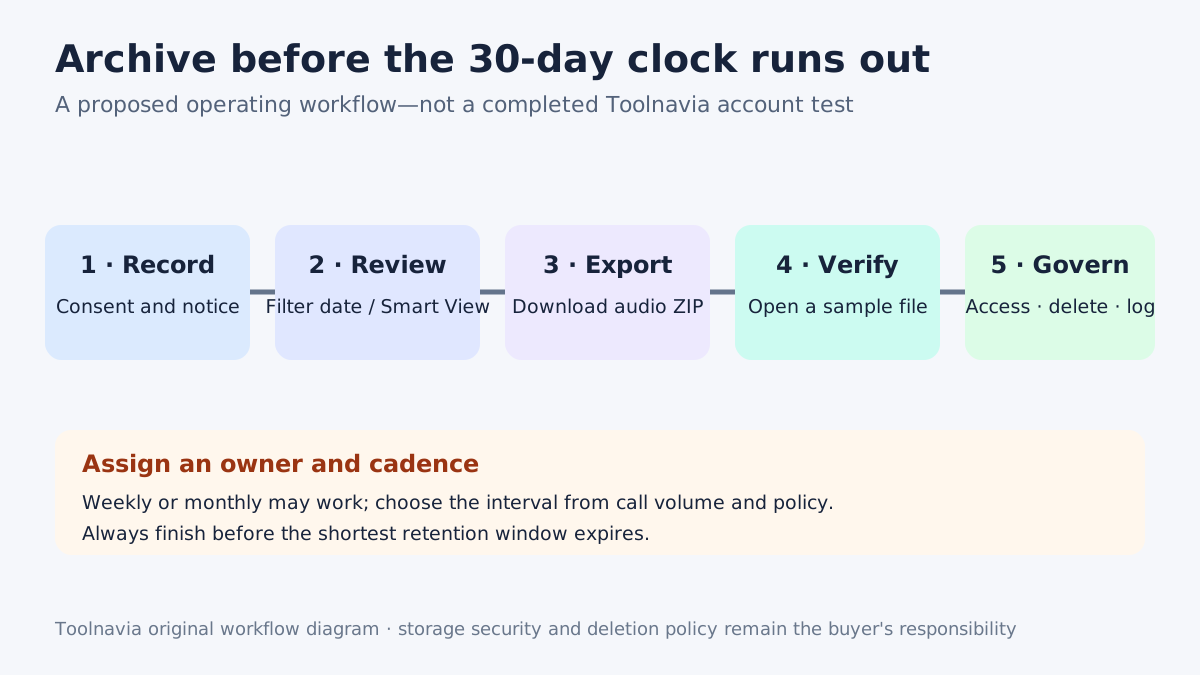
A practical archive routine is:
1. **Name an owner.** Give one role responsibility for the export and another person responsibility for checking that it happened. 2. **Choose a cadence inside the shortest window.** Weekly or twice-monthly leaves more recovery time than a task scheduled on day 29. 3. **Filter a closed date range.** Record the start/end dates and the Smart View used so the next run does not create a gap. 4. **Download the recording ZIP and any needed transcripts.** Treat these as separate outputs. 5. **Open representative files.** A completed download is not evidence that every file can be played. 6. **Store and protect the archive.** Limit access, document retention, and delete copies when policy requires it.
This is an editorial workflow to test in the buyer's account, not a completed Toolnavia export. Direct recording links also require governance: a convenient share link is not automatically an approved long-term archive.
Do not confuse the 30-day clock with cancellation
Removing a user does not delete that person's existing Activities in Close. Account cancellation follows a different rule: after an organization is deactivated or canceled, Close says its lead data is purged 91 days later by default and recommends exporting data before cancellation.
| Deadline | What it controls | Buying consequence | |---|---|---| | 30 days on Essentials | Recorded call audio | Export before the recording expires | | Transcript persistence | Call Assistant text where enabled | Useful text, but not an audio substitute | | 91 days after cancellation | Organization lead data by default | Complete the broader account export before purge |
Do not use the 91-day cancellation period as extra recording retention. A recording can expire under the plan long before the organization purge date.
Compare manual archiving with a plan upgrade
The current public USD page shows Essentials at **$49 per user/month on monthly billing** or **$35 per user/month billed annually**. Growth is **$109 monthly** or **$99 annually**, while Scale is **$149 monthly** or **$139 annually**. Final tax, currency and checkout terms can vary.
Essentials is not automatically cheaper once archive work is included. Estimate staff minutes per export, secure storage and access administration, the cost of a missed 30-day deadline, and whether 90 days on Growth or unlimited retention on Scale removes enough manual work. Do not allocate the whole upgrade price to retention if automation, dialers or permissions are also part of the decision. Conversely, do not call manual exports free merely because the storage bill is small.
Call Assistant is another separate line: Close currently lists **$50 per month per billing account plus $0.02 per transcribed minute**. Calling and numbers are also usage-based; most outbound calls are described as about $0.02 per minute, and phone numbers start at about $1 per month. Actual rates vary by destination and number type.
Put consent, access and deletion around the feature
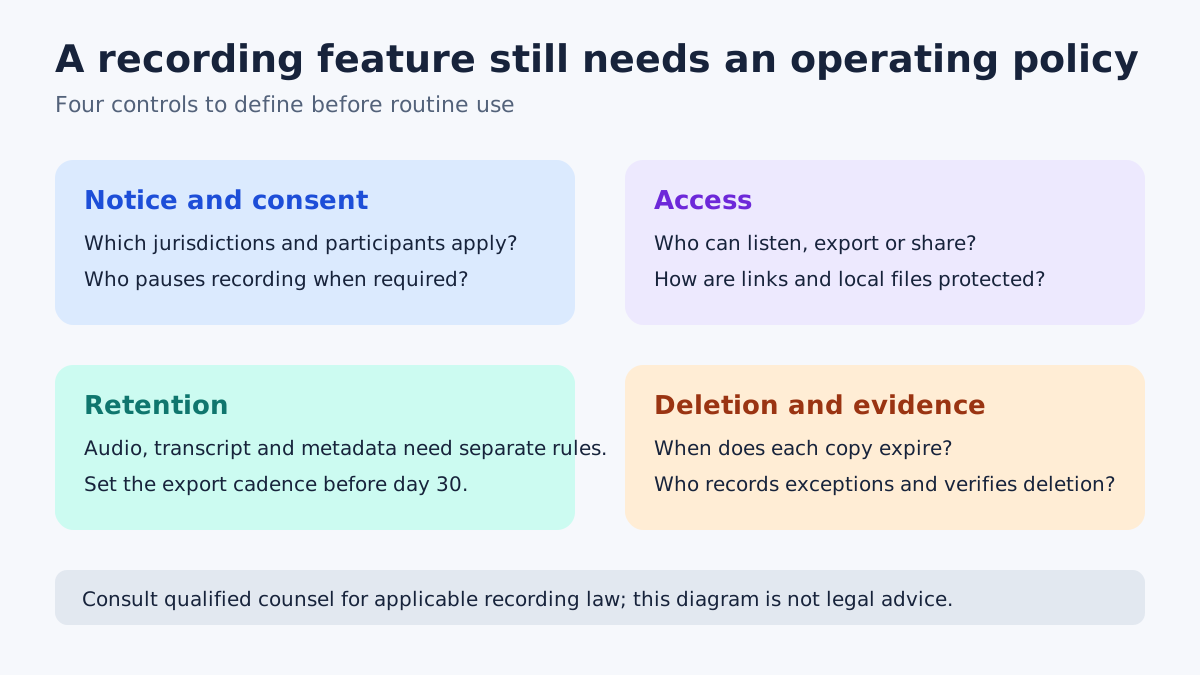
Recording laws and consent duties vary by location and circumstances. Close lets a user pause recording, but the buyer still needs an approved process for notice, consent, sensitive segments, access, sharing and deletion.
HubSpot's official guidance similarly centers consent prompts and jurisdiction review; that supports the need for a policy, not a claim that HubSpot and Close provide identical compliance.
At minimum, decide who may enable or pause recording; what notice is given and how consent is documented; who may listen, export or share a link; where downloaded audio is stored and encrypted; when audio, transcripts, metadata and local copies are deleted; and who reviews exceptions. Consult qualified counsel for the applicable jurisdictions. A CRM setting does not make every call lawful or policy-compliant.
Use competitor workflows as a boundary check
Aircall documents a dashboard/export window and individual MP3 downloads, while its Conversation Center guidance distinguishes downloadable recordings from exported recording links. Dialpad documents individual MP3 downloads, optional Drive backup, and plan-specific access windows.
These are useful questions to ask any vendor: Is the export bulk or one-by-one? Does it contain media or links? How long can users access recordings? Is an external backup automatic? They are not proof that another service is cheaper, safer or equivalent.
Who should buy Essentials
**Choose Essentials** when a small team already needs its CRM and built-in calling, 30 days covers the review cycle, or a named owner can reliably export required audio.
**Consider Growth or Scale** when a longer native window materially reduces risk or labor and the other tier features justify the price. Growth extends recording retention to 90 days; Scale lists unlimited retention.
**Pause the purchase** when no one owns consent, export, storage or deletion; when exact playback must be kept but the team plans to retain only transcripts; or when a policy requires a longer vendor-hosted window that Essentials cannot provide.
For the broader subscription decision, see the [Close Essentials annual-versus-monthly guide](/en/software/close-essentials).
*Affiliate disclosure: Toolnavia may earn a commission through its approved Close Essentials annual link. Confirm the selected plan, billing cycle and current terms; no discount or compliance result is promised.*