TOOLNAVIA / BUYING GUIDE
AOMEI Cyber Backup: Instant Boot or Full Restore Before You Buy?
The short answer
AOMEI Cyber Backup is worth considering when its recovery route fits your downtime limit, target host and backup files. Choose between full recovery and earlier instant boot before paying, then verify how the recovered VM reaches permanent operation. A successful boot alone is an incomplete purchase test.
This is documentation analysis; Toolnavia has not timed or performed a restore.
At a glance
- Best for
- VM administrators with recurring recovery needs who can verify the backup, target resources, edition entitlement and complete recovery route.
- Price model
- November 1 VM row: $99/year, minimum quantity five; VM-only order total, tax and renewal terms require cart confirmation.
- Check first
- No measured recovery time; Instant Restore edition rights and selected VM-only cart total remain unverified, and old tasks need a compatibility check.
Decide when recovery must be finished
| Buying snapshot | AOMEI Cyber Backup Advanced | |---|---| | Offer | Yearly customized VM license | | Four capabilities | Backup-version choice; configurable new-location restore; expanded instant-recovery platforms/repositories; Hyper-V post-instant migration. | | Cost | VM row US$99/year, minimum five; VM-only cart total unverified. | | Fit | Recurring recovery needs with a verified route; keep an existing solution that already passes. | | Poor fit | Buying only for instant recovery while edition rights or the completion route remain unclear. | | Confirm first | Instant Restore edition entitlement, old-task compatibility and completion path. |
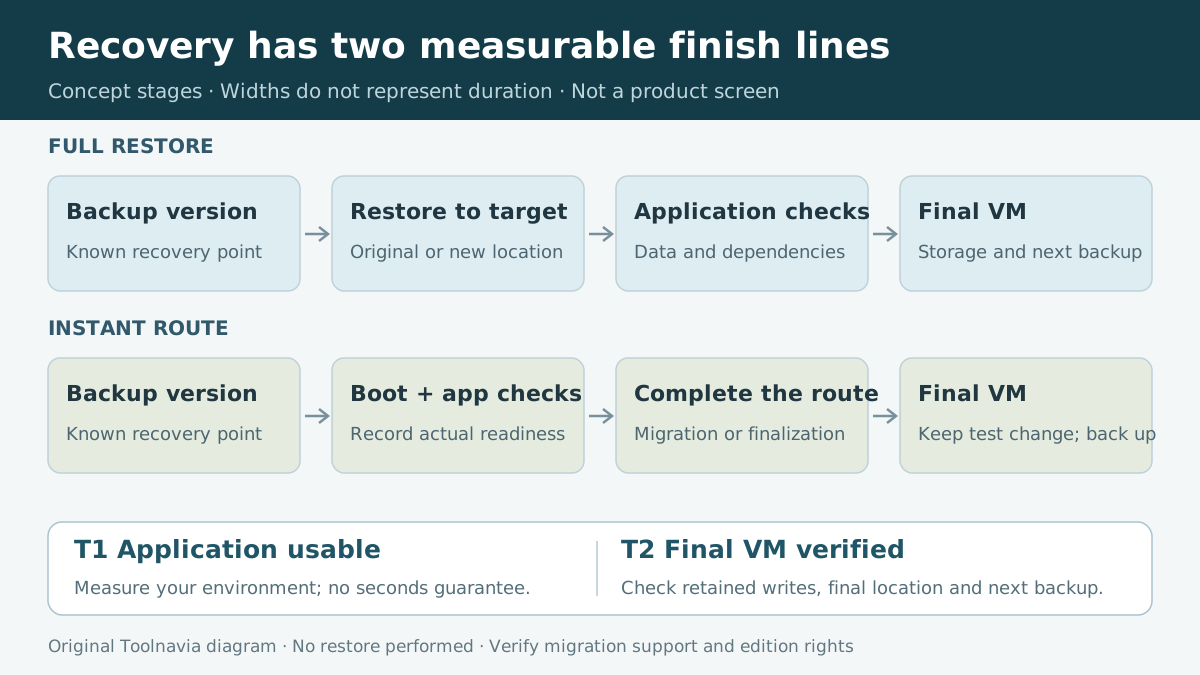
Full restore lets you choose an older backup version when the latest contains the problem you need to undo. Instant Restore provides a route to boot the selected backup state quickly. AOMEI's “usually within seconds” wording is a vendor claim, not a measured result.
Record application availability and final recovery completion separately. For instant recovery, verify that changes written after boot survive the supported completion route.
Check the build behind the instructions
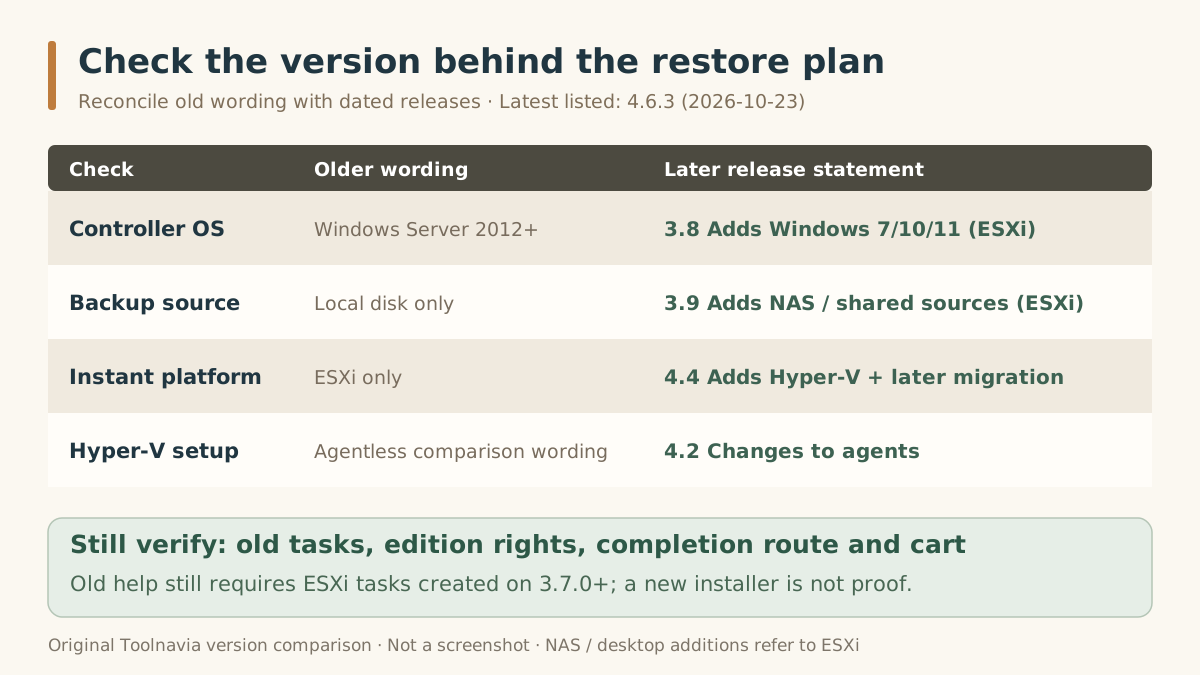
The old AOMEI Instant Restore help still says ESXi only, local-disk backups and a Windows Server 2012-or-later controller. The dated changelog expands those conditions: version 3.8 added Windows 7/10/11 for ESXi instant recovery, 3.9 added shared-network/NAS backup sources, and 4.4 added Hyper-V instant recovery. The latest listed release on November 1 was 4.6.3, dated October 23.
These expanded paths accommodate more repositories and hypervisors. Version 4.4 also lets an instantly recovered Hyper-V VM migrate to another server. Neither capability proves every target combination or disruption-free migration.
Also check agents: the upgrade comparison retains agentless wording, but version 4.2 explicitly switched Hyper-V backup and restore to agents. Keep the older help's requirement that ESXi backup tasks were created with 3.7.0 or later on your verification list. Installing a new build alone does not establish compatibility of every old task.
Choose what happens to the original VM
AOMEI's full-restore instructions default to the original location and require shutting down the VM before restoration. For Hyper-V, restoring there overwrites the original VM with the selected backup state. Preserve newer important data before approving that operation.
Advanced's documented new-location recovery is a concrete paid advantage: create a separate VM and choose its name, datastore, RAM and virtual processors. This supports recovery when the original location is unavailable and lets a rehearsal use a deliberately separate target. The license does not supply spare hardware or prove that the restored application works.
What the annual VM offer actually establishes
On November 1, the annual customized VM row displayed **$99/year and a minimum quantity of five**. The readable upgrade and store pages did not establish the selected VM-only order total. Do not treat that display as either $99 per VM or $99 for five; confirm quantity, annual billing, tax and renewal terms in your cart.
The upgrade page explicitly identifies new-location recovery as paid functionality. It does not clearly assign Instant Restore to Free or Advanced in the readable comparison. Check the exact installed edition before buying solely for instant recovery.
Add target compute and storage, repository headroom, agent maintenance and staff time for recovery rehearsals to the license budget. These costs matter even when the software quote looks small.
Rehearse the complete recovery
Use this proposed acceptance test on an isolated, non-production target:
1. Record controller and agent builds, hypervisor, backup-task creation version, restore point and repository path.
2. Preserve the source and newer data. Give the recovered VM a distinct name and an isolated network.
3. Run the intended full or instant route using that actual backup. Record boot time and application-ready time separately.
4. Verify representative application records, permissions and dependencies; a login screen is insufficient.
5. For instant recovery, make a harmless test change, follow the supported migration or completion route, and verify that the change survives.
6. Check the final VM's application behavior and subsequent backup. Record the final storage location and completion time.
If the edition lacks an option or the permanent recovery route is undocumented for your combination, resolve that before purchase. This is a test to perform, not a report of successful testing.
Buy when the route and entitlement fit
Consider Advanced when its documented new-location recovery and verified workload entitlement solve a recurring recovery need. Keep your existing solution when it already meets the same acceptance test; you need not buy software simply to follow this guide.
Toolnavia may earn a commission from the AOMEI purchase link below. Check the selected VM offer and billing terms; no discount or recovery-time guarantee is promised.