TOOLNAVIA / BUYING GUIDE
WPX Powerstore Cancellation: Refund Rules and Safe Data Exit
The short answer
WPX Powerstore cancellation is not one decision. Stopping the next charge, asking for a refund, moving a WooCommerce store, and restoring a terminated account are four separate workflows. The safest order is to export and test the store first, submit WPX's formal cancellation request second, verify recurring billing separately, and treat any post-termination restore as an emergency possibility rather than a migration plan.
At a glance
- Best for
- Powerstore owners who need a verified WooCommerce migration and an invoice-specific cancellation plan.
- Price model
- Current checkout controls monthly or five-year price; cancellation does not guarantee a refund.
- Check first
- Renewals are not refundable; post-termination restoration is conditional and not a customer-controlled export.
Start with the refund class, not the cancel button
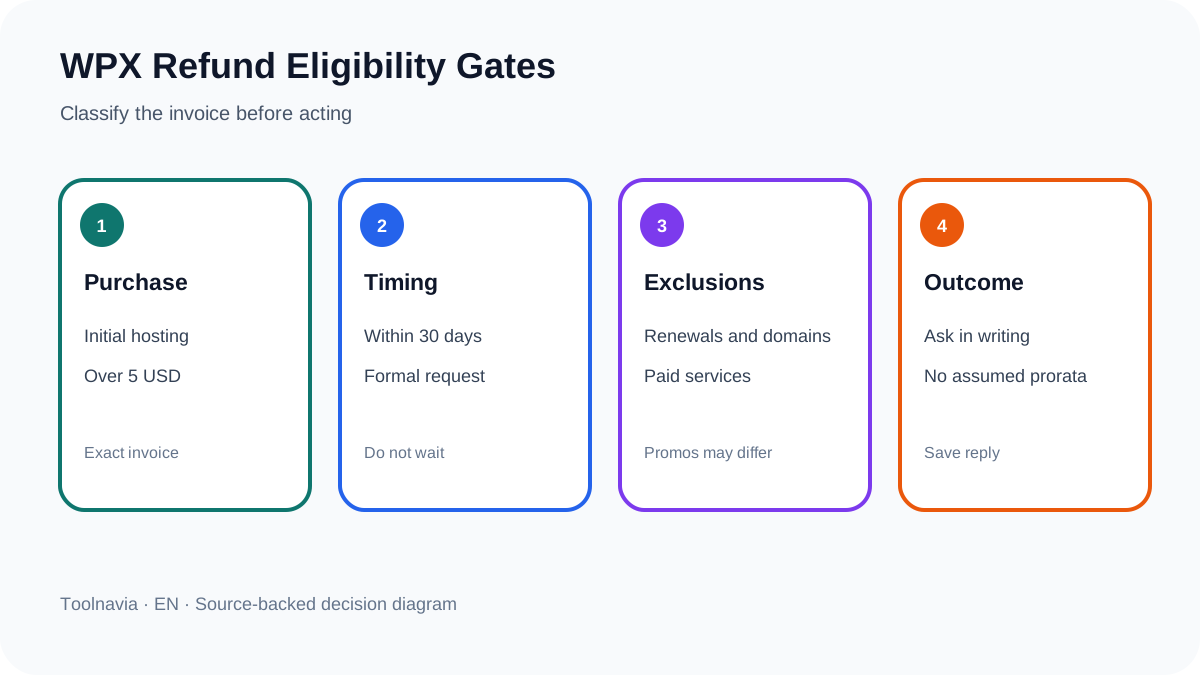
WPX advertises a 30-day money-back window for an initial hosting purchase. Eligibility requires a formal cancellation request through the Client Area inside the first 30 days and a purchase above $5 excluding VAT. The policy says annual initial payments can be refunded within that window, while only the first monthly payment qualifies. Hosting renewals are not refundable, and domains, several paid services, billing-cycle changes, and some promotional purchases have exclusions.
That distinction matters for Powerstore buyers. A monthly buyer asking inside the initial window is not in the same position as a customer canceling after an automatic renewal or ending a five-year commitment. Do not calculate a prorated refund unless WPX confirms one for the exact invoice. The public policy says unused service after the standard window does not create a refund right.
Cancellation must finish inside the Client Area
WPX requires each service to be canceled through its formal Client Area flow. Its cancellation guide directs the owner to Plan Details, the three-dot menu, and Request Cancellation. Completing only part of the flow does not terminate the service; the terms warn that charges can continue until all required steps and confirmation are complete.
Save the request timestamp, confirmation screen, confirmation email, invoice number, and the effective end date. If the plan is the only WPX service, the cancellation guide also tells customers to address an active credit-card or PayPal recurring subscription where appropriate. That is a billing check after the formal WPX request, not a substitute for it.
Build a portable store package before cancellation
The refund policy tells customers to transfer their sites and download needed backups before submitting cancellation because WPX says it cannot retrieve account data after closure. For a WooCommerce store, the exit package should include the WordPress database, wp-content files, uploads, theme and plugin inventory, server and PHP notes, DNS records, email-routing details, SSL and cron dependencies, active integrations, and a dated export of orders and customers where lawful and needed.
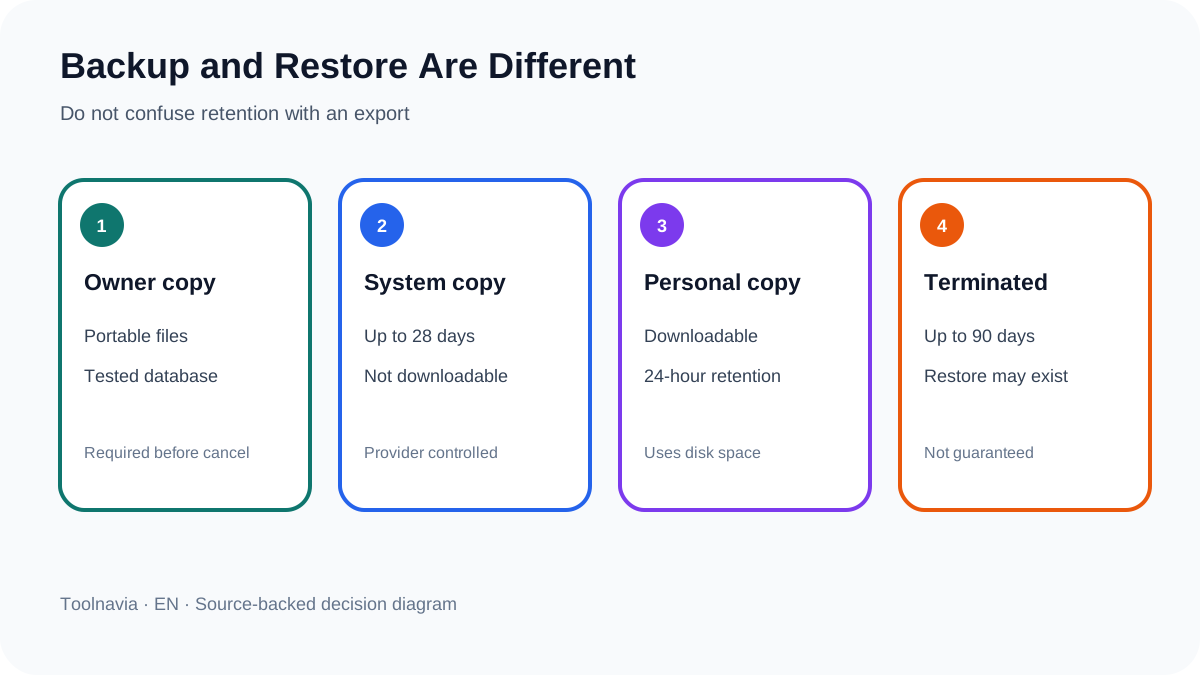
Provider snapshots are not a portable archive. WPX's routine system backups are kept for up to 28 days and cannot be downloaded by the customer; its downloadable Personal Backup lasts only 24 hours and consumes account storage. Create an owner-controlled package, copy it off the hosting account, restore it at the destination or an isolated test environment, open product and checkout pages, verify recent orders, and record file counts and database checks. A successful download is not the same as a successful restore.

The 90-day restore statement is not a guarantee
WPX also says terminated-account backups may be kept on a separate server for up to 90 days. Its restore guide requires the latest invoice to be paid and shows a Restore button only when a backup remains. If that button is inactive, WPX says the data cannot be recovered.
This creates a policy tension with the refund page's categorical instruction that WPX cannot retrieve data after account closure. The cautious reading is that normal customer access and downloadable data end at closure, while a provider-held account restoration may sometimes remain available. The sources do not guarantee that every terminated account will have a usable copy, that it can be downloaded without reactivation, or that restoration will be free. Therefore, never cancel on the assumption that 90-day recovery will rescue a missing export.
Decide what happens to the live store
Before sending the request, lower DNS TTL if a move is planned, schedule a low-order window, freeze nonessential content changes, complete a final database export, and document the last order captured. Migrate the site, test payments in the destination's safe mode, compare orders created around cutover, and then change DNS. Keep the old account active until the new store, admin login, webhooks, transactional email, taxes, shipping, and scheduled jobs are verified.
Independent WPX reviews generally repeat the 30-day initial-purchase rule, the formal cancellation flow, and renewal exclusions. They are useful buyer context, but WPX's current refund policy and terms control the transaction. A third-party coupon or older review must not override the invoice-specific terms shown in the Client Area.
A practical cancellation checklist
Use five gates. First, classify the charge: initial monthly, initial annual or five-year, renewal, promotion, domain, or paid service. Second, export and test an independent store package. Third, move the live store and verify orders, email, DNS, and integrations. Fourth, submit the complete Client Area cancellation request and save confirmation. Fifth, verify that recurring billing is closed and monitor the payment method and WPX account for the expected final status.
If the request is within the initial 30-day window, explicitly ask for an invoice-specific refund instead of assuming cancellation triggers it. If it is a renewal or outside the window, budget for no refund unless WPX provides a written exception. Do not delete evidence while a billing or restoration case is open.
Verdict
Powerstore is easiest to leave when the owner treats cancellation as a controlled migration project. Export and test first, move the store second, cancel formally third, and verify billing last. The possible 90-day terminated-account restore is an emergency provider service with conditions, not an owner backup and not a promise of recovery.
Toolnavia's exact Powerstore offer remains approved, market-confirmed, and enabled. The only commercial link is the matching [WPX Powerstore route](/go/wpx-woocommerce-powerstore-official-usd); checkout controls the current price and terms, and no TOOLNAVIA coupon is claimed.