TOOLNAVIA / BUYING GUIDE
SiteGround GrowBig WordPress Hosting: Staging Limits and $29.99 Renewal
The short answer
SiteGround GrowBig can suit WordPress owners who need several sites, staging and a backup before important changes. Its current $4.99 monthly equivalent requires a prepaid 12-month first term; renewal is displayed at $29.99 per month. Buy for the maintenance workflow only after checking that your database fits the staging limits.
At a glance
- Best for
- WordPress owners who need 50GB, multiple sites, staging and backup checkpoints and can budget for renewal.
- Price model
- $4.99/mo equivalent first 12 months · $29.99/mo displayed renewal reference
- Check first
- Current SiteGround staging docs conflict on a database threshold below 5GB versus below 2GB; use the stricter limit for planning and verify checkout/renewal.
Four useful GrowBig features
Room for several ordinary websites
GrowBig includes 50GB and unlimited websites within the plan's resources. The detailed comparison gives about 100,000 monthly visits as a suitability reference, not a guarantee for every workload. This can simplify a small portfolio, but shared storage and resource headroom still need to cover all its sites.
A separate place to check WordPress changes
Staging provides a copy for reviewing plugin, theme and content changes before deployment. A team can agree on an acceptance checklist before touching production. It is especially useful when an update affects forms or customer journeys; it does not make an older copy safe to overwrite newer live data.
A backup checkpoint before an update
Shared hosting includes up to 30 daily copies, and GrowBig has five free slots for manual backups. Restores can target files, databases or email. Create a named checkpoint before a risky change and keep an independent copy of important data. Included recovery points are useful without proving that your own recovery procedure works.
A choice about which changes go live
SiteGround provides full and custom deployment. Custom deployment lets you select files and database tables to add, update or delete. This can help preserve live comments or orders when only a design change should move. Someone still has to understand the selected tables and verify the resulting site.
Price the first year and the renewal separately
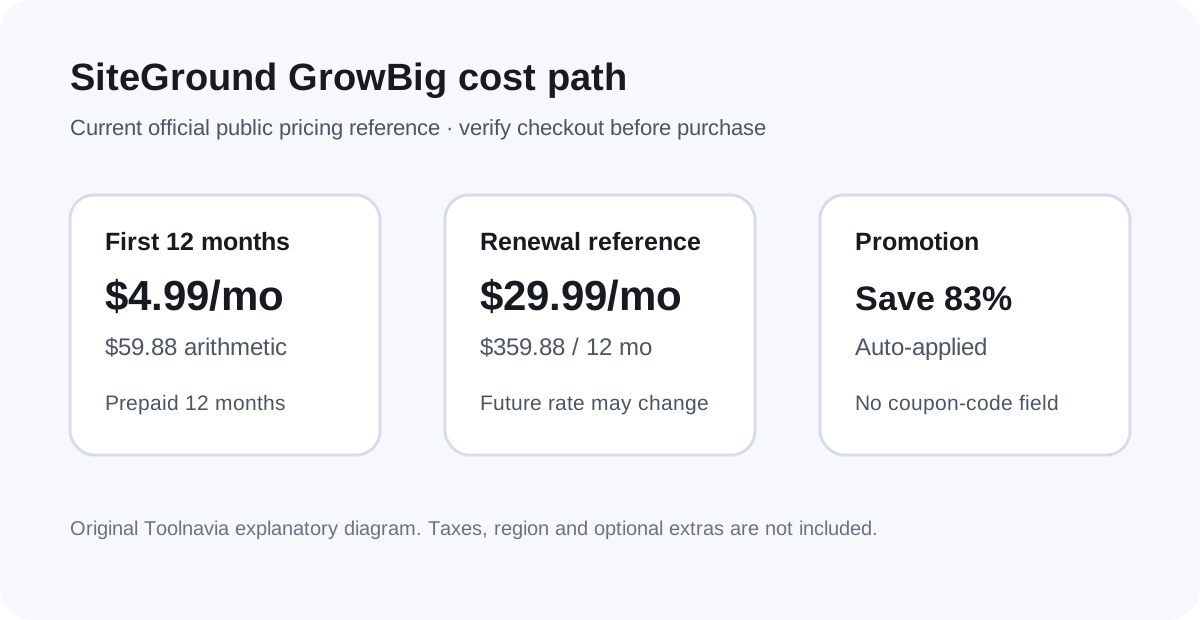
At the checked public USD rate, $4.99 × 12 is $59.88 for the first hosting term. At the displayed $29.99 renewal equivalent, another twelve months would be $359.88. These are arithmetic references before applicable tax or optional extras; the selected checkout market, term and future renewal notice control the actual invoice.
The provider currently displays an 83% introductory saving. Its own promotion guide says the discount is applied automatically, with no coupon-code box. Do not spend time searching for a code to unlock that advertised price. A first-term discount also does not establish a discount on later renewals.
The official staging limits need a conservative reading
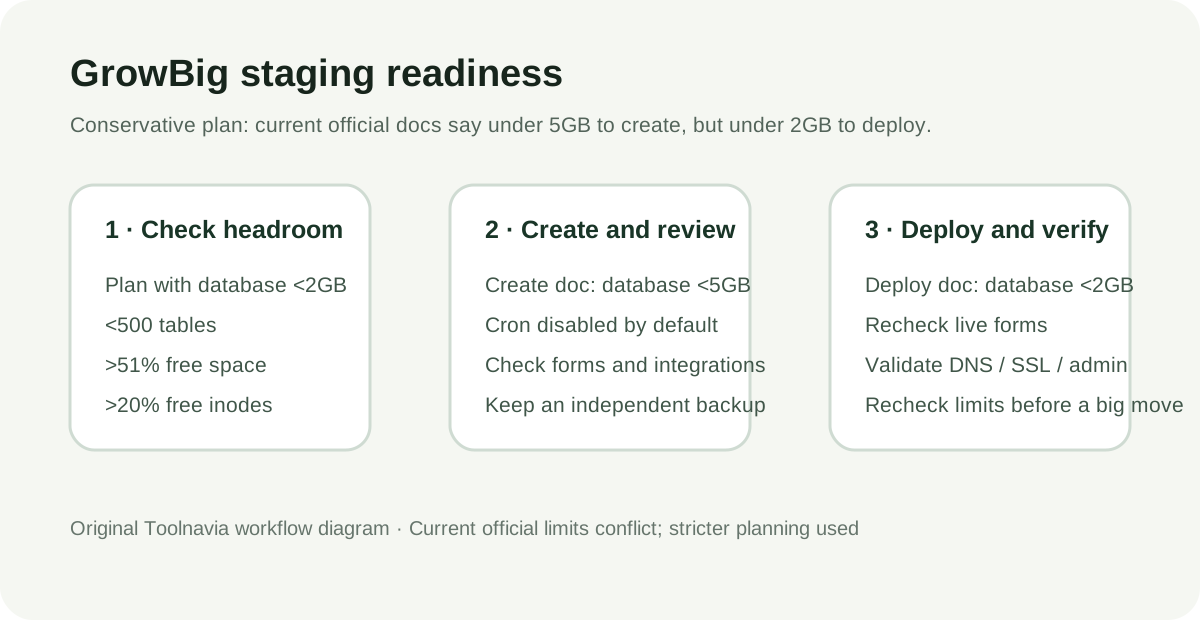
The current create-staging guide says the database must be below 5GB, but the deploy guide still says below 2GB. Those are different published thresholds. Until SiteGround clarifies the workflow for your account, plan below 2GB; a 2–5GB database should not be purchased into this workflow on the assumption that successful creation guarantees deployment.
Both documents also require fewer than 500 tables, more than 51% free account space and more than 20% free inodes. They allow up to ten staging environments and fifteen staging operations daily, and exclude WordPress Multisite. Ordinary separate websites are therefore different from one Multisite installation. Check the database and account headroom before choosing the plan.
Keep backup retention separate from your archive
The backup guide warns that deleting a site removes access to its provider backups. Downloading through the provider's interface requires the relevant Premium Backup feature, while making your own copy is another option. An independent export before a migration or deletion is therefore part of the decision, not an optional task to discover after removing the old site.
A restore can change more than the broken page. Write down which files, database and mail data you intend to recover, and verify those parts after restoration. Keep current orders and submissions in mind when selecting a recovery point.
A practical change and migration checklist
Inventory every website, database size, table count and recurring job. Keep the previous host available while you check the migrated copy, SSL, DNS, email and representative pages. Record the first payment and renewal budget before selecting extras.
Before a WordPress change, make the independent copy and backup checkpoint, then test the staging site against the tasks visitors actually perform. Default WordPress cron is disabled in staging to prevent duplicate automated actions; review external integrations before enabling background activity. Deploy only the required changes, then repeat the important checks on the live site.
Who should choose GrowBig
Choose GrowBig when several sites, 50GB, eligible staging and manual backup checkpoints are worth the ongoing bill. A simple single site without a staging requirement may justify a smaller plan. Multisite, a database near the disputed threshold, or a renewal budget below the displayed rate warrants another plan or confirmation before migration.
SiteGround has an open cash-paying affiliate application route, but Toolnavia has not been approved and keeps affiliate tracking disabled. This guide is based on documented features and proposed checks, not a claim that Toolnavia benchmarked your workload.