TOOLNAVIA / BUYING GUIDE
ScalaHosting Build #1 Node.js: Ports, Paths and Restarts
The short answer
ScalaHosting Build #1 can suit a Node.js team that wants managed server maintenance while keeping responsibility for its application. SPanel supplies a launch interface and application controls; your code still needs a compatible runtime, dependencies and configuration. This is an analysis of official documentation with a suggested acceptance workflow.
| Quick purchase check | Build #1 scope | |---|---| | Resources | 2 CPU cores, 4GB RAM, 50GB NVMe | | Workflow | Preconfigured Node.js/npm, NodeJS Manager, individual restart and deployment API | | First term | $269.52 prepaid for 12 months, or $1,078.20 for 36 months | | Renewal | Published $54.95/month equivalent; check the renewal term | | Fit | Existing app with confirmed requirements; wait if runtime or worker compatibility is unclear |
At a glance
- Best for
- Teams with an existing compatible Node.js app that want managed platform operations and per-app controls.
- Price model
- $269.52 prepaid for 12 months or $1,078.20 for 36 months; published standard renewal $54.95/month equivalent, before checkout conditions.
- Check first
- Confirm runtime and custom dependency/worker requirements. Builds, secrets, application checks and rollback remain the team's responsibility.
Give the URL, startup file and port different jobs
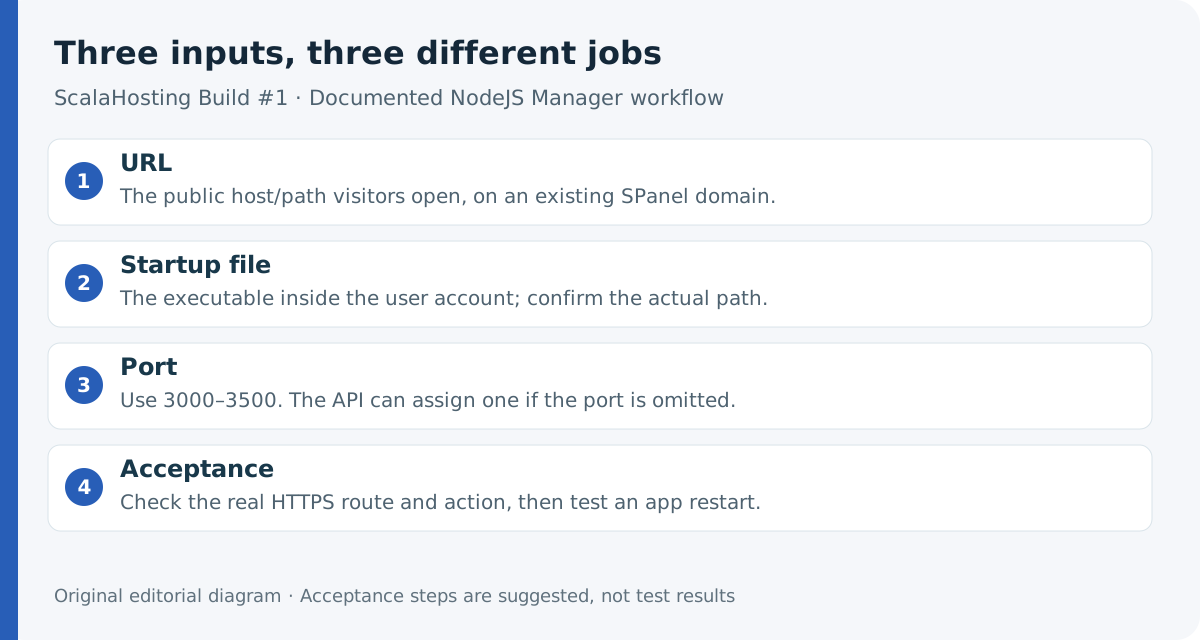
Use a domain already present in the SPanel user account. The **URL** identifies where visitors reach the app. The **executable path** identifies its startup file inside that account; it is not the public URL or simply the parent folder. The **port** is the network endpoint the application listens on.
The documented range is **3000–3500**. The deployment API can choose an available port when omitted; that does not establish that the dashboard accepts a blank port. Confirm how your app receives and uses its assigned port.
Four benefits for an application team
**Begin with Node.js and npm available.** SPanel lists both in its installed stack, so the starting task is preparing your application rather than installing the runtime from scratch. Availability does not establish which version your app will receive.
**Restart the selected app.** NodeJS Manager exposes Stop, Restart and Undeploy for individual applications. After a release, that gives you a focused control instead of rebooting the whole VPS. It is not a zero-downtime release promise.
**Reuse deployment inputs through an API.** The documented endpoint accepts the account, domain, executable path and optional port. A team can incorporate those inputs into its own deployment process; it must still provide suitable build and acceptance steps.
**Get help with the platform.** ScalaHosting's managed-support table covers the operating system, SSL and SPanel. Application errors and custom-code debugging are best effort. This can reduce server-maintenance work without handing ownership of the application to the host.
Budget the prepaid term and renewal
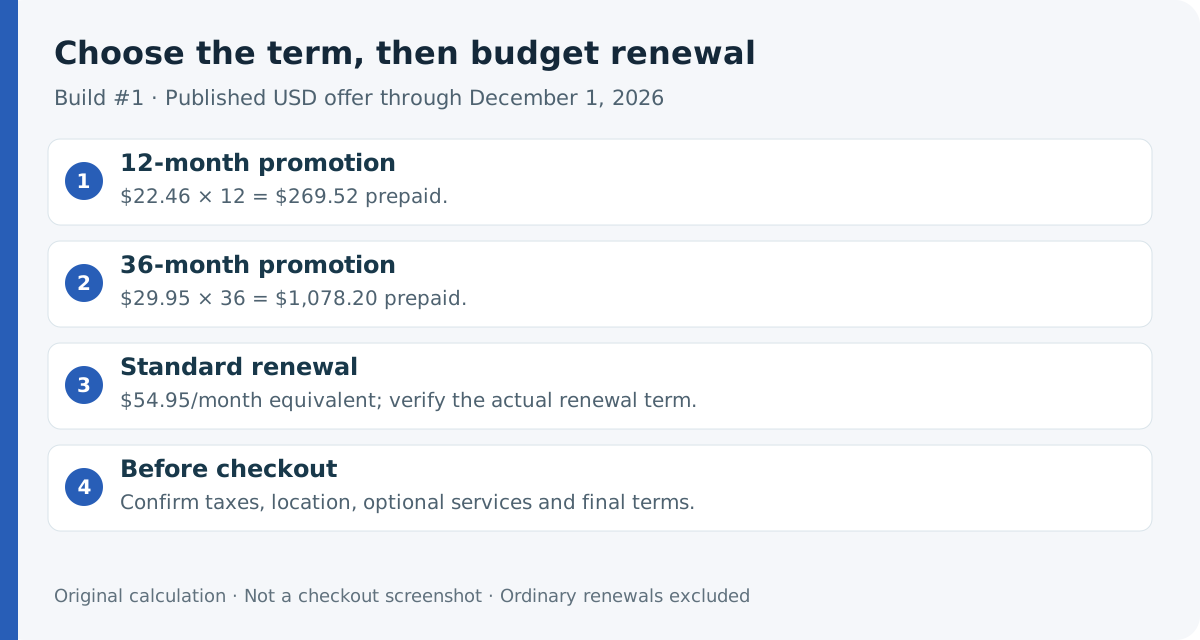
The current Black Friday offer lists $22.46 × 12 = **$269.52**, or $29.95 × 36 = **$1,078.20**. These are prepaid terms, not monthly payment options at those rates. Standard renewal is listed at **$54.95/month equivalent**. The promotion runs through December 1, 2026, for qualifying new plans and upgrades; ordinary renewals are excluded.
The totals are calculations from published USD rates, not a tested cart. Confirm the term, location, taxes and optional services. SPanel, automatic offsite backups and unmetered bandwidth are listed; confirm retention and any paid add-ons at checkout. “Unmetered” does not expand the finite CPU, memory or storage shared by the operating system, databases and your applications.
Prepare the application before clicking Deploy
Confirm a currently supported Node.js LTS release that also works with your project. The tutorial's Node 14 installation example is historical; Node's lifecycle page marks that branch end-of-life. It does not establish today's provisioned runtime.
Record the startup file, dependency versions, build instructions, required secrets and database connections. Keep a recoverable previous release. If the project uses a compatible lockfile workflow, npm documents `npm ci` for clean installation; a manifest/lockfile mismatch fails instead of silently rewriting the lock.
Dependency installation, framework builds and secret configuration need your own documented process. The reviewed SPanel deployment instructions do not establish automatic handling of those tasks. Confirm native modules, background workers or unusual system dependencies before paying.
Verify the application after launch and restart
Suggested workflow: upload the prepared app, open **User Interface → NodeJS Manager → Deploy a New App**, and supply the verified URL, startup path and port. The provider documents the launch controls; the following acceptance checks are editorial recommendations.
Open the intended HTTPS route and complete a representative action, such as a read-only database lookup. Check the expected release and dependency connection, not just the homepage or a successful deployment response. Inspect application output if it fails.
During a planned test, restart that application and repeat the same action. Check that required data remains intact. Keep the previous release recoverable; do not assume Undeploy provides rollback, or that Restart guarantees automatic recovery after every failure.
Choose by the application's requirements
Choose Build #1 when the documented controls fit your app and managed platform support justifies the recurring cost. Keep an existing reliable setup when migration offers no specific benefit. If a required runtime, worker or system change remains unconfirmed, resolve that requirement before ordering.
For unusual server privileges, our [ScalaHosting SSH and root guide](/en/hosting/scalahosting-build1-root-ssh-access-responsibility) explains the separate access decision.
Affiliate disclosure: Toolnavia may earn a commission from an eligible purchase through the existing approved ScalaHosting referral link.