TOOLNAVIA / BUYING GUIDE
Namecheap Stellar Business: More CPU, but the Same 2GB RAM
The short answer
At a glance
- Best for
- CPU or EP constrained accounts that fit 50GB and shared-hosting policy.
- Price model
- $4.98/mo first-year card; $128.88 annual renewal; upgrade quote separate.
- Check first
- RAM stays 2GB and I/O stays 50MB/s versus Plus; no speed guarantee.
Paying more only helps if the right limit moves
Choose Stellar Business when your current Plus account needs more CPU allowance or concurrent entry processes and still fits within 50GB. Do not buy it solely to fix memory exhaustion: both plans list 2GB physical memory. A more expensive name does not make every resource larger.
This is a documentation-based buying guide, not a benchmark or an account migration. Start with the resource that actually failed, then compare that resource with the new plan. That ordering avoids paying for capacity your workload cannot use.
Four limits, two changes
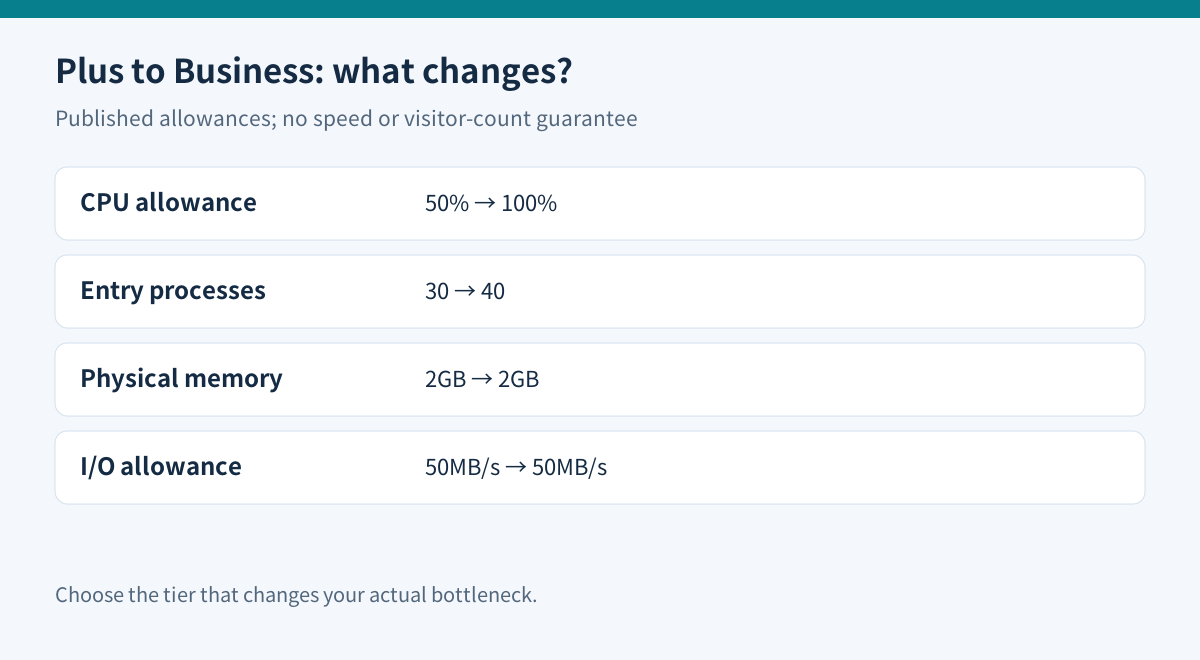
Namecheap's published resource table gives Plus 50% CPU allowance, 30 entry processes, 2GB memory and 50MB/s I/O. Business changes the first two to 100% and 40; memory and I/O remain unchanged. The CPU percentage is a published allowance, not a promise to halve page-load time.
CloudLinux treats CPU, memory, I/O and entry-process limits separately. Saturating one can produce a different failure from saturating another. An entry process is also not a unique visitor, so “40 EP” cannot support a claim that only 40 people can browse the site. Cached pages and expensive uncached requests use resources differently.
Open cPanel's Resource Usage history for the period of the slowdown. Record the time, fault counter, workload and recent changes. A screenshot of a quiet moment is weak evidence. For an illustrative shop, repeated EP faults during uncached checkout would make the higher EP allowance relevant; a repeated memory ceiling during an import would not. These are decision examples, not results from a tested store.
The 50GB boundary can reverse the upgrade
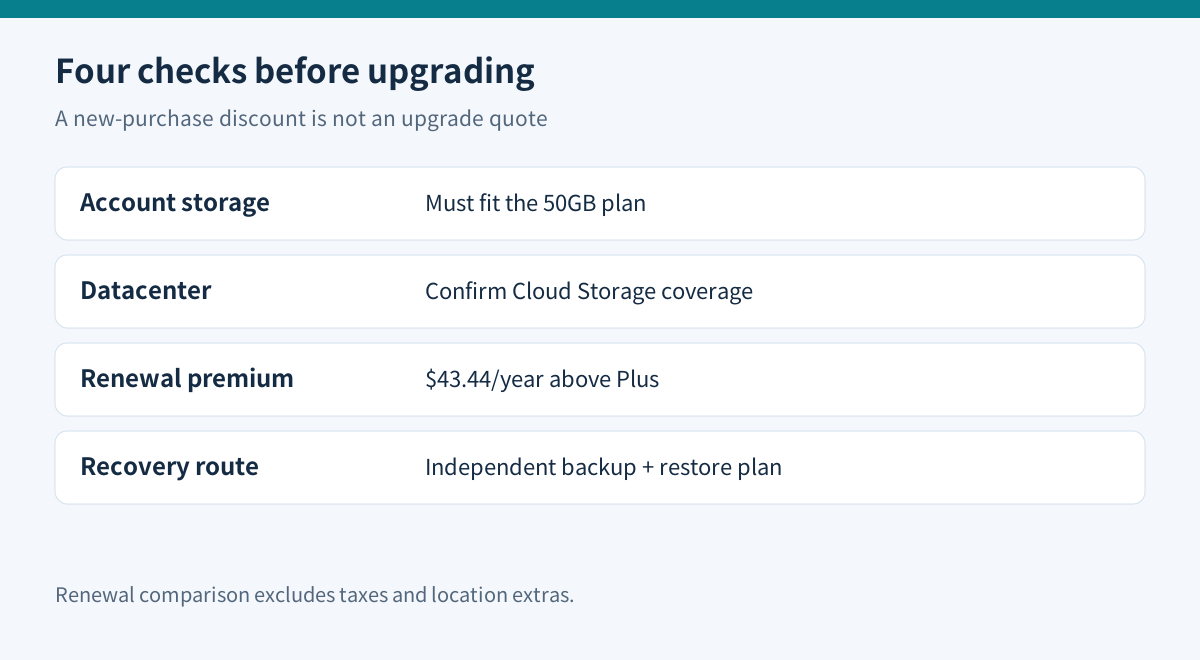
Plus advertises unmetered storage, subject to policy. Business has a 50GB account limit and 600,000 inodes. The official Business guide says support checks disk usage before upgrading; an account already above 50GB needs another option. Count website files, mail, databases and retained archives before requesting the change.
Do not treat Cloud Storage as an exclusive Business feature everywhere. The current comparison includes it for every Stellar tier in EU and Singapore, and for Business in the US. The UK is not included in that Cloud Storage list. Pick a location for the site's audience and confirmed service configuration; the marketing term does not prove an application will be faster.
The acceptable-use policy also imposes category limits, including 10GB for multimedia and 10GB for databases and dumps. Its temporary CPU burst allowance is not sustained capacity. Business remains shared hosting with operating restrictions, rather than an unrestricted server.
Backup storage is a separate benefit
The policy describes unlimited AutoBackup storage for Business, unlike Plus's 25GB backup threshold. That does not remove the 50GB hosting limit or guarantee every recovery point. Weekly system backups have their own eligibility conditions; do not confuse them with the customer-facing AutoBackup tool.
Before an upgrade, keep an independent, matching set of WordPress files and database data. WordPress explains why both are necessary. cPanel distinguishes downloadable full-account archives from restores that require provider or WHM involvement. Confirm who can restore your chosen archive before depending on it.
Price the renewal and the actual change
The current Business page advertises $4.98 per month equivalent and a 58% badge against an $11.88 monthly reference. Multiplying the displayed amount by twelve gives a $59.76 first-year estimate, not a checked invoice. The published annual renewal is $128.88; Plus renews at $85.44. Business therefore adds $43.44 per renewal year, or $3.62 per month equivalent. Taxes and location extras may change the bill.
An existing Plus customer should request the upgrade charge, remaining-term treatment and next renewal amount. A new-subscription promotion does not prove that an existing-account upgrade receives the same discount. Likewise, an advertised trial is not evidence that an upgrade starts a new free period.
A reversible purchase check
Save the baseline fault history, list current storage, and obtain a written quote. Prepare the independent backup and agree on the recovery route. After an authorized change, repeat the same representative workload and compare fault counts, errors and response times over a comparable interval. Avoid aggressive load tests on shared hosting.
Buy Business when its changed limits match the recorded bottleneck and the total bill is acceptable. Stay on Plus if tuning a runaway plugin or scheduled job resolves the problem. If memory, I/O or sustained resource needs remain the constraint, compare a genuinely larger managed environment instead of assuming this tier will solve it. The right purchase is the one whose documented limits fit the workload.
Toolnavia may earn a commission through the linked official affiliate destination. That does not change the unchanged-memory warning or substitute for a performance test.