TOOLNAVIA / BUYING GUIDE
GreenGeeks vs WPX WordPress Hosting: Lite or Starter for One Site?
The short answer
For one WordPress site, GreenGeeks Lite and WPX Starter can look surprisingly close in a five-year budget while demanding very different cash upfront. Lite offers more local storage and a short initial commitment. WPX's stronger distinction is direct access to a documented daily recovery history. This is an official-document comparison, not a performance test.
At a glance
- Best for
- One-site owners comparing a low first invoice with panel-based daily recovery and a five-year purchase.
- Price model
- Lite $35.40 / first year; WPX $719.60 / five years prepaid. Lite $705 five-year scenario is not a fixed quote.
- Check first
- Current price illustrations, unresolved policy wording and no hosting performance test.
At a glance
| Decision | GreenGeeks Lite | WPX Starter | |---|---|---| | First purchase shown | $35.40 for 12 months | $719.60 prepaid for 5 years | | Current five-year illustration | $705 if today's renewal stays unchanged | $719.60 current prepaid offer | | Sites and storage | 1 site, 25GB | 1 site, 10GB | | Traffic | Unmetered, subject to resource policy | 100GB bandwidth; unlimited visitor count | | Provider restore route | Manual request; first monthly restore free, then $25 | Panel restore of daily system copies | | Backup history | Conflicting official descriptions; no guaranteed date | 28 days described in backup documentation | | Independent copy | Export outside the account | Download a personal backup; system copies cannot be downloaded |
Both options are evaluated in the public USD market before tax, domains, email and extras. The GreenGeeks five-year number is a scenario, not a five-year contract.
Similar five-year arithmetic does not mean similar commitment
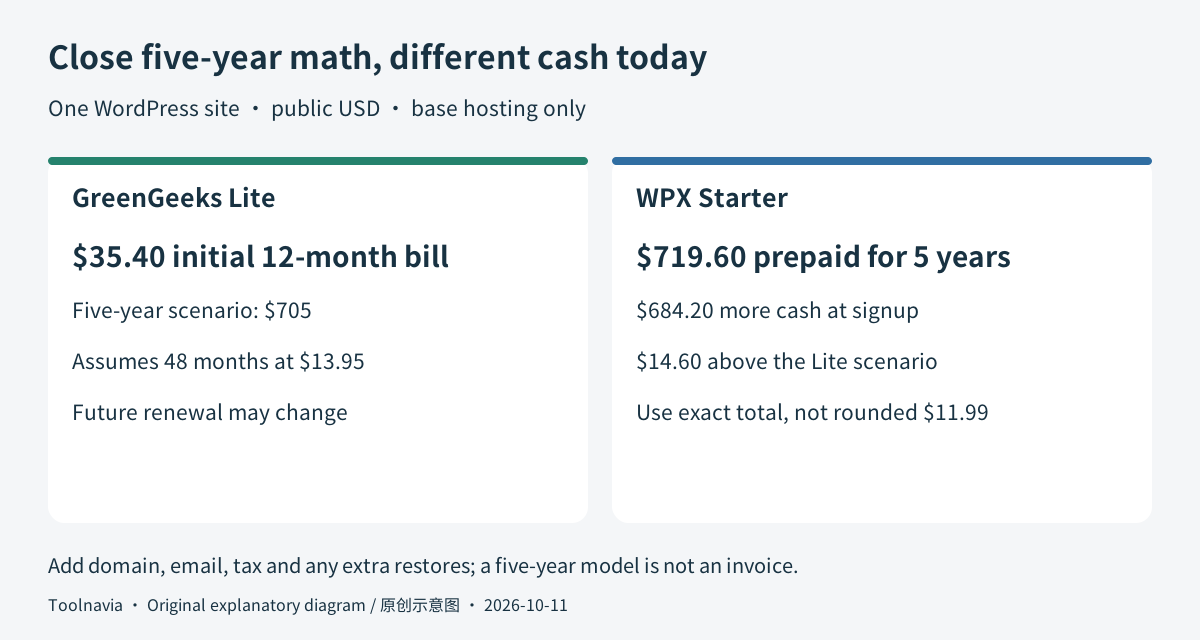
Lite's initial purchase is $2.95 × 12 = **$35.40**. At its current $13.95 monthly renewal reference, four further years would add $669.60, producing **$705** over five years. The reader can reassess the service before each renewal; future rates may change.
WPX shows an exact **$719.60 prepaid for five years**, only $14.60 above that Lite model. Use the exact prepaid amount: the displayed $11.99 monthly equivalent is rounded, so multiplying it by 60 does not reproduce the invoice. The same page shows a $17.99 regular reference; verify the chosen term and eventual renewal in the order.
The immediate cash difference is much larger: **$684.20**. Do not prepay five years just because a modeled long-term difference looks small. A project with uncertain duration may value Lite's smaller initial purchase, even if it could become more expensive later.
Additional Lite manual restores can change the comparison: two chargeable restores would add $50. That is a scenario, not an expected annual fee. Conversely, external email or a domain may add costs to the WPX route. Build the bill around services you actually use.
Use storage headroom for the website, not forgotten archives
Both plans allow one website, so neither is a solution for a growing collection of independent sites. Lite offers 25GB against Starter's 10GB. A site with a 12GB media library cannot fit WPX Starter unchanged; reorganizing or externally hosting media becomes a separate migration task.
WPX publishes 3GB RAM, 0.5 CPU cores and nine PHP workers. Workers handle PHP requests; the count is useful when discussing dynamic workload limits, but it does not prove nine simultaneous visitors or a response-time result. Its 100GB bandwidth limit still matters despite an unlimited-visitor label.
Lite's unmetered traffic is not unlimited computing. GreenGeeks' Terms allow throttling and other action when allocated resources are overused. Choose using your measured workload and required headroom, not a winner inferred from unlike CPU labels.
The meaningful WPX benefit is a restore you can initiate
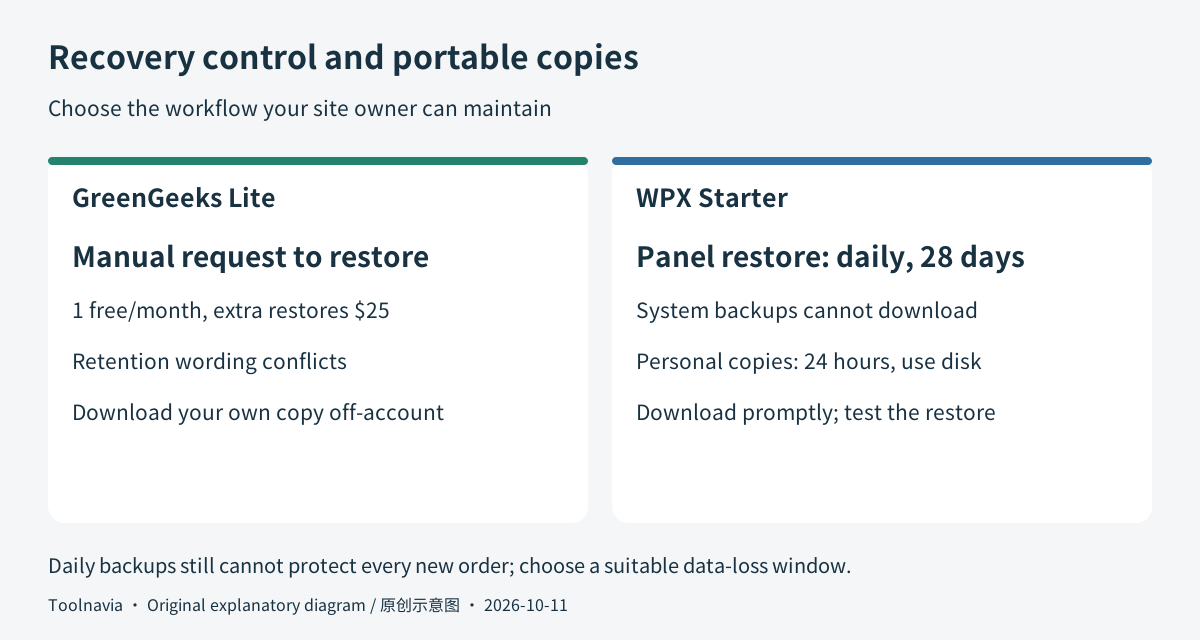
WPX documents daily backups on a separate server, kept for 28 days and restorable from its panel. That gives the owner a visible recovery route after a bad update without first requesting a manual restore. Those automatic copies cannot be downloaded and skip archives, including backup-plugin archives.
Its separate Personal Backups feature can create downloadable copies, but they occupy your hosting disk and remain for only 24 hours. A 10GB plan therefore needs room for that operation. Download the copy promptly; a backup button is not permanent off-account storage.
Lite's policy instead offers one free manual restore per month, with additional restores at $25. Direct access to system backups is reserved for Pro and Premium. The policy aims for about 30 sets, while the Terms describe a 24-hour disaster-recovery copy. Because those statements conflict, this comparison does not promise Lite a fixed 30-day history or a particular recovery date.
A rarely changed personal site may not need WPX's restore convenience. A business owner making frequent changes may value it. A busy store can still need more frequent protection than one daily copy, whichever provider is chosen.
Verify email separately from WordPress help
WPX Starter includes site migration, SSL, malware scanning/removal and support in its exact plan card. These are useful when the buyer wants help operating one WordPress site, but they are not a guarantee that every custom-plugin problem will be repaired.
Email needs special care: the plan hierarchy adds Business Email at the Business tier, while a generic section claims email is included with any plan. That unresolved wording means **Starter email is unconfirmed** here. Keep an existing mailbox provider or obtain written confirmation before budgeting a replacement.
GreenGeeks' conventional cPanel tools can suit an owner who wants to manage application files and settings directly. Its smaller first purchase and extra space remain advantages even if specialist recovery access is less convenient. Confirm mailbox quotas and transfer scope for the selected Lite order.
Rehearse one broken-update recovery before committing production
Suggested acceptance procedure: record your site's files, database size, mail provider and latest business data. Make an independent files-and-database copy before moving; WordPress documents that both components are needed.
Create a disposable test copy. Record a baseline page and form entry, make a harmless change, then restore the baseline into that test environment. Check login, images and the recorded entry. Ask the provider how to preserve newer orders before any real database rollback.
For Lite, establish who submits the restore ticket and the possible fee. For WPX, locate the system restore and personal-download routes, and check available disk space. The output should be a recoverable copy plus written recovery duties. Toolnavia has not performed this test on either service.
Pick the operating model before the low monthly label
Choose Lite for one storage-heavy but modest site when a one-year initial commitment and a $35.40 starting bill fit the project. Choose WPX Starter when the site fits 10GB and panel-based daily recovery plus the included WordPress help justify its selected billing commitment.
If self-service restore is the only missing feature, also read the existing [GreenGeeks Pro restore analysis](/hosting/greengeeks-pro-backup-restore) before changing providers. If the current host already meets your needs, moving is optional.
The approved buttons may open the provider's general website; select the exact plan and term before payment. Toolnavia may earn a commission from qualifying purchases through these links.