TOOLNAVIA / BUYING GUIDE
Cloudways DigitalOcean Standard vs Premium: What Does $3 More Buy?
The short answer
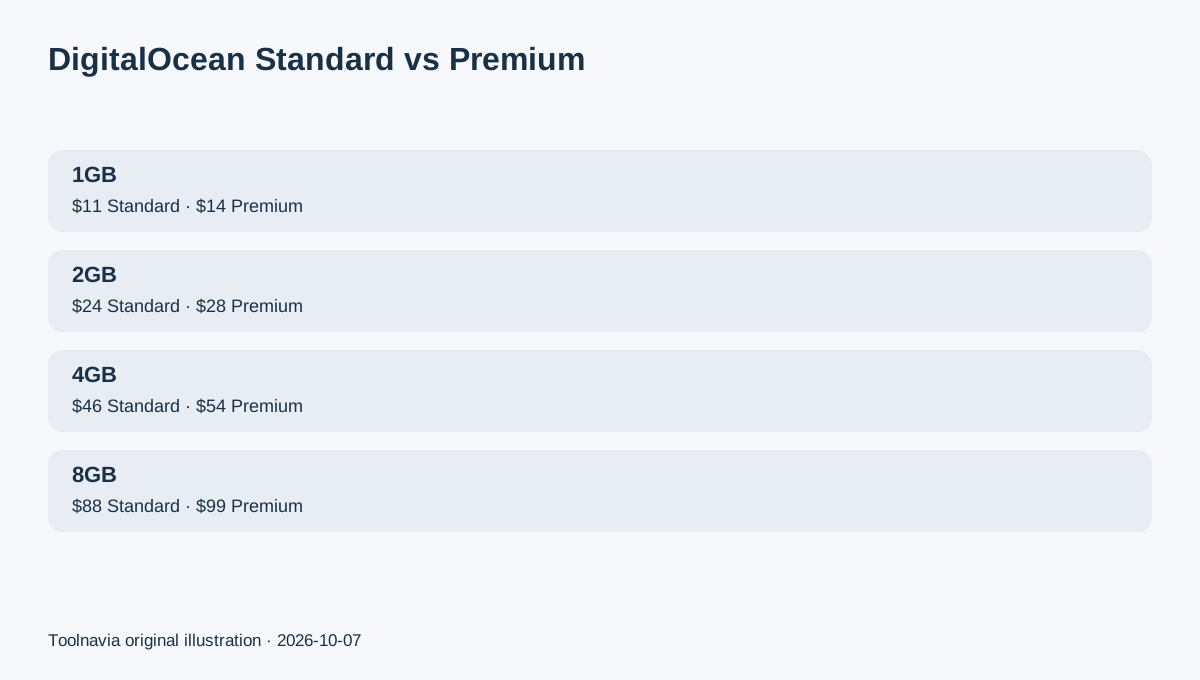
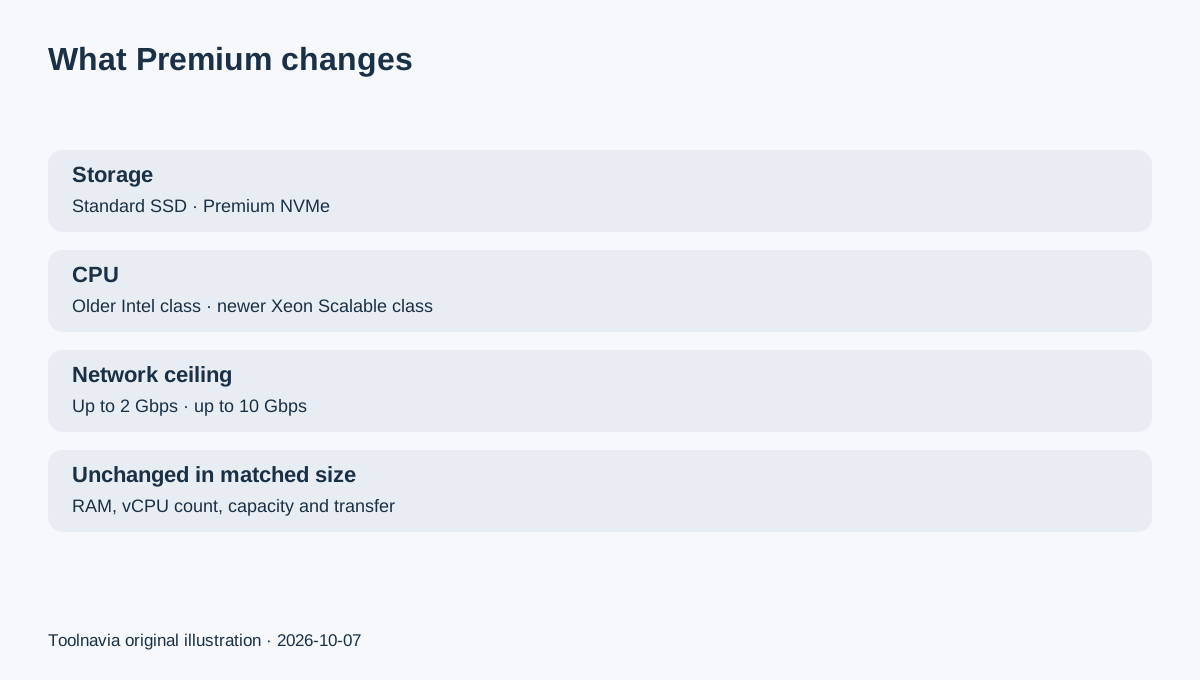
Cloudways DigitalOcean Standard and Premium look almost identical until you focus on the hardware layer. On the dedicated DigitalOcean page, the 1GB Standard plan is $11/month and the 1GB Premium plan is $14/month; both list 1 vCPU, 25GB storage and 1TB transfer. The extra $3 is not more RAM or bandwidth. It buys the Premium hardware class: newer Intel Xeon Scalable CPUs, NVMe storage and a higher network ceiling.
Affiliate disclosure: Toolnavia may earn a commission if you buy Cloudways through links on this page. The recommendation below is based on plan scope and current official pricing, not on a paid placement.
At a glance
- Best for
- Flexible buyers who want to know whether NVMe/newer hardware is worth the recurring premium.
- Price model
- 1GB Standard $11/mo vs Premium $14/mo on dedicated DigitalOcean page
- Check first
- Premium is not autoscaling and Toolnavia has not benchmarked it; live launcher pricing is final.
Start with the exact price gap, not the word “Premium”
At 1GB, Standard is $11 and Premium is $14, a $3 monthly difference. At 2GB the dedicated page lists $24 versus $28; at 4GB, $46 versus $54; at 8GB, $88 versus $99. The percentage premium falls as server size rises, even though the absolute monthly gap gets larger.
The useful question is therefore not “Is Premium better?” It is “Will this workload benefit enough from newer CPU generation, NVMe storage and the higher network ceiling to justify the extra recurring charge?”
What actually changes between Standard and Premium
Cloudways describes Standard DigitalOcean droplets as using second-generation or earlier Intel CPUs with standard SSD storage and networking up to 2 Gbps. Premium uses second- or third-generation Intel Xeon Scalable processors, NVMe storage and networking up to 10 Gbps.
Cloudways' own Premium Droplets help article says Premium is the better candidate for resource-intensive apps, in-memory databases, high-traffic workloads and situations where disk speed, compute consistency or memory throughput matter. Standard is presented as sufficient for smaller/static sites and cost-sensitive workloads.
That is a hardware-positioning statement, not proof that every WordPress site will become visibly faster. Toolnavia has not run a controlled Standard-versus-Premium benchmark.
Standard is the sensible default when the workload is still light
For a brochure site, small content site, development environment or low-traffic WordPress installation, start by asking whether 1GB of RAM is enough at all. If the answer is yes, Standard keeps the recurring bill lower while preserving the same listed RAM, vCPU, storage and transfer at each matched size on the dedicated DigitalOcean page.
Use the 3-day Flexible trial to launch a disposable copy, install the same plugins, warm caches and watch server/application monitoring during your normal admin workflow. If CPU, memory and disk activity remain comfortably within limits, paying extra for Premium may solve a problem you do not have.
Premium becomes easier to justify when storage and concurrency are active constraints
Premium makes more sense when the application frequently reads/writes data, has a busy WooCommerce database, performs imports, search indexing or cache rebuilds, or must absorb higher concurrent traffic without making storage the weak link. The official hardware description is exactly where Premium differs.
Do not confuse that with automatic scaling. Premium is still Cloudways Flexible: it remains a server you size vertically. A traffic spike can still require a larger server or better application tuning. If the requirement is automatic horizontal scaling rather than faster server hardware, compare Cloudways Autonomous instead.
Add backup cost before comparing the “real” monthly bill
Both Standard and Premium Flexible servers can incur separate off-site backup storage charges. Cloudways currently states $0.033/GB for Flexible backups, with charges rounded in $0.50 increments.
That does not erase the Standard/Premium comparison, but it prevents a misleading “$11 versus $14 total cost” conclusion. Your real monthly total can also include taxes and optional add-ons. Save the server size, backup footprint and final invoice before deciding whether the extra hardware class remains a small or meaningful part of the bill.
There is a current page inconsistency worth checking at checkout
Cloudways' dedicated DigitalOcean hosting page still lists the familiar DO1GB/2GB/4GB Standard and Premium tables. The main pricing page currently renders a newer-looking “Micro/Small/Medium” presentation that does not line up cleanly with those labels and can surface different RAM alongside the same $11 headline.
For this guide, the matched Standard/Premium comparison uses the dedicated DigitalOcean table because it explicitly pairs the same plan sizes. At purchase time, confirm the server type, RAM and price in the live Cloudways launcher.
Decision: buy Premium for a workload reason, not a badge
Choose Standard when the application is light, budget matters and you have no evidence that storage/CPU generation is the current bottleneck. Choose Premium when the workload is database-heavy, cache-heavy, higher-traffic or otherwise benefits from NVMe and the newer hardware class.
If you are unsure, start a 3-day trial with the smallest realistic configuration, reproduce the workload that matters, and only pay the Premium difference if the operational evidence supports it.