TOOLNAVIA / BUYING GUIDE
Cloudways Autonomous Growth vs Scale: $99 or $199 for WooCommerce Peaks?
The short answer
Verdict: choose Cloudways Autonomous Growth at $99/month if one WooCommerce store has occasional campaigns but normally fits inside 20 GB of disk, 150 GB of bandwidth, and one baseline autoscale server. Pay $199/month for Scale when the store has sustained dynamic checkout traffic, regularly needs more than one baseline server, or is already approaching 50 GB of disk and 250 GB of bandwidth. Scale is not a separate WooCommerce-only product; it is the larger capacity tier in the same one-application Autonomous lineup.
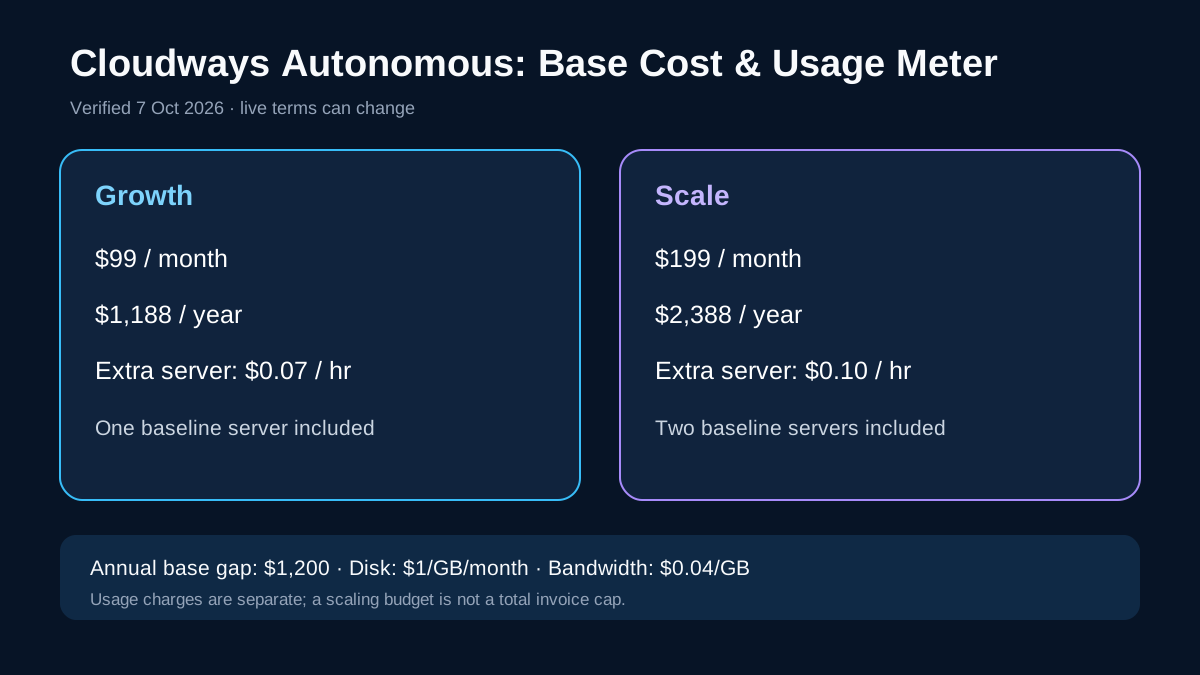
The price gap is simple before usage: Growth is $1,188 per year and Scale is $2,388, a $1,200 annual difference. The harder question is whether Scale's second baseline server and larger allowances replace enough billable peak capacity and operational risk to justify that gap.
At a glance
- Best for
- One WooCommerce store choosing occasional-peak Growth or higher-baseline Scale.
- Price model
- Growth $99/month; Scale $199/month plus usage
- Check first
- One application each; usage charges and prices can change; no independent checkout-load benchmark.
What Growth buys for $99
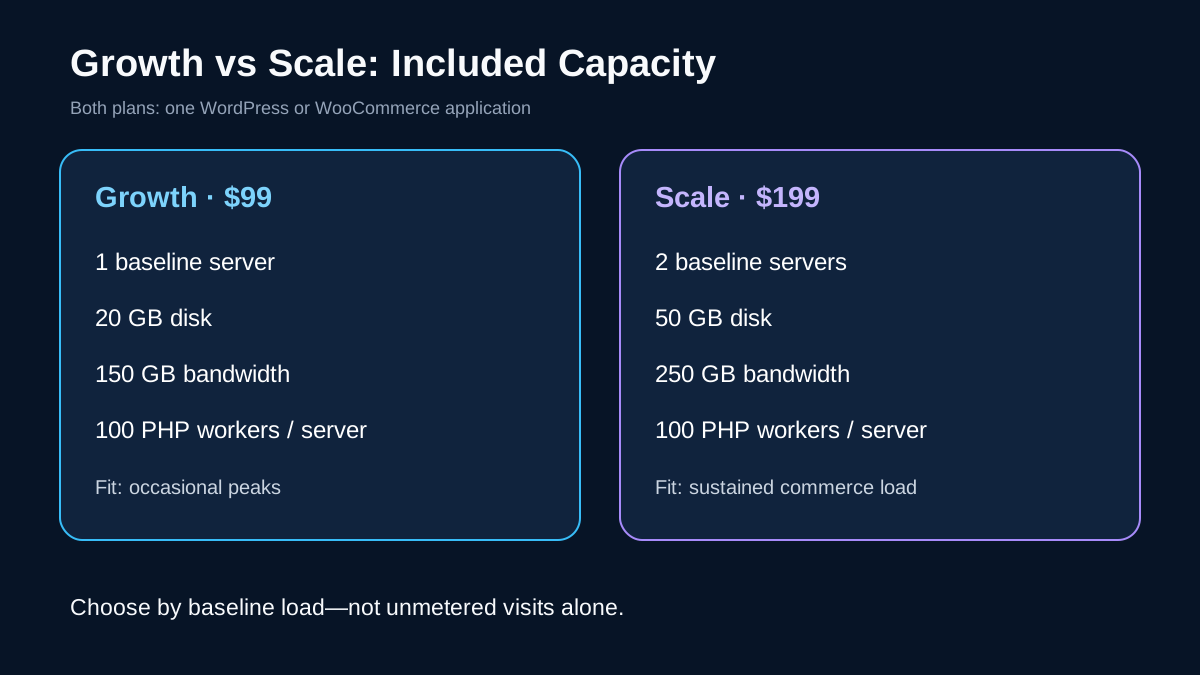
Growth includes one WordPress or WooCommerce application, one baseline autoscale server, 20 GB of disk, 150 GB of bandwidth, unmetered visits, and 100 PHP workers per server. Additional servers cost $0.07 per active hour.
That package has four practical advantages for a smaller store. First, the base bill is $100 lower each month than Scale. Second, it still uses the same Autonomous model: Cloudways manages the Kubernetes-based platform and can add parallel application capacity when demand rises. Third, its extra-server rate is lower. Fourth, it gives you a measurable path to test a campaign before committing to a larger baseline.
The boundary is equally clear. One busy application can consume its single baseline server for sustained periods, and 20 GB/150 GB leaves less room for a large catalog, media, logs, or heavy transfer. "Unmetered visits" does not mean every resource is unlimited.
What Scale changes for $199
Scale still covers one application, but starts with two baseline servers, 50 GB of disk, and 250 GB of bandwidth. Each server carries 100 PHP workers, so the included baseline is materially higher. Extra autoscaling servers cost $0.10 per active hour.
Scale's strongest benefit is not the marketing label; it is capacity already present before a spike. That can suit a store with scheduled launches, flash sales, membership renewals, or other uncached PHP activity where waiting for repeated scale-outs is undesirable. The larger disk and bandwidth allowances also reduce the chance that ordinary growth turns into overage charges.
However, Scale is not automatically cheaper during every peak. Its extra-server rate is higher, and the plan still allows only one site. If you operate several modest stores, multiplying $199 subscriptions may be less efficient than a different hosting structure.
Budget the whole bill, not just the plan
Cloudways currently lists disk overage at $1 per GB per month, prorated hourly, bandwidth overage at $0.04 per GB, and extra server-hours at $0.07 on Growth or $0.10 on Scale. A scaling budget can pause autoscaling when its threshold is reached, but it is not a total invoice cap: disk and bandwidth charges may continue.
For illustration, suppose four promotions in a month each need two billable extra servers for six hours. That is 48 extra server-hours: $3.36 on Growth or $4.80 on Scale. This does not prove which plan performs better, because Scale starts with two baseline servers while Growth starts with one. Use your actual peak pod count and duration from the dashboard.
Cloudways bills Autonomous by the hour per active application and says plan changes are prorated. Its help center illustrates ten days on Growth plus ten days on Scale at $106.43 using example hourly rates. Treat that as a billing example, not a universal quote. There is no traditional fixed "year two" renewal jump published for these plans; the risk is usage and future price changes, so recheck the live page and your account terms.
Limits to verify before moving
Both plans cover one application. Cloudways positions Autonomous for WordPress and WooCommerce; do not assume WordPress Multisite or a custom non-WordPress stack is supported. We did not independently benchmark checkout throughput, so autoscaling and high-availability claims here are vendor-described architecture, not a guaranteed speed result.
Current Cloudways pages conflict with an older company blog that rounds the base prices to $100/$200 and swaps the disk/bandwidth overage figures. This guide uses the live $99/$199 table and the current billing help article. Verify the dashboard values before paying.
Next step
Start the three-day Autonomous trial without a card, clone or migrate a representative store, and run a controlled test that mirrors your real cart, checkout, logged-in users, scheduled jobs, and campaign traffic. Record baseline server count, extra server-hours, disk, and bandwidth. Choose Growth if the store stays comfortably inside its included resources. Choose Scale if the second baseline server and larger allowances repeatedly replace reactive scaling or overage risk. Keep affiliate tracking hidden unless the approved runtime offer is active.
Evidence notes
Growth's one baseline server, 20 GB disk, 150 GB bandwidth and 100 PHP workers per server support a lower $99 base for occasional peaks; its extra server rate is $0.07 per hour, while disk and bandwidth remain separate usage charges.
Scale's two baseline servers, 50 GB disk, 250 GB bandwidth and 100 PHP workers per server provide more included capacity before billable scale-outs; its extra server rate is $0.10 per hour.
Cloudways describes the autoscaling mechanics, the WooCommerce application scope and the three-day trial, while the older official pricing post is retained only to disclose its conflicts. Affiliate eligibility is checked separately from product value.