TOOLNAVIA / BUYING GUIDE
Recoverit Linux EXT4 Recovery: Test Before You Buy Premium
The short answer
At a glance
- Best for
- Stable Linux hosts with logical EXT4 loss, authorized SSH/root access and intact free previews.
- Price model
- Free scan/preview allowance versus paid Premium export; live platform, devices, tax and renewal control.
- Check first
- Remote Windows/macOS workflow; no native Linux GUI, recovery guarantee, physical-drive repair or replacement for encryption keys.
Verdict
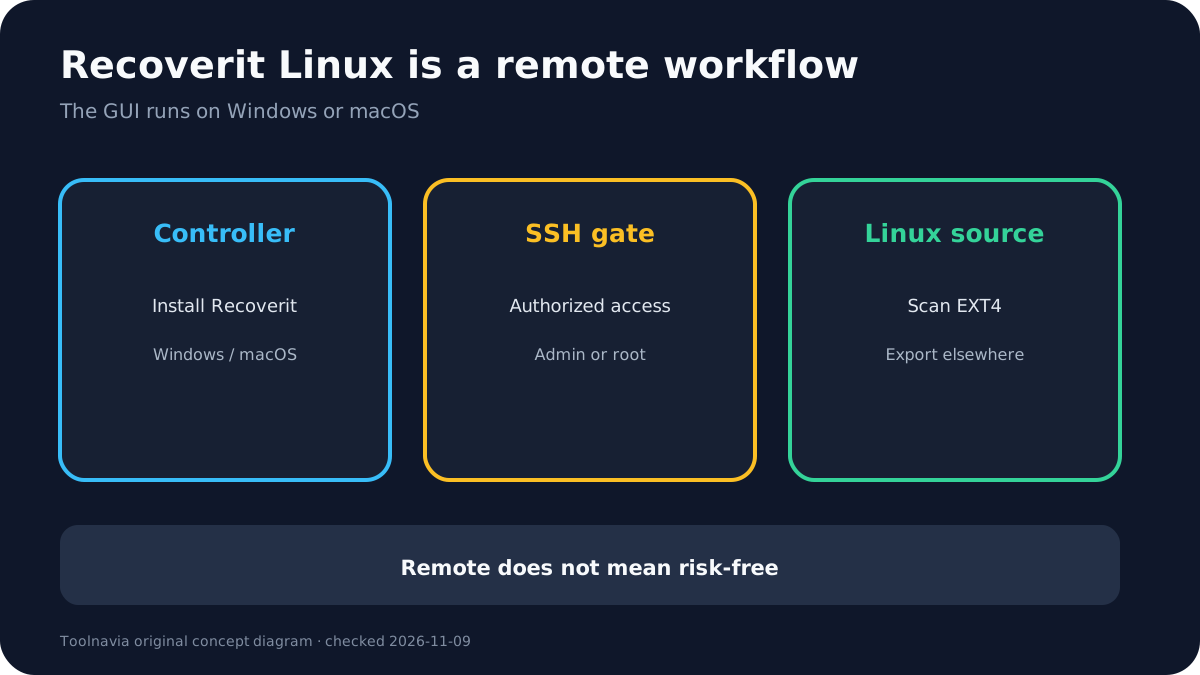
Recoverit Premium can be worth paying for an **EXT4 recovery attempt when you want a graphical workflow and can safely reach the Linux host over SSH**. It is not a native Linux desktop application. The current workflow installs Recoverit on Windows or macOS, opens **NAS and Linux > Linux Recovery**, and connects remotely to the affected Linux computer. The target must be online, SSH must be enabled, and you need administrator or root credentials.
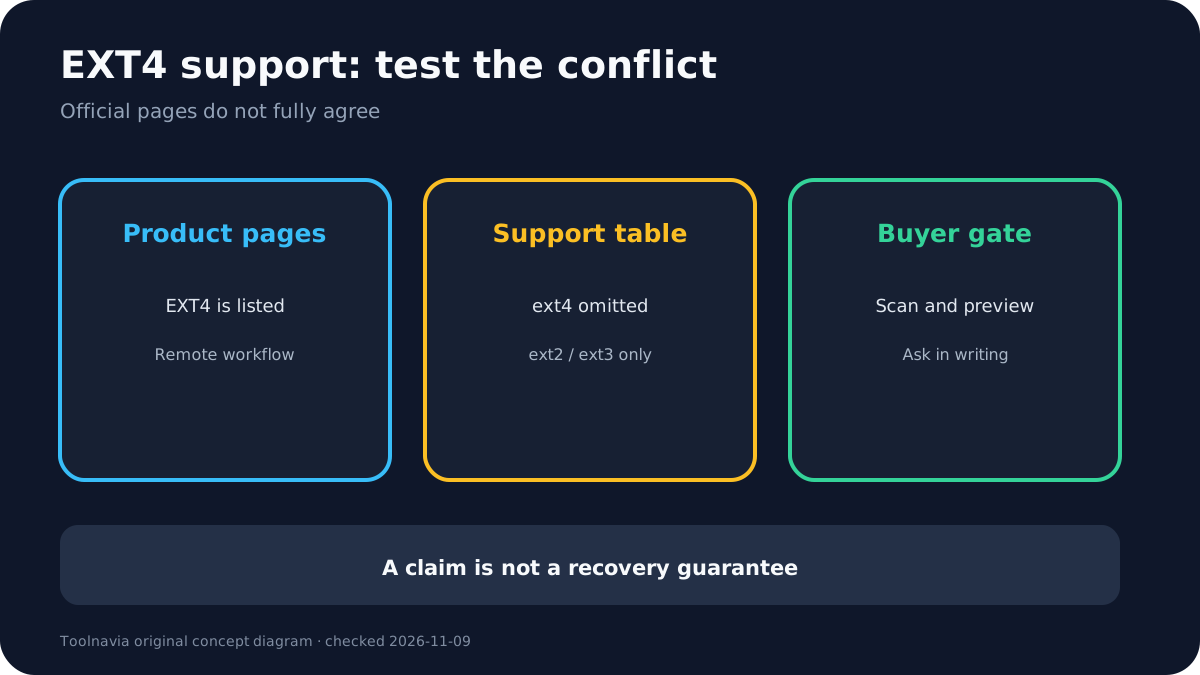
Do not buy merely because “EXT4” appears on a product page. Wondershare’s current product, reference and EXT4 workflow pages name EXT4, but its generic supported-filesystem table lists ext2/ext3 and omits ext4. That documentation conflict makes a free scan and intact preview on the exact host more valuable than any broad compatibility claim.
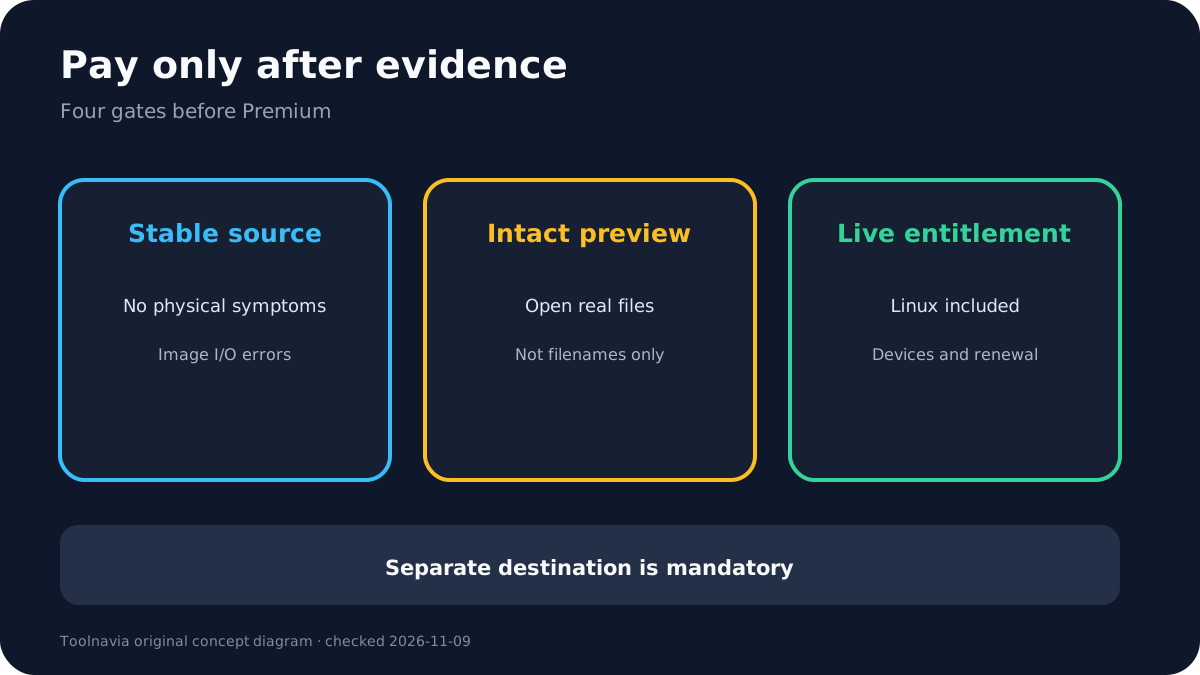
The safer order is: stop writes, decide whether the source is physically stable, image first if it reports I/O errors, connect only if the remote workflow does not add risk, preview the files that justify payment, confirm the live Premium cart, and export to a separate physical destination. A clicking, disappearing or wrong-capacity drive belongs in an imaging or professional-recovery decision—not in repeated remote scans.
What “Linux recovery” actually means
The name can suggest a Linux-native application, but Wondershare’s current instructions say otherwise. You install the GUI on a separate Windows or Mac computer. From there, Recoverit asks for the Linux host address, port and credentials, establishes a remote connection, and scans the Linux storage. The current version notes also say SSH and administrator or root permission are required.
That architecture can be convenient when:
- the Linux machine still boots and stays stable; - the affected filesystem is accessible to the host; - network and SSH access are allowed by your security policy; - an authorized administrator can provide elevated credentials; - you have another drive or network location for the recovered files.
It is a poor fit when the host will not boot, the drive repeatedly disconnects, the device reports I/O errors, or policy forbids handing a third-party recovery process privileged remote access. If the affected disk is the system disk, every boot, log write, package update and swap operation can overwrite deleted blocks. A remote GUI does not remove that risk.
For a server, decide before connecting whether downtime and evidence preservation matter more than convenience. If the data is regulated, legally sensitive or business-critical, document the disk state and involve the responsible administrator or forensic specialist.
Is Premium required?
Wondershare’s current Free-vs-Premium page promotes free NAS/Linux scanning, yet its comparison matrix places **Recover From NAS and Linux Devices** in the Free/Premium table and distinguishes the free recovery allowance from Premium unlimited recovery. The same page currently shows a monthly upgrade price, but promotions, platform, device count, tax, renewal and regional checkout can change. An independent review also describes NAS/Linux recovery as tier-dependent, so the live cart remains authoritative.
Treat “free” as a way to test discovery and preview—not as proof that the amount you need can be exported without payment. Before buying:
1. confirm that the live cart says Recoverit Premium and names the correct Windows or Mac installer; 2. record device count, term, auto-renewal and renewal price; 3. confirm that NAS/Linux recovery is included in that exact order; 4. run the free scan on the exact Linux host and EXT4 source; 5. preview several high-value files in full, not only filenames or thumbnails; 6. verify that the destination has enough free space and is not the source disk.
The approved Toolnavia link maps to the registered Recoverit Premium offer, but the Windows and Mac comparison destinations remain separate and it cannot guarantee an entitlement, price or recovery result. If the cart contradicts the product page, the cart controls the purchase and you should save the discrepancy before paying.
EXT4 support has a real documentation conflict
The current Recoverit product and technical pages list EXT4, and the official EXT4 guide walks through a remote scan from Windows or macOS. The reference page also lists ext2/ext3/ext4 for Linux.
However, Wondershare’s generic support table currently lists ext2/ext3 but not ext4. This could be a stale table, a difference between local and remote workflows, or a documentation error; the public pages do not resolve it. The honest buying conclusion is narrower:
- Recoverit currently **claims and documents** an EXT4 remote workflow. - That does not prove every EXT4 feature, kernel, RAID layer, encryption scheme or corruption state is supported. - A free scan and intact preview on your exact host are the minimum pre-purchase test. - If support cannot explain the conflict in writing, do not treat the feature as guaranteed.
An independent HandyRecovery test found some EXT4 files but incomplete recovery in one disclosed test environment, while its NTFS result was stronger. That is useful negative evidence, not a universal success rate. TechRadar’s controlled success test used NTFS, so it cannot validate EXT4 performance.
Stop and image before scanning when the source is unstable
Logical deletion and physical failure are different problems. Recoverit can help with logical loss on a readable source; it cannot make damaged hardware safe.
GNU ddrescue’s current manual warns against rescuing a read/write-mounted partition or repairing a filesystem on a drive with I/O errors. Its algorithm copies easier areas first, records progress in a mapfile, and postpones difficult sectors. The manual recommends working on a copy and preserving a master image before filesystem repair.
Use this gate:
- **Stable host, stable disk, accidental deletion:** stop writes, run a read-focused preview, and export elsewhere. - **I/O errors but drive remains readable:** power down, plan an image to a healthy larger destination, and recover from the image. - **Clicking, grinding, repeated spin-up, wrong capacity or disappearing device:** stop powering it repeatedly and use a qualified lab if the data matters. - **Encrypted EXT4/LUKS volume:** keep the authorized key or passphrase; software cannot recreate it. - **SSD with TRIM/discard:** deleted blocks may already be unrecoverable; no paid tier reverses TRIM.
Do not run fsck on the only source, accept a format prompt, create a new partition, rebuild MBR/GPT, reinstall the operating system, or save recovered files back to the affected filesystem.
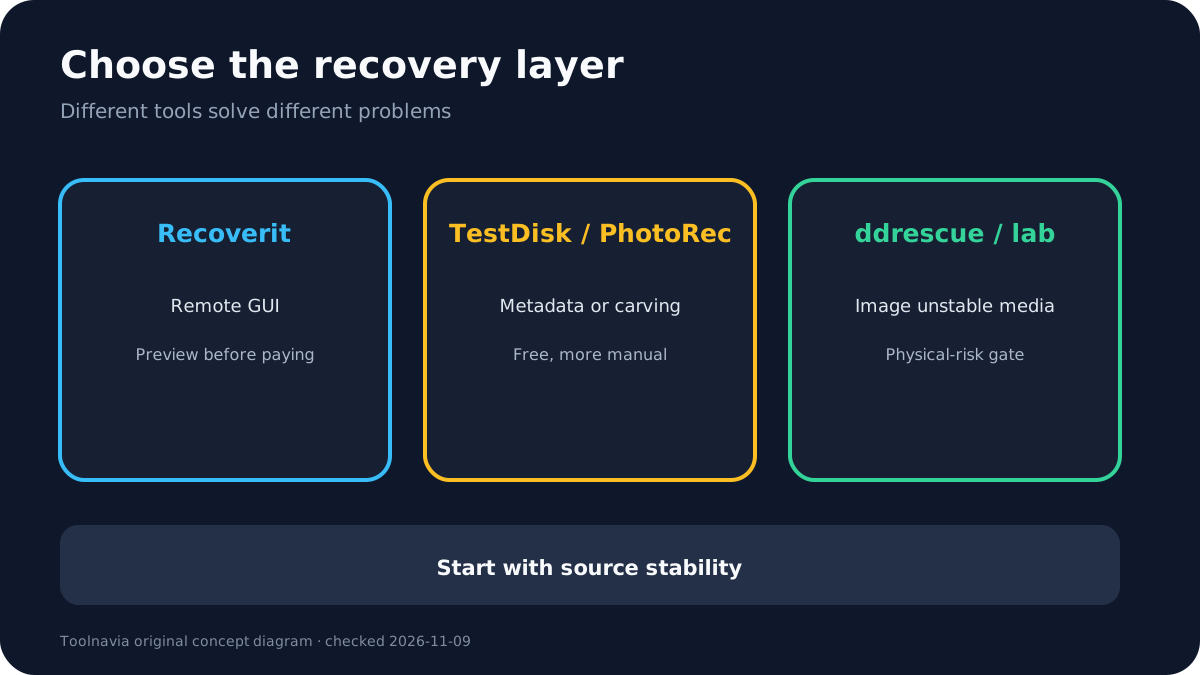
Recoverit vs TestDisk, PhotoRec and ddrescue
These tools solve different layers of the problem.
**Recoverit Premium** is the convenience option: a remote graphical scan, filters and previews from a Windows/macOS controller. It costs money after the free allowance and requires SSH plus privileged access to the Linux host. It is most defensible when the host is stable and intact previews prove value.
**TestDisk** is free and open-source. Its official documentation supports ext2/ext3/ext4 and focuses on lost partitions, boot sectors and filesystem-level recovery. It can preserve names and structure in some cases, but it is command-line driven and a wrong write-oriented choice can make matters worse. Use read-only analysis first and work from an image when the source is questionable.
**PhotoRec** is signature-based carving. It can recover files when filesystem metadata is damaged, but it generally loses original filenames and folder structure. Its official guide warns never to write recovered files to the source and can scan unallocated space on ext2/ext3/ext4.
**GNU ddrescue** is an imaging tool, not a file browser. Use it before recovery software when the drive has read errors, provided the device is safe enough for controlled imaging and you understand source/destination selection. It does not replace a lab for mechanical failure.
The practical sequence may be ddrescue image first, then TestDisk or PhotoRec on the image, with Recoverit used only if its remote workflow is appropriate and previews add enough convenience to justify the price.
A five-minute pre-purchase test
1. Stop applications, services and scheduled jobs that write to the affected filesystem. 2. Confirm the disk model, capacity, health symptoms and whether encryption or TRIM is involved. 3. If there are I/O errors or instability, stop and choose imaging or a lab. 4. On a separate Windows or Mac controller, install the current Recoverit build from the official site. 5. Enable SSH only under an authorized, controlled policy; use the minimum privileged access the workflow accepts. 6. Select Linux Recovery and connect to the exact host. 7. Scan without formatting, repairing or repartitioning. 8. Preview several irreplaceable files end-to-end: open documents, full-resolution photos and playable videos. 9. Save nothing to the source. Verify the separate destination and its free space. 10. Only then compare the live Premium cart with your saved entitlement checklist.
If the preview shows only filenames, corrupted content or low-value files, payment has not been justified. If the host becomes unstable, disconnect and preserve the source.
**Who should buy—and who should not**
Buy Recoverit Premium for this scenario only when the Linux host and source are stable, remote privileged access is acceptable, the current build sees the EXT4 data, intact previews prove value, and the live order confirms Linux recovery, device count and renewal.
Use TestDisk or PhotoRec instead when you are comfortable with Linux tools, understand the metadata-versus-carving tradeoff, and can work safely from a clone or image.
Do not buy for a physically failing drive, a missing encryption key, overwritten data, a TRIM-discarded SSD, a host you cannot access over SSH, or a workflow that must be Linux-native. In those cases, a higher software tier does not solve the actual constraint.
Toolnavia may earn a commission if you buy through the approved Recoverit Premium affiliate link. This does not change the price or the safety recommendation: test first, preserve the source, and treat the live cart and intact previews as the purchase gate.