TOOLNAVIA / BUYING GUIDE
MailerLite RSS Campaigns: Avoid Duplicate or Missed Posts
The short answer
**Quick answer:** MailerLite Comfort can be worth paying for when you want a scheduled RSS newsletter and your feed survives a real trial. It is not a cure for unstable GUIDs, bad timestamps or last-minute publishing. Before upgrading, prove that one new post appears once, one edited old post stays old, and one canceled/rescheduled campaign does not surprise your test list.
[Check the approved MailerLite Comfort offer](https://www.mailerlite.com/?linkId=lp_170762&sourceId=toolnavia&tenantId=mailerlite). Comfort currently starts at $12/month and includes RSS campaigns; Power starts at $25/month and increases sending capacity. Those are starting references, not a cart quote. Confirm subscriber tier, billing period, tax and current limits in your own checkout.
*Affiliate disclosure: Toolnavia may earn a commission if you buy through this approved MailerLite link, at no extra cost to you. Mailchimp, Brevo and Kit are editorial comparison sources only.*
At a glance
- Best for
- Stable blog feeds that passed GUID and reschedule tests
- Price model
- Comfort from $12/month; verify subscriber tier and checkout
- Check first
- Paid feature; feed quality and GUID behavior remain the publisher's responsibility
The purchase gate is feed behavior, not the RSS checkbox
MailerLite labels RSS campaigns as a paid feature on Comfort and Power. A campaign can run daily, weekly or monthly, and its feed is checked and processed about five minutes before the scheduled send. One RSS feed is used per RSS newsletter. A regular campaign can instead contain multiple RSS blocks with more editorial control.
That entitlement answers only whether the control exists. It does not prove that your site exposes a public HTTPS feed, that each item has a stable GUID, that publication dates are correct, or that excerpts, full content and images will look right. MailerLite renders what the feed supplies. Paying cannot repair the feed.
The decisive trial therefore has three cases:
1. Publish a genuinely new test post and confirm it appears exactly once. 2. Edit the old test post without changing its URL or GUID and confirm it does not reappear as new. 3. Cancel a test campaign from the Outbox, reschedule it and inspect which recent posts are included before any real audience sees it.
MailerLite explains that it compares GUIDs; without a GUID, a changed link can make an item look new. It also warns that canceling and rescheduling can remove the comparison history and cause recent posts to be sent again. This is the duplicate-post risk a feature checklist misses.
GUID, link and timestamp: what counts as new
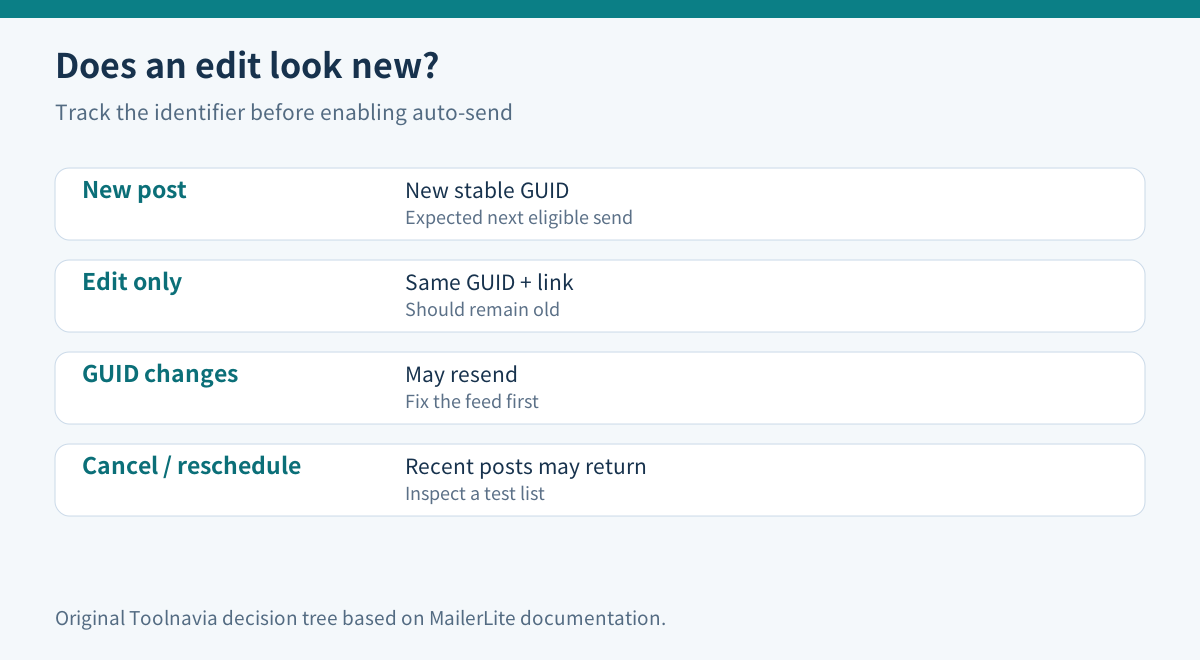
A GUID is meant to identify one feed item across updates. If the CMS regenerates that value when a post is edited, MailerLite can treat the edit as a new item. If no GUID exists, a changed post link can have the same effect. Conversely, editing the body while keeping the GUID and link stable normally does not create a new RSS item.
| Feed change | Expected safe behavior | Purchase warning | |---|---|---| | New post, new stable GUID | Included at next eligible check | Missing item suggests feed or timestamp trouble | | Edit text, same GUID and link | Old post stays old | Reappearance suggests unstable identifiers | | Edit creates new GUID | Item may resend | Fix the CMS/feed before auto-send | | Feed URL or ordering changes | Recent items can be reconsidered | Use a test list and review the next issue |
Do not fix a missed send by repeatedly changing GUIDs or URLs. That can turn one missed issue into duplicate mail. First open the raw feed, locate the item, verify its GUID, link and date, and compare it with the last successful campaign.
Choose cadence from publishing volume and send budget
Daily is appropriate only when readers expect timely updates and the site publishes enough distinct material. Weekly is the safer default for many editorial sites because it creates a digest, provides a wider buffer and reduces send consumption. Monthly is useful when timing is not urgent, but it increases the chance that too many items accumulate or that an old issue feels stale.
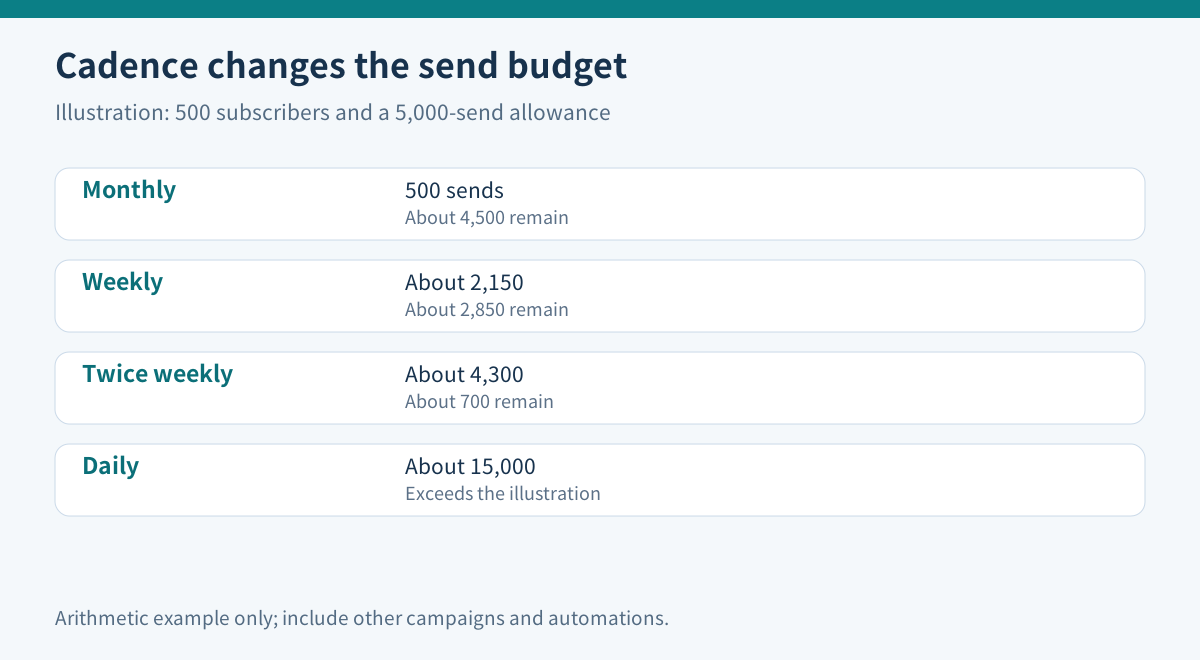
Comfort currently lists monthly email capacity as ten times the subscriber count. For an illustrative 500-subscriber list:
| RSS cadence | Approximate sends per 30-day month | What remains of a 5,000-send allowance | |---|---:|---:| | Monthly | 500 | About 4,500 | | Weekly (4.3 sends) | About 2,150 | About 2,850 | | Twice weekly | About 4,300 | About 700 | | Daily | About 15,000 | Exceeds the illustration |
This is arithmetic, not a promise about your account. Other broadcasts, automations, resends and audience changes consume capacity too. A campaign to 500 recipients uses about 500 sends; frequency multiplies that cost. Check the live plan counter and leave headroom.
Power can make sense when the validated RSS workflow and the rest of your sending program exceed Comfort’s real allowance. Do not buy Power merely because RSS is mentioned; RSS itself is available on Comfort.
The five-minute check is not a safe publishing buffer
MailerLite says it processes the feed five minutes before send. That is a system behavior, not a recommendation to publish five minutes before the deadline. Caches, CMS jobs, CDN propagation and incorrect dates can make a last-minute item invisible.
Competitor documentation shows why a conservative buffer matters. Mailchimp recommends publishing at least three hours before its RSS automation; Brevo recommends at least one hour before its integration checks. Those timings are not MailerLite rules, so they do not prove a universal threshold. They do support a safer operating practice: publish earlier than the minimum, validate the public feed, and observe at least two test cycles before enabling a real audience.
If there is no new item at the check, MailerLite normally does not send. Broken, private or unavailable feeds and bad timestamps can also suppress a campaign. The absence of an email is therefore not proof that the schedule failed; inspect the feed and eligibility window first.
Automatic send or review draft?
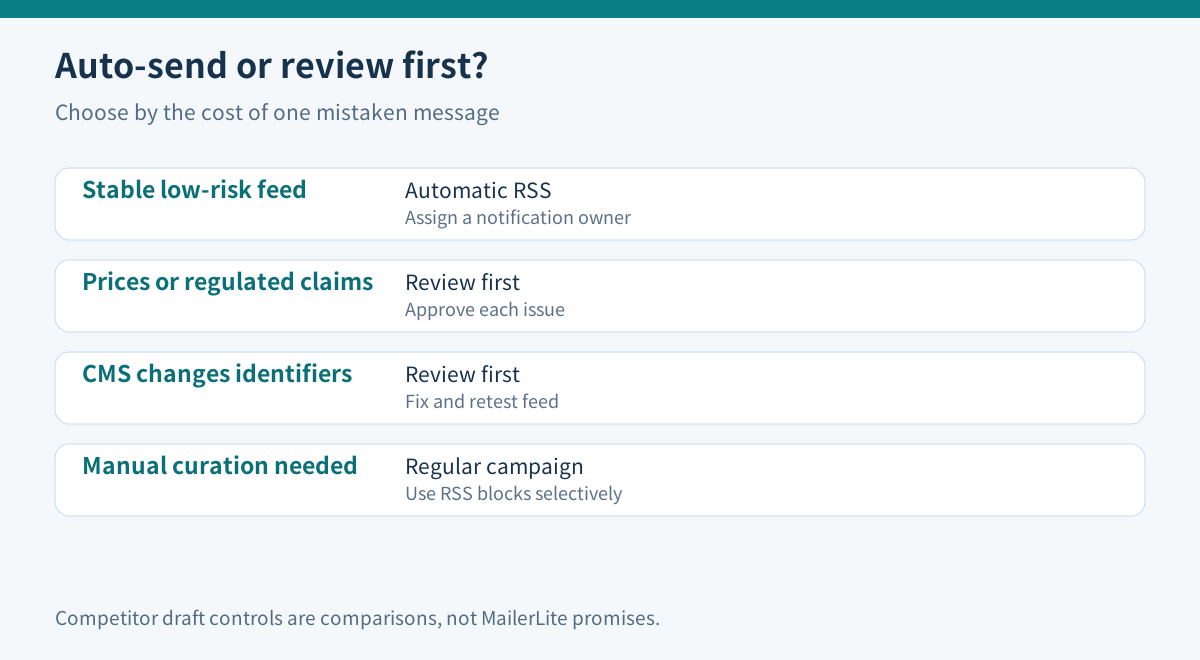
MailerLite RSS campaigns favor a direct scheduled automation. Scheduling remains an operating control rather than a delivery guarantee. That is efficient for a stable, low-risk feed. But a draft-review boundary may be better when one duplicate email could create legal, pricing or reputation harm.
Kit provides a useful comparison: it can create single-post or digest drafts, leave them for review, or auto-send about 30 minutes after the draft is created. Brevo can also create RSS campaigns as drafts for manual sending. These are competitor-specific controls, not MailerLite features.
Choose automatic RSS when:
- GUIDs, links and timestamps stayed stable across multiple tests; - the template looks acceptable with both excerpts and full content; - a late or duplicate item would be annoying rather than damaging; - one person owns notifications and cancellation decisions.
Choose review-first when:
- posts contain prices, offers, regulated claims or embargoes; - the CMS frequently updates slugs or regenerates feed identifiers; - several authors publish at irregular times; - one mistaken send would require a correction campaign.
A regular MailerLite campaign with RSS blocks can provide more manual selection and formatting than an automated RSS newsletter, though it is a different workflow.
A 20-minute preflight before paying
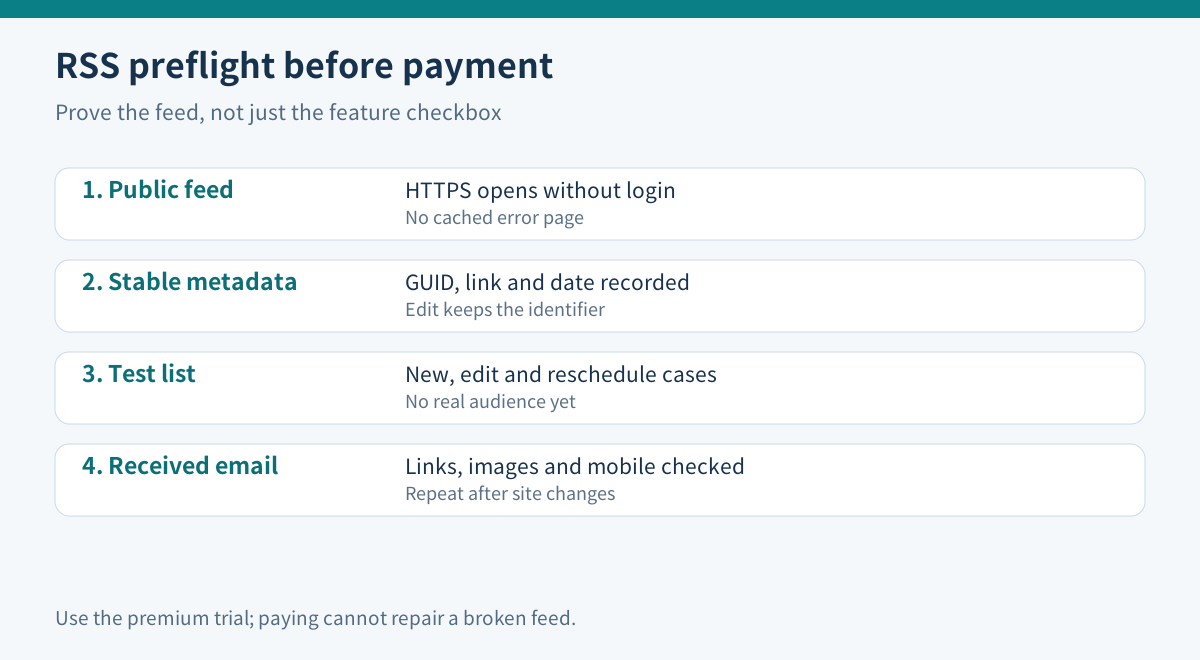
1. **Open the exact HTTPS feed without authentication.** Confirm it returns recent items and not a cached error page. 2. **Record each item’s GUID, link and publication date.** Save a baseline before editing. 3. **Create a test RSS campaign during the premium trial.** MailerLite’s current trial includes RSS campaigns; verify that the offer is available in your account. 4. **Send only to an internal test group.** Test one new post, one unchanged edit and one reschedule. 5. **Inspect the received email.** Check title, excerpt/full content, image size, link destination and mobile layout. 6. **Estimate monthly sends.** Multiply recipients by planned RSS frequency, then add normal campaigns and automations. 7. **Assign an owner.** One person should receive send notifications, review feed failures and decide whether to cancel.
Repeat the test after a CMS, feed plugin, CDN or domain change. Those changes can alter the feed even if MailerLite settings stay untouched.
When Comfort is worth it
**Buy Comfort** when RSS automation removes a recurring manual job, the feed passed the new/edit/reschedule tests, and the planned cadence fits the current send allowance with headroom.
**Choose Power** only when verified total sending or another Power capability justifies it. The higher plan is not required merely to create an RSS campaign.
**Stay manual or use a review-first tool** when the feed is unstable, the content is high risk, or the audience is small enough that a weekly manual digest costs less than monitoring automation.
**Do not buy yet** when you have only previewed the template. Preview content can be an example; the live feed is processed near send time.
Bottom line
MailerLite Comfort’s RSS feature is valuable after the feed proves reliable, not before. Stable GUIDs prevent edits from masquerading as new posts; a realistic cadence protects the send budget; and a test list exposes reschedule and formatting surprises. Use the premium trial, publish with a conservative buffer, and keep a manual review boundary wherever a duplicate email would be costly.