TOOLNAVIA / BUYING GUIDE
Moving from Mailchimp to MailerLite: What Your Import Leaves Behind
The short answer
MailerLite can be a practical destination for a Mailchimp newsletter, but a successful contact import is not a finished migration. The direct importer is free; do not buy Comfort just to unlock it. The paid decision comes after checking what your receiving account must do and how much of the old operation needs rebuilding.
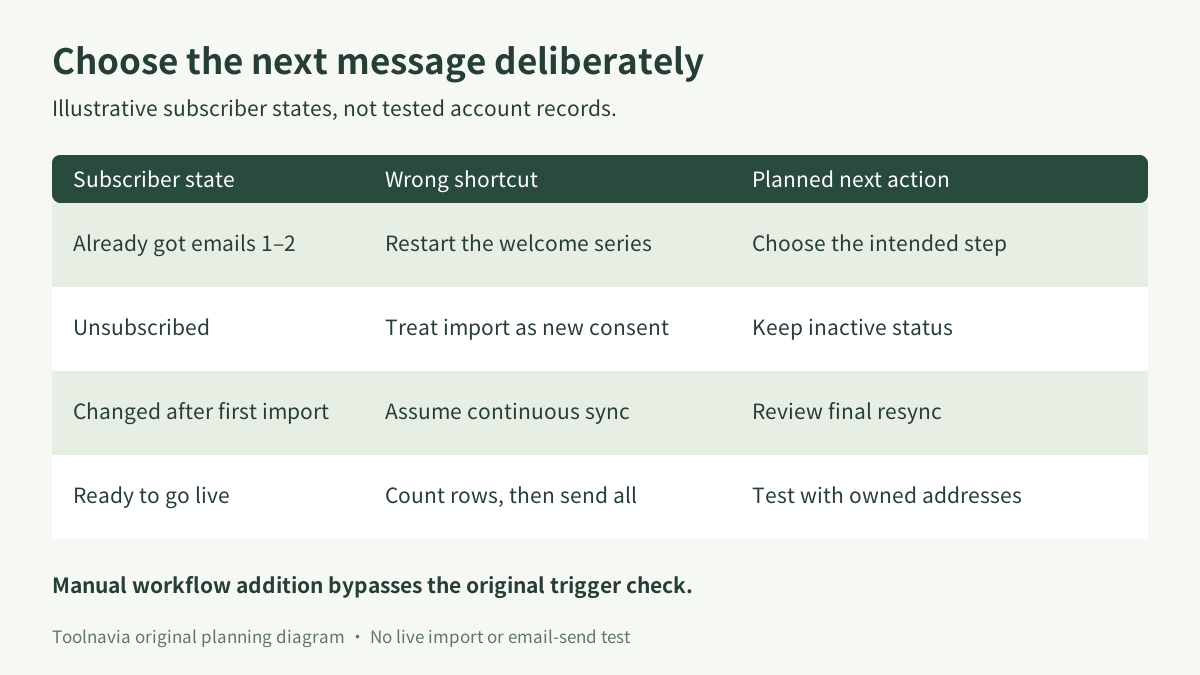
Imagine Ana has already received two welcome emails. Importing her address does not, by itself, establish which message she should receive next. That is an illustrative planning problem, not a record from a tested account. Toolnavia has not imported subscribers or sent emails for this guide.
At a glance
- Best for
- Teams planning a deliberate newsletter cutover with known contact states.
- Price model
- Comfort fromUS$12/month in November2 FAQ; importer free; exact selected tier and tax unverified.
- Check first
- No live migration test or automatic journey-position guarantee; exact tier quote required.
Separate portable data from the running operation
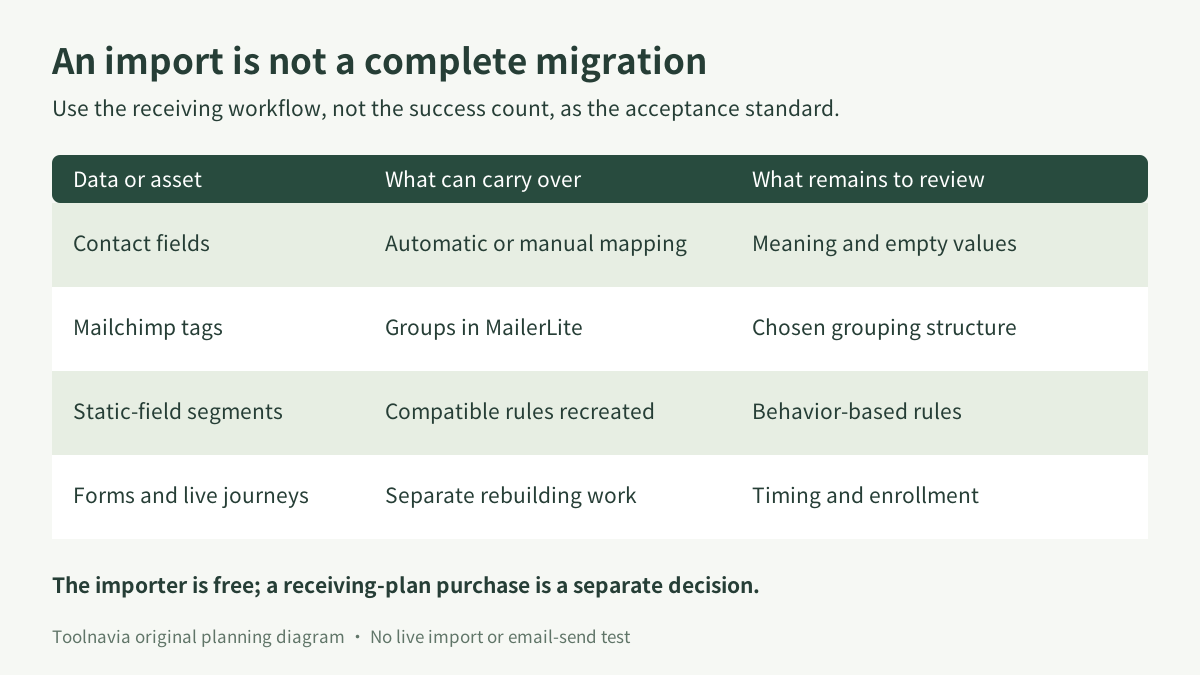
The integration offers field mapping, tags-to-groups organization, compatible segment recreation and an import report. Those are useful conveniences for moving an audience. The detailed guide narrows automatic segment migration to simple field-based rules; forms, templates and automated flows require separate reconstruction.
| Migration item | Buyer question | |---|---| | Fields and groups | Does the new record retain the meaning used by your team? | | Subscription state | Is a person who opted out still excluded from newsletters? | | Segment logic | Does membership depend on history the destination does not possess? | | An unfinished sequence | Which message and waiting period should apply next? |
The four relevant benefits are direct mapping, preserved group organization, optional inactive-status import and controlled enrollment in rebuilt workflows. Their value is reduced reconstruction work, not a promise that every aspect of a live audience transfers automatically.
Protect contact state before trusting the totals
The direct importer can bring unsubscribed and unconfirmed records into separate inactive categories. It also lets you choose how duplicate records are updated; overwriting all fields can replace existing values with empty imported data. Inspect these choices before a large import.
A matching row count cannot show that a preference, exclusion or custom consent field means the same thing in both systems. Keep a controlled mapping record: source field, destination field, intended meaning and treatment of blank values. Review a few known examples rather than assuming an automatic match is correct because the names look similar.
MailerLite's general import instructions separately provide an option to trigger group-associated automations. They also describe rejection of addresses already in inactive or complaint states. Check the exact route you are using; do not assume the direct connector and a file upload present identical controls.
Keep imports from accidentally becoming sends. During preparation, leave unreviewed workflows inactive and use addresses you control for testing. Moving a contact is not fresh permission to send marketing.
Reconstruct the next message, not just the workflow diagram
MailerLite allows manual addition to an active workflow at its start or a chosen step. Crucially, that route bypasses the original trigger check, although conditions inside the workflow remain relevant. Its activation popup is different: it concerns eligible existing subscribers who have not entered that workflow.
For Ana, decide whether to continue at a later message, wait, or exclude her from this particular sequence. Document what she already received and the intended next action before choosing a step. Do not treat a manual-entry feature as evidence that Mailchimp's current journey position or remaining delay has been imported. The reviewed guides do not document that automatic continuation.
A diagram that resembles the old journey is therefore only part of the work. Compare its behavior for an already-welcomed person, an opted-out person and a new signup using controlled test records. Define expected outcomes first; otherwise an unexpected email can be mistaken for proof that the migration works.
Plan the final update and ownership of the switch
MailerLite documents a manual Sync again action; later Mailchimp changes are not continuously copied by this importer. Assign someone to reconcile changes after the first import, check the final update and replace the intended signup entry points.
Keep the source information needed to investigate differences until the destination has been accepted. An audience CSV is useful, but Mailchimp says it excludes engagement metrics and purchase history; campaign reports need a separate export. Export availability is limited to thirty days in the account, and status-specific files may be separate.
Our suggested cutover record has an owner, a last-source-review time, the final imported state and the point when new signups should use the new forms. It should also name who stops the old sending path. This avoids leaving two operators assuming the other system has already stopped. It is an operational proposal, not a MailerLite automatic-switch feature.
Compare migration behavior, not just an import button
Kit's Mailchimp guide also separates contact transport from rebuilding forms, email sequences and visual automations, followed by testing. That makes it a useful comparison for estimating the human work in a move; it does not establish identical behavior or pricing.
Brevo's connector offers scheduled synchronization, but its documentation says Mailchimp tags are not imported and later subscription-status changes are not reflected. A recurring sync therefore is not automatically a safer substitute for MailerLite's manual update. The relevant choice depends on the data and exclusions your process actually requires.
Do not select a destination solely because it imports the largest number fastest. Favor the one whose documented scope and tested receiving workflows match your audience, and include the labor of rebuilding missing behavior.
Buy the receiving plan after the migration design fits
On November 2, 2026, MailerLite's pricing FAQ listed Comfort from **US$12/month** and a fourteen-day premium-feature trial. The readable page did not establish a freshly selected 500-contact checkout or annual total. Use the account's actual subscriber tier, sending allowance, billing period, currency and tax to obtain the relevant quote.
Budget reconstruction, test time and any temporary overlap with the old service separately. The free importer is a reason to evaluate the move, not a reason to pay immediately.
Choose Comfort when the actual receiving-plan limits fit and the migration plan preserves intended contact states and next messages. Defer the switch when essential history is missing, suppression handling is unclear or live journeys cannot yet be continued deliberately.
[Check the current MailerLite plan options](https://www.mailerlite.com/?linkId=lp_170762&sourceId=toolnavia&tenantId=mailerlite). Toolnavia may earn a commission through this link. It does not preselect a subscriber tier or promise a discount, delivery rate or migration result.