TOOLNAVIA / BUYING GUIDE
ClickFunnels® Failed Renewals: When Does Access Actually Stop?
The short answer
A failed renewal can leave a ClickFunnels® subscription active while its invoice remains unpaid. Before buying Launch for memberships, identify who retries the charge and who changes access. This guide uses official documentation reviewed on November 2; no payment or access workflow was tested.
At a glance
- Best for
- A recurring-product seller whose funnel workflow fits Launch and who can confirm the actual Payments AI rule entitlement, existing fee base, configured failure policy and product-access outcome.
- Price model
- November 4: Launch US$97 monthly or US$970 prepaid annually. Payments AI recurring 0.5% is not duplicated when automation expands the base; gateway charges remain separate.
- Check first
- Specific Launch Exit Dunning entitlement is unverified; official third-retry timing and activation/billing-baseline descriptions differ. No live merchant workflow was tested.
Is this the recovery route you need?
| Buying question | Decision point | |---|---| | Launch cost | US$97 monthly or US$970 prepaid annually; Payments AI charges are separate. | | Useful controls | Product/customer targeting, retry controls, renewal timing and final-failure actions. | | Suitable buyer | A recurring-product seller who needs those controls and can confirm their account's entitlement. | | Confirm first | The existing 0.5% fee base, enabled rules and permission to use the required access workflow. | | Keep existing billing | It already handles recovery and access reliably; a new funnel subscription alone proves neither. |
Name the system that retries the charge
In the documented Payments AI integration, Payments AI runs configured dunning—the attempts to collect a failed renewal. Buying ClickFunnels does not create a working recovery rule. Without a rule, automatic retries do not occur, and the unpaid invoice can coexist with continuing product access.
The developer guide requires enabled Pro Features and a rule under Automation Rules → Subscriptions. Confirm the actual gateway route and rule owner before assuming a direct Stripe setup follows Payments AI instructions. The fee and activation descriptions also need reconciliation for your account.
Check which transactions the 0.5% covers
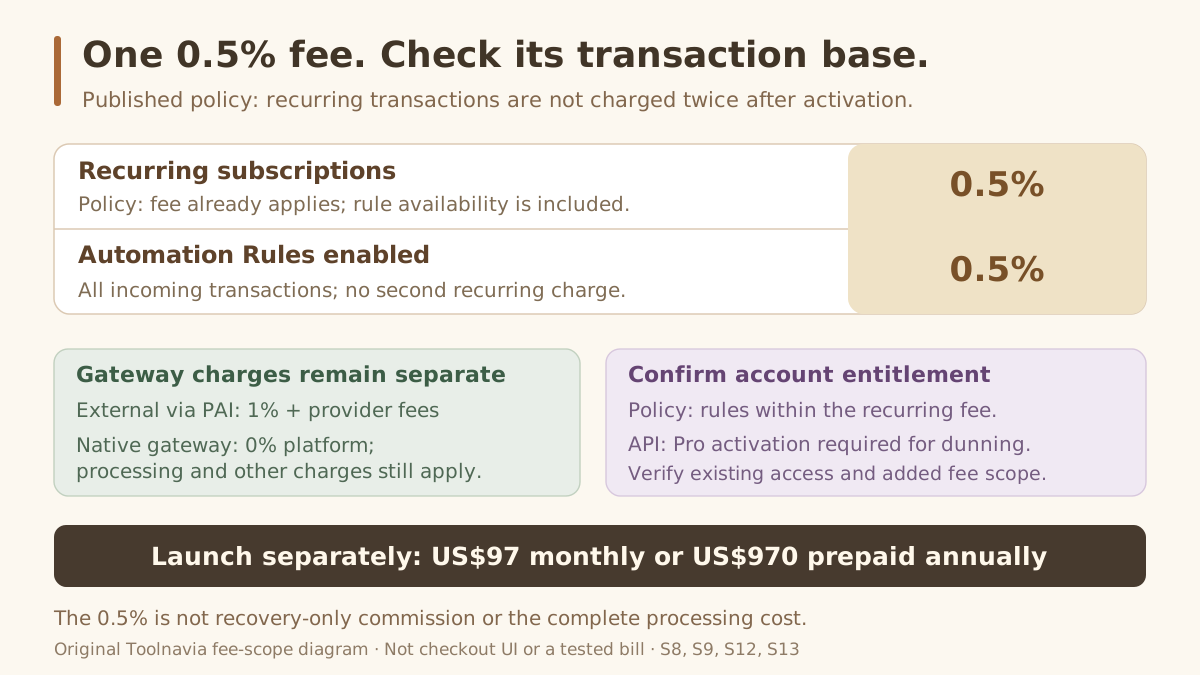
Payments AI's pricing policy says recurring subscription transactions incur 0.5% from the start, including subscription-rule availability. Activating Automation Rules extends 0.5% to all incoming transactions, without charging recurring transactions twice.
Its developer documentation describes optional Pro activation at one 0.5% transaction fee and requires Pro for dunning. These pages do not fully align the existing entitlement and billing baseline. Ask whether your renewals already incur 0.5%, what must be activated, and which non-recurring receipts would enter that fee base. Do not add a second 0.5% to renewals already charged.
This is neither a recovery-success commission nor the complete processing bill. External gateways used through Payments AI carry its 1% platform fee plus the gateway's own charges. The native Payments AI Gateway has a 0% platform layer but retains processing and other applicable charges. These routing fees should not be assigned to direct Stripe outside Payments AI.
Choose useful controls and a final policy
Four documented capabilities can justify evaluating this charged Payments AI route. They are not benefits granted merely by purchasing Launch; confirm the Pro/rule entitlement described above.
- **Target products or customers.** Give different subscription categories their own recovery rules instead of imposing one policy on everyone.
- **Control retries.** Configure timing, amount and a backup payment instrument, when available. An attempt still does not guarantee collection.
- **Adjust renewal timing.** A selected rule can push the next billing date, avoiding a new cycle falling due during recovery of the previous invoice. Do not assume automatic postponement.
- **Choose the terminal action.** Cancel the subscription, abandon only the invoice, or notify another system through a webhook. Abandoning an invoice does not cancel the subscription.
The default calendar is unresolved: ClickFunnels describes the third retry as “15 days later”; Payments AI says the 15th day of the month at 06:30. Inspect the actual rule's dates and final action rather than assuming a universal recovery window.
Read Exit Dunning as two possible outcomes
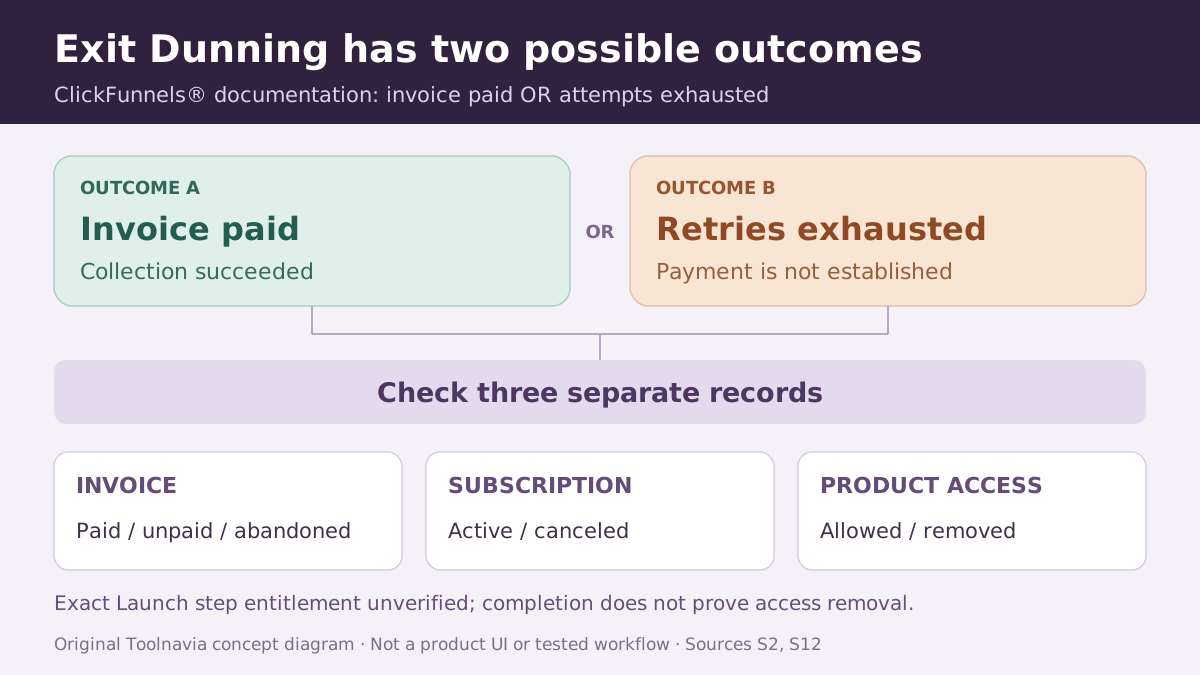
ClickFunnels documents Exit Dunning for either a paid invoice or exhausted attempts. Its completion therefore cannot prove successful collection. Invoice payment, subscription status and product access require separate decisions and observations.
The exact current Launch entitlement to this specific step and conditional access actions was not established. Broad Automations marketing does not settle that question. Confirm the required actions in your selected account before relying on automatic access removal.
Use this four-step purchasing review:
1. Record the actual gateway, current transaction-fee base and a representative subscription; keep the merchant's existing configuration unchanged.
2. Ask the responsible operator to show rule conditions, retry settings and the final-failure action.
3. Request demonstrations of successful recovery and exhausted retries using an appropriate account-specific method.
4. In both cases, compare invoice status, future renewal status and actual membership access; record any missing entitlement.
These are proposed checks, not scenarios tested for this article.
Subscribe only when the full policy fits
An existing billing stack may already solve the problem. Stripe documents its own retry settings and cases that prevent an attempted charge; Kajabi documents payment-failure access settings, while stopping retries alone does not cancel its subscription. Their rules are alternatives to evaluate, not behaviors to import into ClickFunnels.
Consider Launch when its selling workflow fits and the recovery owner, transaction base and final access policy are clear.
Toolnavia may earn a commission from the Launch link below. Review the selected annual offer and current terms; no recovered-revenue or automatic-access guarantee is promised.