TOOLNAVIA / BUYING GUIDE
ClickFunnels® Funnel Sharing: Who Maintains the Client’s Copy?
The short answer
ClickFunnels® Launch can suit a client receiving an ordinary hosted funnel to maintain in their own account. Sharing creates an independent copy, so future template fixes need a separate maintenance agreement. Choose it when the destination plan fits and someone accepts responsibility for the installed version. This is documentation analysis, not a performed handoff.
At a glance
- Best for
- Agencies and creators handing an ordinary hosted funnel configuration to a client whose account and plan support the required features, with a named owner for destination acceptance and future maintenance.
- Price model
- Official reference: Launch $97/month or $970/year, with one workspace and two team members. Confirm recipient feature entitlement, final currency, tax, term and renewal. Client maintenance and any separate account are distinct obligations.
- Check first
- Teams requiring automatic updates to every installed client copy, revocation of installed copies through a disabled share link, or an unverified transfer of customer history, payment approval and billing ownership. External SDK pages and unsupported destination-plan features need separate evaluation.
Decide what the client will receive
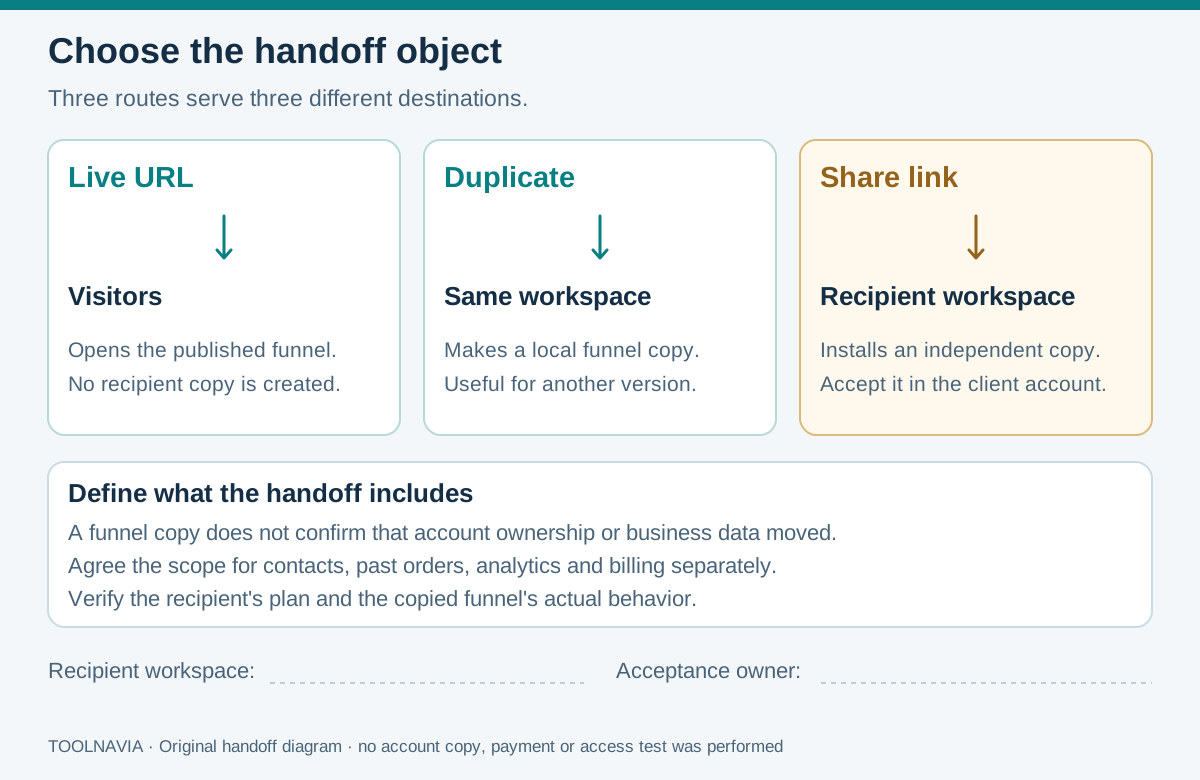
A funnel connects pages into a visitor journey. Three different deliverables are easy to confuse:
- **Live URL:** sends visitors to the published funnel.
- **Duplicate:** creates another copy inside the same workspace.
- **Share link:** lets another user copy the funnel into their account.
Write the requested destination into the brief. An accessible review link does not give the client an editable operating copy.
Four capabilities that support a deliberate handoff
- **Same-workspace duplication** preserves a working variant for preparation. Use it to compare proposed changes before disturbing the version the team already recognizes; still record what was changed.
- **Funnel copying** reuses pages, settings and applicable product configurations. That gives the recipient a concrete starting point against which to judge the agreed scope.
- **Independent client editing** supports local branding and offers. Its practical value is clear responsibility: the client can adapt the copy without changing the agency's source, but needs an owner for future maintenance.
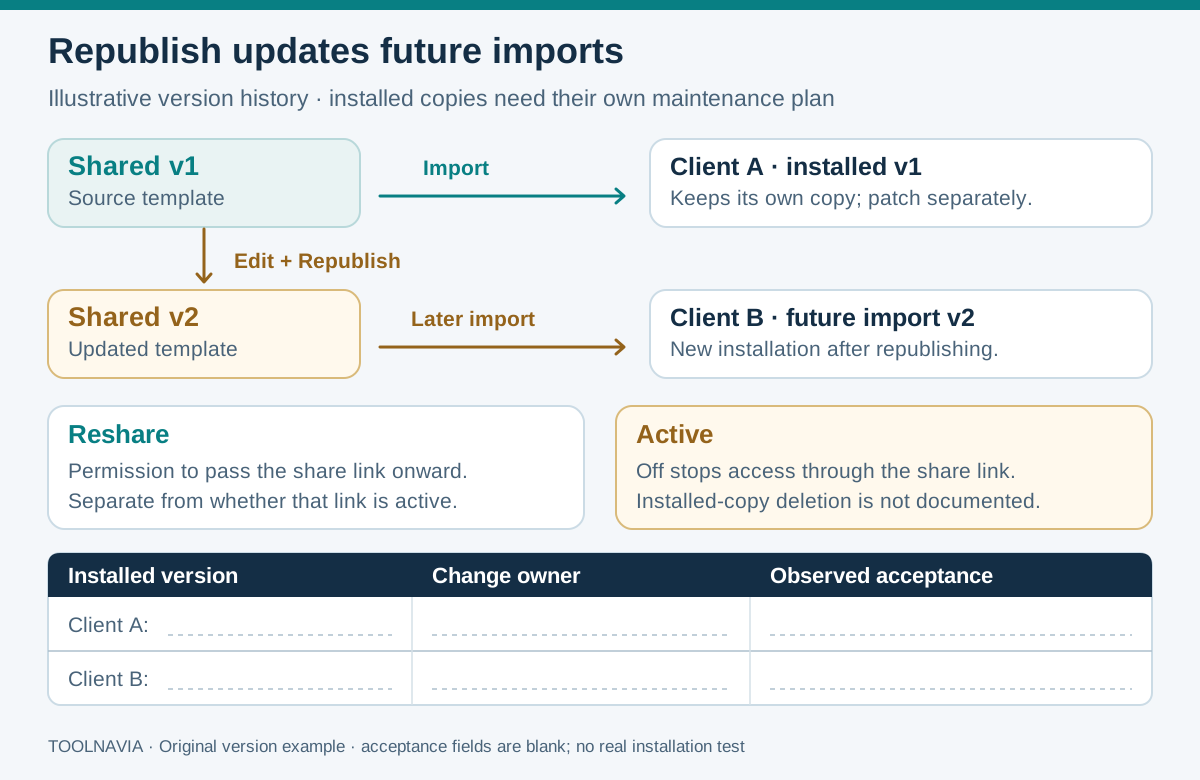
- **Republish Funnel** refreshes the version available to future imports. Treat each release as a named deliverable with a change note; installed copies do not automatically receive it.
Check the destination plan and excluded dependencies
On 28 October 2026, official help listed Launch at $97 monthly or $970 annually, with one workspace and two team members. The recipient needs a valid account and a plan supporting the required features. Sharing does not supply another subscription. Confirm final currency, tax, renewal and term; the official dollar symbol is not a verified checkout quote.
Funnel Share excludes extra courses, themes and email templates. SDK external pages block sharing and cloning; hosted Custom HTML can be shared. That technical support does not grant Launch custom-code editing: the pricing guide places the Custom Code Editor on Scale.
Classic funnels cannot share directly into the current platform; BarnumPT page migration is a separate route. Do not promise transferred contacts, historical orders, analytics, payment approval or billing ownership without evidence for that separate job.
Accept the copy inside the client's account
Use this proposed sequence; no source-to-client transfer or payment test was performed for this guide.
1. **Define acceptance.** List the intended pages, business outcomes, destination account and people responsible for content, payments and maintenance. Mark dependencies that need separate setup. Confirm the client can administer the intended account without relying on an agency employee's personal login.
2. **Identify the release.** Record a version, date and short change note. Have the authorized recipient choose the intended workspace. Keep the source and destination identifiers in the handoff record.
3. **Check the destination journey.** Review domain, page order, mobile presentation, buttons, selected products/prices and connected workflows. The official guide warns that some actions may be missing after sharing. Assign each discrepancy to an owner instead of accepting visual similarity as completion.
4. **Record evidence and permission to launch.** Use harmless authorized test data and the documented test setup appropriate to the payment method. Record where the resulting record appears and who approved the release. Leave unresolved items visible; an untested payment route must not acquire a passed result. The [course checkout guide](/en/software/funnel-platform-course-checkout-trial) covers that separate exercise.
Assign every later fix to an owner
Suppose Client A accepted version 1 and your source later becomes version 2. Maintain a release register identifying which clients need the correction, who can edit their copy and when they will verify it. A cosmetic improvement may be optional; a wrong price or broken destination needs an explicit response deadline.
Before applying a correction, record the client's local edits and the previous settings. Agree how to restore the affected behavior if the change fails; a new import could create another copy rather than repair the active one. Retest the changed journey and record the client's acceptance.
**Reshare** controls redistribution; **Active** controls share-link availability. Disabling the link is not documented as deleting installed copies. Neither control replaces that maintenance process.
Choose the handoff model your client can run
Other tools use distinct mechanisms. Webflow documents an accepted workspace transfer with plan conditions. Unbounce copies pages unpublished without the original leads or statistics. Leadpages' **Classic Builder** shares independent templates without analytics or integration settings. These are scoped comparisons, not equivalent transfer promises.
Choose Launch when an ordinary hosted copy, the client's plan and a named maintenance owner meet the brief. Reconsider when centralized updates or a complete business transfer is essential. Price the ongoing acceptance and repair work alongside the subscription.
Toolnavia may earn a commission through the Launch offer. No special discount or successful client handoff is promised.