TOOLNAVIA / BUYING GUIDE
CorelDRAW Design Suite on Mac: Will Your Windows Workflow Transfer?
The short answer
CorelDRAW on Mac can handle vector, layout and photo tasks. Before moving a Windows workflow, check automation, workspaces and fonts. Essential Windows macros may still require the old computer or a separately budgeted rewrite.
*Official-documentation analysis, checked October 28, 2026. Migration steps are suggestions, not hands-on testing.*
At a glance
- Best for
- A Mac-centered designer whose vector/layout and photo tasks can be completed natively, with verified scripts, authorized fonts and an accepted output path at a tolerable migration cost.
- Price model
- Monthly, annual or 2026 one-time license; current USD/CAD amount unconfirmed. Check existing entitlement, taxes and renewal.
- Check first
- A production process dependent on essential VBA/VSTA or unverified Windows integrations, or a buyer assuming platform-agnostic licensing transfers every workspace, font and automation dependency.
What transfers from your Windows workflow?
This guide covers **CorelDRAW Graphics Suite**, with subscription or 2026 one-time purchase options. Current US/Canada amounts could not be verified; check your existing entitlement before ordering another license.
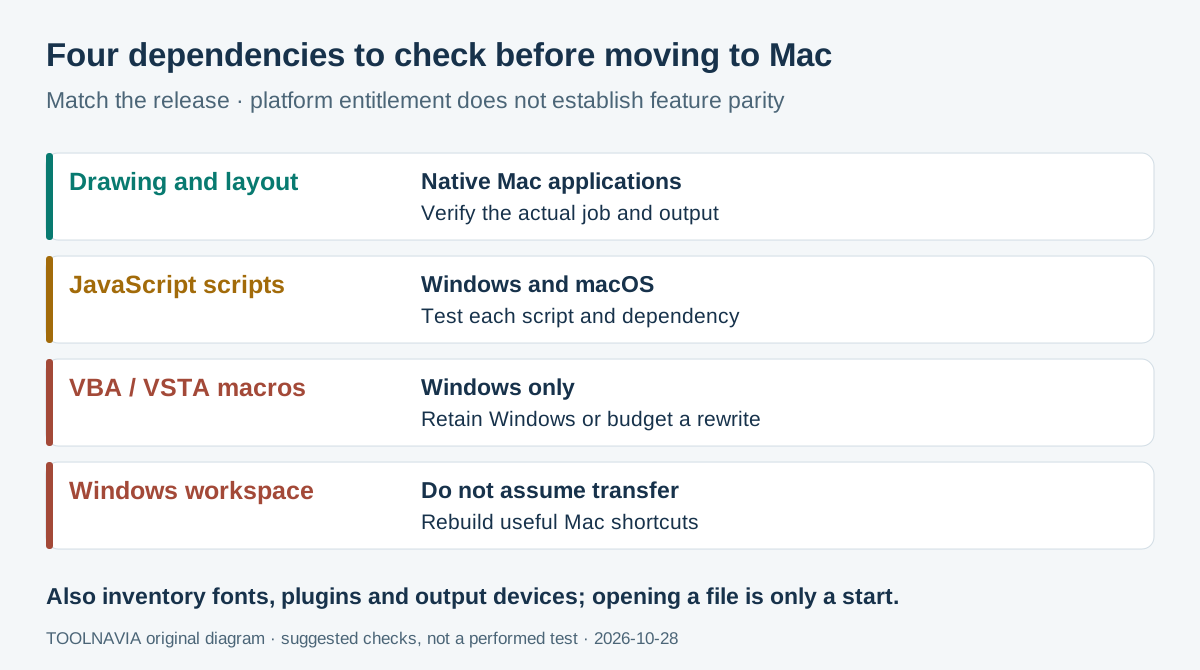
| Workflow component | Mac decision | | --- | --- | | Drawing, layout and photo editing | Native Mac applications exist; verify your actual job | | VBA/VSTA macros | These automation environments are Windows-only | | JavaScript automation | Supported on both platforms; test each script and dependency | | Saved Windows workspace | Do not assume it transfers; Mac has customizable keyboard shortcuts |
Macros automate repeated actions; their language matters when switching platforms.
Corel's matrix labels workspaces and full interface customization **Windows-only**, narrowing the product page's broader wording. A license covering both platforms does not remove these differences.
Four useful capabilities on the Mac
- **Design in a native Mac application.** For everyday vector and page-layout work, the Mac version avoids adding a Windows virtual machine solely to run CorelDRAW. The machine must meet the requirements, and this does not bring Windows-only automation with it.
- **Keep photo and vector work in one suite.** CorelDRAW and PHOTO-PAINT provide an integrated route for a brochure needing image edits and page composition. Verify the actual document and exported output before promising equivalent results.
- **Build automation around cross-platform JavaScript.** CorelDRAW and PHOTO-PAINT support JavaScript on both systems, providing a route for new or rewritten repetitive tasks. It does not automatically convert VBA, external Windows applications or COM integrations.
- **Assign Mac shortcuts to frequent commands.** Customizable keyboard shortcuts let you rebuild convenient access to routine actions. They do not import the Windows workspace or reproduce every interface customization.
Photoshop likewise separates cross-platform JavaScript from Windows VBScript and Mac AppleScript; changing tools still requires checking automation.
Price the move before buying another license
Corel's subscription FAQ says qualifying active Graphics Suite subscriptions cover Mac and Windows. Check the platform-agnostic entry in your account; do not extend that statement to every perpetual, OEM or reseller license. Device-count questions belong in our [CorelDRAW two-computer license guide](/en/software/coreldraw-two-computers-license).
The purchase page offers monthly, annual and 2026 one-time routes, but **its numeric prices did not render during this check**. Obtain the current US-dollar or Canadian-dollar quote, selected term, upfront total, taxes and renewal amount before paying. Subscriptions can auto-renew; a one-time license covers its purchased version, not an entitlement to future releases.
Add quotes for required script rewrites, replacement plugins and properly licensed fonts, plus setup time and any retained Windows workstation. Compare this incremental migration cost with keeping the working setup; a new software license alone cannot replace those dependencies.
*Affiliate disclosure: Toolnavia may earn a commission through this approved Corel offer for the United States and Canada. The Chinese translation does not extend the offer to China.*
Check the target Mac and its fonts
The Mac help page specifies 8GB RAM, recommends 16GB and excludes case-sensitive file systems. Minimum eligibility does not establish performance for a complex production job.
The current product page lists macOS 27 alongside 26, 15 and 14, while the 2026 help page lists only 26, 15 and 14. This discrepancy remains unresolved: confirm your intended OS and exact CorelDRAW build, particularly for macOS 27, before buying.
Install and validate authorized font files with Font Book. Microsoft generally prohibits copying Windows-supplied fonts to other computers; obtain appropriate rights or substitutes instead of assuming the Windows font folder can migrate. Then inspect line breaks and spacing in the real design.
Complete one real job before retiring Windows
Use this suggested acceptance procedure on a working copy:
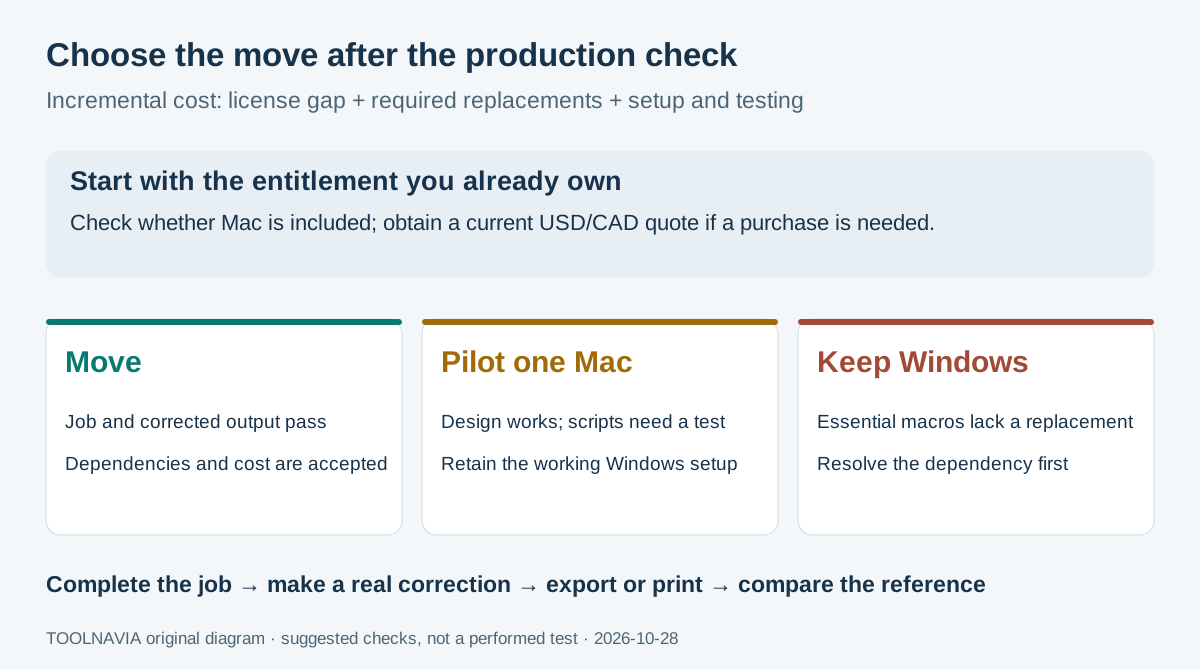
1. List required scripts, plugins, fonts and output devices. Save an approved reference export and keep the original Windows files untouched.
2. Match the CorelDRAW release on the intended Mac, verify entitlement, load authorized assets and recreate essential shortcuts.
3. Perform the actual production task, including its automation. Make one realistic customer correction, then repeat the task; opening the drawing alone is insufficient.
4. Export or print through the intended delivery route. Compare dimensions, text, color and automated results with the approved reference, involving the recipient when needed.
5. Record failures and obtain replacement or rewrite estimates. Retain Windows until the repeated job and corrected output meet the agreed requirements.
Move, pilot one Mac or keep Windows
Move when native editing and verified dependencies cover the job at an acceptable total cost. Pilot one Mac when manual design can move but automation remains uncertain. Keep Windows when essential VBA/VSTA work has no tested, affordable replacement; buying Mac access does not solve that production constraint.