TOOLNAVIA / BUYING GUIDE
Close Essentials Calendar Sync: Which Meetings Appear on the Lead?
The short answer
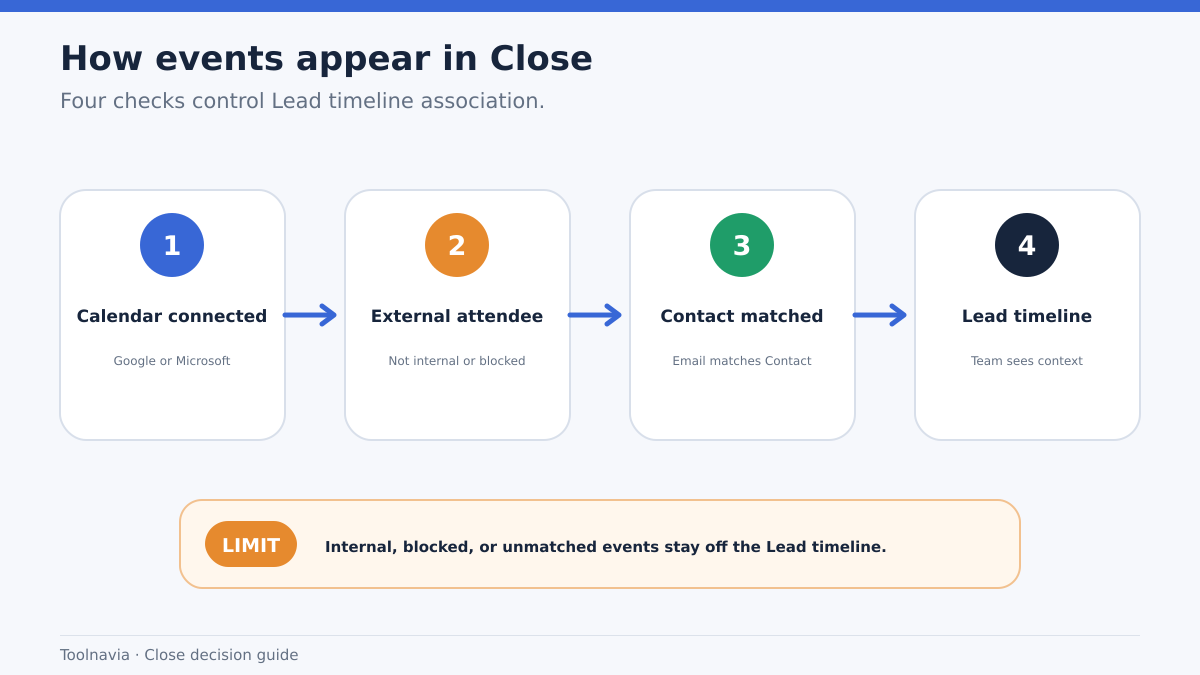
Close Essentials calendar sync is useful when your sales team wants customer meetings to appear beside the Lead without copying every private or internal appointment into the CRM. The buying decision turns on a narrow rule: Close associates a calendar event only when an attendee email matches a Contact on a Lead. Internal and blacklisted addresses are filtered.
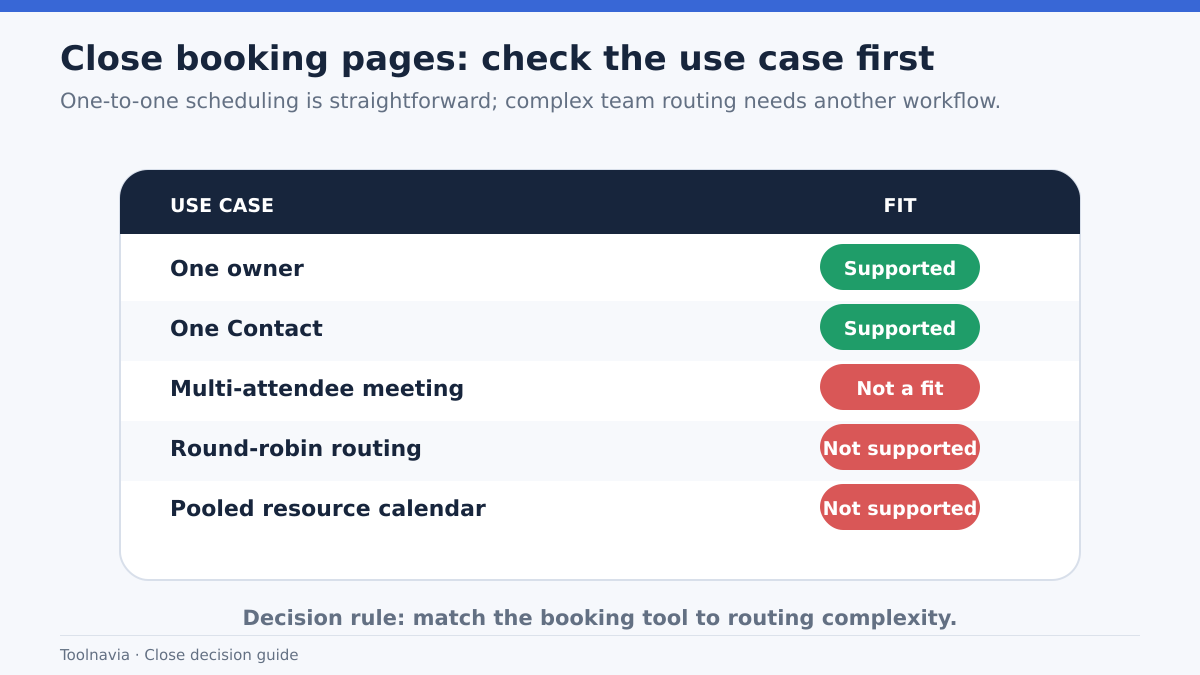
That makes Close a good fit for small teams that value automatic customer context more than granular calendar administration. It is a weaker fit if you need round-robin booking, pooled calendars, multi-person booking, or the ability to hide one recurring event while keeping all other sync active.
This guide is based on current official documentation. I did not connect a mailbox, authorize a Microsoft tenant, or run a live meeting test. The quoted 8–10 second sync time is an official estimate, not an SLA.
At a glance
- Best for
- Small sales teams that want customer meetings attached to the right Lead through Contact email matching.
- Price model
- USD 49/user/month monthly, or USD 35/user/month billed annually; verify live pricing and plan scope.
- Check first
- No round-robin, pooled calendars, multi-attendee booking, or per-recurring-event hide control; Microsoft Entra consent may block connection.
The short answer: which meetings appear on the Lead?
A Google Calendar or Microsoft 365 event can appear in Close when all of the following are true:
1. The user has connected a supported Google or Microsoft account. 2. Calendar access is enabled and at least one named calendar is selected. 3. The event includes an attendee whose email address exactly matches a Contact on a Close Lead. 4. The attendee is not excluded by an internal-domain or blacklisted-address filter.
The practical implication is that a calendar event is not imported merely because it belongs to a salesperson. Close looks for a customer-record relationship. If the matching Contact email is removed from the event, the meeting is no longer associated with that Lead.
This is different from a broad calendar mirror. It can reduce noise, but it also means that a typo, alias, secondary email, or missing Contact can make a real customer meeting invisible in the Lead timeline. Before paying, test with representative Contacts and the exact addresses your team uses.
What stays private—and what does not
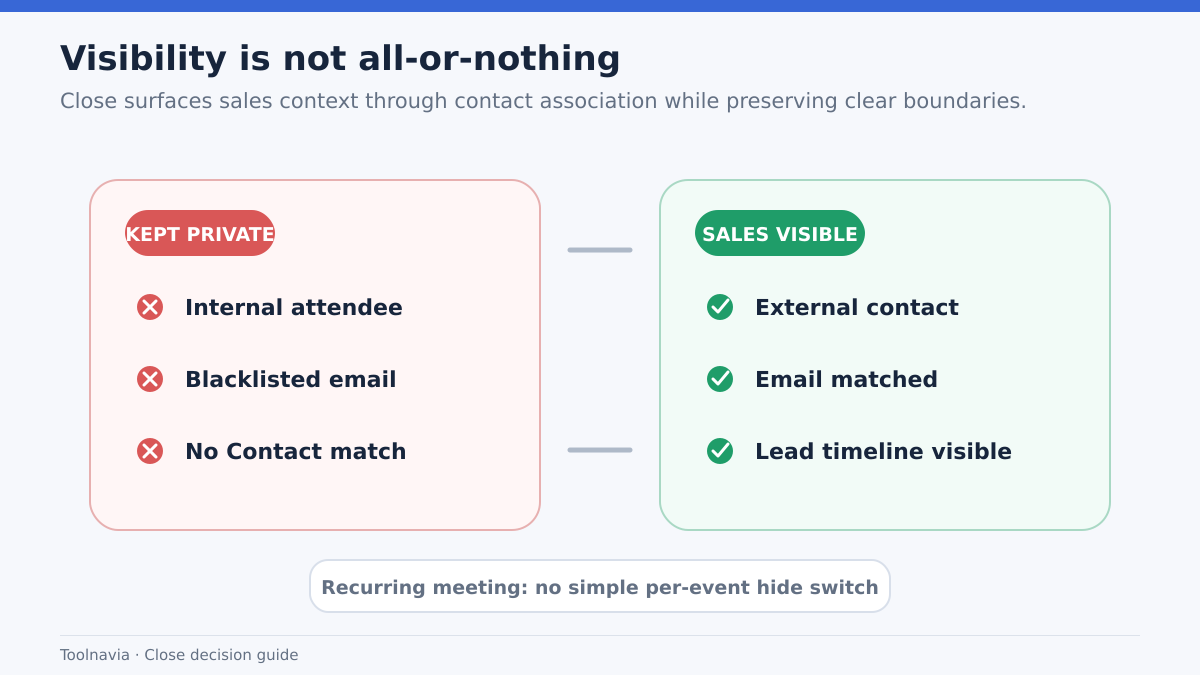
Close filters internal domains and blacklisted domains or addresses for privacy. That is helpful when a calendar contains staff meetings, interviews, or personal events. But it is not a complete per-event privacy control.
The most important limitation is recurring meetings. Close states that you cannot hide or block one specific recurring calendar event for a Lead while continuing to sync the rest. The documented choices are to remove the matching Contact email from the event or stop calendar syncing more broadly.
That boundary matters for teams that schedule sensitive customer calls, legal discussions, or mixed internal/external recurring meetings. Do not assume that marking an event “private” in the provider automatically changes Close’s association behavior unless the official documentation for your exact setup says so. A safe trial should include:
- one normal customer meeting; - one internal-only event; - one event with an external participant who is not a CRM Contact; - one recurring customer event you may want to hide; - one event using an alternate customer email.
Record which events appear and which fields are visible before connecting the calendars of the entire team.
Google and Microsoft setup risks are different
Close supports Google Calendar and Office 365 Calendar. Calendar sync uses the provider’s calendar API; Microsoft accounts use Microsoft Graph.
For Google, the main operational check is whether the intended account and named calendars are connected. For Microsoft 365, tenant administration can be the larger risk. If Microsoft Entra restricts app consent or withholds calendar permissions, the entire Close account connection can be blocked—not merely the calendar toggle. An administrator may have to approve the app.
This is a purchasing issue, not just an onboarding detail. A small team with self-managed Google accounts may test quickly. A regulated Microsoft 365 tenant may need security review, consent approval, and a documented rollback owner before the trial can prove anything.
Essentials currently allows up to three connected email accounts, while Meetings requires calendar permission. Treat email-account capacity and calendar authorization as separate checks.
Booking a meeting is narrower than a scheduling platform
Close can create a meeting on the selected user’s Google or Microsoft calendar and sync it back to the Lead. Its official guide says that this normally takes about 8–10 seconds.
However, the built-in booking flow is intentionally narrow:
- one Close user is selected; - one Contact is selected; - multi-attendee meetings are not supported; - round-robin assignment is not supported; - pooled calendars are not supported.
If each salesperson owns their own prospects, that simplicity may be enough. If inbound demos must be distributed across a team, or a solutions engineer and account executive must always join together, you may still need a dedicated scheduling tool or a different CRM workflow.
Do not buy Essentials merely because “meeting scheduling” appears on the pricing page. Test the exact ownership model your team uses.
How Close compares with Pipedrive, HubSpot, and Zoho
Pipedrive documents one-way and two-way calendar sync choices and exposes controls around which activity types and private-event information synchronize. That can be better for buyers who want explicit sync direction and more visible calendar configuration.
HubSpot emphasizes connected-calendar settings and scheduling-page behavior. It may suit teams whose purchase decision centers on booking pages, availability rules, and broader meeting-tool administration.
Zoho CRM supports one-way or two-way Google Calendar sync and can use up to five calendars to block availability. Its documentation also warns that deleting and recreating a sync configuration can create duplicates, and that recurring events are not supported in that synchronization flow.
Close takes a different approach: it prioritizes meeting context on the Lead when an attendee matches a Contact. That can feel cleaner for a sales team, but it gives the buyer fewer controls over sync direction, per-event hiding, and pooled scheduling.
The right comparison is therefore not “which CRM has calendar sync?” All four do. Compare the data-association rule, privacy controls, booking ownership, and administrator burden.
What Essentials costs—and what the price does not prove
Close currently lists Essentials at USD 49 per user per month on monthly billing, or USD 35 per user per month when billed annually. The pricing matrix includes meetings, scheduling, and calendar sync.
For a three-person team, the annual seat baseline is USD 1,260 before taxes or any separate communication usage. That arithmetic is simply 3 × USD 35 × 12; it does not include implementation time, a scheduling add-on, or Microsoft administrator review.
The pricing page does not prove that the capability is exclusive to Essentials. This guide only confirms that Essentials includes it under the current matrix. Check the live pricing page before purchase because plan names, prices, and entitlements can change.
A useful break-even question is: how many missed or undocumented customer meetings would the team need to avoid each month to justify the seat cost and setup time? If calendar context prevents one costly handoff failure, the feature may pay for itself. If the team already records every meeting reliably, calendar sync may be a convenience rather than a purchase driver.
A 20-minute trial checklist
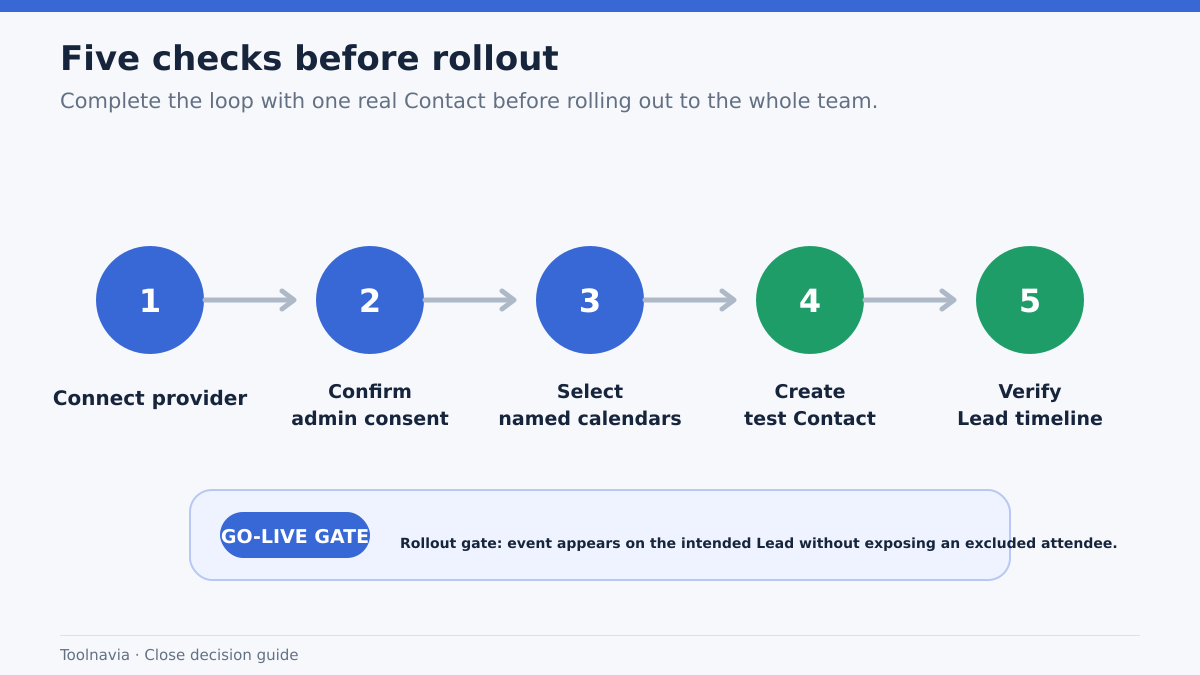
Run this test before committing annually:
1. Connect one representative Google or Microsoft account. 2. If using Microsoft 365, confirm whether Entra administrator consent is required. 3. Select only the named calendar you intend to test. 4. Create a Lead with a Contact using the exact attendee email. 5. Schedule a customer meeting and confirm it appears on the correct Lead. 6. Remove the matching email and verify the association changes as documented. 7. Test an internal event and a blacklisted address. 8. Test a recurring meeting that you may need to hide. 9. Create a booking and measure the actual sync delay in your environment. 10. Try the handoff path: can another rep understand the customer context without opening the external calendar?
Keep screenshots or written observations, but do not place confidential calendar details in a shared evaluation document.
Who should buy Close Essentials for calendar sync
Close Essentials is a sensible choice when:
- salespeople own their customer meetings individually; - Google or Microsoft calendars are already the source of truth; - automatic Contact-linked context is more important than mirroring every event; - the team does not require round-robin or pooled booking; - the administrator can approve the required calendar permissions; - the three connected-account limit fits each user’s setup.
Look elsewhere, or budget for an additional scheduling tool, when:
- inbound meetings must rotate across multiple reps; - several internal attendees must be booked automatically; - users need to hide individual recurring customer events; - the organization cannot grant the required Microsoft Graph permissions; - calendar sync must be explicitly one-way or two-way with detailed privacy controls.
Final verdict
Close Essentials calendar sync is not a universal calendar import. Its value is narrower and often more useful: customer meetings can become part of the Lead record when the attendee email matches a Contact.
Buy for that relationship-driven context, not for advanced scheduling administration. Validate one real Contact, one internal event, one recurring meeting, and your Microsoft consent path during the trial. If those tests pass, Close can reduce the gap between the salesperson’s calendar and the team’s CRM history. If they fail, upgrading the CRM will not solve the underlying calendar-governance problem.
Affiliate disclosure: Toolnavia may earn a commission if you buy through the approved Close referral link, at no additional cost to you. This does not affect the limitations or recommendation above.