TOOLNAVIA / BUYING GUIDE
Verpex Bronze Staging: What to Confirm Before Testing a Live Store
The short answer
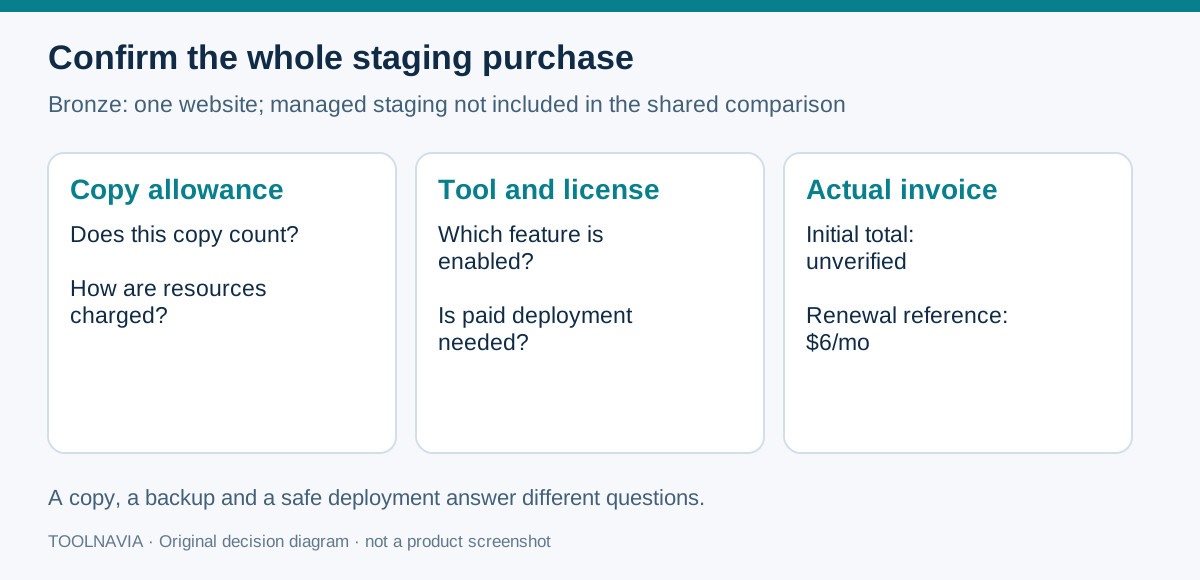
Verpex's official shared-plan comparison does not include a managed staging environment with Bronze. A plugin-created test copy may still be an option, but its allowance, resource treatment and deployment license need confirmation. For an active store, the decisive question is how to preserve orders received after the copy.
At a glance
- Best for
- One modest WordPress site with a confirmed copy allowance and hands-on deployment owner.
- Price model
- $6/month renewal reference; current initial total and staging license costs unverified.
- Check first
- Managed staging not included in the shared comparison; DIY copy quota and license need confirmation.
Start with the exact Bronze entitlement
Bronze lists one website, 30GB NVMe storage, 1GB RAM and 1vCPU. Its shared-hosting comparison marks staging as not included. The separate WordPress hosting page advertises staging and push-to-live for Basic, Plus and Premium; those claims do not establish Bronze's entitlement.
This does not prove that a plugin cannot create a copy. Verpex's older staging tutorial describes a WPvivid workflow, including a backup and copy-location choice. It is a general tutorial, not confirmation of a free staging service or current push license for Bronze.
Ask whether your intended copy counts toward the one-site allowance and how its storage, database and execution resources are treated. No confirmed exemption or isolated resource allocation was found. The [Bronze SSH/SFTP guide](/hosting/verpex-bronze-ssh-sftp-developer-access) separately covers developer access.
Four useful building blocks, with boundaries
Bronze offers practical starting points for an operator managing a small WordPress installation.
- **cPanel and Softaculous:** a documented administration stack for installation work. Its presence does not confirm that a particular staging button is enabled.
- **30GB NVMe storage:** a defined capacity budget against which to estimate the live installation and any permitted copies. It is not a separate 30GB allowance for each copy.
- **Unlimited database count:** useful when an allowed workflow needs a separate database. The published database-size row still imposes a 5GB limit; unlimited count does not mean unlimited data.
- **Daily backups:** a recovery resource to include in deployment planning. A backup does not merge later orders into an older staging database.
These features support hands-on work; they do not settle the commercial permission or safe deployment method for your proposed copy.
Understand the time gap before pushing
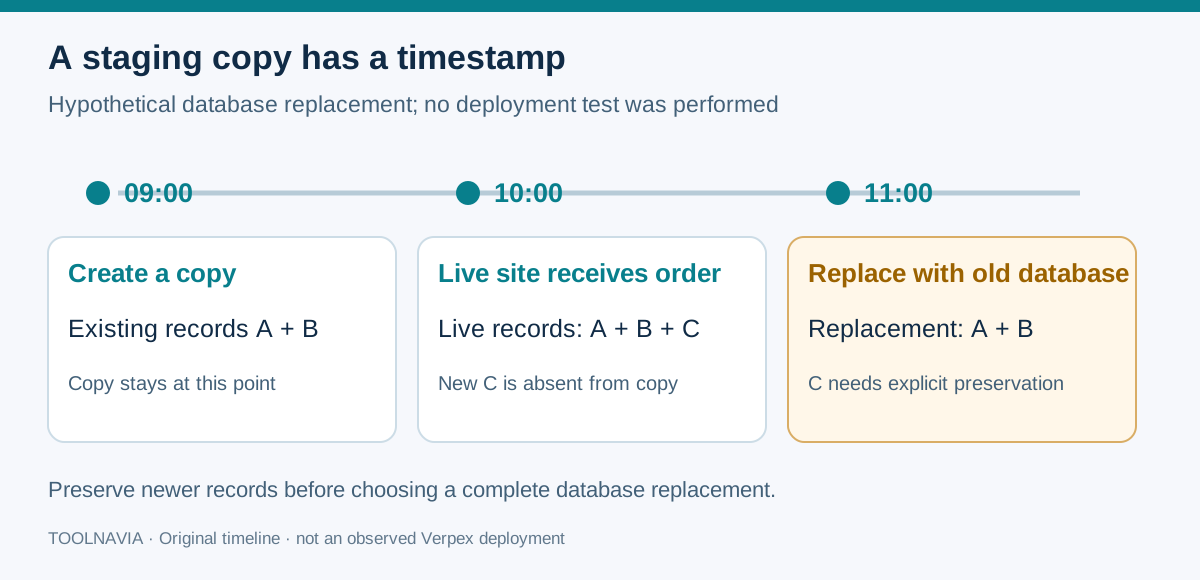
Consider a hypothetical store copied at 09:00. A customer places an order at 10:00. Replacing production at 11:00 with the complete 09:00 database would omit that order unless another process preserves it.
WordPress.com's synchronization guide expressly warns about production orders and users added after a copy. Kinsta similarly explains that a full database push cannot distinguish newer production transactions. These are examples of replacement behavior in those providers' systems, not claims about an observed Verpex push.
The diagram illustrates that chronology. We performed no account test, clone or production deployment. The same question applies to new registrations, comments and edited content: which records would the selected operation replace?
Choose the deployment scope first
Softaculous documents separate staging creation and push-to-live operations, including customized file/database choices. Its creation guide also excludes WordPress Multisite. These tool capabilities must be checked against the actual enabled installation; they are not Bronze plan promises.
WP STAGING's PRO guide allows file and table selection and explains that selected tables overwrite their production counterparts. Its Push Wizard is a PRO workflow, so do not assume a free plugin or hosting subscription includes it. A current license price was not verified.
A files-only change can be appropriate when the intended update genuinely needs no database changes. Theme settings, content or application changes may require data work too. Do not treat files-only as universally safe or select tables without knowing what they contain.
Before production work, identify exactly what will change, retain a current production backup, and agree how new transactions will be preserved. If the deployment requires a write pause or reconciliation, plan that explicitly. Check the latest records and the changed workflow afterward. A rollback can itself discard data created after the restore point.
Price the whole workflow
| Cost item | What is established | |---|---| | Bronze renewal reference | $6 per month on the shared plan page | | Current first-term total | Not verified in the accessible price widget | | Plugin deployment license | Edition and current price need confirmation | | Additional copy or hosting allowance | Treatment and any charge need confirmation |
The public price widget did not expose a current introductory amount. Do not substitute an old coupon or assume $6 is today's initial charge. Obtain the selected term, full initial total, taxes and next billing arrangement in the actual order.
Decide whether the operating responsibility fits
Bronze can be a candidate for one modest WordPress site with an operator who accepts a self-managed workflow, confirms the copy allowance and can control deployment scope. A largely static brochure site may require less transaction coordination than a busy store, but its content changes still matter.
If included managed staging is essential, or nobody can identify which live data a push would replace, resolve those requirements before buying. Do not infer automatic order merging from a backup, clone or staging label. Keep the provider's written answers alongside the chosen tool and exact plan.
Affiliate disclosure: Toolnavia may earn a commission from an eligible Verpex purchase through its link. This guide is documentation analysis, not a tested performance or deployment review.