TOOLNAVIA / BUYING GUIDE
UltaHost VPS Basic IP Addresses: When Is One IPv4 Enough?
The short answer
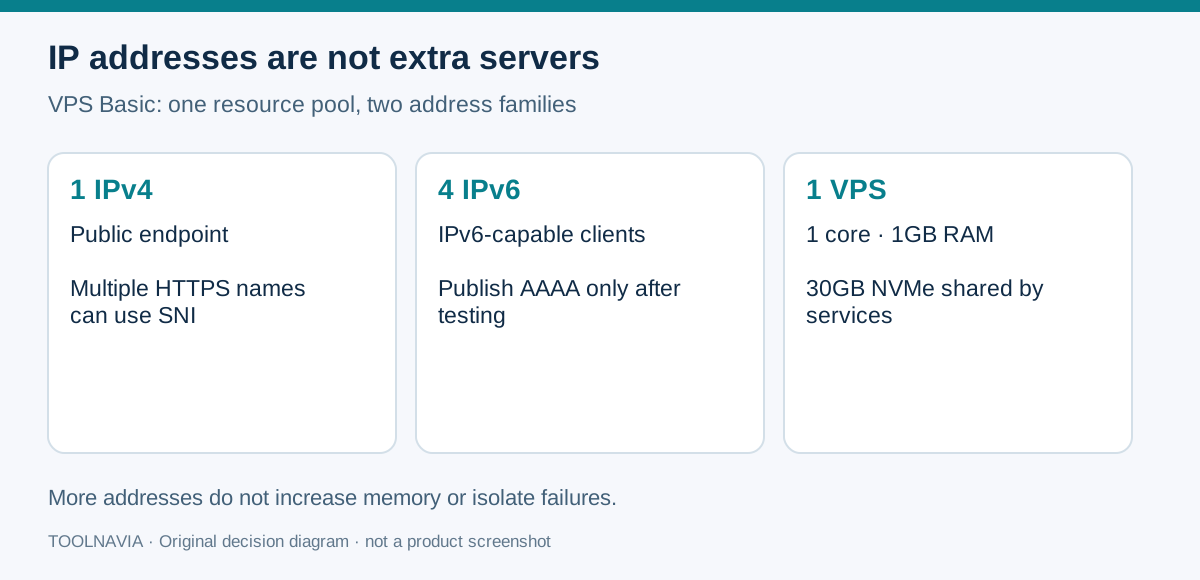
UltaHost VPS Basic includes one dedicated IPv4 address and four IPv6 addresses. That is useful for a small server, but it does not mean five isolated servers—or a five-website limit. Buy extra addresses only when a real network requirement calls for them. This guide analyzes official documentation, without claiming a server test.
At a glance
- Best for
- A small managed VPS with deliberately configured public addressing.
- Price model
- Two-year reference $132.48 before tax/options; extra IP quote required.
- Check first
- 1GB resource pool; IPv6 must work before AAAA; renewal needs exact-order confirmation.
What the included addresses actually buy
| Purchase question | VPS Basic answer | |---|---| | Included network addresses | 1 dedicated IPv4 and 4 dedicated IPv6 | | Server resources behind them | 1 CPU core, 1GB DDR5 RAM, 30GB NVMe | | Multiple HTTPS websites | Possible with a correctly configured web server and modern SNI clients | | Additional IPs | An upgrade option; exact price and availability need a quote | | Two-year price reference | $5.52/month equivalent; $132.48 before tax and paid options |
The IPv4 address gives your VPS a specific public network endpoint, while the IPv6 allocation lets you serve compatible clients over the newer address family. Both still lead into the same small VPS. The useful purchasing distinction is **addresses versus computing capacity**: another address does not add RAM, CPU or an independent failure boundary.
UltaHost also lists managed setup and troubleshooting assistance. That gives a new buyer a place to ask about address assignment and the chosen operating system; it is not evidence that every application or firewall will automatically support both protocols. Ask for the expected setup responsibilities before ordering.
One IPv4 can serve several HTTPS websites
For ordinary websites, you usually do not need one IPv4 per domain. NGINX documents Server Name Indication, or SNI: a compatible browser includes the requested hostname during the TLS handshake so the web server can select the corresponding certificate. This allows several HTTPS sites to share one IP. Old or specialized clients can require different treatment.
For example, a portfolio and a small documentation site could use different domain names on the same address. Configure each site's hostname and certificate, then check that requesting either domain returns the right site. This is an example architecture, not a tested capacity promise: the Basic plan's 1GB RAM still has to support the actual web stack.
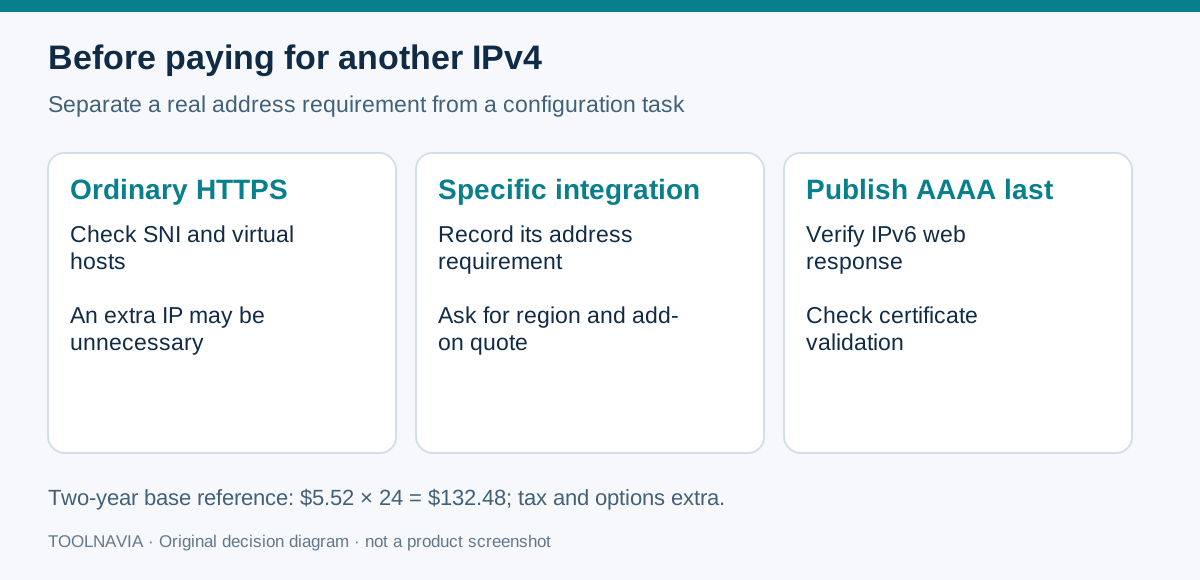
The purchasing consequence is practical: if the only reason for another IPv4 is “I am adding a second HTTPS site,” first check virtual-host and SNI configuration. If an integration specifically requires separate public addresses, record that requirement and obtain an add-on quote instead.
Four IPv6 addresses need a working IPv6 path
An A record points a hostname to IPv4; an AAAA record points it to IPv6. Publishing AAAA is only sensible when the assigned IPv6 address actually reaches the intended service. Do not create records for every included address just to use the allocation.
Certificate issuance is one reason this matters. Let's Encrypt initially prefers IPv6 when both address families exist. It retries IPv4 for some network failures, but a reachable IPv6 server returning the wrong challenge response can still fail validation. An apparently healthy IPv4 site therefore does not prove the IPv6 path works.
Keep the application, firewall rules, DNS and certificate configuration aligned. If you are not deploying IPv6 yet, avoid publishing a premature AAAA record; enable it after the IPv6 route has passed your checks. The benefit is a controlled dual-stack rollout, rather than an unexplained certificate or connectivity problem.
Price the server and additional IPs separately
The current Linux VPS Basic card displays $5.52/month for a two-year term: **$132.48 for 24 months**, calculated before tax, paid panels and other options. It also displays the same renewal monthly equivalent.
However, UltaHost's general terms say automatic renewal uses the then-current non-promotional rate. Those statements do not establish a guaranteed two-year renewal bill; save the exact order and obtain written clarification if renewal cost changes your decision.
The official upgrade instructions explicitly include adding IP addresses and completing payment at checkout. They do not publish a universal additional-IPv4 price. Ask about price per address, billing period, region availability, allowed quantity and whether the allocation requires justification. Keep that answer separate from the base-server quote.
A quoted two-year monthly equivalent is not proof of a monthly-pay option at that rate. Buyers wanting a short commitment should select that term in checkout and compare its actual invoice. For detailed exit conditions, read our [VPS Basic cancellation and migration guide](/hosting/ultahost-vps-basic-cancellation-refund-data-exit).
A short pre-purchase and deployment check
1. List the domains and services, then identify any genuine need for distinct public addresses. Ordinary HTTPS hostnames can often share the IPv4 endpoint. 2. Confirm the Basic plan, region, term, panel and included address allocation in the order. Request a written add-on quote if necessary. 3. After provisioning, configure each hostname and certificate on the correct virtual host. Establish the IPv4 path first. 4. Enable IPv6 deliberately. Test the intended page and TLS response over both families before publishing or retaining AAAA records. 5. Verify a certificate renewal challenge and keep DNS, application bindings and firewall rules consistent. Save the working configuration and a rollback plan.
VPS Basic fits someone who needs a small managed VPS with included public addressing and can validate its network configuration. Seek a larger plan or a different design when resource headroom or independently isolated services drive the requirement. An IP add-on solves an address requirement; it does not solve an undersized server.
Affiliate disclosure: Toolnavia may earn a commission from an eligible purchase through the UltaHost link. Check the final term, panel, taxes and any IP add-on in checkout.