TOOLNAVIA / BUYING GUIDE
ClickFunnels® Launch Contact Import: What Happens at 10,000?
The short answer
ClickFunnels® Launch can fit a business whose existing contacts, planned imports and near-term growth fit its 10,000-contact allowance. A completed import action does not prove the whole list arrived: at capacity, the importer can accept only the first records. Check the intended migration and customer access before paying. This is documentation analysis, not an import test.
At a glance
- Best for
- Businesses whose authorized existing records, planned new contacts and near-term growth fit Launch with headroom, and whose migration can preserve customer access and verify the intended records.
- Price model
- Official reference: Launch $97/month or $970/year; Scale $197/month or $1,970/year. Use explicit annual totals, not rounded monthly equivalents multiplied by twelve. Confirm final currency, tax, term and renewal; no actual upgrade invoice quoted.
- Check first
- Workloads already exceeding the 10,000-contact allowance, or teams relying on a partial import, unsubscribe or deletion to prove the whole migration fits. Contact-status counting and the individual-versus-bulk course-enrollment rule require confirmation.
Calculate room for the whole intended list
Launch lists 10,000 contacts, one workspace and two team members. Its 50,000 monthly email allowance is a separate limit. This guide covers the current platform, formerly called 2.0; legacy plans retain their own limits.
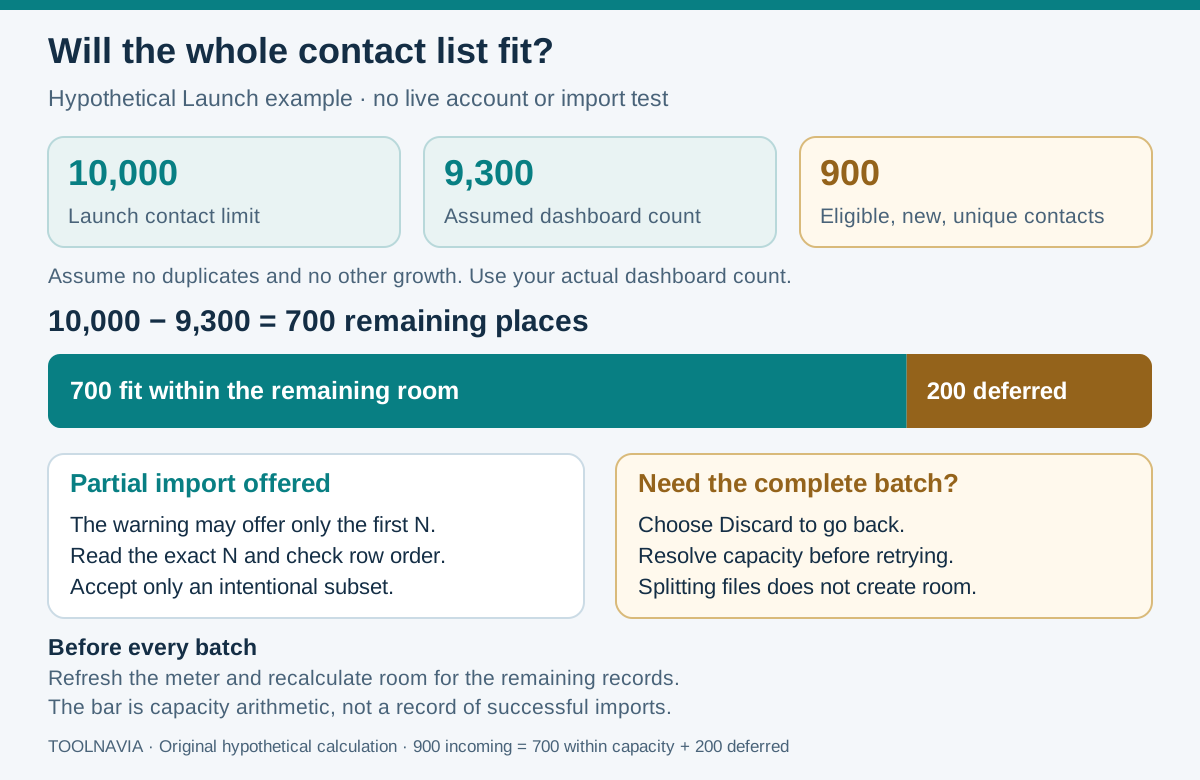
Suppose the relevant account meter reads 9,300 and you want to add 900 distinct, new, eligible contacts, with no other growth. That would total 10,200. The arithmetic leaves room for 700 and defers 200; it is not an observed account result.
The import warning offers **Proceed** for only the first specified contacts or **Discard** to go back. Read that actual count before continuing. If the whole batch is required, resolve the capacity choice first. Splitting the CSV does not create extra room.
Four controls that make imports reviewable
- **Reusable field mapping** supports a repeatable import process. Its value depends on agreeing which columns are authoritative and assigning someone to maintain that decision when the source changes.
- **Preview** provides a checkpoint before committing. Treat it as approval of the intended batch and updates, not an invitation to click through until a completion message appears.
- **Automatic dated batch tags** help you return to affected records. Use that reference in your reconciliation log, alongside expected results and outstanding exceptions.
- **Selected-field exports and action history** preserve chosen contact fields and expose failed deletions with reasons. A CSV export is not a complete restorable copy of orders, course progress and every historical event.
Keep unsubscribe, deletion and customer access separate
Unsubscribe stops marketing communication while retaining the contact record. The checked documentation does not define how every contact status contributes to the capacity meter. Do not assume unsubscribing frees a slot, or that all statuses necessarily count identically. Verify the current account's rule.
The official removal guides differ. The bulk-actions guide blocks deletion for active subscriptions or purchased course, community or asset access, but says nonpurchased course enrollments do not block deletion and are suspended afterward. The individual **Remove contact** guide says any course enrollment prevents that option. This difference remains unresolved for the exact removal path.
Preserve legitimate customer access. Do not cancel paid subscriptions or remove purchased access merely to fit Launch. Individual removal is irreversible; confirm the intended operation and obtain clarification before destructive cleanup.
Budget with the stated annual totals
On 28 October 2026, official help listed Launch at $97 monthly or $970 annually and Scale at $197 monthly or $1,970 annually, with 75,000 contacts. The public pricing page's $81 and $164 annual-equivalent monthly displays are rounded; multiplying them by twelve is not the documented annual total.
These are whole-plan references, not extra-contact unit prices, an automatic overage charge or your prorated upgrade invoice. The dollar symbol follows the official pages; confirm billing currency, tax, renewal and the exact term at checkout. More capacity does not establish that every migration or course-access requirement is met.
Accept a representative batch before migrating
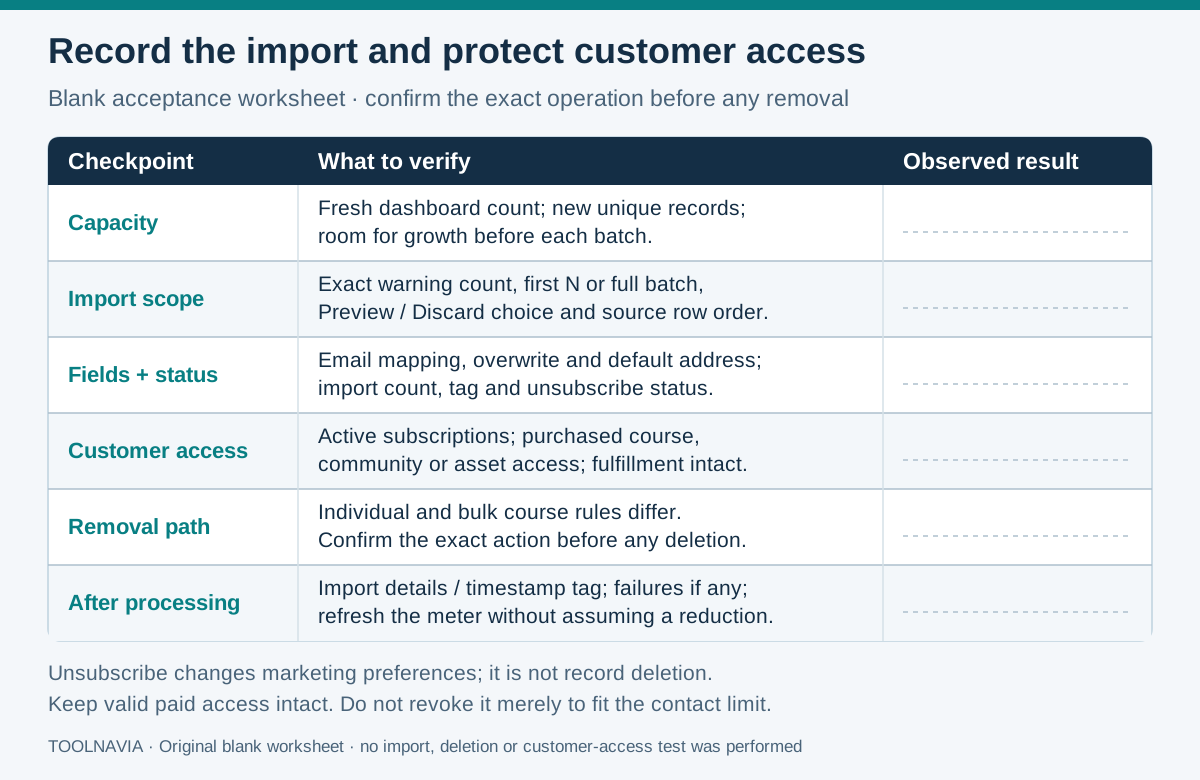
Use a small, authorized sample first. These are proposed checks, with observed results left blank in the worksheet.
1. Write a migration manifest: expected new identities, intended updates, allowed field changes and customer access to preserve. Record the current meter and growth reserve. Keep an unchanged source file so later differences can be explained.
2. Choose cases that challenge the plan: a new contact, an intended update and an existing customer whose access must remain intact. Follow the documented requirement that contacts are over 18 and have permitted marketing communication.
3. Record which values may change. An imported address becomes the default, replacing the existing default. A useful marketing update could still create the wrong fulfillment address; have the record owner approve that outcome before a broad update.
4. Reconcile identities, values, communication preferences and access against the manifest. A matching total can hide the wrong records or changed addresses. List accepted, updated, rejected and deferred cases separately, assign each exception an owner, and recheck capacity before the next batch.
Choose from verified capacity and preserved access
Other platforms define different counters. ActiveCampaign and Mailchimp explicitly exclude archived contacts from their respective contact or billing limits; HubSpot distinguishes billable marketing contacts and documents automatic tier upgrades. Those rules do not establish equivalent behavior in ClickFunnels®.
Choose Launch when the authorized workload fits with headroom and customer access remains intact. If legitimate records already exceed it, evaluate Scale or another suitable arrangement before migrating. Check the [email-send budget](/en/software/funnel-platform-launch-email-send-limit) separately: fitting the database does not prove the campaign schedule fits.
Toolnavia may earn a commission on qualifying subscriptions through the Launch offer. No special discount or complete-import outcome is promised.